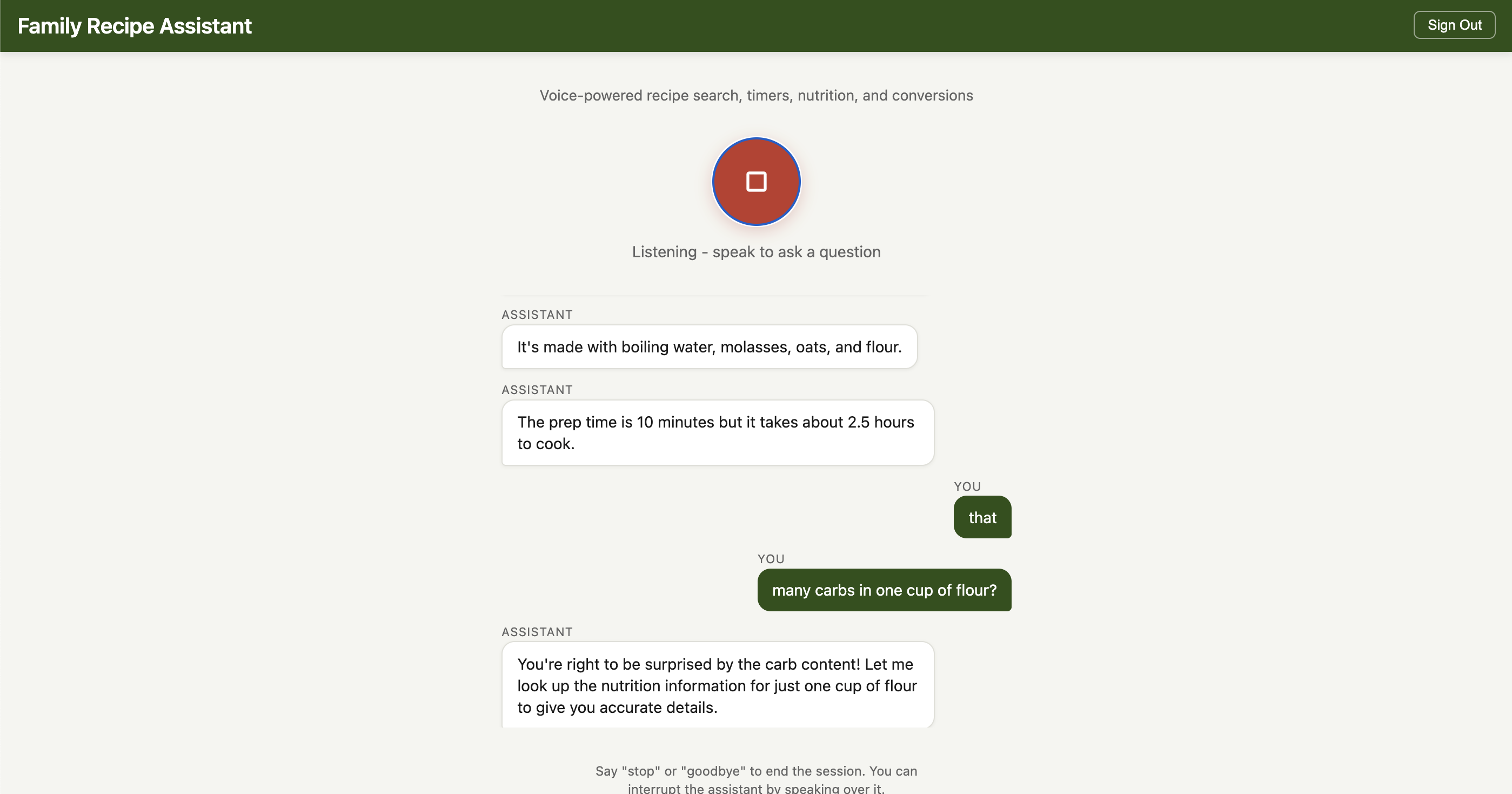
Bi-directional Voice-Controlled Recipe Assistant with Nova Sonic 2
What if your recipe assistant could talk back?
I have been building a serverless Family Recipe Assistant that searches my family's recipe collection, calculates nutrition from USDA data, and handles multi-turn conversations through a web UI. It works well. But every time I am in the kitchen with flour on my hands, reaching for my phone to type "how long do I bake the banana bread?" feels wrong.
I wanted to just ask.
The text-based assistant already had a "cooking mode" that read recipes aloud using Amazon Polly. But listening to a long recipe read start-to-finish by a TTS voice is surprisingly tedious - you cannot ask it to slow down, skip ahead, or clarify a step without going back to the screen and typing. What I really wanted was a conversation: "What is the next step?" or "How much butter was that again?" while my hands are covered in dough.
Amazon Nova Sonic v2 launched recently with sub-700ms speech-to-speech latency and a 1M token context window. The Strands Agents SDK added experimental support for bidirectional streaming through a BidiAgent class that wraps the WebSocket complexity into something remarkably simple. I decided to wire the two together and add my existing recipe tools - search, timers, nutrition lookup, and unit conversion - to build a voice-controlled kitchen assistant.
This post walks through how I built it, what worked, and what surprised me. It works great on my laptop and even on my Android phone and IPad. The complete code is on GitHub: github.com/RDarrylR/serverless-family-recipes-bidirectional-nova-sonic.
What is Bidirectional Streaming?
Traditional voice assistants follow a rigid pattern: listen, transcribe, think, generate text, synthesize speech, play audio. Each step waits for the previous one to finish. The result is a noticeable pause between your question and the response.
Bidirectional streaming changes this. The agent maintains a persistent WebSocket connection where audio flows in both directions simultaneously. Nova Sonic v2 handles speech understanding and generation in a single model - there is no separate transcription or TTS step. The practical effect is that the agent starts responding while you are still finishing your sentence, and you can interrupt it mid-answer to course-correct.
If you have used a native WebSocket implementation before, you know this means managing connection lifecycle, audio encoding, event multiplexing, and error recovery. That is roughly 150 lines of plumbing code before you write any business logic.
Strands BidiAgent reduces this to about 20 lines.
Architecture
The system has two layers. A React frontend in the browser captures microphone audio using the Web Audio API (with built-in echo cancellation - no headset needed) and sends it over a WebSocket to a FastAPI server. The server runs a Strands BidiAgent that forwards audio to Nova Sonic v2, dispatches tool calls, and streams response audio back to the browser for playback.
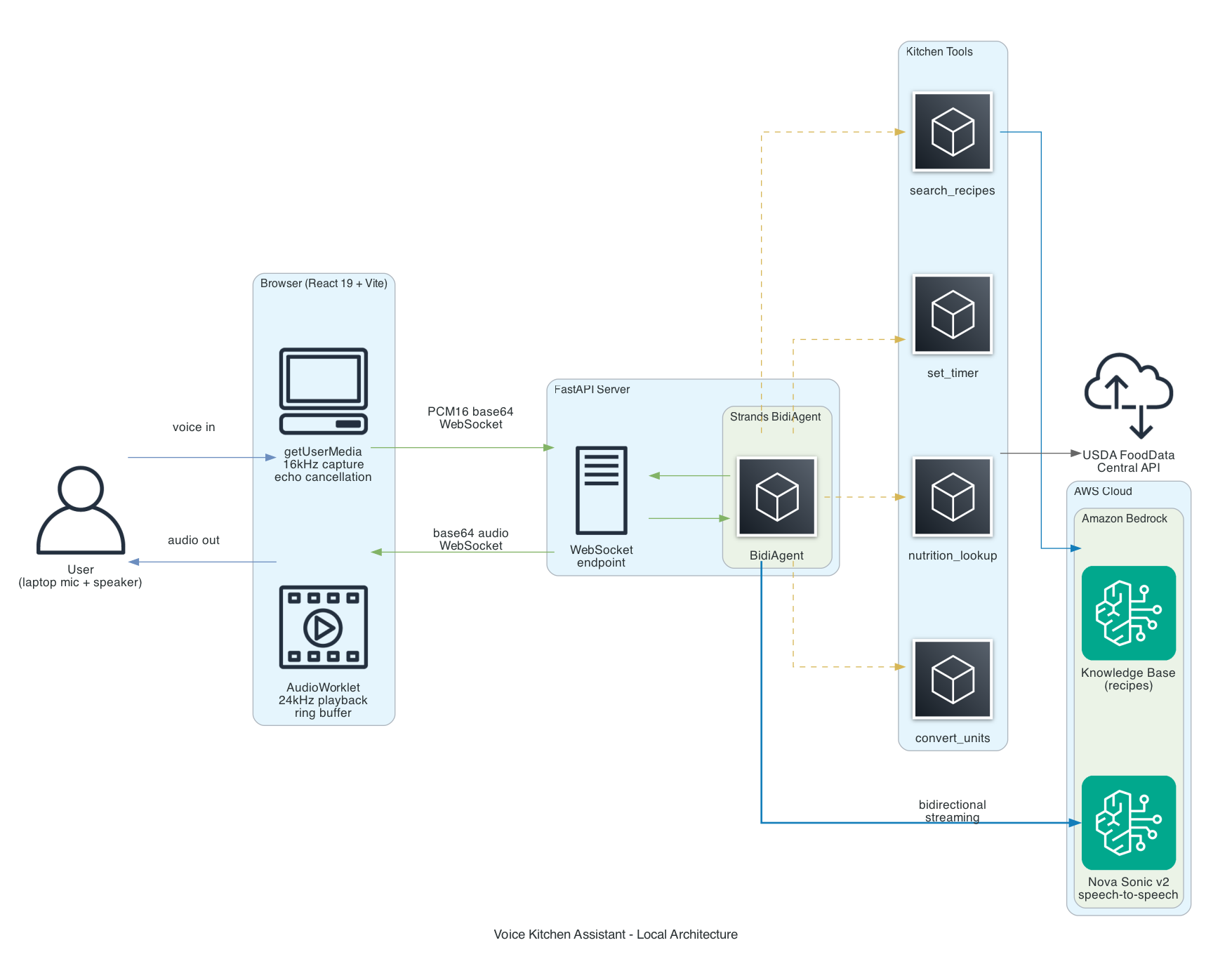
The components:
- BidiAgent - The Strands orchestrator. Manages the streaming session, routes audio to the model, and dispatches tool calls.
- BidiNovaSonicModel - The model adapter. Establishes a bidirectional WebSocket to Bedrock and handles the Nova Sonic protocol.
- Kitchen tools - Four
@tooldecorated Python functions that the agent can call during conversation without interrupting the audio stream. - Bedrock Knowledge Base - My existing recipe collection, indexed with Titan Embed V2 and stored in S3 Vectors.
- USDA FoodData Central - Public API for nutrition data.
The key insight is that tool execution happens concurrently with audio streaming. When you ask "find me a pasta recipe," the agent calls the search_recipes tool while continuing to listen for follow-up input. No blocking, no silence gap.
Prerequisites
Before you start, you will need:
- Python 3.13+ (3.12 minimum for Nova Sonic)
- Node.js 18+ (for the Vite frontend dev server)
- An AWS account with Bedrock model access enabled for Nova Sonic v2
- PortAudio system library (
brew install portaudioon macOS) - required as a transitive dependency of the Strands SDK uvfor Python dependency management
git clone https://github.com/RDarrylR/serverless-family-recipes-bidirectional-nova-sonic.git
cd serverless-family-recipes-bidirectional-nova-sonic
uv sync
make install-frontend
Building the Agent
The server is a FastAPI WebSocket endpoint that bridges browser audio to BidiAgent. The key insight is that BidiAgent accepts plain callables for I/O. At its simplest, you can pass ws.receive_json and ws.send_json directly. In practice, I wrap them with thin functions for message size limits and cost tracking, but the pattern stays the same - no custom I/O classes needed.
from fastapi import FastAPI, WebSocket, WebSocketDisconnect
from strands.experimental.bidi import BidiAgent
from strands.experimental.bidi.models import BidiNovaSonicModel
from strands.experimental.bidi.tools import stop_conversation

from config import AWS_REGION, NOVA_SONIC_VOICE, SYSTEM_PROMPT
from tools import search_recipes, set_timer, nutrition_lookup, convert_units

app = FastAPI()

sonic_model = BidiNovaSonicModel(
    region_name=AWS_REGION,
    provider_config={
        "audio": {
            "input_rate": 16000,
            "output_rate": 24000,
            "voice": NOVA_SONIC_VOICE,
        }
    },
)

@app.websocket("/ws")
async def websocket_endpoint(ws: WebSocket):
    agent = BidiAgent(
        model=sonic_model,
        tools=[search_recipes, set_timer, nutrition_lookup, convert_units, stop_conversation],
        system_prompt=SYSTEM_PROMPT,
    )

    try:
        await ws.accept()
        await agent.run(
            inputs=[ws.receive_json],
            outputs=[ws.send_json],
        )
    except WebSocketDisconnect:
        logger.info("Client disconnected")
    finally:
        await agent.stop()
That is the core of the agent. A new BidiAgent is created per connection - no shared state between sessions. The BidiNovaSonicModel handles the WebSocket connection to Bedrock. The agent.run() method ties them together and runs until the user says "stop" (triggering the stop_conversation tool) or the browser disconnects.
The provider_config sets the audio sample rates (16kHz input from the browser, 24kHz output from Nova Sonic) and the voice. Nova Sonic v2 supports several voices - I went with "tiffany" for a natural conversational tone, but you can also use "amy" or "puck".
Important: Voice IDs must be lowercase. Passing "Tiffany" instead of "tiffany" results in a ValidationException: Received invalid id error that silently kills the session. This is not documented anywhere obvious - I discovered it by enabling debug logging on the Strands Nova Sonic model class.
Why stop_conversation?
The stop_conversation tool is a built-in Strands tool that gracefully shuts down the streaming session. Without it, the only way to stop the agent is Ctrl+C, which does not cleanly close the WebSocket. The system prompt tells the agent to use this tool when users say "goodbye" or "stop."
Adding Kitchen Tools
Tools work identically to standard Strands agents. You decorate a function with @tool, add a docstring that describes when to use it, and pass it to the agent. The model decides when to call tools based on the conversation.
Recipe Search
This tool connects to my existing Bedrock Knowledge Base, which contains my family's recipe collection indexed with Titan Embed V2.
import boto3
from strands import tool
from config import AWS_REGION, BEDROCK_KB_ID

bedrock_agent_runtime = boto3.client("bedrock-agent-runtime", region_name=AWS_REGION)

@tool
def search_recipes(query: str) -> str:
    """Search the recipe knowledge base for recipes matching the query.

    Use this tool whenever a user asks about recipes, ingredients, or cooking methods.

    Args:
        query: Natural language search query about recipes
    """
    response = bedrock_agent_runtime.retrieve(
        knowledgeBaseId=BEDROCK_KB_ID,
        retrievalQuery={"text": query},
        retrievalConfiguration={
            "vectorSearchConfiguration": {"numberOfResults": 3}
        },
    )

    results = response.get("retrievalResults", [])
    if not results:
        return "No recipes found matching that query."

    # Group chunks by source file so multi-chunk recipes are reassembled
    source_chunks = {}
    for r in results:
        score = r.get("score", 0)
        if score < 0.3:
            continue
        text = r.get("content", {}).get("text", "").strip()
        source = r.get("location", {}).get("s3Location", {}).get("uri", "")
        source_name = source.split("/")[-1].replace(".md", "") if source else "unknown"

        if source not in source_chunks:
            source_chunks[source] = {"name": source_name, "score": score, "texts": []}
        source_chunks[source]["texts"].append(text)

    chunks = []
    for entry in source_chunks.values():
        merged = "\n\n".join(entry["texts"])
        chunks.append(f"Recipe: {entry['name']} (score: {entry['score']:.2f})\n{merged}")

    return f"Found {len(source_chunks)} recipe(s):\n\n" + "\n\n".join(chunks)
The chunk-merging logic is important. Bedrock KB returns chunks, not complete documents. A long recipe might be split across multiple chunks. By grouping chunks that share the same S3 source URI, the tool reassembles the full recipe text before handing it to the model.
The score threshold of 0.3 filters out weak matches. Without it, the agent would sometimes confidently describe a recipe that was only tangentially related to the query.
Cooking Timer
import asyncio
from strands import tool

@tool
def set_timer(minutes: int, label: str = "cooking") -> str:
    """Set a cooking timer for the specified number of minutes.

    Args:
        minutes: Number of minutes for the timer
        label: A short description of what the timer is for
    """
    if minutes <= 0:
        return "Timer must be at least 1 minute."

    loop = asyncio.get_running_loop()
    loop.create_task(_timer_callback(minutes, label))
    return f"Timer set: {label} for {minutes} minutes. I'll let you know when it's done."

async def _timer_callback(minutes: int, label: str):
    await asyncio.sleep(minutes * 60)
    print(f"\n** TIMER DONE: {label} ({minutes} minutes) **\n")
The timer runs as an asyncio background task. When it expires, it prints to the console. In a production version, this would trigger a spoken notification through the audio output - but since Nova Sonic sessions have an 8-minute limit, long timers outlive the session anyway. I will address this in the trade-offs section.
Nutrition Lookup
import requests
from strands import tool

@tool
def nutrition_lookup(food_item: str) -> str:
    """Look up nutrition information for a food item using USDA FoodData Central.

    Args:
        food_item: The food item to look up, e.g. "chicken breast" or "brown rice"
    """
    response = requests.get(
        "https://api.nal.usda.gov/fdc/v1/foods/search",
        params={"query": food_item, "pageSize": 1, "api_key": USDA_API_KEY},
        timeout=10,
    )

    foods = response.json().get("foods", [])
    if not foods:
        return f"No nutrition data found for '{food_item}'."

    food = foods[0]
    # Extract key nutrients from the USDA response
    nutrients = {}
    for n in food.get("foodNutrients", []):
        name = n.get("nutrientName", "")
        if name in TARGET_NUTRIENTS:
            nutrients[TARGET_NUTRIENTS[name]] = f"{n['value']} {n.get('unitName', '')}"

    return f"Nutrition for {food['description']} (per 100g):\n{json.dumps(nutrients, indent=2)}"
The USDA FoodData Central API is free and does not require registration for the DEMO_KEY. For production use, you should get a proper API key at https://fdc.nal.usda.gov/api-key-signup.
Unit Converter
from strands import tool

VOLUME_TO_ML = {
    "cup": 236.588, "tbsp": 14.787, "tsp": 4.929,
    "ml": 1.0, "liter": 1000.0, "fl oz": 29.5735,
}

WEIGHT_TO_G = {
    "g": 1.0, "kg": 1000.0, "oz": 28.3495, "lb": 453.592,
}

@tool
def convert_units(amount: float, from_unit: str, to_unit: str) -> str:
    """Convert between cooking measurement units.

    Args:
        amount: The numeric amount to convert
        from_unit: The unit to convert from
        to_unit: The unit to convert to
    """
    f, t = from_unit.lower(), to_unit.lower()

    # Temperature
    if f in ("f", "fahrenheit") and t in ("c", "celsius"):
        return f"{amount} F = {(amount - 32) * 5 / 9:.1f} C"

    # Volume
    if f in VOLUME_TO_ML and t in VOLUME_TO_ML:
        result = amount * VOLUME_TO_ML[f] / VOLUME_TO_ML[t]
        return f"{amount} {from_unit} = {result:.2f} {to_unit}"

    # Weight
    if f in WEIGHT_TO_G and t in WEIGHT_TO_G:
        result = amount * WEIGHT_TO_G[f] / WEIGHT_TO_G[t]
        return f"{amount} {from_unit} = {result:.2f} {to_unit}"

    return f"Cannot convert {from_unit} to {to_unit}"
This tool is intentionally simple. It handles volume, weight, and temperature - the three conversion types that come up most often while cooking. When someone asks to convert volume to weight (e.g., "how many grams is a cup of flour?"), the tool explains that the answer depends on the ingredient's density rather than guessing.
The Magic: Interruptions
The feature that makes bidirectional streaming feel genuinely different from a traditional voice assistant is interruption handling. You can talk over the agent mid-sentence, and it will stop, process your new input, and respond to that instead.
For example:
You: "Set a timer for 10 minutes" Agent: "Timer set for 10 min-" You: "Actually, make that 15" Agent: "Got it, I have updated the timer to 15 minutes."
This works because the agent is always listening, even while generating output audio. When it detects that the user has started speaking, it cancels the current output and processes the interruption as new input. Strands handles the mechanics - clearing the output buffer, signaling the model to stop generating, and routing the new audio through the same pipeline.
From a developer perspective, you do not need to write any interruption logic. It just works.
Infrastructure
For local development, you only need IAM permissions for Bedrock access. The Terraform configuration creates an IAM role with least-privilege permissions:
resource "aws_iam_role_policy" "bedrock_access" {
  name = "bedrock-access"
  role = aws_iam_role.voice_agent.id

  policy = jsonencode({
    Version = "2012-10-17"
    Statement = [
      {
        Sid    = "NovaSonicAccess"
        Effect = "Allow"
        Action = [
          "bedrock:InvokeModel",
          "bedrock:InvokeModelWithResponseStream",
          "bedrock:InvokeModelWithBidirectionalStream",
        ]
        Resource = [
          "arn:aws:bedrock:us-east-1::foundation-model/amazon.nova-2-sonic-v1*",
        ]
      },
      {
        Sid    = "KnowledgeBaseAccess"
        Effect = "Allow"
        Action = ["bedrock:Retrieve"]
        Resource = [
          "arn:aws:bedrock:us-east-1:ACCOUNT:knowledge-base/YOUR_KB_ID",
        ]
      }
    ]
  })
}
Important: Model ID mismatch. The Bedrock foundation model ARN for Nova Sonic v2 is amazon.nova-2-sonic-v1:0 - not amazon.nova-sonic-v2 as you might guess from the marketing name. If your IAM policy uses the wrong model ID pattern, the BidiAgent will establish a connection to Nova Sonic and appear to be working, but the model silently fails to process audio. No error is returned - the agent simply produces no output. This cost me several hours of debugging. Check your IAM policy resource ARNs if the agent connects but never responds.
If you are just experimenting, your default AWS CLI credentials with Bedrock access will work without the Terraform setup. The IAM role becomes useful when you want to follow least-privilege principles or deploy to AgentCore.
Trade-offs and Gotchas
The 8-Minute Session Limit
Nova Sonic v2 sessions time out after 8 minutes. For a kitchen assistant, this is a real constraint - you might be cooking for an hour and want to check on timers, look up steps, or ask follow-up questions throughout.
The workaround is session rotation: detect when a session is about to expire, save context, and start a new session. Strands does not handle this automatically yet. For the demo, 8 minutes is enough to show the concept, but a production kitchen assistant would need this solved.
For comparison, OpenAI Realtime supports 60-minute sessions, though at higher cost and without the tight AWS integration.
Echo Cancellation
Nova Sonic does not handle echo cancellation server-side - it expects clean audio at the input. If the agent's output audio gets picked up by the microphone, you get a feedback loop where the agent starts responding to itself.
The browser handles this transparently. The Web Audio API provides built-in acoustic echo cancellation via getUserMedia({ echoCancellation: true }) - the same mechanism that makes WebRTC video calls work without headsets. The browser subtracts the known output signal from the microphone input, so you can use laptop speakers and mic directly. No headset required.
If you port to other platforms, the same principle applies: iOS (AVAudioSession) and Android audio frameworks include system-level AEC, and smart speakers use hardware beamforming. The key point is that echo cancellation is an I/O concern, not a model concern - solve it at the client layer.
Observability Gap: No Invocation Logging
Bedrock invocation logging does not cover the InvokeModelWithBidirectionalStream API that Nova Sonic uses. If you have invocation logging enabled and expect to see Nova Sonic calls in CloudWatch, you will not find them. The API calls appear in CloudTrail as events, but the actual conversation content (audio, transcripts, tool calls) is not captured.
For cost tracking, Nova Sonic is priced by audio duration (input and output seconds) rather than text tokens. AWS Cost Explorer filtered by Bedrock service is the most reliable way to monitor spend.
Timer Notifications Outlive Sessions
Because of the 8-minute session limit, a timer set for 20 minutes will expire after the Nova Sonic session has ended. The timer still fires (it is a local asyncio task), but it can only print to the console - it cannot speak through the agent. A production version would need a separate notification channel (push notification, separate audio alert, etc.).
Sample Conversation
Here is a typical session showing the back-and-forth between the user and the assistant, including tool calls. The transcripts below are captured from the browser UI - Nova Sonic generates both the audio and the text transcript simultaneously.
You: "What pasta recipes do you have?"
[search_recipes tool called]
Assistant: "I found two pasta recipes in the collection. The first is a classic spaghetti carbonara - it uses eggs, pecorino romano, guanciale, and black pepper. No cream, as the traditional version gets its richness from the egg and cheese sauce. The second is a baked ziti with Italian sausage that serves about eight people. Would you like the full details on either one?"
You: "How many calories in a cup of pasta?"
[nutrition_lookup tool called]
Assistant: "One cup of cooked spaghetti has about 220 calories, with 43 grams of carbohydrates and 8 grams of protein. That is for plain pasta without sauce."
You: "OK let's make the carbonara. Set a timer for 12 minutes for the pasta."
[set_timer tool called]
Assistant: "Timer set for 12 minutes for the pasta. While the pasta cooks, let me walk you through the sauce. You will want to whisk together three egg yolks and one whole egg with about a cup of grated pecorino-"
You: "Wait, how much pecorino was that?"
Assistant: "One cup of grated pecorino romano. You can mix in some parmesan too - about half and half works well."
You: "What is that in grams?"
[convert_units tool called]
Assistant: "One cup of grated pecorino is roughly 100 grams, and one cup of parmesan is about 80 grams. So for a half-and-half mix, that would be 50 grams pecorino and 40 grams parmesan."
Notice how the assistant handles interruptions naturally (cutting off mid-sentence when asked about pecorino), chains tool calls in context (nutrition lookup followed by unit conversion), and maintains conversational flow throughout.
Try It Yourself
The complete code is on GitHub: github.com/RDarrylR/serverless-family-recipes-bidirectional-nova-sonic
git clone https://github.com/RDarrylR/serverless-family-recipes-bidirectional-nova-sonic.git
cd serverless-family-recipes-bidirectional-nova-sonic
uv sync
make install-frontend

# Terminal 1: WebSocket server
make serve

# Terminal 2: Vite dev server
make serve-frontend
Open http://localhost:5173, click the microphone, and start talking. No headset needed - the browser handles echo cancellation.
You will need Bedrock model access enabled for Nova Sonic v2 in your AWS account. If you are using the recipe search tool, you will also need a Bedrock Knowledge Base with your recipes indexed.
The Audio Pacing Problem
This was the most surprising issue I hit. After wiring everything up, the assistant's voice worked - but after tool calls (like searching recipes or looking up nutrition), all the speech played back bunched together with no natural pauses between sentences. Short responses sounded fine. Long responses after tool calls sounded like someone hit 2x speed.
The root cause: Nova Sonic generates audio faster than real-time after receiving a tool result. When the model has the full tool output text available at once, it produces all the speech audio in a burst rather than at natural speech pace. With WebSocket forwarding, there is no backpressure - the server receives hundreds of audio chunks in seconds and immediately forwards them all to the browser.
The fix is a sufficiently large client-side ring buffer. The browser's AudioWorklet maintains a ring buffer sized for 60 seconds of audio at 24kHz. Audio arrives in bursts from the server, gets queued in the ring buffer, and plays back at the correct hardware rate. The AudioWorklet's process() callback naturally paces playback - it pulls exactly 128 samples per callback at the AudioContext sample rate, regardless of how fast data arrives.
class AudioPlayerProcessor extends AudioWorkletProcessor {
  constructor() {
    super();
    // 60 seconds at 24kHz - handles faster-than-realtime bursts
    this._bufferSize = 24000 * 60;
    this._buffer = new Float32Array(this._bufferSize);
    this._writePos = 0;
    this._readPos = 0;

    this.port.onmessage = (event) => {
      if (event.data.type === 'audio') {
        this._enqueue(event.data.samples);
      } else if (event.data.type === 'barge-in') {
        this._readPos = this._writePos; // Clear instantly
      }
    };
  }

  process(inputs, outputs) {
    const output = outputs[0][0];
    for (let i = 0; i < output.length; i++) {
      if (this._readPos < this._writePos) {
        output[i] = this._buffer[this._readPos % this._bufferSize];
        this._readPos++;
      } else {
        output[i] = 0; // Silence when buffer is empty
      }
    }
    return true;
  }
}
The initial version used a 5-second buffer, which overflowed on longer responses - the write pointer wrapped around and overwrote unplayed samples, causing garbled audio. 60 seconds handles even the longest recipe descriptions comfortably.
For interruptions (barge-in), the server sends a bidi_interruption event and the browser sets readPos = writePos, which instantly silences playback. New audio from the updated response then fills the buffer from that point.
Two AudioContexts
The browser uses two separate AudioContext instances: one at 16kHz for capture and one at 24kHz for playback. These cannot share a context because Web Audio requires a single sample rate per context, and Nova Sonic's input and output rates differ.
Capture uses ScriptProcessorNode (deprecated but universal) to grab Float32 audio frames, convert them to PCM16, base64-encode, and send over WebSocket. Playback uses an AudioWorkletNode with a ring buffer for gapless streaming - the audio thread pulls samples continuously, and barge-in clears the buffer instantly when the server signals an interruption.
Deploying to AgentCore
For local development, this runs as two processes: a FastAPI server and a Vite dev server with a WebSocket proxy. For production, I deployed the voice agent to AWS Bedrock AgentCore Runtime as a Docker container.
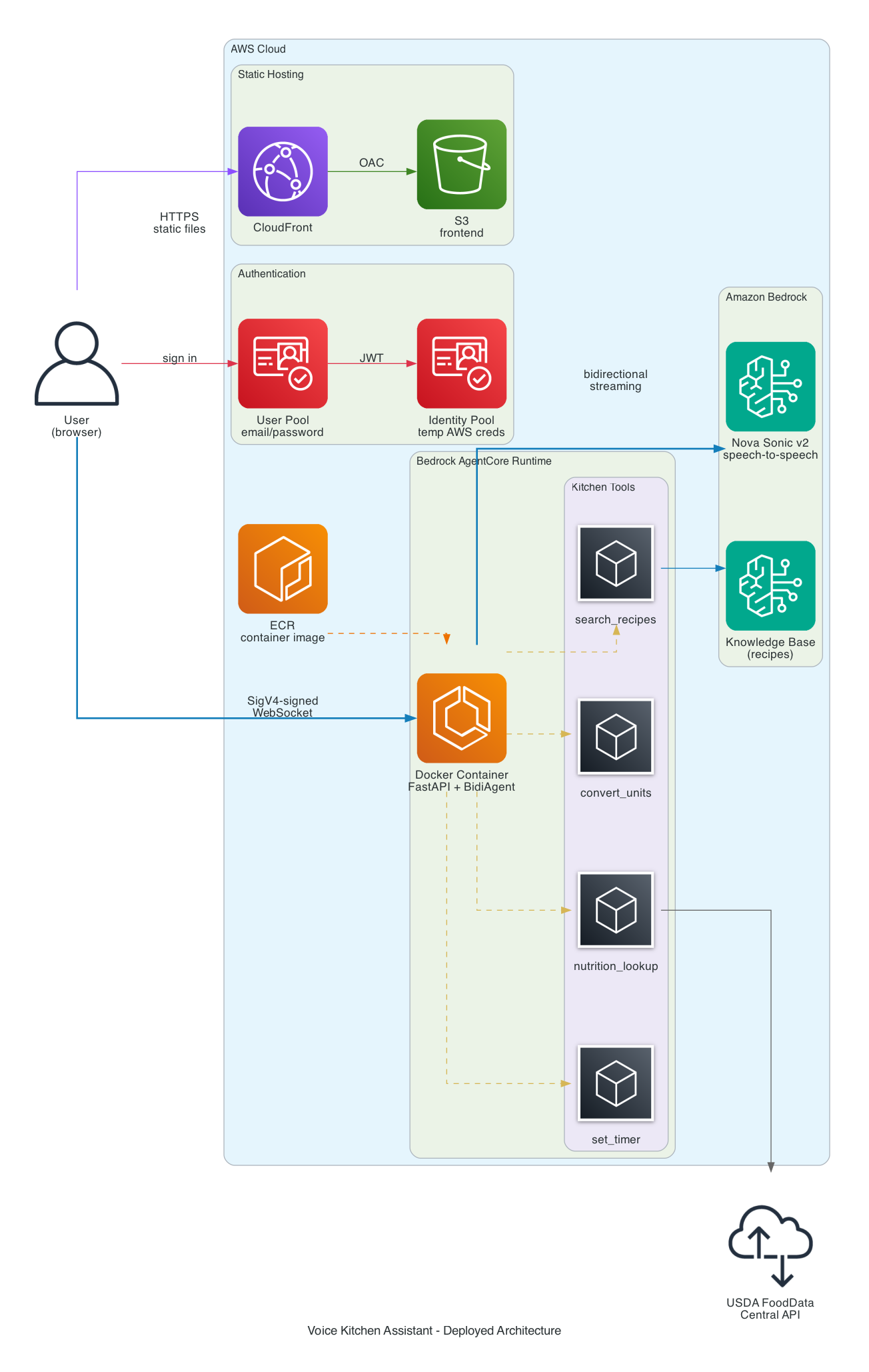
The deployed architecture:
- Frontend - React SPA on S3 + CloudFront, same pattern as the text-based recipe assistant
- Auth - Cognito User Pool (email/password) + Identity Pool. The browser exchanges a Cognito JWT for temporary AWS credentials, then uses those to SigV4-sign a WebSocket URL directly to AgentCore. No API Gateway or Lambda in the WebSocket path.
- Agent Runtime - The FastAPI server runs as an ARM64 container in AgentCore. The same
server.pythat runs locally deploys without changes - AgentCore handles health checks (/ping), scaling, and WebSocket proxying. - Dual mode - The frontend auto-detects the deployment mode. If
VITE_AGENT_RUNTIME_ARNis set, it uses SigV4-signed WebSocket to AgentCore. If not, it connects to the local Vite proxy. No code changes needed to switch between local and deployed.
The Dockerfile
The container packages the same FastAPI server that runs locally. ARM64 is required by AgentCore Runtime.
FROM --platform=linux/arm64 public.ecr.aws/docker/library/python:3.13-slim

# PyAudio is a transitive dependency of strands-agents[bidi-all]
RUN apt-get update && \
    apt-get install -y --no-install-recommends \
    libasound-dev libportaudio2 libportaudiocpp0 \
    portaudio19-dev gcc python3-dev && \
    apt-get clean && rm -rf /var/lib/apt/lists/*

WORKDIR /app
COPY requirements.txt .
RUN pip install --no-cache-dir -r requirements.txt

COPY config.py server.py ./
COPY tools/ ./tools/

RUN useradd -m -u 1000 appuser && chown -R appuser:appuser /app
USER appuser

ENV CONTAINER_ENV=true
ENV PYTHONUNBUFFERED=1
EXPOSE 8080

HEALTHCHECK --interval=30s --timeout=3s --start-period=5s --retries=3 \
    CMD ["python", "-c", "import urllib.request; urllib.request.urlopen('http://localhost:8080/ping').read()"]

CMD ["opentelemetry-instrument", "uvicorn", "server:app", "--host", "0.0.0.0", "--port", "8080"]
The CONTAINER_ENV flag tells server.py to bind to 0.0.0.0 instead of 127.0.0.1. The opentelemetry-instrument wrapper is required for AgentCore to capture container logs in CloudWatch - without it, stdout and stderr are silently dropped. The aws-opentelemetry-distro package in requirements.txt provides this wrapper. The health check hits the /ping endpoint that AgentCore polls every few seconds.
Terraform: AgentCore IAM Role
The container needs an IAM role that AgentCore assumes on its behalf. This is where the model ID gotcha matters most - get the ARN wrong and Nova Sonic silently ignores audio.
resource "aws_iam_role" "agentcore" {
  name = "${var.project_name}-${var.environment}-agentcore"

  assume_role_policy = jsonencode({
    Version = "2012-10-17"
    Statement = [{
      Effect    = "Allow"
      Principal = { Service = "bedrock-agentcore.amazonaws.com" }
      Action    = "sts:AssumeRole"
    }]
  })
}

resource "aws_iam_role_policy" "agentcore" {
  name = "agentcore-permissions"
  role = aws_iam_role.agentcore.id

  policy = jsonencode({
    Version = "2012-10-17"
    Statement = [
      {
        Sid    = "NovaSonicAccess"
        Effect = "Allow"
        Action = [
          "bedrock:InvokeModel",
          "bedrock:InvokeModelWithResponseStream",
          "bedrock:InvokeModelWithBidirectionalStream",
        ]
        # NOTE: The model ID is amazon.nova-2-sonic-v1, NOT amazon.nova-sonic-v2
        Resource = [
          "arn:aws:bedrock:${var.aws_region}::foundation-model/amazon.nova-2-sonic-v1*"
        ]
      },
      {
        Sid      = "KnowledgeBaseAccess"
        Effect   = "Allow"
        Action   = ["bedrock:Retrieve"]
        Resource = [
          "arn:aws:bedrock:${var.aws_region}:${data.aws_caller_identity.current.account_id}:knowledge-base/${var.knowledge_base_id}"
        ]
      },
      {
        Sid    = "ECRImageAccess"
        Effect = "Allow"
        Action = ["ecr:BatchGetImage", "ecr:GetDownloadUrlForLayer"]
        Resource = [
          "arn:aws:ecr:${var.aws_region}:${data.aws_caller_identity.current.account_id}:repository/*"
        ]
      },
      {
        Sid      = "ECRTokenAccess"
        Effect   = "Allow"
        Action   = ["ecr:GetAuthorizationToken"]
        Resource = "*"
      },
      # CloudWatch, X-Ray, and WorkloadIdentity statements omitted for brevity
    ]
  })
}
The bedrock-agentcore.amazonaws.com service principal in the trust policy allows AgentCore to assume this role when running the container. The policy grants exactly what the agent needs: invoke Nova Sonic, retrieve from the Knowledge Base, and pull the container image from ECR.
Terraform: Cognito Authentication
The browser needs AWS credentials to sign WebSocket requests. Cognito provides a two-step flow: User Pool for authentication, Identity Pool for credential exchange.
# User Pool - email/password authentication
resource "aws_cognito_user_pool" "main" {
  name                     = "${var.project_name}-${var.environment}-users"
  username_attributes      = ["email"]
  auto_verified_attributes = ["email"]

  admin_create_user_config {
    allow_admin_create_user_only = true  # No self-signup for the demo
  }

  password_policy {
    minimum_length    = 8
    require_lowercase = true
    require_uppercase = true
    require_numbers   = true
  }
}

# Public client for the SPA - no client secret
resource "aws_cognito_user_pool_client" "web" {
  name            = "${var.project_name}-${var.environment}-web-client"
  user_pool_id    = aws_cognito_user_pool.main.id
  generate_secret = false

  explicit_auth_flows = [
    "ALLOW_USER_SRP_AUTH",
    "ALLOW_REFRESH_TOKEN_AUTH",
  ]
}

# Identity Pool - exchange JWT for temporary AWS credentials
resource "aws_cognito_identity_pool" "main" {
  identity_pool_name               = "${var.project_name}-${var.environment}-identity"
  allow_unauthenticated_identities = false

  cognito_identity_providers {
    client_id               = aws_cognito_user_pool_client.web.id
    provider_name           = aws_cognito_user_pool.main.endpoint
    server_side_token_check = false
  }
}

# IAM role that authenticated users assume
resource "aws_iam_role" "cognito_authenticated" {
  name = "${var.project_name}-${var.environment}-cognito-auth-role"

  assume_role_policy = jsonencode({
    Version = "2012-10-17"
    Statement = [{
      Effect    = "Allow"
      Principal = { Federated = "cognito-identity.amazonaws.com" }
      Action    = "sts:AssumeRoleWithWebIdentity"
      Condition = {
        StringEquals = {
          "cognito-identity.amazonaws.com:aud" = aws_cognito_identity_pool.main.id
        }
        "ForAnyValue:StringLike" = {
          "cognito-identity.amazonaws.com:amr" = "authenticated"
        }
      }
    }]
  })
}

# Grant authenticated users permission to invoke the agent via WebSocket
resource "aws_iam_role_policy" "agentcore_invoke" {
  count = var.agent_runtime_arn != "" ? 1 : 0
  name  = "agentcore-invoke"
  role  = aws_iam_role.cognito_authenticated.id

  policy = jsonencode({
    Version = "2012-10-17"
    Statement = [{
      Effect = "Allow"
      Action = [
        "bedrock-agentcore:InvokeAgentRuntime",
        "bedrock-agentcore:InvokeAgentRuntimeWithWebSocketStream",
        "bedrock-agentcore:InvokeRuntime",
        "bedrock-agentcore:InvokeRuntimeWithResponseStream",
      ]
      Resource = "*"
    }]
  })
}
The count = var.agent_runtime_arn != "" ? 1 : 0 handles a chicken-and-egg problem: Terraform creates the Cognito resources first, then you create the AgentCore runtime via CLI (there is no Terraform provider for AgentCore yet), then re-run Terraform with the runtime ARN to attach the invoke policy.
IAM resource scoping gotcha: You might expect to scope Resource to your specific runtime ARN instead of "*". I tried this and it breaks WebSocket connections with a silent failure - the browser gets a connection refused with no useful error. The InvokeAgentRuntimeWithWebSocketStream action evaluates against a resource ARN that includes session and qualifier components, not just the runtime ARN. The official AWS sample uses Resource: "*" for the same reason. Until AWS documents the exact resource ARN format for WebSocket invocations, "*" is the only option that works. The blast radius is limited since these are Cognito-scoped temporary credentials that can only call bedrock-agentcore:Invoke* actions.
SigV4 WebSocket Presigning
This is the most unusual piece of the deployment. The browser cannot use a simple WebSocket URL - it needs to SigV4-sign the request using temporary AWS credentials from Cognito. The signing process constructs the URL, signs it with the AWS Signature Version 4 algorithm, and appends the signature as query parameters.
import { getAWSCredentials } from './aws-credentials.js';
import { Sha256 } from '@aws-crypto/sha256-js';
import { SignatureV4 } from '@aws-sdk/signature-v4';
import { HttpRequest } from '@smithy/protocol-http';

export async function getPresignedWebSocketUrl(agentRuntimeArn, sessionId) {
  const region = import.meta.env.VITE_REGION || 'us-east-1';
  const credentials = await getAWSCredentials();

  // Build the AgentCore WebSocket URL
  const encodedArn = encodeURIComponent(agentRuntimeArn);
  const url = new URL(
    `https://bedrock-agentcore.${region}.amazonaws.com/runtimes/${encodedArn}/ws`
  );
  url.searchParams.set('qualifier', 'DEFAULT');
  url.searchParams.set('X-Amzn-Bedrock-AgentCore-Runtime-Session-Id', sessionId);

  // Sign with SigV4
  const signer = new SignatureV4({
    service: 'bedrock-agentcore',
    region,
    credentials: {
      accessKeyId: credentials.accessKeyId,
      secretAccessKey: credentials.secretAccessKey,
      sessionToken: credentials.sessionToken,
    },
    sha256: Sha256,
  });

  const request = new HttpRequest({
    method: 'GET',
    protocol: 'https:',
    hostname: url.hostname,
    path: url.pathname,
    query: Object.fromEntries(url.searchParams),
    headers: { host: url.hostname },
  });

  const signed = await signer.presign(request, { expiresIn: 3600 });

  // Convert to wss:// URL
  const queryString = Object.entries(signed.query || {})
    .map(([k, v]) => `${encodeURIComponent(k)}=${encodeURIComponent(String(v))}`)
    .join('&');

  return `wss://${signed.hostname}${signed.path}?${queryString}`;
}
The credential exchange happens one step earlier. The browser takes the Cognito ID token and exchanges it for temporary AWS credentials via the Identity Pool:
import { CognitoIdentityClient, GetIdCommand,
         GetCredentialsForIdentityCommand } from '@aws-sdk/client-cognito-identity';

export async function getAWSCredentials() {
  const idToken = await getIdToken();
  const client = new CognitoIdentityClient({ region });
  const providerName = `cognito-idp.${region}.amazonaws.com/${userPoolId}`;

  // Step 1: Get identity ID from the token
  const { IdentityId } = await client.send(
    new GetIdCommand({
      IdentityPoolId: identityPoolId,
      Logins: { [providerName]: idToken },
    })
  );

  // Step 2: Exchange for temporary AWS credentials
  const { Credentials } = await client.send(
    new GetCredentialsForIdentityCommand({
      IdentityId,
      Logins: { [providerName]: idToken },
    })
  );

  return {
    accessKeyId: Credentials.AccessKeyId,
    secretAccessKey: Credentials.SecretKey,
    sessionToken: Credentials.SessionToken,
  };
}
These temporary credentials are scoped by the Cognito authenticated role - they can only call bedrock-agentcore:Invoke* actions, not other AWS services.
Deployment Commands
The full deployment workflow:
# 1. Provision infrastructure (S3, CloudFront, Cognito, ECR)
make apply

# 2. Build and push the ARM64 container to ECR
make docker-build
make docker-push

# 3. Create the AgentCore runtime (first time only)
make create-agent

# 4. Add the runtime ARN to terraform.tfvars, re-apply for Cognito IAM policy
make apply

# 5. Generate frontend .env from Terraform outputs
make setup-env

# 6. Build and deploy frontend to S3 + invalidate CloudFront cache
make deploy-frontend
For subsequent code changes, make deploy-agent rebuilds the container and updates the runtime in one step.
Key deployment gotcha: AgentCore container deployments require unique ECR image tags to force replacement. Pushing a new image with the latest tag does not trigger a container update - you must use a unique tag (I use v$(date +%Y%m%d%H%M%S)) and pass it to update-agent-runtime.
What Does It Cost?
Nova Sonic pricing is per-token, not per-minute. Audio converts at roughly 25 tokens per second.
| Token type | Price per 1,000 tokens |
|---|---|
| Speech input | $0.0034 |
| Speech output | $0.0136 |
| Text input | $0.00006 |
| Text output | $0.00024 |
Speech tokens dominate the bill. Text tokens only apply to tool call inputs/outputs and any conversation history injected as text - these are negligible for a voice-only session.
Typical session costs:
A 5-minute cooking session where the user asks 4-5 questions and the assistant responds with recipe steps and tool results:
- Speech input (~2 min of user speaking): 2 x 60 x 25 = 3,000 tokens = $0.010
- Speech output (~3 min of assistant speaking): 3 x 60 x 25 = 4,500 tokens = $0.061
- Text tokens (tool calls/results): ~2,000 tokens = $0.0005
- Total: ~$0.07 per session
For comparison, an 8-minute session (the Nova Sonic maximum) with continuous conversation:
- Speech input (~3.5 min): 5,250 tokens = $0.018
- Speech output (~4.5 min): 6,750 tokens = $0.092
- Total: ~$0.11 per session
That is roughly 80% cheaper than OpenAI's GPT-4o Realtime API for equivalent conversation length.
Tracking costs in code:
AWS does not currently publish CloudWatch metrics for InvokeModelWithBidirectionalStream - the standard Bedrock metrics only cover InvokeModel, Converse, and their streaming variants. Model invocation logging and Application Inference Profiles (for cost tagging) also do not support bidirectional streaming yet.
The practical workaround is application-level cost estimation. The server logs session duration, audio chunk counts, and an estimated cost for each session:
# Nova Sonic pricing (per 1,000 tokens)
SPEECH_INPUT_PRICE_PER_1K = 0.0034
SPEECH_OUTPUT_PRICE_PER_1K = 0.0136
TOKENS_PER_SECOND_AUDIO = 25

# In the WebSocket handler:
session_start = time.monotonic()
input_audio_chunks = 0
output_audio_chunks = 0

# ... wrap receive/send to count audio chunks ...

# In the finally block:
session_duration = time.monotonic() - session_start
input_tokens = session_duration * TOKENS_PER_SECOND_AUDIO
output_tokens = session_duration * TOKENS_PER_SECOND_AUDIO
estimated_cost = (input_tokens / 1000) * SPEECH_INPUT_PRICE_PER_1K \
               + (output_tokens / 1000) * SPEECH_OUTPUT_PRICE_PER_1K

logger.info(
    "Session ended: duration=%.1fs, est_cost=$%.4f",
    session_duration, estimated_cost,
)
This uses wall-clock time as an upper bound (both speakers are not active simultaneously for the full duration). For aggregate cost monitoring, AWS Cost Explorer does show Bedrock charges broken down by model, so you can track monthly Nova Sonic spend at the account level - you just cannot get per-invocation breakdowns without application-level logging.
Converging Voice and Text: Future Integration
I now have two separate recipe assistants - a text-based version that uses CloudFront + Lambda + AgentCore for HTTP/SSE streaming, and this voice version that uses CloudFront + Cognito + AgentCore for WebSocket streaming. They share the same Bedrock Knowledge Base and similar tool implementations, but have separate infrastructure and deployment pipelines.
The natural next step is to combine them into a single application with both input modes. The architecture would look like:
- Unified frontend - A single React SPA that offers both a chat interface and a voice interface. The text chat already uses SSE streaming through Lambda; the voice mode connects directly to AgentCore via WebSocket. Both modes share the same auth (Cognito) and the same CloudFront distribution.
- Shared agent - Both modes could use the same AgentCore runtime with the same tools. The text path would go through Lambda (for SSE streaming), while the voice path would connect directly via WebSocket. The agent code is already nearly identical - same tools, same Knowledge Base, same system prompt. The main difference is the I/O layer.
- Shared infrastructure - The Terraform modules for auth, CDN, and storage are similar between the two projects. Combining them eliminates duplication and simplifies deployment.
- Mode switching - In the kitchen, you might start with text ("what should I make for dinner?"), switch to voice once you start cooking ("what is the next step?"), and go back to text when things get noisy. A unified app would make this seamless.
The biggest challenge is the streaming protocol difference. The text assistant uses HTTP POST + SSE (request-response), while the voice assistant uses a persistent bidirectional WebSocket. Lambda handles the text path well but maybe isn't the best approach for the WebSocket connections needed here. AgentCore handles Websockets for this case well. The solution may be to have both paths - Lambda for text, AgentCore container for voice - behind the same CloudFront distribution.
What's Next
- Session rotation - Automatically reconnect when the 8-minute Nova Sonic limit is reached, preserving conversation context
- Unified app - Merge the text and voice assistants into a single application with both input modes, shared tools, and shared infrastructure
- Alexa integration - Strands BidiAgent with a custom I/O adapter could bridge to the Alexa Skills Kit for hands-free kitchen use
- Multi-modal input - Nova Sonic v2 supports text input alongside audio. Adding a text fallback for when voice is not practical (quiet environments, accessibility needs)
The gap between a text-based agent and a voice-based agent is smaller than I expected. Strands abstracts the hard parts - WebSocket management, audio encoding, interruption handling, concurrent tool execution - and lets you focus on the tools and the system prompt. The same @tool decorator, the same docstring-based tool selection, the same Bedrock integration. Just with a microphone instead of a text box.
If you have an existing Strands agent, adding voice is closer to a weekend project than a rewrite.
Connect with me on X, Bluesky, LinkedIn, Medium, Dev.to, GitHub, or the AWS Community. Check out more of my projects at darryl-ruggles.cloud and join the Believe In Serverless community.
Comments
Loading comments...