Amazon EventBridge: The Event-Driven Backbone of AWS (And My Favourite Service)
I have been building serverless applications on AWS for years now, and if you asked me to pick one service that keeps showing up in almost every project I build, it would be Amazon EventBridge without hesitation. EventBridge is my favourite AWS service. It offers rules for reacting to events, pipes for bridging data across AWS services, a scheduler for time-based triggers, and a schema registry for discoverability - all fully serverless and practically free.
I recently had the opportunity to present on EventBridge to the AWS Cloud Club at Amity University Chhattisgarh, and I decided to consolidate key details about this service into one place. This blog post is the companion to that presentation - a dive into why EventBridge matters, how I use it, and how you can start building with it today.
Why Event-Driven Architecture?
Before we talk about EventBridge specifically, let's talk about why event-driven architecture (EDA) is worth adopting. Four core principles make EDA compelling:
- Loose coupling - Producers emit events without knowing who consumes them. You can add new consumers without touching existing code.
- Real-time reactivity - Respond to changes as they happen, instead of polling for updates.
- Scalability by default - Event buses handle millions of events. Consumers scale independently.
- Extensibility - New capabilities just subscribe to existing events. No rewiring required.
EventBridge is purpose-built to make this simple, scalable, and serverless on AWS.
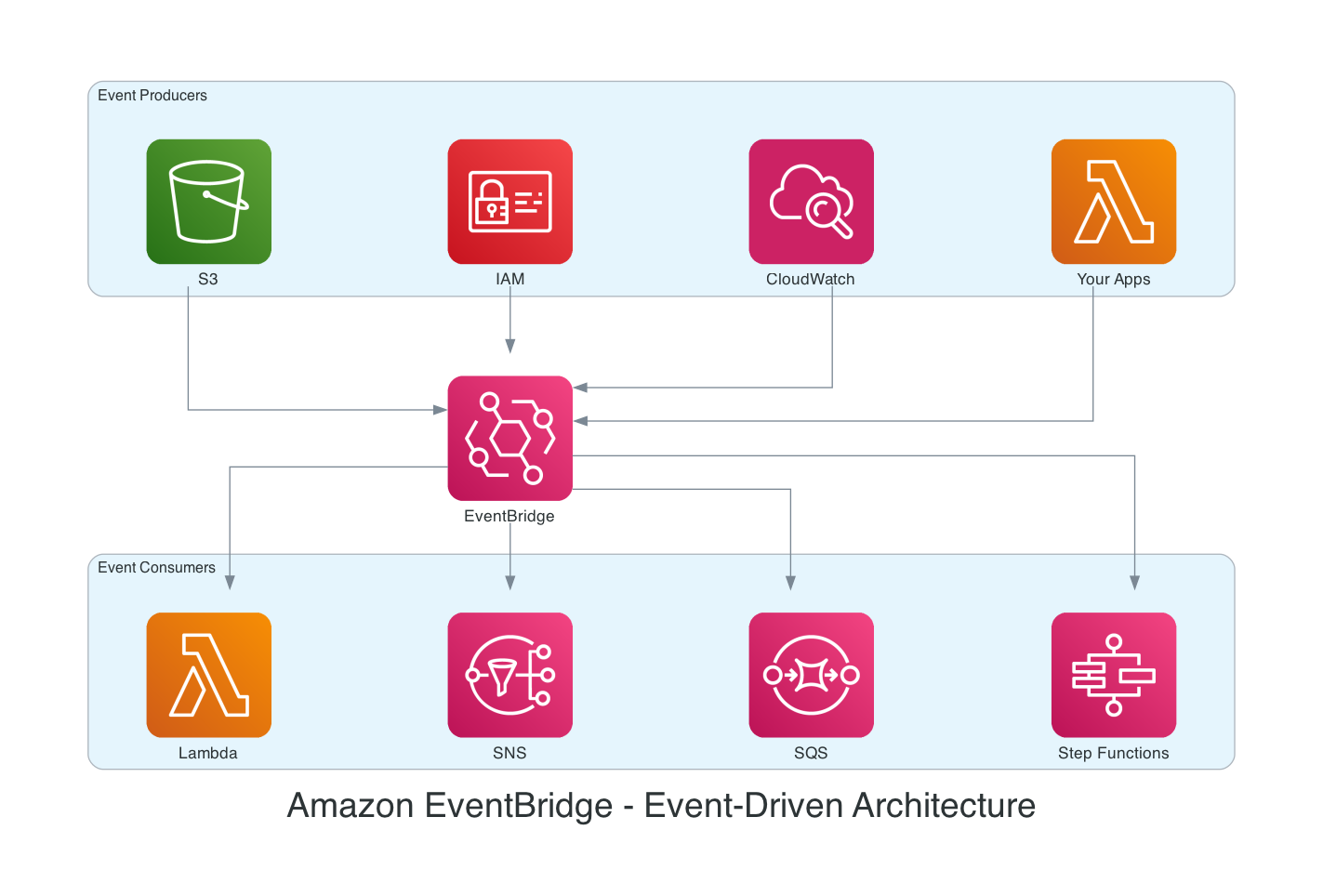
The pattern is straightforward. On the left, producers - S3, IAM, CloudWatch, your applications - emit events onto EventBridge. In the middle, EventBridge routes them via rules and content-based patterns. On the right, consumers - Lambda, SNS, SQS, Step Functions - each subscribe independently. Producers don't know about consumers. Consumers don't know about producers. EventBridge is the decoupling layer.
What is Amazon EventBridge?
EventBridge is a serverless event bus that helps you receive, filter, transform, route, and deliver events. It has four major capabilities:
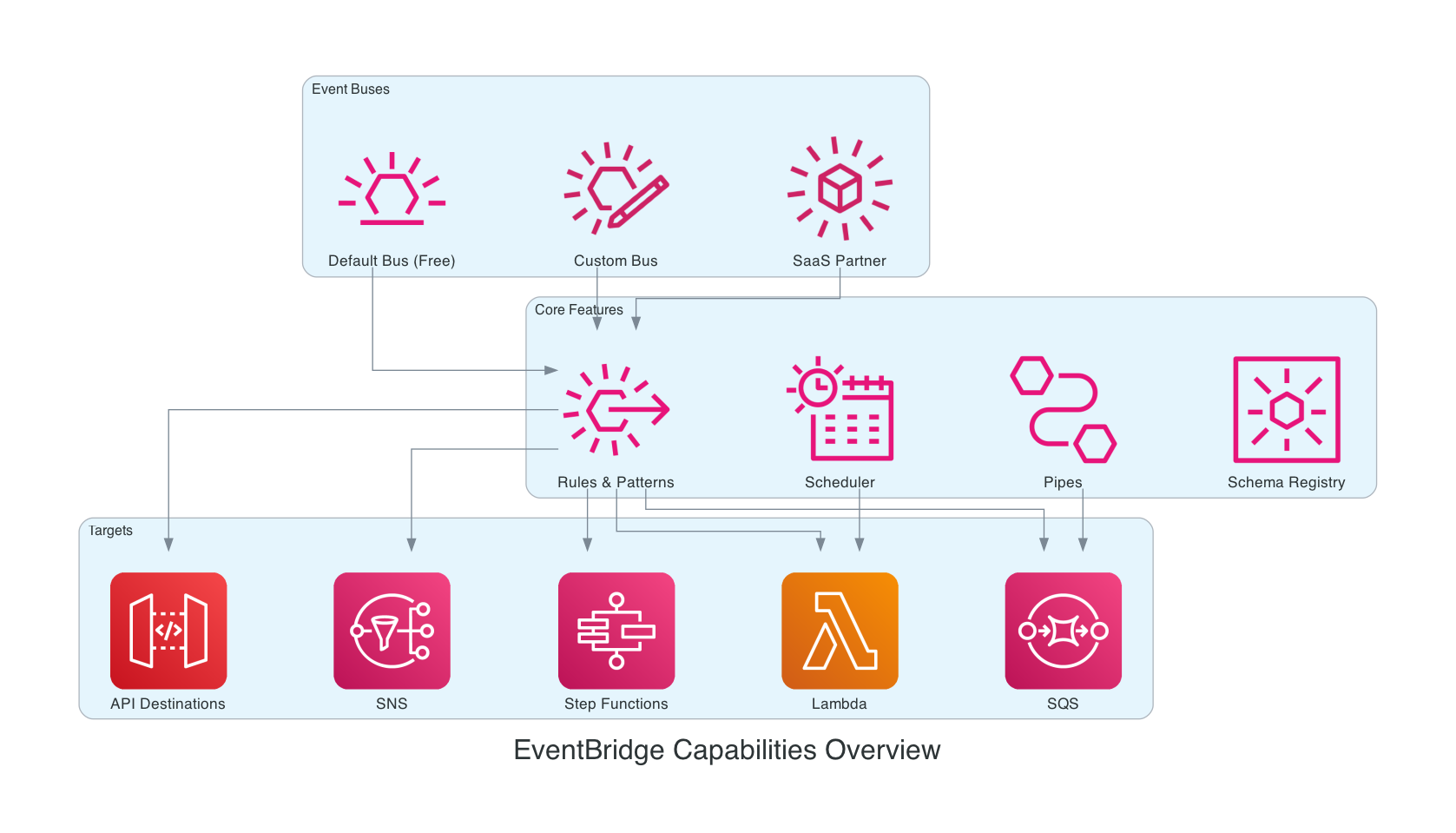
Event Buses
- Default Event Bus - Every AWS account gets one automatically. It receives virtually all mutating API calls via CloudTrail - anything that creates, modifies, or deletes something across 250+ AWS services. Events flow whether you are listening or not. And it is completely free.
- Custom Event Buses - Create your own buses and publish custom events. Cross-account sharing via resource policies. As of January 2025, EventBridge also supports direct cross-account delivery to targets like SQS, Lambda, SNS, Kinesis, and API Gateway - no intermediary event bus required in the target account.
- SaaS Partner Buses - Partners like Datadog and PagerDuty can send events directly into your bus.
Rules & Event Patterns
Rules match events and route them to targets. You can have up to 5 targets per rule. The pattern matching is remarkably flexible:
- Prefix/suffix matching - Match on the beginning or end of string values
- Anything-but - Exclude specific values
- Numeric ranges - Filter by greater-than, less-than, or between
- Exists - Check for the presence or absence of a field
- OR logic - Arrays match any value in the list
Matching happens at the EventBridge level - you only pay for events that actually match your rules.
Scheduler
Three types of schedules: rate-based, cron expressions, and one-time schedules. Supports millions of schedules with integrations across 270+ AWS services and over 6,000 API operations. Includes flexible time windows, automatic retries, and dead-letter queues. EventBridge Scheduler replaces the older scheduled rules and is significantly more capable.
Pipes
Pipes provide point-to-point integration with a pipeline architecture: Source → Filter → Enrich → Transform → Target. They replace the "glue Lambda" functions that many of us have written to connect services. Filtered events are free.
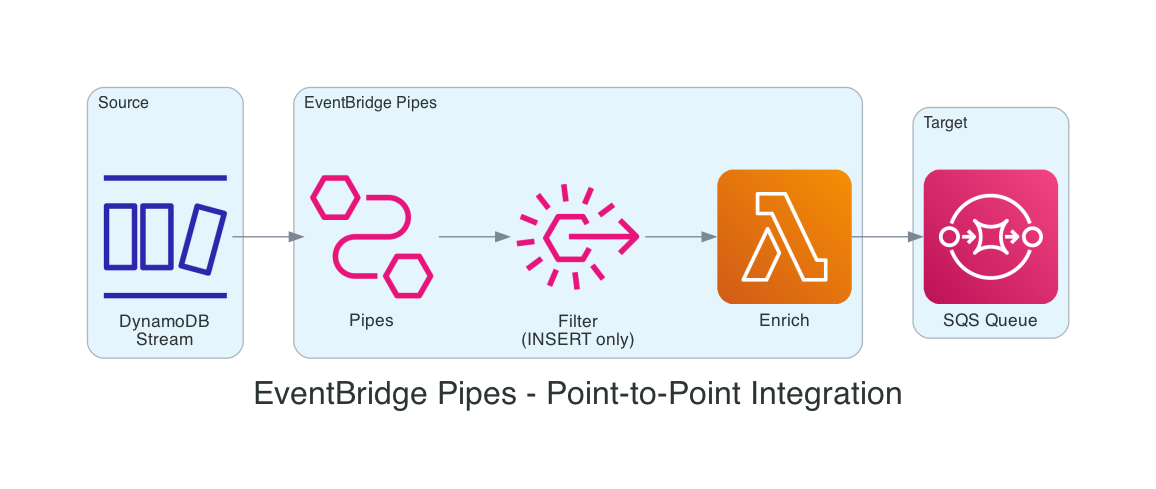
For example, a DynamoDB stream can flow into Pipes, filter for only INSERT events, enrich the data with a Lambda function, and deliver to an SQS queue - all without writing a custom Lambda to glue the pieces together.
Real-World Pattern: Security Monitoring with the Account Watcher
The best way to understand EventBridge is to see it in action. My Serverless AWS Account Watcher project is a perfect example. The challenge was simple: keeping track of all the actions being done in your AWS account can be a real challenge, especially from a security perspective. I needed to know immediately when someone deleted an S3 bucket, created an IAM access key, or logged into the console.
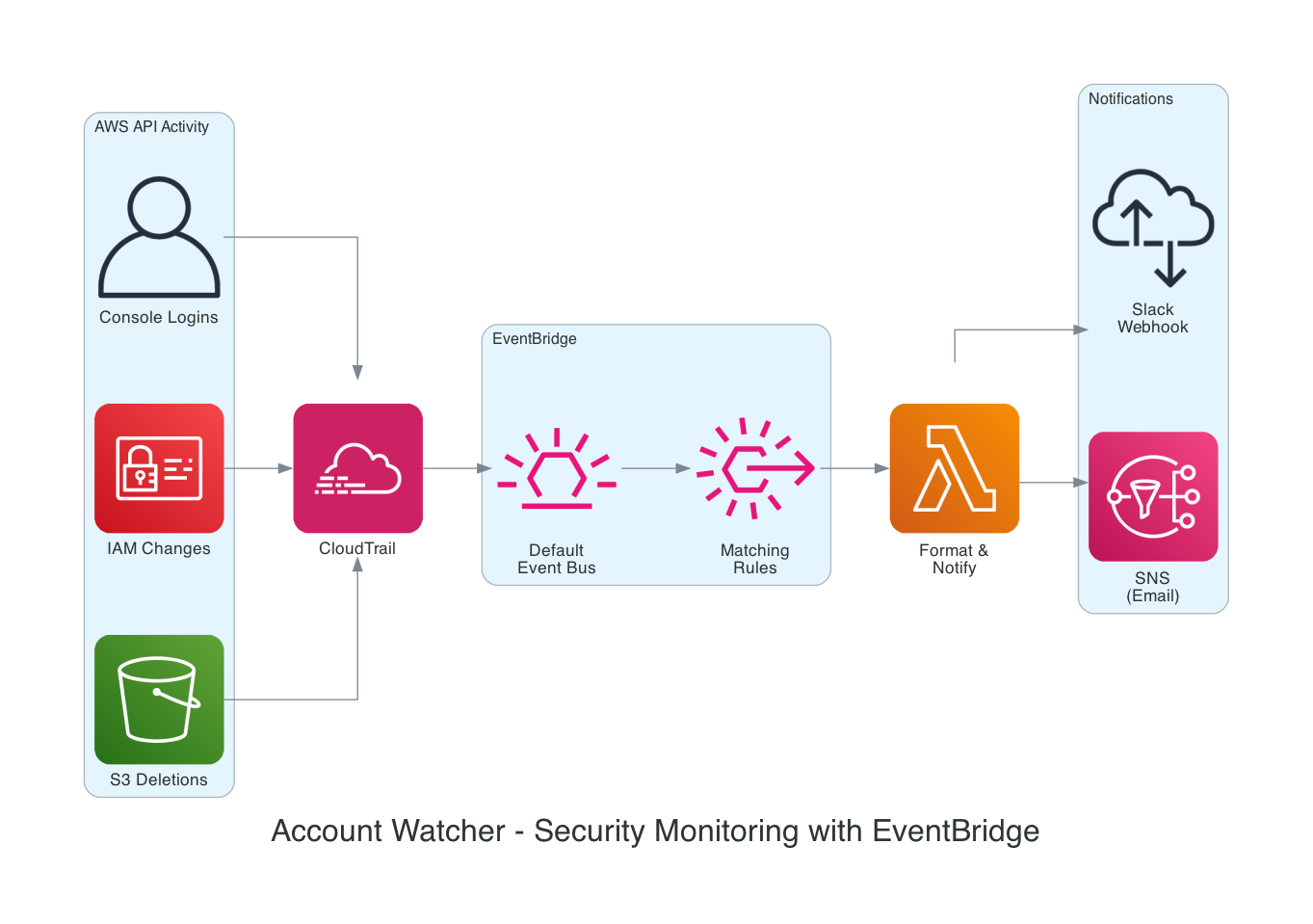
The architecture relies entirely on the default event bus. CloudTrail captures API activity - S3 deletions, IAM changes, console logins - and delivers those events to EventBridge automatically. Rules match specific event patterns and trigger a Lambda function that formats notifications and fans them out to SNS (for email) and a Slack webhook.
Here is what the SAM template looks like for the EventBridge rule:
Events:
  S3EventsRule:
    Type: EventBridgeRule
    Properties:
      Pattern:
        source:
          - aws.s3
        detail-type:
          - "AWS API Call via CloudTrail"
        detail:
          eventName:
            - DeleteBucket
            - DeleteBucketPolicy
            - PutBucketPolicy
That is it. A pattern and a source. SAM handles the rule creation, permissions, and target wiring. The Lambda handler uses Python's match/case to route different event types:
match event_name:
    case "DeleteBucket":
        message = f"S3 bucket '{bucket_name}' was deleted by {user}"
    case "CreateAccessKey":
        message = f"New access key created for {target_user} by {user}"
    case "ConsoleLogin":
        message = f"Console login by {user} from {source_ip}"
The last two lines of the handler are the entire fan-out - send_slack_message() and publish_to_sns(). Two notification channels, completely decoupled from the event detection logic.
The extensibility story is powerful here. Want to monitor a new API action? Add one line to the event pattern. Want to add a Microsoft Teams notification? Add one more function call. The event detection, routing, and notification logic are all independent.
I wrote about this project in detail in my Serverless AWS Account Watcher blog post - the full SAM template, Lambda code, and deployment instructions are all there.
Real-World Pattern: Health Check Alerts
My Serverless Site Health Check Notification System takes the same EventBridge pattern in a different direction. Route53 health checks monitor endpoints globally via HTTP, HTTPS, or TCP. When a health check fails, CloudWatch transitions an alarm state, and that state change flows through the default event bus.
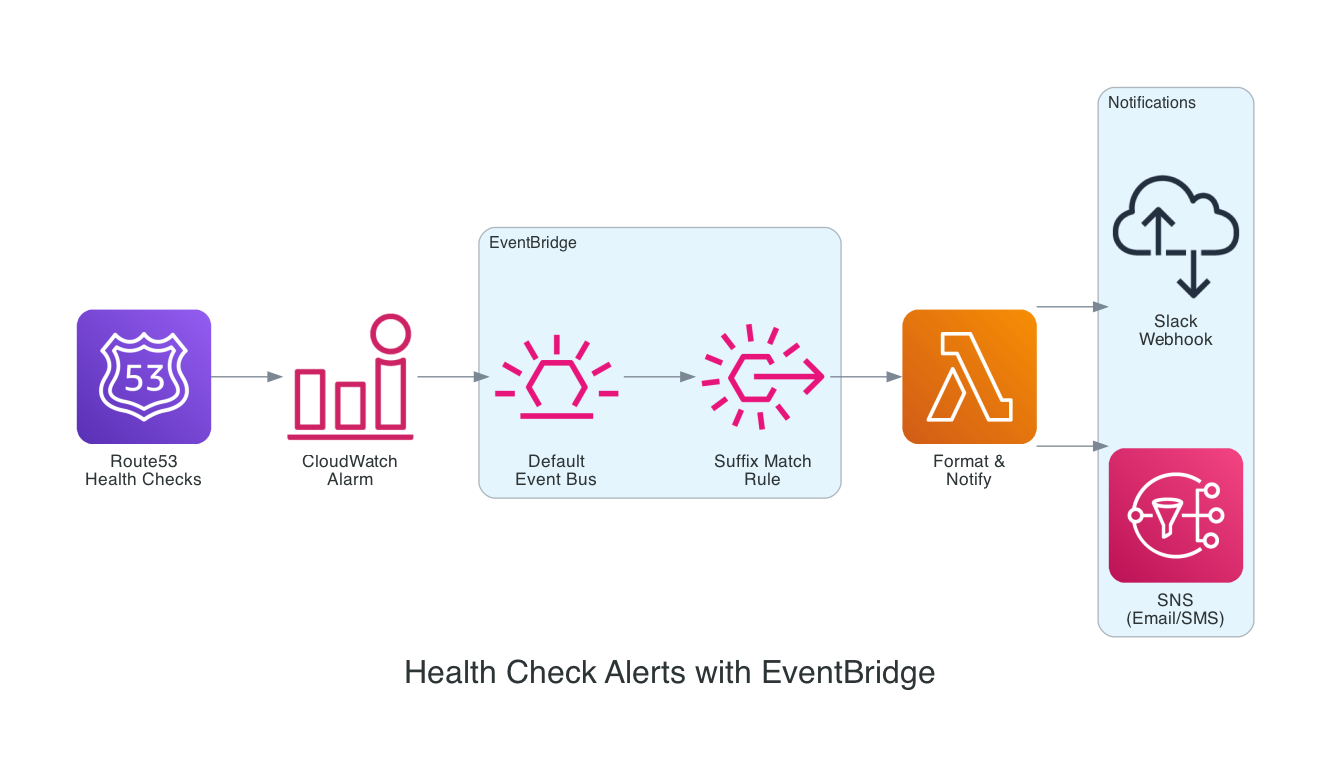
I took advantage of the suffix matching. The EventBridge rule matches alarm names ending with -HealthCheckAlarm:
{
  "source": ["aws.cloudwatch"],
  "detail-type": ["CloudWatch Alarm State Change"],
  "detail": {
    "alarmName": [{ "suffix": "-HealthCheckAlarm" }]
  }
}
This means you can add new Route53 health checks without ever updating the EventBridge rule or redeploying your Lambda. Name the CloudWatch alarm with the -HealthCheckAlarm suffix, and it automatically triggers the existing notification pipeline. This is the extensibility promise of EDA in practice - new health checks, no code changes.
Real-World Pattern: Event-Driven Sales Analytics
In my Serverless Sales Analytics Platform, EventBridge plays a dual role. First, S3 object creation events flow through the default bus - when a store uploads daily sales data, an EventBridge rule matches the bucket and prefix, triggering a Step Functions workflow to transform and analyze the data. Second, an EventBridge Scheduler rule runs at 11 PM daily as a fallback, ensuring the analysis pipeline executes even if stores have not reported.
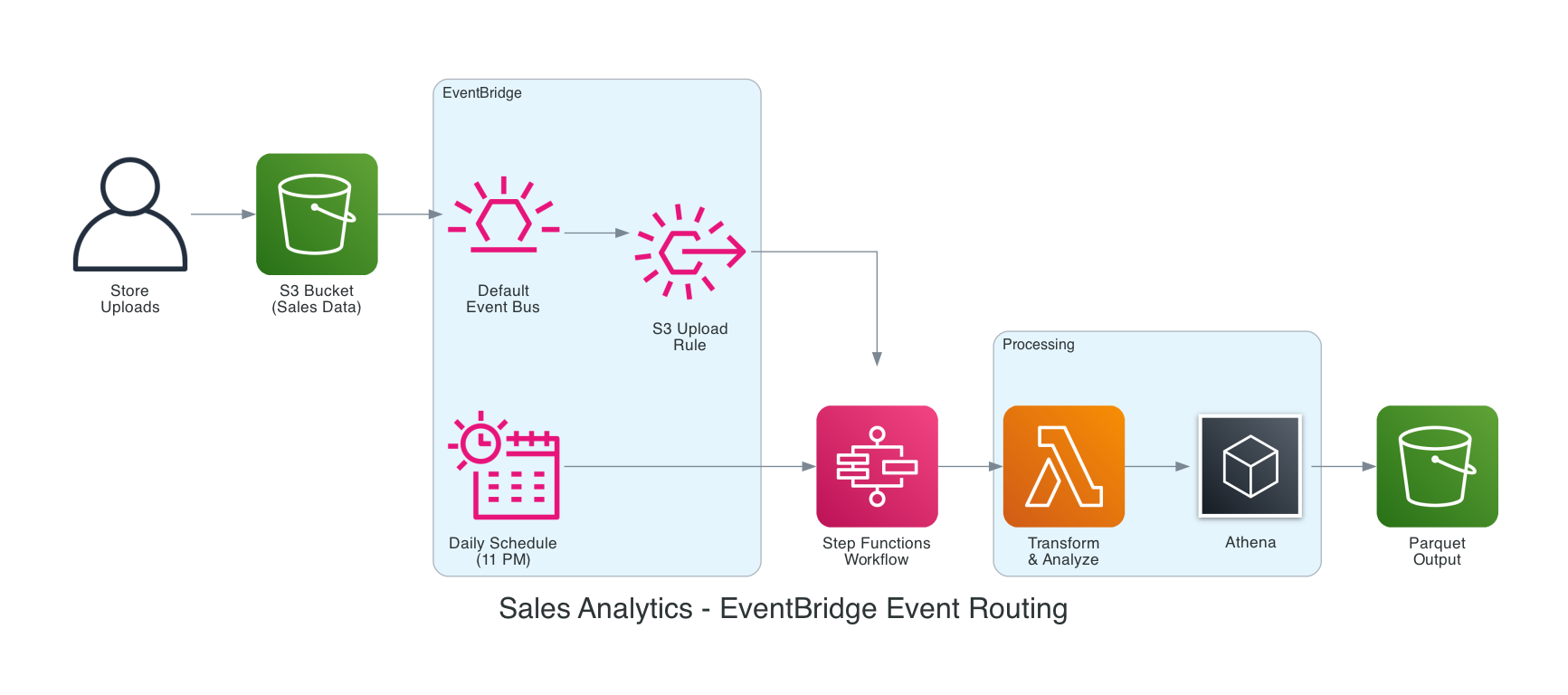
This combination of event-driven triggers and scheduled fallbacks is a pattern I use frequently. EventBridge handles both seamlessly - reactive processing when data arrives, and scheduled processing as a safety net.
EventBridge vs SNS vs SQS - When to Use What
This is one of the most common questions I get. All three are messaging services, but they serve different purposes:
| Feature | EventBridge | SNS | SQS |
|---|---|---|---|
| What it does | Routes events based on content | Broadcasts to subscribers | Queues messages for consumers to pull |
| Filtering | Prefix, suffix, numeric, anything-but, exists | Basic attribute filters | None |
| AWS service events | 250+ services on default bus, free | You wire it up yourself | You wire it up yourself |
| Schema discovery | Built-in Schema Registry | No | No |
| Targets | 20+ supported target types | Lambda, SQS, HTTP, email subscriptions | Consumer pulls at their own pace |
| Ordering | Best-effort | Best-effort | FIFO available |
Use EventBridge for intelligent content-based routing and reacting to AWS service events. Use SNS for simple pub/sub fan-out when you already know the event structure. Use SQS for guaranteed message processing with consumer-controlled throughput.
In practice, they work together. My Account Watcher uses EventBridge for routing and SNS for email delivery - each service doing what it does best.
EventBridge vs Kafka
Another comparison that comes up: Kafka is a distributed log for high-throughput streaming with replay capabilities. EventBridge is a managed event router for AWS-native architectures. They are fundamentally different tools. Kafka excels at sustained high-throughput data streaming (millions of messages per second). EventBridge excels at reactive event routing with content-based filtering and zero infrastructure management.
They can also work together - EventBridge Pipes can consume directly from Kafka topics.
Best Practices
After building several production systems with EventBridge, here are the practices I have found most valuable:
- Use specific event patterns - The more precise your pattern, the fewer unnecessary Lambda invocations you pay for.
- Implement dead-letter queues on rule targets - When EventBridge cannot deliver to a target, the DLQ captures the event for investigation. Use Lambda Destinations OnFailure for richer error context.
- Use input transformers - Shape the event payload before it reaches your target. Reduce parsing logic in your Lambda functions.
- Separate buses for different domains - Custom buses keep application events isolated from the AWS service events on the default bus.
- Prefer Scheduler over scheduled rules - EventBridge Scheduler is the newer, more capable replacement. Use it for all new time-based triggers.
- Archive and Replay for debugging - Enable archiving so you can replay events after fixing a bug. This is invaluable in production.
- Implement idempotency - EventBridge provides at-least-once delivery for most targets. Your consumers should handle duplicate events gracefully.
- Use SAM, Terraform, or CDK for infrastructure - Define your rules, patterns, and targets as code. The SAM
EventBridgeRuleevent type is incredibly concise.
Pricing - Practically Free
This might be the most surprising part for people new to EventBridge:
- Default event bus: Completely free. Every AWS service event that flows through it costs you nothing.
- Custom events: $1.00 per million events. Each 64 KB chunk of a payload counts as one event.
- Scheduler: $1.00 per million invocations, with a generous free tier of 14 million invocations per month.
- Pipes: $0.40 per million requests after filtering. Filtered-out events are not charged.
For my projects - Account Watcher, Health Check Alerts, Sales Analytics - the EventBridge cost has been essentially $0. The Lambda invocations and SNS messages that EventBridge triggers are also well within free tier for low-to-moderate volume alerting.
Things to Know
A few operational details worth keeping in mind:
- At-least-once delivery - EventBridge delivers events at least once for most targets, and AWS service events are delivered with either "best effort" or "durable" guarantees depending on the service. Design your consumers to be idempotent.
- 5 targets per rule - Need more? Create additional rules with the same pattern.
- 1 MB event size limit - As of January 2026, EventBridge increased the payload limit from 256 KB to 1 MB. For larger payloads, put the data in S3 and pass the reference in the event. Note that CloudTrail events are still capped at 256 KB.
- Sub-second latency - EventBridge routes events quickly, but CloudTrail-sourced events have a 1–5 minute delay from the original API call.
- No ordering guarantee - The default bus does not guarantee event order. Handle this in your consumer logic.
The EDA Trade-offs - Being Honest
I believe in being transparent about trade-offs rather than only presenting the benefits. Event-driven architecture is not universally better than request/response - it is a different set of trade-offs.
Debugging is harder. In request/response, you get a stack trace from top to bottom. In EDA, an event flows through multiple decoupled services - when something fails, you are piecing together a distributed trace across Lambda logs, EventBridge metrics, and DLQ messages.
Eventual consistency, not immediate. If a user creates a resource and your event handler has not processed yet, a subsequent read might show stale data. You need to design your UX to tolerate this lag.
Testing is more complex. You cannot just call an endpoint and check the response. You need to verify that events were emitted, rules matched, targets invoked, and downstream side effects occurred.
"Invisible" coupling. EDA is loosely coupled at the code level, but you still have coupling on the event schema. If a producer changes their event format, consumers break silently. Schema Registry helps, but it requires discipline.
The good framing: use request/response when you need synchronous answers and simple debugging. Use EDA when you need loose coupling, scalability, extensibility, and real-time reactivity. Most real systems use both.
Recent Updates Worth Knowing
EventBridge continues to evolve. Here are the most notable changes from the past year:
- Scheduler quota monitoring (Feb 2026) - EventBridge Scheduler now emits resource count metrics to CloudWatch, so you can monitor how close you are to quota limits and request increases proactively.
- 1 MB event payload (Jan 2026) - The event size limit increased from 256 KB to 1 MB, eliminating the need for data chunking or S3 offloading in most cases. Particularly useful for LLM prompts, telemetry signals, and complex ML output payloads.
- Enhanced visual rule builder (Nov 2025) - The console now includes an intuitive visual rule builder with a comprehensive event catalog and schema-aware drag-and-drop canvas. Makes it much easier to discover available events from 250+ AWS services and build patterns without referencing individual service docs.
- SQS fair queue targets (Nov 2025) - EventBridge can now target SQS fair queues, enabling fairer message distribution across consumer groups in multi-tenant systems.
Wrapping Up
EventBridge sits at the center of event-driven architecture on AWS. The default event bus gives you free, automatic visibility into virtually every mutating API call across your account. Rules and patterns give you precise, content-based routing. Scheduler replaces cron jobs with a fully managed, scalable solution. Pipes eliminate glue code for point-to-point integrations.
I have used it for security monitoring, health check alerting, and data pipeline orchestration - and every time, EventBridge has been the simplest, most cost-effective piece of the architecture. It is the service I reach for first when I need to connect systems, react to changes, or automate workflows. If you are building on AWS and have not explored EventBridge yet, start with the default event bus. Write one rule. Match one event. You will be hooked.
If you are interested in going deeper, I recently presented this material to the AWS Cloud Club at Amity University Chhattisgarh.
Resources
- Amazon EventBridge Documentation
- Serverless AWS Account Watcher - My blog post on security monitoring with EventBridge
- Serverless Site Health Check Notification System - Health check alerting with EventBridge suffix matching
- Building a Serverless Sales Analytics Platform - EventBridge event routing + scheduled triggers
- Account Watcher GitHub Repo
- Health Check GitHub Repo
- AWS Cloud Club at Amity University Chhattisgarh - EventBridge Presentation
- AWS London Ontario User Group - Meetups, talks, and community for AWS builders in the London, Ontario area
- AWS London Ontario User Group YouTube - Recorded talks and presentations
Connect with me on X, Bluesky, LinkedIn, Medium, Dev.to, or the AWS Community. Check out more of my projects at darryl-ruggles.cloud and join the Believe In Serverless community.
Comments
Loading comments...