A Serverless Recipe Assistant with Bedrock AgentCore, Knowledge Bases, and S3 Vectors
During the last couple of years I have changed my life by adopting a low-carb/keto diet and lots of regular cardio and weight training. As part of this I have accumulated many recipes using alternative ingredients like nut flours, sugar substitutes, and more. Also our family has accumulated more than 600 recipes over the years - everything from bread experiments I've been perfecting, to my grandmother's handwritten brown bread recipe on a stained index card, to my wife's collection of holiday baking favourites bookmarked from blogs that no longer exist. They were scattered across PDFs, photos of handwritten cards, screenshots, and dead URLs. Finding anything was painful - I'd scroll through folders, skim titles, and still end up Googling a recipe I already had saved somewhere.
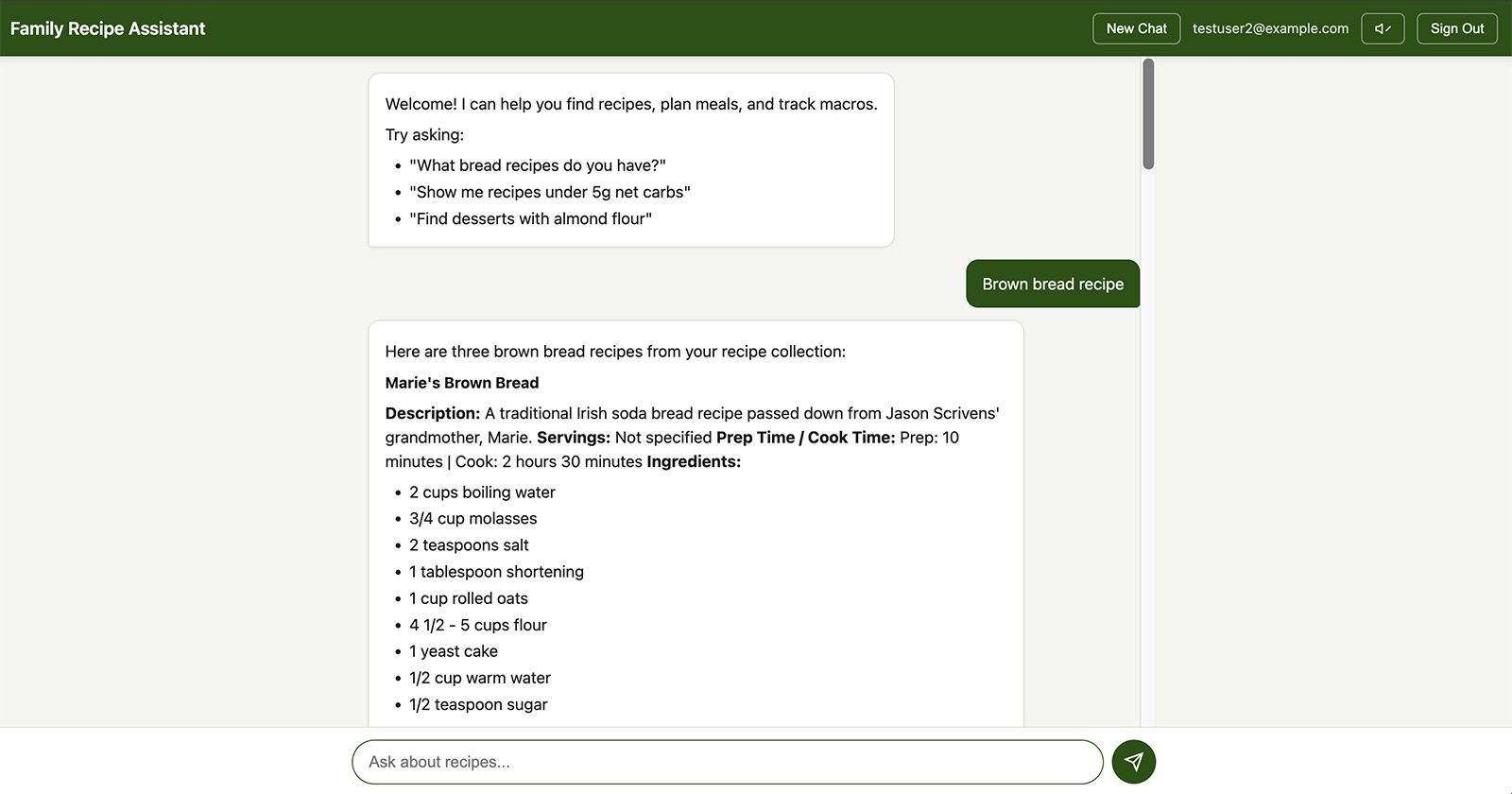
I wanted a way to just ask for what I needed: "what keto bread recipes do we have?", "what's in grandma's homemade brown bread?", or "what are the macros in that almond flour waffle recipe?" - and get answers from our own collection, with the option to look up accurate nutrition from the USDA database for any recipe or ingredient list.
This project started as a way to learn Amazon Bedrock Knowledge Bases and Bedrock AgentCore by building something I'd actually use every day. Along the way it turned into a full-stack serverless application with recipe search, real-time USDA nutrition lookup, text-to-speech cooking mode, and streaming chat - all for about $0.08 per half month in AWS costs.
You can check out the complete source code in my GitHub repo here → Serverless Family Recipe Assistant Repo
The Problem
Our family recipe collection is a mix of everything - food blog PDFs, Instagram screenshots, handwritten cards from my grandmother and mother-in-law, scribbled notes on the backs of envelopes, and bookmarked URLs that had since gone dead. Some of the oldest recipes were on stained, faded cards where the handwriting was barely legible. Others were photos taken at awkward angles with half the ingredients cut off.
Beyond just finding recipes, I wanted to track nutrition. I've been following a keto diet for a few years, and knowing the macros - especially net carbs - matters. But most family recipes don't come with a nutrition label. I wanted to be able to ask "what are the macros in grandma's homemade brown bread?" and get a real answer calculated from USDA data, not a guess.
Traditional approaches (a database with manual data entry, or simple full-text search) wouldn't cut it. Manually transcribing 600+ recipes - many handwritten - would take forever. And I didn't want to fill out search forms. I wanted to type "show me chicken recipes under 10g net carbs" and get actual answers from our own collection.
The Solution - Architecture Overview
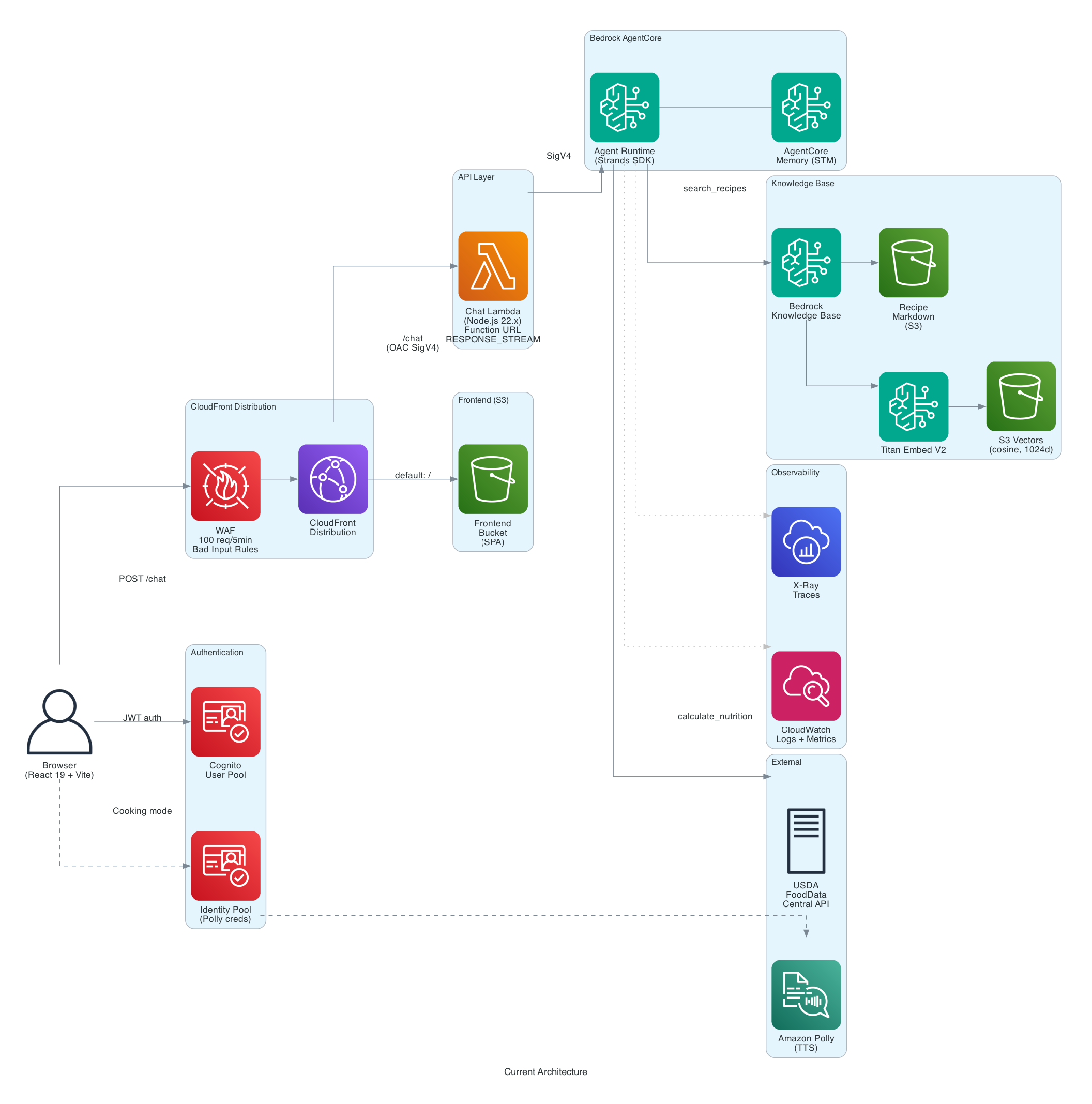
The system uses a layered serverless architecture: CloudFront + Lambda Function URL + WAF as a secure proxy layer in front of Bedrock AgentCore. CloudFront serves both the React frontend (from S3) and the API (/chat path) from a single distribution, giving you CDN caching, HTTPS, and WAF integration with one resource. WAF provides rate limiting (100 requests per 5 minutes per IP) and bad input protection. The Lambda function, configured with RESPONSE_STREAM mode, enables true SSE streaming with no timeout constraint, bridges JWT authentication to IAM, and signs requests to AgentCore with SigV4.
Why This Layered Architecture?
Each layer in the stack serves a specific purpose:
- CloudFront - single HTTPS domain for both frontend and API, CDN edge caching for static assets, WAF integration for rate limiting and input filtering, and origin access control (OAC) for secure S3 and Lambda origins
- Lambda Function URL - auth bridging (JWT to IAM), SigV4 request signing to AgentCore,
RESPONSE_STREAMinvoke mode for true SSE and request/response transformation - WAF - rate limiting per IP to prevent abuse, and managed rule groups for bad input protection
- AgentCore - managed agent runtime with auto-scaling to zero, built-in telemetry, container management, and memory
Why CloudFront + Lambda Function URL (Not API Gateway or ALB)
The browser needs to talk to AgentCore, but AgentCore uses IAM auth and the browser has JWT tokens. Something has to sit in the middle to bridge that gap, provide HTTPS, and add WAF protection. Three AWS options can do this:
API Gateway REST API (v1) is the traditional choice. It has a built-in Cognito authorizer, request validation, usage plans, and API keys. But it buffers responses with a 29-second timeout (I know you can open a support ticket and get this increased but i didn't want to go down that path) - ~~there's no streaming support ~~. UPDATE: As others have pointed out - API Gateway does support stream (https://aws.amazon.com/about-aws/whats-new/2025/11/api-gateway-response-streaming-rest-apis/). I will revisit that approach again at some point but am happy with what i came up with instead.
An agent response that involves a KB search, a USDA API call, and a multi-paragraph answer easily takes 10-30 seconds, and complex queries can run longer.
Application Load Balancer supports WebSockets and long connections with no timeout ceiling, and gives you weighted target groups for canary deployments. But ALBs have a fixed hourly cost (~$16/month minimum) regardless of traffic. For a personal project handling a few requests per day, that's more than the rest of the infrastructure combined.
CloudFront + Lambda Function URL is what we went with. Lambda Function URL with RESPONSE_STREAM invoke mode supports true SSE with no timeout constraint -- the Lambda streams chunks as they arrive from AgentCore, and CloudFront forwards them to the browser. CloudFront adds CDN edge caching for the frontend, HTTPS termination, and WAF integration, all from a single distribution. The Lambda handles JWT-to-IAM auth bridging and SigV4 request signing. At low traffic, the entire layer costs $0 (CloudFront and Lambda both have generous free tiers).
The tradeoff: you lose API Gateway's built-in JWT authorizer and request validation, so you handle those in Lambda code. You also lose ALB's weighted routing for canary deployments. For a personal/family app, those aren't needed. For a multi-tenant SaaS product, you'd likely want API Gateway's usage plans and API keys, and accept the streaming limitation (or use WebSockets instead of SSE).
One subtlety worth noting: CloudFront's origin read timeout defaults to 60 seconds. Once streaming starts, each SSE chunk resets that clock, so long responses work fine as long as data keeps flowing. But if the agent goes quiet during a long tool execution (say, a slow external API call), CloudFront could drop the connection. The Lambda sends SSE keepalive comments (: keepalive) every 30 seconds to prevent this.
Why AgentCore?
Deploying an AI agent to production involves a lot more than writing the agent logic. You need an HTTP endpoint that can handle long-running streaming connections, authentication middleware, auto-scaling that can handle bursty traffic, container orchestration, health checks, and observability. In a traditional setup, you'd wire together API Gateway (or an ALB), ECS or EKS, ECR for container images, CloudWatch for logs, and X-Ray for tracing. That's a lot of infrastructure to build and maintain for what is, at its core, a Python function that takes a prompt and yields text.
Bedrock AgentCore collapses all of that into a managed runtime. You write a Python function decorated with @app.entrypoint, define your auth and memory config in a YAML file, and deploy with one CLI command. AgentCore handles:
- HTTP ingress with SSE support - long-lived streaming connections work out of the box, no ALB timeout tuning or WebSocket configuration needed
- IAM authentication - AgentCore uses IAM auth, and the Lambda proxy signs each request with SigV4 using its execution role credentials
- Auto-scaling to zero - consumption-based pricing means you pay only for vCPU-seconds and memory-seconds while handling requests. No minimum instance count, no idle compute. My half-month bill for AgentCore was $0.06
- Container management - AgentCore builds and runs your container. You don't write Dockerfiles, manage ECS task definitions, or configure load balancers
- Built-in telemetry - OTLP-compatible tracing and metrics with no setup. AgentCore provides the telemetry endpoint automatically
The practical result: the entire agent deployment is a make deploy-agent command that takes about 2 minutes. Compare that to the hours you'd spend configuring ECS + ALB + API Gateway + CloudWatch + X-Ray for the same functionality.
The Lambda function in front of AgentCore is intentionally thin - it handles auth bridging (decoding the JWT and signing the request with SigV4) and streams the response back through CloudFront. All the heavy lifting - LLM inference, tool execution, memory management, and observability - stays in AgentCore where it belongs.
Services Used
| Service | Role |
|---|---|
| CloudFront | CDN, HTTPS, WAF integration, single distribution for frontend + API |
| Lambda | Streaming proxy - bridges JWT auth to IAM, SigV4 signing |
| WAF | Rate limiting (100 req/5min per IP), bad input protection |
| Bedrock AgentCore | Managed runtime for the Strands SDK agent |
| Bedrock Knowledge Base | Vector search over recipe collection |
| S3 Vectors | Zero-idle-cost vector storage for embeddings |
| Amazon S3 | Recipe markdown storage + frontend static hosting |
| Amazon Cognito | User authentication (User Pool + Identity Pool) |
| Amazon Polly | Text-to-speech for cooking mode |
| Bedrock LLM | Nova Pro (default) or Claude Sonnet 4 |
| Titan Embed V2 | Embedding model for Knowledge Base |
| Terraform | Infrastructure as code |
Recipe Ingestion Pipeline
Before the agent can search recipes, they need to be converted from their original formats into something a Knowledge Base can index. The ingestion pipeline handles this in three stages.
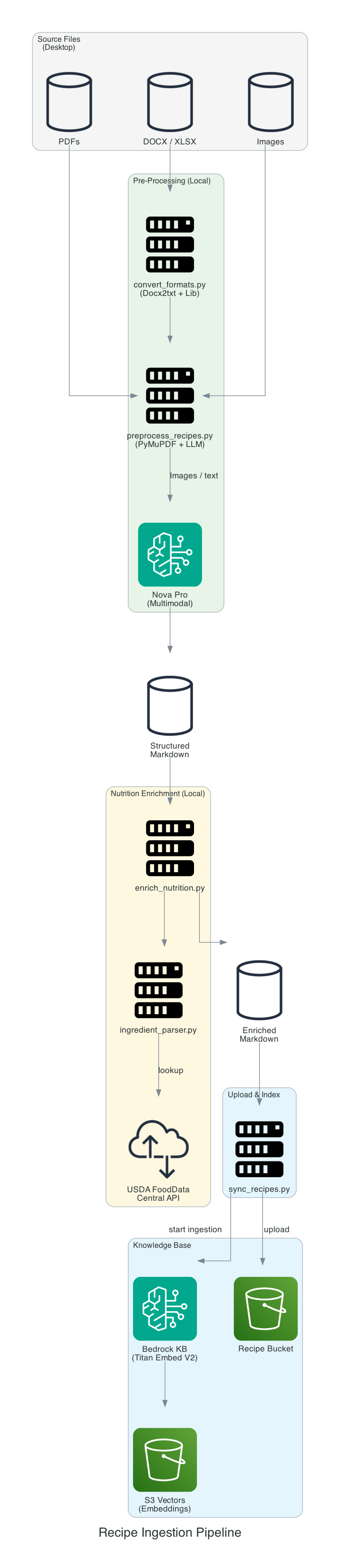
Stage 1: Preprocessing - Where AI Really Shines
The preprocess_recipes.py script takes raw source files - PDFs, images, DOCX files - and converts them into structured markdown using Amazon Nova Pro as a multimodal LLM.
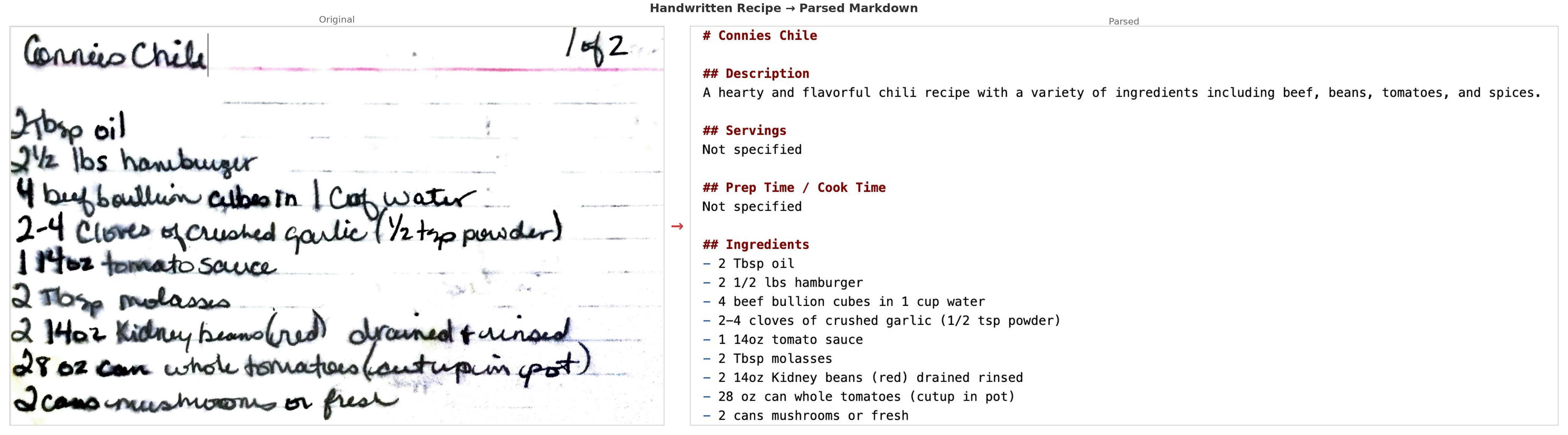
This is where AI made the biggest practical difference. Many of our family recipes were photos of handwritten cards - some decades old, stained with cooking splatters, faded ink, and the kind of cursive that only the person who wrote it could normally read. Nova Pro's multimodal capabilities handled these remarkably well. It could read through coffee stains, interpret faded handwriting, and even make reasonable guesses at abbreviated ingredient names ("chx" → "chicken", "tbls" → "tablespoon"). A few needed manual corrections, but the vast majority were parsed correctly on the first pass - work that would have taken weeks to do by hand.
Each recipe gets a consistent format:
- Title, description, source URL
- Ingredients with quantities
- Numbered instructions
- Nutrition per serving (from the source, or LLM-estimated and marked
[estimated]) - Tags for dietary categories
Stage 2: USDA Nutrition Enrichment
About 57% of recipes had LLM-estimated nutrition that wasn't very accurate. The enrich_nutrition.py script re-calculates nutrition for each recipe using the USDA FoodData Central API:
- Parse each ingredient line (quantity, unit, name) using regex
- Look up each ingredient in the USDA database (Foundation + SR Legacy data types)
- Convert from per-100g USDA data to actual recipe quantities using a unit conversion table
- Replace
[estimated]markers with[USDA]markers
This runs as a batch process locally and caches API responses to avoid redundant lookups.
Stage 3: Upload & Index
The sync_recipes.py script uploads the processed markdown files to S3 and triggers a Knowledge Base ingestion job. The KB uses Titan Embed V2 to generate embeddings and stores them in S3 Vectors with semantic chunking (300 max tokens, 95% breakpoint threshold).
make preprocess    # PDFs/images → structured markdown via Nova Pro
make sync          # Upload to S3 + trigger KB ingestion
The Beauty of Plain Markdown
Real-world data ingestion is messy. No matter how good the AI is, you end up with typos, misread quantities, garbled ingredient names, and the occasional recipe that just won't parse at all. One of my grandmother's recipes came through with "1/2 cup fleur" instead of "flour". Another had the instructions jumbled because the photo was taken at an angle. A few recipes from scanned PDFs had entire sections missing where the scan quality dropped off.
This is where the decision to use plain markdown pays off. The processed recipes are just .md files sitting in data/processed/. If the AI misread an ingredient, got a quantity wrong, or produced something unparseable, you open the file in any text editor, fix it, and run make sync. The Knowledge Base re-ingests in a couple of minutes and the agent immediately returns the corrected version. No database migrations, no redeployment, no rebuild. It's the simplest possible feedback loop: edit a text file, push, done.
I ended up doing a manual pass through about 10% of the recipes after the initial AI processing. That's still massively better than transcribing all 600+ by hand, and the corrections took minutes each rather than the 5-10 minutes it would take to type out a full recipe from scratch.
Adding New Recipes
The collection keeps growing. When I find a new recipe I want to keep, the process is simple: save the source file (PDF, screenshot, photo, or even just copy-paste the text into a .md file) into your recipe source directory (configured via RECIPE_SOURCE_DIR in .env), run make preprocess to let Nova Pro convert it to structured markdown, review and fix any issues in the output, then make sync to push it to S3 and re-index the Knowledge Base. The new recipe is searchable within a couple of minutes. For recipes that are already in a clean text format, I sometimes skip the AI preprocessing entirely and just write the markdown file directly.
The Agent - Strands SDK on AgentCore
The agent is built with the Strands Agents SDK and deployed to Bedrock AgentCore. It's a surprisingly small amount of code - the core entrypoint is about 40 lines of Python.
Why Strands SDK
There are several Python frameworks for building LLM-powered agents - LangChain, LlamaIndex, AutoGen, CrewAI, and others. I chose Strands for a few reasons.
Minimal abstraction. Strands doesn't try to wrap everything in its own object model. Tools are plain Python functions decorated with @tool. The agent is constructed with a model, a system prompt, and a list of tools. There's no chain-of-thought pipeline to configure, no "memory module" to plug in, no retriever-adapter pattern. You write Python, not framework DSL. When I needed to debug why the agent was calling search_recipes twice for the same query, I could read through the Strands source in an afternoon - it's a thin layer over the Bedrock Converse API, not a 50-module abstraction.
Native streaming. The agent exposes an async generator (agent.stream_async()) that yields events as they happen - text deltas, tool invocations, and metadata. This maps directly to the SSE pattern the frontend needs. There's no callback system to wire up and no post-processing step to convert the response into a streamable format. Each yield from the agent becomes an SSE data: line.
First-class AgentCore integration. Strands was built alongside AgentCore, so the deployment model is native. The @app.entrypoint decorator, the BedrockAgentCoreApp class, and the AgentCoreMemorySessionManager all come from the SDK. There's no glue code needed to bridge the framework to the runtime. This also means the SDK's streaming protocol matches what AgentCore expects - you yield dicts and they become SSE events.
Predictable behavior. The agent loop is straightforward: send prompt to LLM, if the LLM requests a tool call then execute it and feed the result back, repeat until the LLM produces a final response. The max_iterations parameter caps cycles to prevent runaway loops. There's no autonomous planning step, no chain selection logic, and no implicit retries that change behavior in surprising ways. For a recipe assistant with two tools, this simplicity is exactly right.
Open source. Strands is Apache 2.0 licensed, so there's no vendor lock-in concern beyond the Bedrock model provider integration (and even that is pluggable - Strands supports other providers).
The trade-off is that Strands is newer and less battle-tested than tools like LangChain. The documentation is still catching up, and some features (like long-term memory and multi-agent coordination) are less mature. For a focused single-agent application like this, those gaps didn't matter. For a complex multi-agent orchestration system, you might want to evaluate more carefully.
Entrypoint
@app.entrypoint
async def handle(event, context):
    prompt = event.get("prompt", "")

    # Frontend sends {cognito_sub}_{conversation_uuid} as session_id.
    # AgentCore validates the JWT but strips the Authorization header,
    # so we derive user_id from the session_id prefix.
    session_id = event.get("session_id") or context.session_id or "anonymous"
    user_id = session_id.rsplit("_", 1)[0] if "_" in session_id else session_id

    config = AgentCoreMemoryConfig(
        memory_id=MEMORY_ID,
        session_id=session_id,
        actor_id=user_id,
    )

    for attempt in range(MAX_RETRIES + 1):
        try:
            with AgentCoreMemorySessionManager(config, region_name=REGION) as session_manager:
                agent = Agent(
                    model=model,
                    system_prompt=SYSTEM_PROMPT,
                    tools=[search_recipes, calculate_nutrition],
                    session_manager=session_manager,
                )
                last_tool = None
                async for stream_event in agent.stream_async(prompt):
                    if "data" in stream_event:
                        yield {"chunk": stream_event["data"]}
                    elif stream_event.get("current_tool_use"):
                        tool_name = stream_event["current_tool_use"].get("name", "")
                        if tool_name and tool_name != last_tool:
                            last_tool = tool_name
                            yield {"tool_use": tool_name}
                return
        except Exception as e:
            if attempt == MAX_RETRIES:
                raise
            await asyncio.sleep(1)
Each yield becomes an SSE event that the frontend consumes in real time. The agent forwards both text chunks and tool-use notifications so the UI can show what's happening.
LLM Configuration
The agent supports multiple models, selected via the ACTIVE_LLM environment variable at deploy time:
| Model | ID | Use Case |
|---|---|---|
nova (default) | us.amazon.nova-pro-v1:0 | General use, free tier |
nova-lite | us.amazon.nova-lite-v1:0 | Faster, cheaper |
claude | us.anthropic.claude-sonnet-4-20250514-v1:0 | Higher quality |
claude-haiku | us.anthropic.claude-3-5-haiku-20241022-v1:0 | Fast and cheap |
Memory - Multi-Turn Conversations
One of the things that makes this feel like a real assistant rather than a search box is that the agent remembers the conversation. Without memory, every prompt is independent - the agent has no idea what you asked 10 seconds ago. You'd have to repeat context every time: "In the almond flour waffle recipe you just showed me, what are the macros?" becomes meaningless if the agent doesn't know which recipe it just showed you.
Building this yourself means managing a conversation store (typically DynamoDB or Redis), writing serialization logic to pack and unpack conversation turns, handling TTLs and cleanup, scoping sessions by user and conversation, and injecting the right context window into each LLM call. It's not difficult code, but it's infrastructure and logic that has nothing to do with your agent's actual purpose.
AgentCore Memory handles all of this as a managed service. You configure a memory ID and session scope, wrap your request in an AgentCoreMemorySessionManager context manager, and the SDK takes care of the rest - loading prior turns on entry, saving the new turn on exit. The result is natural multi-turn conversations:
You: "What keto bread recipes do we have?" Agent: (searches KB, returns 3 recipes) You: "What are the macros in the second one?" Agent: (knows which recipe you mean, calculates nutrition) You: "How does that compare to the first one?"
Each conversation gets a unique session ID ({cognito_sub}_{conversation_uuid}) scoped by user. Memory events expire after 30 days. Clicking "New Chat" generates a fresh UUID, giving the agent a clean slate with no prior context. The total code to integrate memory is about 6 lines - the config object and the with block.
Custom Tools - Recipe Search & Nutrition
The agent has two tools it can call during a conversation.
search_recipes
Queries the Bedrock Knowledge Base using vector similarity search. Key implementation details:
- Top 3 results to avoid overwhelming the LLM context
- Score threshold of 0.3 to discard irrelevant matches
- Chunk merging - recipes split across multiple embedding chunks get reassembled into a single result. Without this, you'd get fragments of the same recipe appearing as separate results.
@tool
def search_recipes(query: str) -> str:
    """Search the recipe knowledge base. Always use this tool first
    when users ask about recipes, ingredients, or cooking."""
calculate_nutrition - Real-Time USDA Lookup
This is one of the most useful features for anyone tracking macros. You can ask the agent to calculate nutrition for anything - a recipe from the collection, a custom ingredient list, or even "what are the macros in 2 cups of almond flour and 3 eggs?" The agent calls the USDA FoodData Central API in real time and returns a detailed breakdown.
@tool
def calculate_nutrition(ingredients: str) -> str:
    """Calculate nutrition for a list of ingredients using USDA data.
    Input: newline-separated ingredients with quantities."""
The tool parses quantities and units, looks up each ingredient in the USDA database (Foundation + SR Legacy data types), converts from per-100g USDA values to actual recipe quantities, and returns a formatted markdown table with per-ingredient breakdowns and totals - calories, net carbs, total carbs, fat, protein, and fiber. The UI shows "Calculating nutrition..." while this runs, and the results come back with a [USDA] marker so you know the data source.
This was especially valuable for our older family recipes that never had nutrition info. I can now ask "what are the macros in grandma's homemade brown bread?" and get real USDA-backed numbers instead of guesses.
The Frontend - React 19 with SSE Streaming
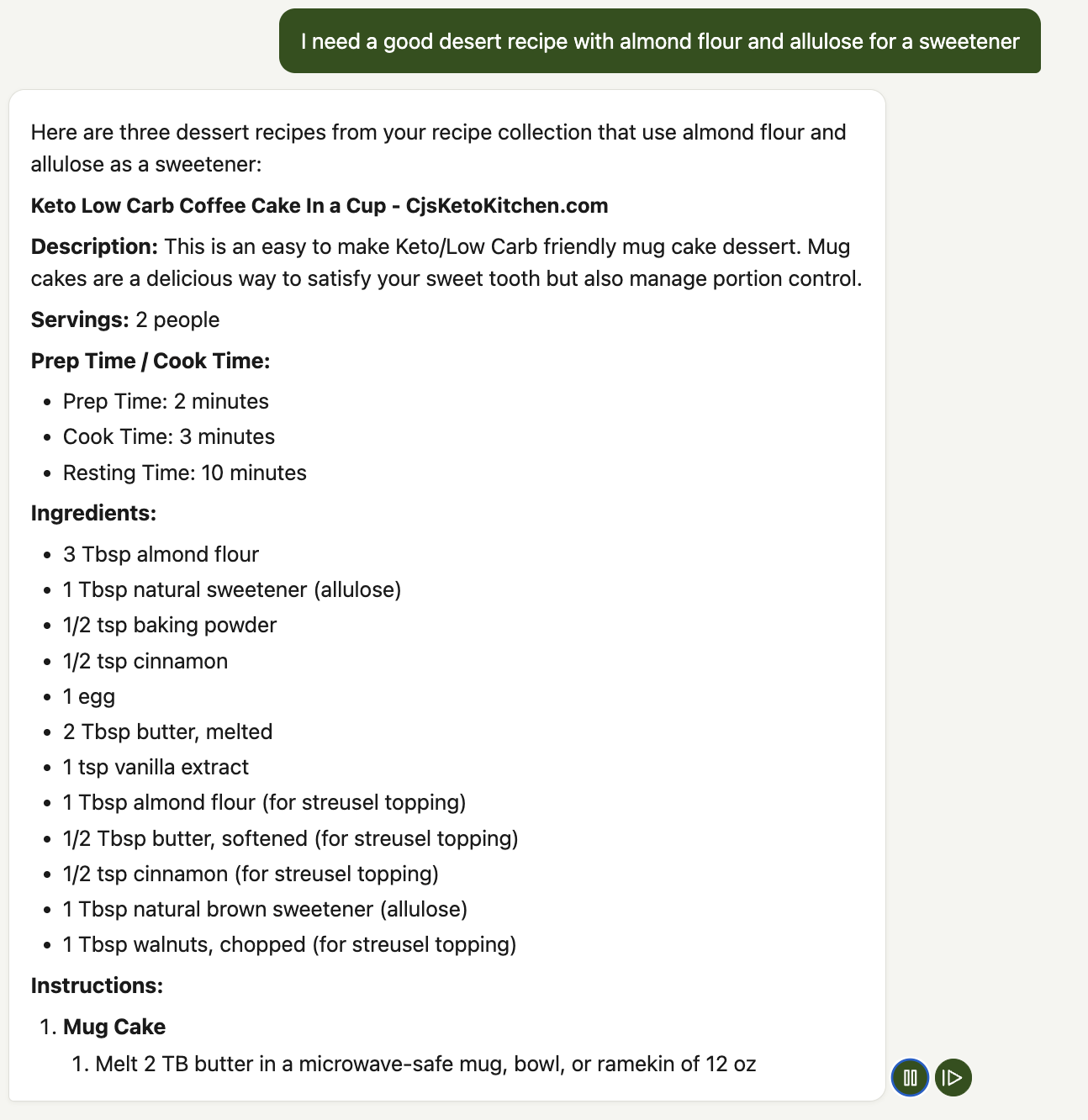
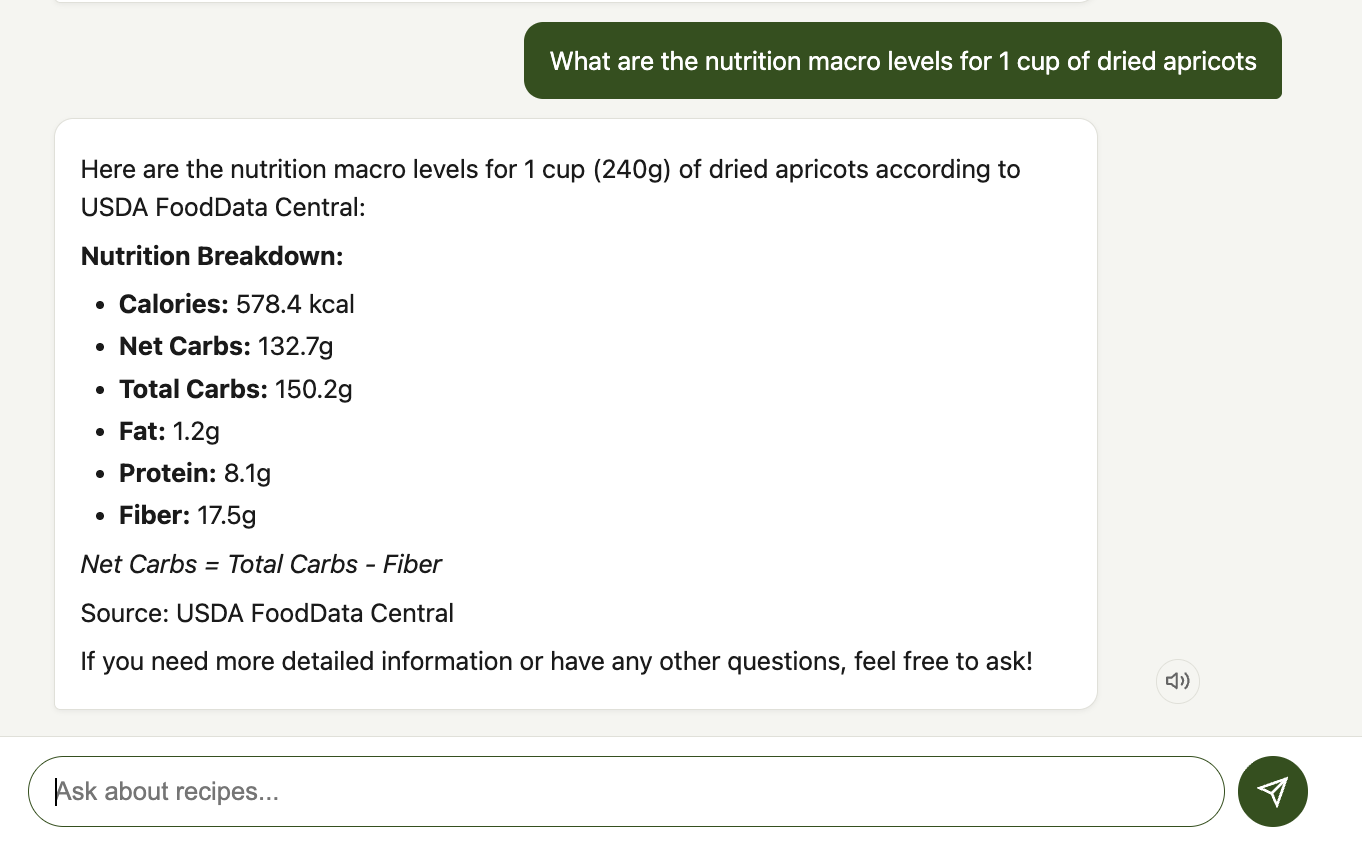
The frontend is a React 19 single-page application built with Vite. No TypeScript - plain JSX throughout. It POSTs to the CloudFront /chat endpoint, which proxies through the Lambda Function URL to AgentCore. The request includes the JWT in the Authorization header and an x-amz-content-sha256 header (SHA-256 hash of the request body, required by CloudFront OAC for POST requests). CloudFront proxies to the Lambda Function URL, which streams SSE back through CloudFront. The frontend uses fetch with ReadableStream to consume these SSE events, which gives more control than the EventSource API (custom headers for auth, POST method, abort support). The VITE_API_URL environment variable points to the CloudFront /chat path.
SSE Streaming
The chat hook processes two types of SSE payloads:
const parsed = JSON.parse(json);

if (parsed.tool_use) {
    // Show "Searching recipes..." or "Calculating nutrition..."
    onMessage({ type: 'tool_use', tool_name: parsed.tool_use });
} else if (parsed.chunk) {
    // Append text to the current message, render markdown
    onMessage({ type: 'chunk', content: parsed.chunk });
}
The frontend strips `` blocks from Claude's extended thinking output before displaying text to the user.
Abort Handling - Harder Than It Sounds
Streaming responses from an LLM can take a while, especially when the agent is searching the KB and then generating a long recipe with full instructions and nutrition. Users need to be able to cancel mid-stream. The send button swaps to a red stop button during streaming, and clicking it triggers AbortController.abort() to close the HTTP connection.
The tricky part is what happens to memory. When you abort, AgentCore may have already saved a partial conversation turn - half a recipe, a dangling tool call, or garbled markdown. If the next request loads that corrupted context, the agent gets confused and produces garbage.
The fix: on abort, the client generates a new conversation UUID and stores it in sessionStorage. The next request uses this fresh session ID, so AgentCore Memory loads a clean slate instead of the corrupted partial turn. The trade-off is that you lose conversation history from before the abort, but that's better than garbled responses.
This same session-reset mechanism powers the "New Chat" button - it's the same operation, just intentional rather than error recovery.
S3 Vectors - The $0.00 Vector Store
This was the most surprising part of the project. Traditional RAG setups use OpenSearch Serverless as the vector store, which costs a minimum of ~$350/month for 2 OCUs (OpenSearch Compute Units) - even with zero traffic. For a personal recipe project, that's a non-starter.
S3 Vectors provides the same semantic search capability with truly pay-per-query pricing:
| Vector Store | Monthly Cost (dev) | Monthly Cost (prod, ~10K queries) |
|---|---|---|
| OpenSearch Serverless | ~$350 | ~$350+ |
| S3 Vectors | ~$0.00 | ~$0.40 |
S3 Vectors pricing: $0.00004/query + $0.0006/GB-month storage. At my development usage of ~200 KB queries per half month, the cost rounds to zero.
The vector index uses 1024 dimensions (matching Titan Embed V2), cosine distance similarity, and float32 precision. It's configured via Terraform:
resource "aws_s3vectors_index" "recipes" {
  vector_bucket_name = aws_s3vectors_vector_bucket.recipes.name
  index_name         = "${var.project_name}-${var.environment}-recipes"

  metadata {
    dimension     = 1024
    distance_type = "cosine"
    data_type     = "float32"
  }
}
Authentication - Cognito JWT
Authentication uses Amazon Cognito with a User Pool for signup/signin and an Identity Pool for temporary AWS credentials (used by the browser for Polly TTS). The auth flow bridges JWT-based frontend authentication to IAM-based AgentCore authentication through the Lambda proxy layer.
The flow:
- User signs in via the React auth screen (email + password, SRP auth)
- Cognito returns access + ID + refresh tokens
- Frontend sends POST to CloudFront
/chatwithBearerJWT in theAuthorizationheader and anx-amz-content-sha256header (SHA-256 hash of the request body) - A CloudFront Function copies
AuthorizationtoX-Forwarded-Authorizationbefore OAC replaces theAuthorizationheader with SigV4 credentials for the Lambda Function URL origin - Lambda decodes the JWT from
X-Forwarded-Authorizationto extract the user identity (subclaim) for session scoping - Lambda signs the request to AgentCore with SigV4 (IAM auth) using its execution role credentials
- For text-to-speech, the ID token is exchanged via the Identity Pool for temporary IAM credentials scoped to
polly:SynthesizeSpeech
No Amplify - just amazon-cognito-identity-js for the Cognito SDK, keeping the bundle small.
Real-Time Tool Visibility
When the agent calls a tool, there's a noticeable delay while the Knowledge Base search or USDA API call completes. Instead of showing generic typing dots, the UI shows what the agent is actually doing.
The Strands SDK emits current_tool_use events during streaming. The agent forwards these as {"tool_use": "search_recipes"} SSE payloads. The frontend maps tool names to human-readable labels:
| Tool Name | UI Label |
|---|---|
search_recipes | "Searching recipes..." |
calculate_nutrition | "Calculating nutrition..." |
The label appears next to the animated typing dots and disappears as soon as text starts streaming. It's a small touch but makes a real difference in perceived responsiveness.
Text-to-Speech Cooking Mode
When you're actually cooking, you don't want to keep looking at your phone with flour-covered hands. Cooking mode uses Amazon Polly to automatically read each bot response aloud as it completes.
- Toggle on/off with a speaker button in the header
- Per-message play/pause/restart controls on every bot response
- Uses Polly's generative voice via temporary Cognito Identity Pool credentials
- Streams audio directly from the browser - no Lambda or backend involvement
Observability - Traces, Metrics, and Logs
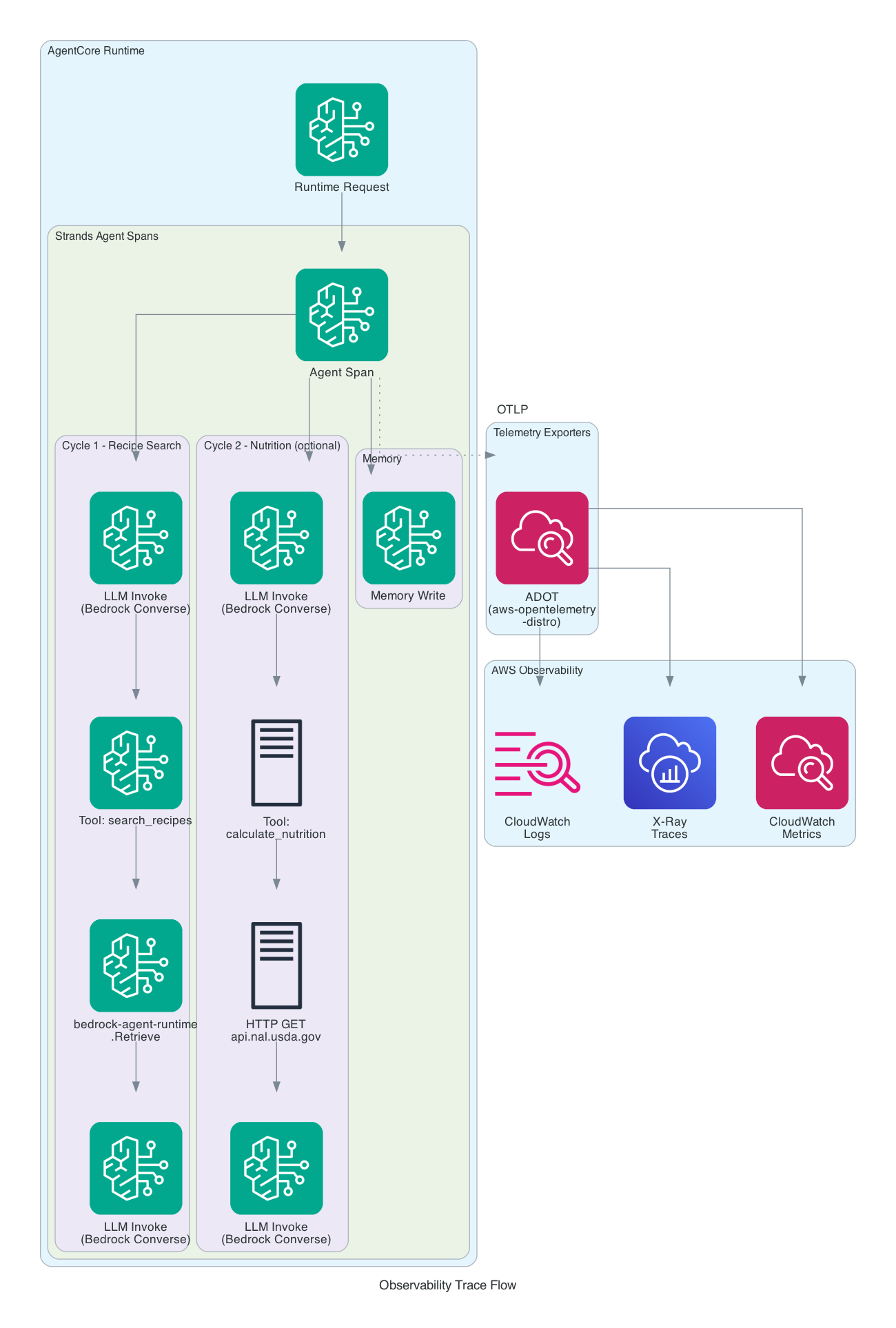
Setting observability.enabled: true in the AgentCore YAML config gives you structured logs and service-level metrics in CloudWatch without any code changes. But the real payoff comes from distributed tracing - seeing exactly what happens inside the agent during every request.
Beyond AgentCore, the CloudFront and Lambda layers also contribute to the observability story. CloudFront access logs capture every request to both the frontend and the /chat API, including client IP, response time, and cache status. Lambda CloudWatch logs provide request-level tracing through the proxy layer, including JWT validation results, AgentCore response status, and streaming duration. Together these give you end-to-end visibility from the browser through CloudFront, Lambda, and into AgentCore.
What AgentCore Provides by Default
With observability enabled, AgentCore automatically emits:
- Service-level metrics - invocation count, error rate, latency (p50/p95/p99), token usage
- Structured JSON logs - every log statement includes
traceId,spanId,requestId, andsessionIdfor correlation - Memory spans - trace segments for AgentCore Memory read/write operations
These show up in the CloudWatch GenAI Observability dashboard and X-Ray without any code changes. But there's a catch - by default, these are the only spans you get. The Bedrock LLM invocations, Knowledge Base queries, tool executions, and external HTTP calls are invisible in the trace.
Unlocking Full Distributed Tracing
The Strands Agents SDK has comprehensive built-in OpenTelemetry instrumentation that creates a rich hierarchy of trace spans:
| Span Type | What It Captures |
|---|---|
| Agent | Top-level span for the entire invocation, aggregate token usage |
| Cycle | Each event loop iteration (reasoning cycle) |
| LLM | Individual Bedrock model invocations with prompts, completions, and token counts |
| Tool | Tool execution with name, inputs, outputs, and timing |
But these spans only get exported if a tracer provider is configured. The required piece is the AWS Distro for OpenTelemetry (aws-opentelemetry-distro). Adding this single package to requirements.txt does three things at once:
- Configures a global tracer provider so the Strands SDK actually exports its spans
- Auto-instruments botocore/boto3 capturing Bedrock
InvokeModeland KBRetrievecalls as child spans - Auto-instruments the
requestslibrary capturing external HTTP calls (like the USDA API) as child spans
AgentCore Runtime automatically runs the opentelemetry-instrument wrapper when this package is present - no code changes needed beyond adding the dependency.
# agent/requirements.txt
strands-agents[otel]>=0.1.0
aws-opentelemetry-distro>=0.10.0
What the Traces Look Like
After adding the ADOT distro, a single recipe search request produces a trace like this:
AgentCore Runtime Request
  └── Agent Span (Strands)
      ├── Cycle 1
      │   ├── LLM Invoke (bedrock converse)
      │   ├── Tool: search_recipes
      │   │   └── bedrock-agent-runtime.Retrieve
      │   └── LLM Invoke (bedrock converse)
      └── Memory Write (AgentCore)
A more complex request involving nutrition calculation shows the external API call:
AgentCore Runtime Request
  └── Agent Span (Strands)
      ├── Cycle 1
      │   ├── LLM Invoke (bedrock converse)
      │   ├── Tool: search_recipes
      │   │   └── bedrock-agent-runtime.Retrieve
      │   └── LLM Invoke (bedrock converse)
      ├── Cycle 2
      │   ├── LLM Invoke (bedrock converse)
      │   ├── Tool: calculate_nutrition
      │   │   └── HTTP GET api.nal.usda.gov
      │   └── LLM Invoke (bedrock converse)
      └── Memory Write (AgentCore)
Each span includes timing data, so you can immediately see where latency lives. In practice, the KB retrieval and LLM inference dominate - the USDA API calls are fast by comparison.
Custom Trace Attributes
The Strands SDK supports custom trace attributes on the Agent constructor, which get attached to every span in the request. This is useful for filtering traces by user or session in CloudWatch:
agent = Agent(
    model=model,
    system_prompt=SYSTEM_PROMPT,
    tools=[search_recipes, calculate_nutrition],
    trace_attributes={
        "session.id": session_id,
        "user.id": user_id,
    },
)
Cost Breakdown
This is the part that surprised me the most. Here are the actual AWS costs for the first half of February 2026:
| Service | Cost | Notes |
|---|---|---|
| Bedrock (LLM) | $0.00 | Free tier - Nova Pro, Titan Embed V2 |
| Bedrock AgentCore | $0.06 | ~6 vCPU-hours, consumption-based |
| S3 (storage + vectors) | $0.02 | Recipes, frontend, embeddings |
| CloudFront | $0.00 | Free tier (1 TB transfer/month) |
| Lambda | $0.00 | Free tier (1M requests/month) |
| WAF | $0.00 | Free tier covers dev usage |
| Cognito | $0.00 | Free tier (< 50K MAU) |
| CloudWatch | $0.00 | Free tier covers logs + metrics |
| Project total | ~$0.08 | Half month |
The entire project costs $0.08 for a half month of development usage. The Terraform provisions zero compute resources - no EC2 instances, no ECS tasks, no ECR repositories. Every service is either covered by free tier or has pay-per-use pricing with no idle cost.
Why So Cheap?
Four architectural decisions keep costs near zero:
- S3 Vectors over OpenSearch Serverless - saves ~$350/month at any scale
- AgentCore over self-managed compute - no idle costs, no infrastructure to manage. An equivalent ECS Fargate setup would cost $30-50/month minimum even with zero traffic
- CloudFront + Lambda + WAF - all three are covered by free tier at development usage levels. CloudFront gives you CDN, HTTPS, and WAF integration without adding meaningful cost
- Bedrock free tier - Nova Pro's free tier (50K input token requests, 300K output tokens/month) covers development usage comfortably
Projected Costs at Scale
| Scenario | Monthly Est. |
|---|---|
| Light (1 user, ~50 queries/day, Nova Pro) | ~$6.50 |
| Medium (10 users, ~500 queries/day, Nova Pro) | ~$44 |
| Heavy (100 users, ~5K queries/day, Claude Sonnet 4) | ~$995 |
Model choice is the dominant cost factor. Switching from Claude Sonnet 4 ($3.00/M input tokens) to Nova Pro ($0.80/M) at the same volume drops the LLM cost dramatically. The CloudFront + WAF layer adds roughly $5-10/month at medium to heavy scale (WAF web ACL base fee + per-request charges), which is negligible compared to LLM costs.
Key Learnings
S3 Vectors changes the RAG cost equation
Before S3 Vectors, the minimum cost of entry for a RAG application was ~$350/month for OpenSearch Serverless. That made it impractical for personal projects, prototypes, or low-traffic production workloads. S3 Vectors eliminates the idle cost entirely. This is a big deal for anyone building RAG applications that don't need millisecond latency.
AgentCore is the simplest way to deploy an agent
No Dockerfiles to maintain, no ECS task definitions, no load balancers. You write a Python function decorated with @app.entrypoint, run make deploy-agent, and you have a managed HTTP endpoint with JWT auth, auto-scaling, and telemetry. The trade-off is less control over the runtime environment, but for most agent workloads that's a fine trade.
Chunk merging is essential for Knowledge Base search
Bedrock Knowledge Base splits documents into chunks for embedding. When a recipe spans multiple chunks, the default behavior returns each chunk as a separate search result - so you might get the ingredients from one chunk and the instructions from another, but never the complete recipe. Grouping chunks by source document and merging them back together was critical for usable results.
Stream everything
The difference between waiting 8 seconds for a complete response and seeing the first words appear after a few seconds is enormous for user experience. The CloudFront to Lambda to AgentCore streaming chain delivers text chunks to the browser as they're generated, with incremental markdown rendering that makes the agent feel responsive even when it's doing multi-step tool calls behind the scenes. Adding tool-use indicators ("Searching recipes...") takes this further - the user knows the agent is working, not stalled.
Multimodal AI is a game-changer for digitizing family recipes
I was genuinely surprised at how well Nova Pro handled our oldest, most damaged recipes. Handwritten cards with coffee stains, faded ink, and cramped cursive that I could barely read myself - the model parsed them into structured ingredients and instructions with maybe a 90% accuracy rate. The remaining 10% needed minor corrections (a misread quantity here, a garbled ingredient name there), but the alternative was typing 600+ recipes by hand. This alone saved weeks of work and made the entire project feasible.
Understanding Strands SDK event loop and guardrails
The Strands Agents SDK event loop runs until the model emits end_turn (done generating) or max_tokens (response truncated). There's no built-in iteration cap - the model decides when to stop. For a recipe assistant with two tools this works fine, but for safety I added a BeforeToolCallEvent hook that cancels tool execution after 10 calls per request, preventing runaway loops:
class MaxToolCallsHook:
    def __init__(self, max_calls=10):
        self.max_calls = max_calls
        self._count = 0

    def register_hooks(self, registry, **kwargs):
        registry.add_callback(BeforeToolCallEvent, self._on_before_tool_call)

    def _on_before_tool_call(self, event):
        self._count += 1
        if self._count > self.max_calls:
            event.cancel_tool = "Maximum tool calls reached."
The hooks system is one of the cleanest parts of the Strands SDK - you implement HookProvider with a register_hooks method, and the registry gives you typed events for every stage of the agent lifecycle: BeforeModelCallEvent, AfterModelCallEvent, BeforeToolCallEvent, AfterToolCallEvent, and more. The cancel_tool field on BeforeToolCallEvent is particularly useful - it short-circuits the tool call and feeds the cancel message back to the model as a tool result, prompting it to wrap up with what it has.
On the token side, max_tokens=8192 on the BedrockModel prevents runaway generation. If the model hits this limit, the SDK raises a MaxTokensReachedException rather than silently truncating. Understanding these SDK internals - hooks, token limits, and stop reasons - is important for building agents that behave predictably.
What's Next
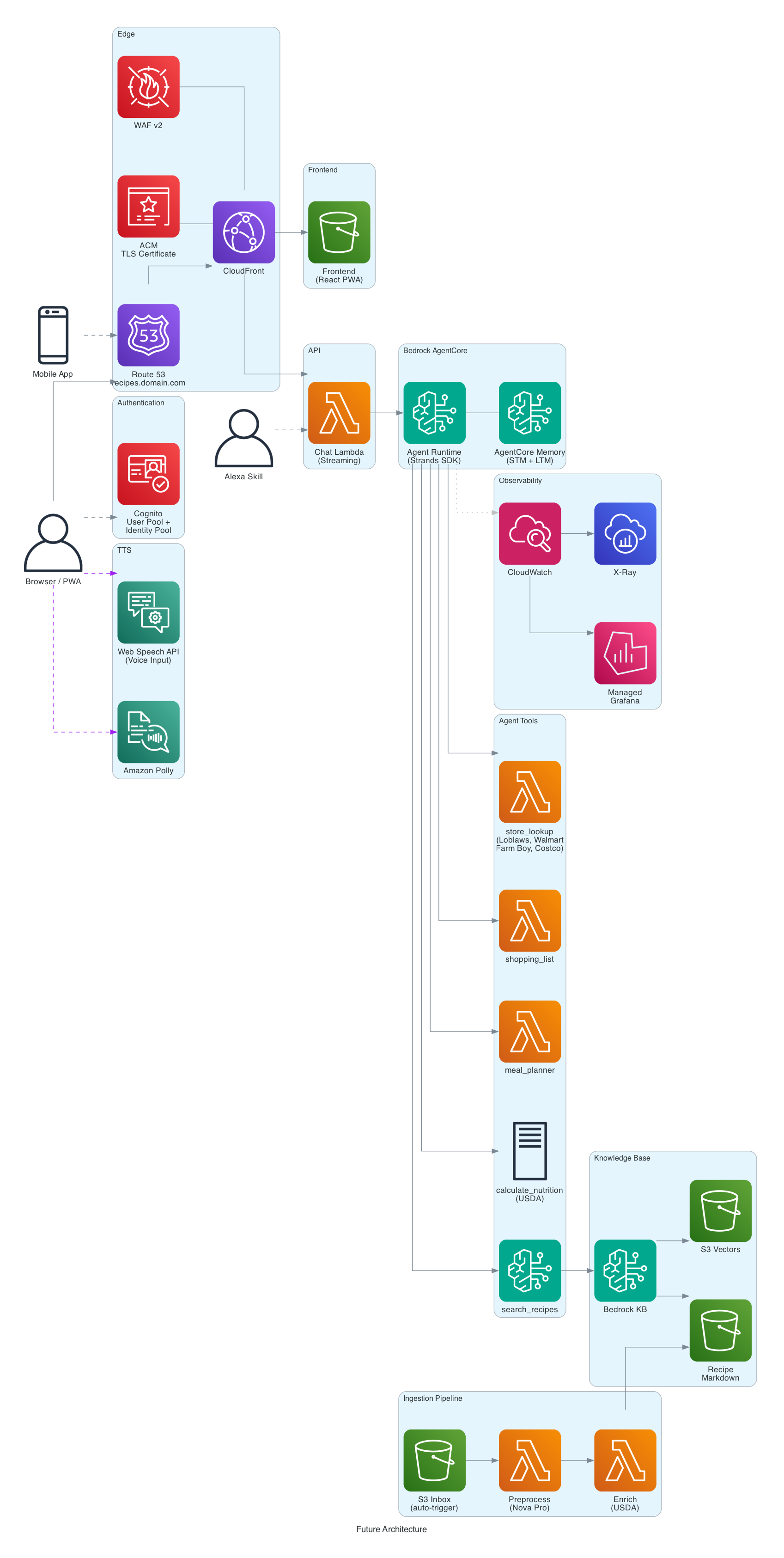
The long-term vision for this project includes:
- Meal planning - generate weekly meal plans from the recipe collection
- Shopping lists - aggregate ingredients, normalize quantities, deduplicate
- Store availability - check prices at Loblaws, Walmart, Farm Boy, Metro, Amazon.ca, Costco.ca
- Custom domain with ACM certificate - use a branded domain name with an AWS Certificate Manager TLS certificate instead of the default CloudFront distribution domain
- Voice input - Web Speech API for hands-free queries while cooking
- Multi-platform - PWA improvements for iPad/Android, and eventually an Alexa skill
- CI/CD - GitHub Actions for automated testing and deployment
Try It Yourself
You can clone the GitHub repo and deploy this in your own AWS account. The infrastructure is fully defined in Terraform.
Prerequisites
- AWS account
- AWS CLI, AgentCore CLI
- Terraform >= 1.14
- Python 3.13+ with
uv - Node.js 20+ with npm
- A USDA FoodData Central API key (free -sign up here)
Quick Start
Bootstrap requires two passes because Terraform needs the AgentCore runtime ARN, but the agent can't be deployed until the infrastructure (KB, Cognito, S3) exists. See the README for full configuration details.
git clone https://github.com/RDarrylR/serverless-family-recipe-assistant.git
cd serverless-family-recipe-assistant

# 1. Install dependencies
make init               # Install Python deps
make install-frontend   # Install frontend deps

# 2. First Terraform pass (infrastructure without agent)
cd infrastructure
cp terraform.tfvars.example terraform.tfvars
# Edit terraform.tfvars: set alert_email and aws_profile
terraform init && terraform apply
cd ..

# 3. Configure and deploy agent
aws xray update-trace-segment-destination --destination CloudWatchLogs  # one-time
make agent-config       # Generate AgentCore YAML from Terraform outputs
make setup-env          # Generate .env and frontend/.env from Terraform outputs
# Edit .env: set USDA_API_KEY, RECIPE_SOURCE_DIR
make deploy-agent       # Deploy agent to AgentCore
# Edit .env: set AGENT_RUNTIME_ID (from "make agent-status") and
#   MEMORY_ID (from "grep memory_id agent/.bedrock_agentcore.yaml")

# 4. Second Terraform pass (wire up Lambda to AgentCore)
# Edit terraform.tfvars: set agent_runtime_arn, add CloudFront URL to cognito_callback_urls
make apply              # Re-apply Terraform (wires Lambda to AgentCore)
make setup-env          # Regenerate .env files (preserves manual values)

# 5. Process recipes and deploy
make preprocess         # Convert raw recipes to markdown
make sync               # Upload to S3 + index in Knowledge Base
make deploy-frontend    # Build React app + deploy to S3 + invalidate CloudFront
CLEANUP (IMPORTANT!!)
If you deploy this yourself please understand some of the included resources will cost you a small amount of real money. Please don't forget about it.
Please MAKE SURE TO DELETE the infrastructure if you are no longer using it. Running terraform destroy from the infrastructure/ directory will handle this, or you can delete resources manually in the AWS console.
For more articles from me please visit my blog at Darryl's World of Cloud or find me on Bluesky, X, LinkedIn, Medium, Dev.to, or the AWS Community.
For tons of great serverless content and discussions please join the Believe In Serverless community we have put together at this link: Believe In Serverless Community
Comments
Loading comments...