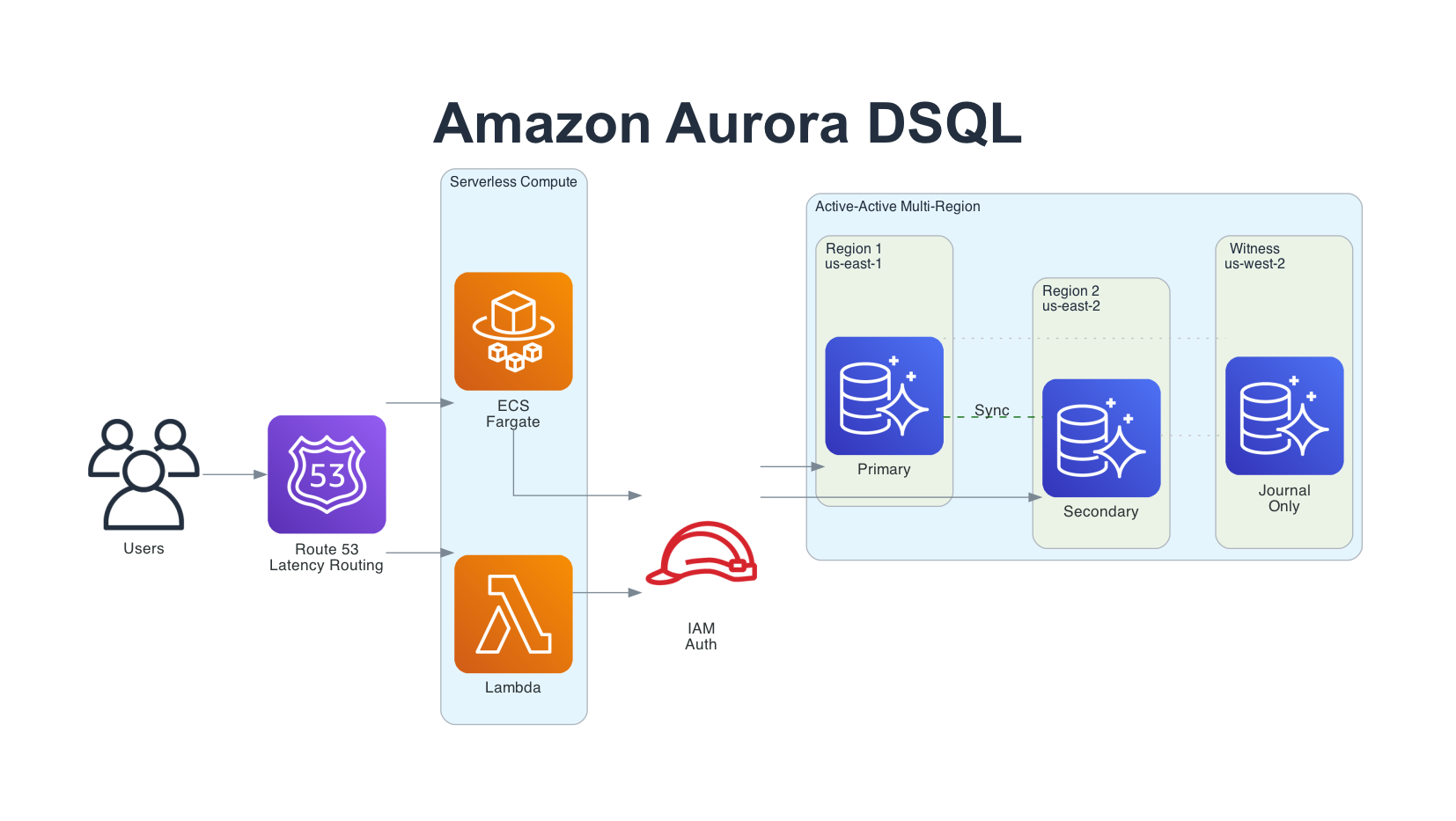
Amazon Aurora DSQL: A Practical Guide to AWS's Distributed SQL Database
Architecture, features, Terraform setup, and real application code - March 2026
When AWS announced Aurora DSQL at re:Invent 2024, I was very interested. We had heard promises about distributed SQL databases before and I really wanted to try it out. I experimented with it locally for a while and then built the Kabob Store example on it. Fifteen months later, DSQL has gone from preview to general availability, expanded to 14 regions, and shipped a steady stream of features. It fills the gap between DynamoDB's serverless economics and Aurora PostgreSQL's SQL power - and it does it well.
This is my comprehensive look at where DSQL stands in March 2026: what it does, what it doesn't do yet, how to set it up with Terraform, and practical application code you can use today.
Why Aurora DSQL?
For years, the database decision on AWS looked like this:
- Need serverless economics? DynamoDB. But learn single-table design and give up SQL.
- Need SQL? RDS or Aurora PostgreSQL. But accept always-on costs, instance sizing, and 10-15 minute provisioning.
- Need multi-Region? DynamoDB Global Tables. SQL wasn't an option without manual replication.
Aurora DSQL eliminates the tradeoff. Four things make it different:
- Serverless to zero - No instances, no capacity planning. Zero DPU charges when idle. Provisions in under 60 seconds.
- PostgreSQL compatible - Based on PostgreSQL 16. Use psql, psycopg2, pgx, JDBC - the drivers you already know.
- Strongly consistent - Not eventually consistent. Snapshot isolation with linearizability. Readers always see committed data.
- Active-active multi-Region - Two full regions with concurrent reads and writes. No leader, no failover, no replication lag on commit.
What is Aurora DSQL?
Aurora DSQL is a serverless, distributed SQL database that disaggregates every component of a traditional database engine. Unlike Aurora PostgreSQL (which separates storage from compute but keeps them coupled), DSQL breaks the database into six independently scaling components:
- Query Processors (QPs) - Run customized PostgreSQL engines inside Firecracker MicroVMs. Handle SQL parsing, planning, and execution. Scale independently based on query load.
- Adjudicators - Validate transactions at COMMIT time using Optimistic Concurrency Control (OCC). Stateless and reconstructible.
- Journal - A Paxos-based distributed transaction log (same technology as MemoryDB). Provides cross-AZ and cross-Region durability.
- Crossbar - Merges journal streams and publishes committed writes to storage replicas. Sits between the Journal and Storage layers, ensuring all storage replicas receive the same ordered stream of committed transactions.
- Storage - MVCC storage replicas distributed across 3 AZs. Consume committed entries from the Crossbar. Scale independently.
- Control Plane - Coordinates all components, handles cluster lifecycle and scaling.
Note: The official AWS User Guide describes these layers as "Relay and connectivity, Compute and databases, Transaction log/concurrency control/isolation, Storage, and Control plane." The component names used here (Query Processors, Adjudicators, Journal, Crossbar) come from Marc Brooker's architecture deep-dive series and the AWS Database Blog, which provide more implementation detail.
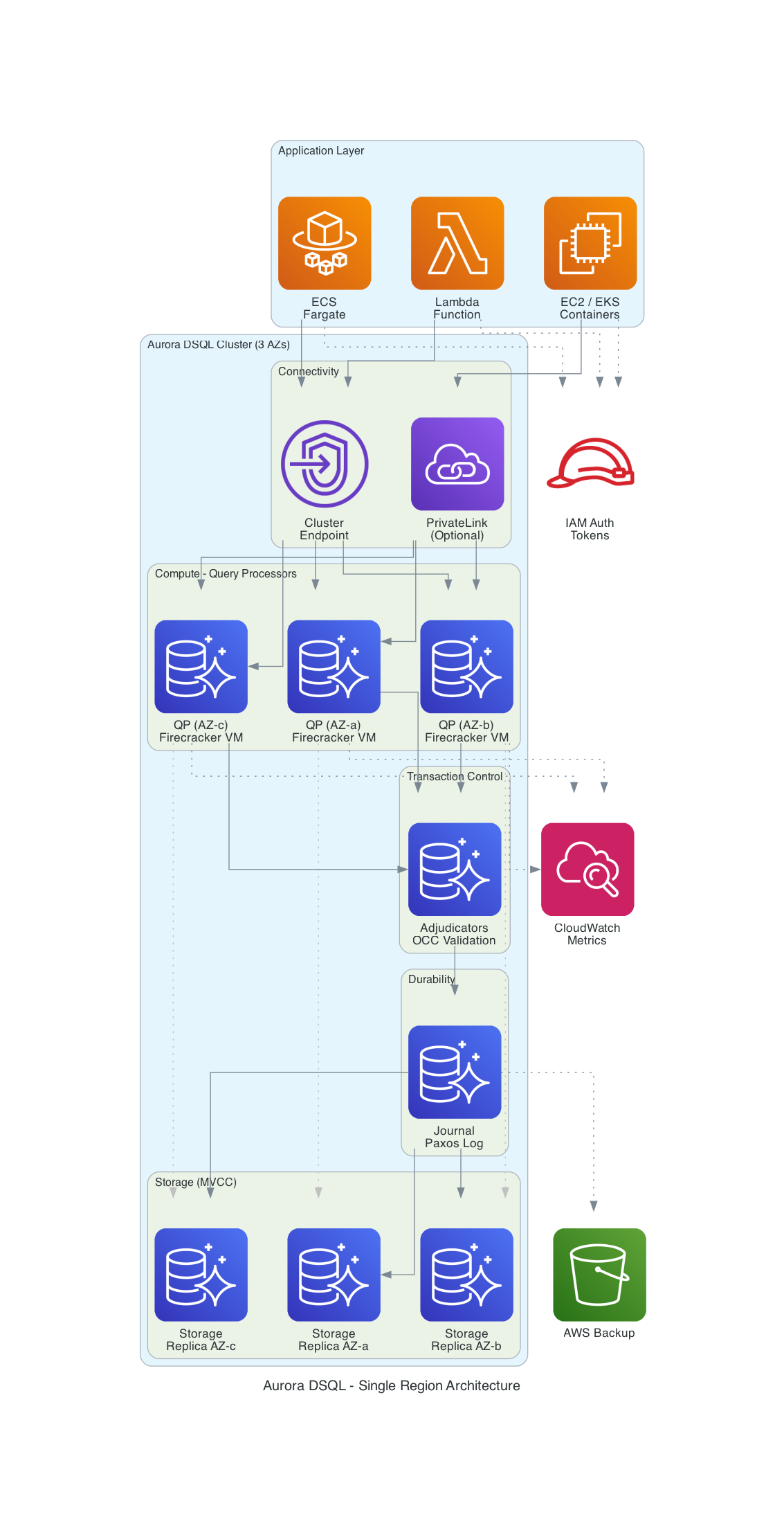
The key design achievement, as Marc Brooker (VP/Distinguished Engineer at AWS) explained in his DSQL blog series, is that cross-region latency is incurred only at COMMIT time, not per-statement. During a transaction, reads and writes execute locally on the Query Processor. Only when you commit does the system coordinate with the Adjudicator and Journal for conflict detection and durability. Read-only transactions need no validation, no persistence, and no cross-region coordination at all.
Core Concepts
Optimistic Concurrency Control (OCC) - DSQL doesn't use locks. Transactions proceed without blocking each other. At COMMIT, the Adjudicator checks for write-write conflicts. If two transactions modified the same rows, one succeeds and the other gets a serialization failure (SQLSTATE 40001). Your application retries the failed transaction. No deadlocks, ever.
Snapshot Isolation - Each transaction sees a consistent snapshot of the database as of its start time (tau_start). All reads within a transaction see the same data, regardless of concurrent commits by other transactions. Equivalent to PostgreSQL's REPEATABLE READ.
IAM Authentication - No database passwords. Period. Applications generate tokens using generate_db_connect_auth_token (for runtime DML) or generate_db_connect_admin_auth_token (for schema migrations only). Integrates with IAM roles, so your ECS tasks and Lambda functions authenticate using their execution role. Tokens default to 15 minutes but can be configured up to one week using the token-duration-secs parameter in the connectors and CLI.
Asynchronous Indexes - DSQL requires CREATE INDEX ASYNC (synchronous CREATE INDEX is not supported). The index builds asynchronously while transactions continue. You can monitor build progress through system catalog queries.
Single DDL Per Transaction - Each CREATE TABLE, ALTER TABLE, or CREATE INDEX statement needs its own transaction with an explicit commit before the next DDL statement.
Feature Timeline: From Preview to Production
DSQL has shipped features at a steady pace since launch. Here's what has been added:
| Date | Feature |
|---|---|
| February 2026 | DSQL Playground (browser-based, no AWS account needed), sequences and identity columns, Go/Ruby/Python (asyncpg)/Node.js (WebSocket) connectors, numeric index support, AI steering (Kiro Powers, Claude/Gemini/Codex Skills), DBeaver plugin, SQLTools VS Code driver, Tortoise ORM adapter, Flyway dialect, Prisma CLI tools, expanded to 14 regions (added Canada, Sydney, Melbourne) |
| December 2025 | Cluster lifecycle management, enhanced PrivateLink (Direct Connect + VPC peering), PostgreSQL migration guide |
| November 2025 | Query Editor in console, JupyterLab integration, Python and Node.js connectors, storage quota increased to 256 TiB |
| October 2025 | Resource-based policies for fine-grained cluster access control |
| September 2025 | JDBC connector for Java applications |
| August 2025 | AWS Fault Injection Service (FIS) integration for chaos testing |
| May 2025 | General Availability - CloudWatch monitoring, AWS Backup, KMS CMK encryption, CloudFormation support, PrivateLink, Views |
| December 2024 | Preview launch at re:Invent (3 US regions) |
Region Availability (March 2026)
DSQL is now available in 14 regions across 4 continents:
| Continent | Regions |
|---|---|
| North America | us-east-1 (Virginia), us-east-2 (Ohio), us-west-2 (Oregon), ca-central-1 (Montreal), ca-west-1 (Calgary) |
| Europe | eu-central-1 (Frankfurt), eu-west-1 (Ireland), eu-west-2 (London), eu-west-3 (Paris) |
| Asia Pacific | ap-northeast-1 (Tokyo), ap-northeast-2 (Seoul), ap-northeast-3 (Osaka), ap-southeast-2 (Sydney), ap-southeast-4 (Melbourne) |
Multi-Region Cluster Sets
Multi-Region clusters must stay within one geographic set:
- US: us-east-1, us-east-2, us-west-2
- Europe: eu-central-1, eu-west-1, eu-west-2, eu-west-3
- Asia Pacific: ap-northeast-1, ap-northeast-2, ap-northeast-3
Canada (ca-central-1, ca-west-1), Sydney (ap-southeast-2), and Melbourne (ap-southeast-4) are available as single-region clusters only and are not part of any multi-Region set. This is a common gotcha for customers in those regions.
Cross-continent multi-Region clusters are not supported. For global data sync across continents, DynamoDB Global Tables remain the option.
DSQL vs the Alternatives
| Feature | Aurora DSQL | Aurora PostgreSQL Serverless v2 | DynamoDB |
|---|---|---|---|
| Query language | PostgreSQL SQL | PostgreSQL SQL | PartiQL / NoSQL API |
| Provisioning time | Under 60 seconds | 10-15 minutes | Instant |
| Scales to zero | Yes (no DPU charges) | Yes (0 ACU with auto-pause, ~15s cold start) | Yes (on-demand mode) |
| Multi-Region | Active-active, strong consistency | Read replicas, eventual | Global Tables, eventual |
| Availability SLA | 99.99% / 99.999% multi-Region | 99.99% | 99.99% / 99.999% global |
| Authentication | IAM only (no passwords) | IAM or passwords | IAM or passwords |
| Foreign keys | Not yet | Yes | No (NoSQL) |
| Stored procedures | Not yet | Yes | No |
| Max storage | 256 TiB | 128 TiB | Unlimited |
| Transaction limits | 3,000 rows, 10 MiB, 5 min | Practical limits (memory, storage, lock timeouts) | 100 items, 4 MB |
| Pricing model | Per DPU ($8/million) | Per ACU-hour ($0.12+) | Per RRU/WRU or provisioned |
When to Use What
Choose DSQL when you need SQL with serverless economics, multi-Region strong consistency, or you're building new applications that benefit from zero infrastructure management.
Choose Aurora PostgreSQL when you need foreign keys, stored procedures, triggers, pgvector for AI embeddings, or you're running an existing PostgreSQL application that uses unsupported features. Aurora Serverless v2 now scales to 0 ACUs with auto-pause (since November 2024), so it also offers scale-to-zero economics - with the tradeoff of a ~15-second cold start on resume.
Choose DynamoDB when your data model fits key-value or document patterns naturally, you need sub-millisecond latency, cross-continent global replication, or unlimited throughput scaling.
Setting Up DSQL with Terraform
All the Terraform code below uses Terraform >= 1.11 and the AWS provider ~> 6.0 . The terraform-aws-modules/rds-aurora DSQL submodule requires Terraform >= 1.11 and provider >= 6.18. The complete examples are in the GitHub repo.
Single-Region Cluster
This is the simplest setup. One resource, 60 seconds to provision, automatically distributed across 3 AZs:
terraform {
  required_version = ">= 1.11"

  required_providers {
    aws = {
      source  = "hashicorp/aws"
      version = "~> 6.0"
    }
  }
}

data "aws_region" "current" {}

resource "aws_dsql_cluster" "main" {
  deletion_protection_enabled = false

  # For production, enable deletion protection and add a KMS CMK:
  # deletion_protection_enabled = true
  # kms_encryption_key          = aws_kms_key.dsql.arn

  tags = {
    Name        = "my-app-dsql"
    Environment = "dev"
  }
}

# DSQL has no "endpoint" attribute - construct it from the identifier
output "dsql_endpoint" {
  value = "${aws_dsql_cluster.main.identifier}.dsql.${data.aws_region.current.id}.on.aws"
}

output "dsql_arn" {
  value = aws_dsql_cluster.main.arn
}
That's it. No instance class, no storage allocation, no replica configuration. One resource gives you a PostgreSQL-compatible database with 99.99% availability.
Multi-Region Cluster with Terraform Module
For production workloads requiring 99.999% availability, use multi-Region clusters. The official terraform-aws-modules/rds-aurora module includes a DSQL submodule:
provider "aws" {
  region = "us-east-1"
}

provider "aws" {
  alias  = "secondary"
  region = "us-east-2"
}

module "dsql_primary" {
  source  = "terraform-aws-modules/rds-aurora/aws//modules/dsql"
  version = "~> 10.0"

  deletion_protection_enabled = false
  witness_region              = "us-west-2"
  create_cluster_peering      = true
  clusters                    = [module.dsql_secondary.arn]

  tags = {
    Name = "my-app-dsql-primary"
  }
}

module "dsql_secondary" {
  source  = "terraform-aws-modules/rds-aurora/aws//modules/dsql"
  version = "~> 10.0"

  providers = {
    aws = aws.secondary
  }

  deletion_protection_enabled = false
  witness_region              = "us-west-2"
  create_cluster_peering      = true
  clusters                    = [module.dsql_primary.arn]

  tags = {
    Name = "my-app-dsql-secondary"
  }
}
The module handles cluster peering automatically. One terraform apply creates:
- Primary cluster in us-east-1 with full read/write endpoint
- Secondary cluster in us-east-2 with full read/write endpoint
- Witness region in us-west-2 for Journal-only quorum (no endpoint, no user access)
- Bidirectional peering with synchronous replication
Both endpoints present a single logical database. Your application can read and write to either endpoint. Strong consistency across both regions with zero replication lag on commit.
If you prefer using the native aws_dsql_cluster resource directly instead of the module, the multi-Region interface uses multi_region_properties with witness_region - see the commented-out Option B in the dsql-multi-region.tf example. Also note that AWS provider 6.x introduced per-resource region attributes, which can eliminate the need for provider aliases in some configurations.
IAM Authentication Policy
DSQL uses two IAM permission levels. Use the right one for each role:
dsql:DbConnect- Generates tokens for connecting with custom database roles. Use this for application runtime.dsql:DbConnectAdmin- Generates tokens for connecting as theadmindatabase user (full DDL + DML). Use this only for schema migrations and admin tasks.
Note that the DDL/DML restriction is enforced at the database role level, not the IAM layer. DbConnect generates a token that can only authenticate as a custom role (not admin), and custom roles only have the permissions you grant them. DbConnectAdmin generates a token that authenticates as admin, which has full privileges. AWS's security best practices are clear: don't use the admin role for everyday operations. Create separate IAM roles and custom database roles for application access.
# Application runtime policy - DML only (least privilege)
data "aws_iam_policy_document" "dsql_app_runtime" {
  statement {
    effect    = "Allow"
    actions   = ["dsql:DbConnect"]
    resources = [aws_dsql_cluster.main.arn]
  }
}

# Admin/migration policy - DDL + DML (for CI/CD pipelines, not app runtime)
data "aws_iam_policy_document" "dsql_admin" {
  statement {
    effect    = "Allow"
    actions   = ["dsql:DbConnectAdmin"]
    resources = [aws_dsql_cluster.main.arn]
  }
}

# ECS task role for application runtime - uses DbConnect, NOT DbConnectAdmin
resource "aws_iam_role" "app_task" {
  name = "my-app-task-role"

  assume_role_policy = jsonencode({
    Version = "2012-10-17"
    Statement = [{
      Action    = "sts:AssumeRole"
      Effect    = "Allow"
      Principal = { Service = "ecs-tasks.amazonaws.com" }
    }]
  })
}

resource "aws_iam_role_policy" "app_dsql" {
  name   = "dsql-runtime-access"
  role   = aws_iam_role.app_task.id
  policy = data.aws_iam_policy_document.dsql_app_runtime.json
}

# Separate role for schema migrations (CI/CD pipeline, not the running app)
resource "aws_iam_role" "migration_role" {
  name = "my-app-migration-role"

  assume_role_policy = jsonencode({
    Version = "2012-10-17"
    Statement = [{
      Action    = "sts:AssumeRole"
      Effect    = "Allow"
      Principal = { Service = "ecs-tasks.amazonaws.com" }
    }]
  })
}

resource "aws_iam_role_policy" "migration_dsql" {
  name   = "dsql-admin-access"
  role   = aws_iam_role.migration_role.id
  policy = data.aws_iam_policy_document.dsql_admin.json
}
Always scope DSQL permissions to the specific cluster ARN. No wildcard resources. Your running application should never have DbConnectAdmin - reserve that for migration tasks.
Custom Database Role (Least Privilege at the Database Layer)
IAM controls which token type you can generate, but you should also avoid connecting as admin for everyday operations. Create a custom database role and map it to an IAM identity:
-- Connect as admin (one-time setup via DbConnectAdmin)
CREATE ROLE app_role WITH LOGIN;
GRANT USAGE ON SCHEMA public TO app_role;
GRANT SELECT, INSERT, UPDATE, DELETE ON ALL TABLES IN SCHEMA public TO app_role;

-- Map the IAM role ARN to the custom database role (DSQL-specific syntax)
AWS IAM GRANT app_role TO 'arn:aws:iam::123456789012:role/my-app-task-role';

-- To revoke later:
-- AWS IAM REVOKE app_role FROM 'arn:aws:iam::123456789012:role/my-app-task-role';
Then connect as the custom role in your application code:
conn = psycopg2.connect(
    host=cluster_endpoint,
    port=5432,
    database="postgres",
    user="app_role",  # Custom role, not admin
    password=token,   # Token from generate_db_connect_auth_token
    sslmode="require",
)
This completes the least-privilege story at both layers: IAM controls token generation (DbConnect vs DbConnectAdmin), and the database role controls what SQL the connection can execute.
PrivateLink (Production)
For production workloads, keep database traffic off the public internet using VPC endpoints:
resource "aws_vpc_endpoint" "dsql" {
  vpc_id              = aws_vpc.main.id
  service_name        = aws_dsql_cluster.main.vpc_endpoint_service_name
  vpc_endpoint_type   = "Interface"
  subnet_ids          = aws_subnet.private[*].id
  security_group_ids  = [aws_security_group.dsql_endpoint.id]
  private_dns_enabled = true
}

resource "aws_security_group" "dsql_endpoint" {
  name_prefix = "${var.project_name}-dsql-endpoint-"
  vpc_id      = aws_vpc.main.id

  ingress {
    from_port       = 5432
    to_port         = 5432
    protocol        = "tcp"
    security_groups = [aws_security_group.app.id]
  }

  egress {
    from_port   = 0
    to_port     = 0
    protocol    = "-1"
    cidr_blocks = ["0.0.0.0/0"]
    description = "Allow all outbound (required for VPC endpoint communication)"
  }
}
With private_dns_enabled = true, your application connects using the same cluster endpoint - no code changes needed. For connections from on-premises via Direct Connect without private DNS, use the amzn-cluster-id connection parameter.
Application Code: Python
The examples below use Python 3.13+ with psycopg2 2.9.11 and boto3. The full example is in dsql_connection.py.
Connection with IAM Auth
import boto3
import psycopg2
from psycopg2.extras import RealDictCursor

client = boto3.client("dsql", region_name="us-east-1")
cluster_endpoint = f"{cluster_id}.dsql.us-east-1.on.aws"

# Token method must match the user:
# - user="admin" -> generate_db_connect_admin_auth_token (DDL + DML)
# - custom role  -> generate_db_connect_auth_token (DML only)
token = client.generate_db_connect_admin_auth_token(cluster_endpoint, "us-east-1")

conn = psycopg2.connect(
    host=cluster_endpoint,
    port=5432,
    database="postgres",
    user="admin",  # For production, use a custom database role - see "Custom Database Role" section
    password=token,
    sslmode="require",
    cursor_factory=RealDictCursor,
)
Or use the official connector (pip install aurora-dsql-python-connector, v0.2.6+) which handles token refresh automatically:
from aurora_dsql_python_connector import connect

conn = connect(
    cluster_endpoint="abc123.dsql.us-east-1.on.aws",
    region="us-east-1",
)
The OCC Retry Pattern
This is the most important pattern for DSQL applications. Since DSQL uses Optimistic Concurrency Control instead of locks, write transactions can fail at COMMIT when concurrent modifications conflict:
import time
import psycopg2.errors

def with_occ_retry(func, max_retries=3, base_delay=0.1):
    """Retry wrapper for OCC conflicts (SQLSTATE 40001)."""
    for attempt in range(max_retries):
        try:
            return func()
        except psycopg2.errors.SerializationFailure:
            if attempt == max_retries - 1:
                raise
            delay = base_delay * (2 ** attempt)
            time.sleep(delay)

def create_order(customer_email, items, total):
    def _do_insert():
        conn = db.get_connection()
        cur = conn.cursor()
        cur.execute("""
            INSERT INTO orders (customer_email, items, total_amount)
            VALUES (%s, %s, %s)
            RETURNING *
        """, (customer_email, json.dumps(items), total))
        result = cur.fetchone()
        conn.commit()
        return dict(result)

    return with_occ_retry(_do_insert)
Key points about OCC:
- Read-only transactions never conflict - they don't need retry logic
- OCC conflicts are SQLSTATE 40001 (serialization_failure)
- Use exponential backoff to avoid retry storms
- Design transactions to be small and fast to minimize conflict windows
- Avoid hot-spot writes (e.g., incrementing a single counter row from many threads)
Schema Setup with DDL Limits
def create_tables():
    conn = db.get_connection()
    cur = conn.cursor()

    # One DDL per transaction - commit before next DDL
    cur.execute("""
        CREATE TABLE IF NOT EXISTS products (
            id UUID DEFAULT gen_random_uuid() PRIMARY KEY,
            name VARCHAR(200) NOT NULL,
            price NUMERIC(10, 2) NOT NULL,
            category VARCHAR(50),
            created_at TIMESTAMPTZ DEFAULT now()
        )
    """)
    conn.commit()  # Must commit before next DDL

    cur.execute("""
        CREATE TABLE IF NOT EXISTS orders (
            id UUID DEFAULT gen_random_uuid() PRIMARY KEY,
            customer_email VARCHAR(255) NOT NULL,
            items TEXT NOT NULL,
            total_amount NUMERIC(10, 2) NOT NULL,
            status VARCHAR(20) DEFAULT 'pending',
            created_at TIMESTAMPTZ DEFAULT now()
        )
    """)
    conn.commit()  # Separate transaction for each DDL
Sequences and Identity Columns (New - February 2026)
# Using identity columns for auto-incrementing IDs
cur.execute("""
    CREATE TABLE IF NOT EXISTS audit_log (
        id BIGINT GENERATED ALWAYS AS IDENTITY (CACHE 65536) PRIMARY KEY,
        event_type VARCHAR(50) NOT NULL,
        payload TEXT,
        created_at TIMESTAMPTZ DEFAULT now()
    )
""")
conn.commit()

# Or use sequences directly
cur.execute("CREATE SEQUENCE IF NOT EXISTS invoice_seq START 1000 CACHE 65536")
conn.commit()

cur.execute("SELECT nextval('invoice_seq')")
next_invoice = cur.fetchone()["nextval"]
Application Code: Node.js
The examples below use Node.js 24.x LTS with @aws-sdk/dsql-signer and pg 8.20+. The full example is in dsql-connection.mjs. You can also use the official connector @aws/aurora-dsql-node-postgres-connector (v0.1.8+) which wraps pg with automatic IAM auth.
Connection with AWS SDK Signer
import { DsqlSigner } from "@aws-sdk/dsql-signer";
import pg from "pg";

const signer = new DsqlSigner({
  hostname: "abc123.dsql.us-east-1.on.aws",
  region: "us-east-1",
});

// Token method matches the user:
// - "admin" -> getDbConnectAdminAuthToken (DDL + DML)
// - custom role -> getDbConnectAuthToken (DML only)
const token = await signer.getDbConnectAdminAuthToken();

const pool = new pg.Pool({
  host: "abc123.dsql.us-east-1.on.aws",
  port: 5432,
  database: "postgres",
  user: "admin",
  password: token,
  ssl: true,
});
OCC Retry in Node.js
async function withOccRetry(pool, txnFn, maxRetries = 3) {
  for (let attempt = 0; attempt < maxRetries; attempt++) {
    const client = await pool.connect();
    try {
      await client.query("BEGIN");
      const result = await txnFn(client);
      await client.query("COMMIT");
      return result;
    } catch (err) {
      await client.query("ROLLBACK").catch(() => {});
      if (err.code === "40001" && attempt < maxRetries - 1) {
        await new Promise((r) => setTimeout(r, 100 * 2 ** attempt));
        continue;
      }
      throw err;
    } finally {
      client.release();
    }
  }
}

// Usage
const order = await withOccRetry(pool, async (client) => {
  const result = await client.query(
    `INSERT INTO orders (customer_email, items, total_amount)
     VALUES ($1, $2, $3) RETURNING *`,
    [email, JSON.stringify(items), total]
  );
  return result.rows[0];
});
Multi-Region Application Architecture
For applications that need 99.999% availability and low-latency reads from multiple regions, deploy your application stack in each DSQL region with Route53 latency-based routing:
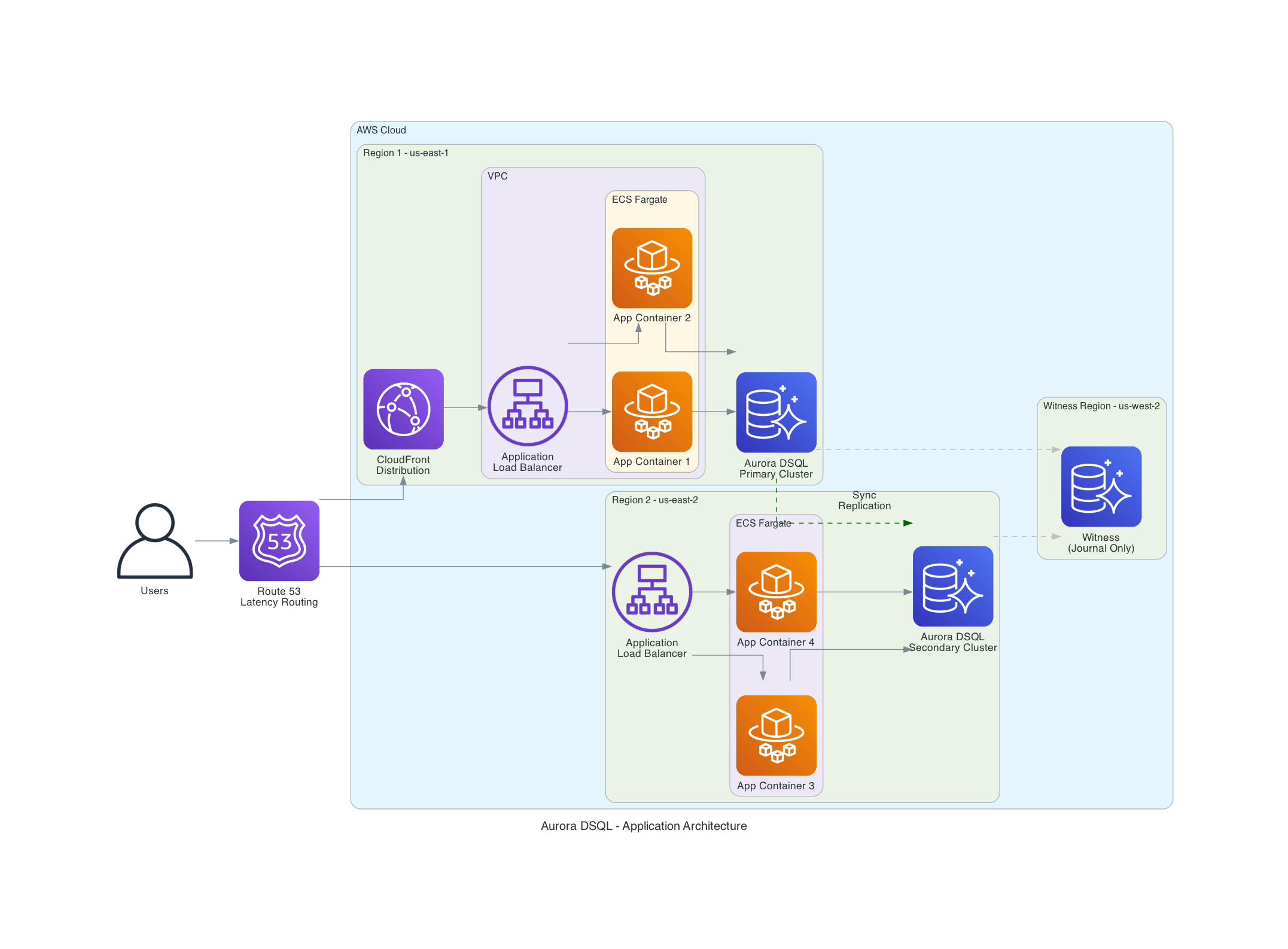
The architecture uses:
- Route53 latency-based routing to direct users to the nearest region
- CloudFront for static asset caching and edge termination
- ECS Fargate running application containers in each region
- Aurora DSQL with active-active clusters in both regions and a witness for quorum
Both DSQL endpoints present a single logical database. East Coast users connect to us-east-1, West Coast users connect to us-east-2 (or us-west-2 if available as a full endpoint) - both reading and writing the same strongly consistent data. The witness region in us-west-2 stores only encrypted Journal entries for quorum, with no user endpoint.
This is conceptually similar to DynamoDB Global Tables, but with full PostgreSQL SQL support and strong consistency instead of eventual consistency.
Database Limits to Know
DSQL has intentional limits that prevent tail latency and keep the system predictable. These aren't bugs - they're design choices:
| Limit | Value | Why It Matters |
|---|---|---|
| Rows per transaction | 3,000 | Keeps OCC conflict windows small. Batch large inserts. |
| Transaction size | 10 MiB | Prevents oversized commits from impacting the Journal. |
| Transaction duration | 5 minutes | Forces short, focused transactions. No long-running locks (because there are no locks). |
| Connection duration | 60 minutes | Aligns with IAM token lifecycle. Reconnect periodically. |
| Max connections | 10,000 per cluster | Configurable via Service Quotas. |
| Connection rate | 100/second (1,000 burst) | Not configurable. Critical for Lambda cold-start scenarios. |
| Tables per database | 1,000 | One database per cluster. |
| Schemas per database | 10 | Not configurable. |
| Indexes per table | 24 | Including primary key. |
| Max row size | 2 MiB | Individual column max is 1 MiB. |
| Max storage | 256 TiB (with quota increase) | Default is 10 TiB. |
| Sequences | 5,000 per database | Added February 2026. |
| Views | 5,000 per database | Added at GA, May 2025. |
Pricing
DSQL uses a DPU (Distributed Processing Unit) billing model that covers all database activity - compute, I/O, and transaction processing - in a single metric.
- DPU rate: $8 per million DPUs (us-east-2)
- Storage: $0.33 per GB-month (pay for one logical copy per region)
- Multi-Region writes: Additional DPU charges equal to originating write DPUs
- Free tier: 100,000 DPUs + 1 GB storage per month (roughly 700K TPC-C equivalent transactions)
- Scales to zero: No DPU charges when idle
Cost Comparison for a Modest Workload
For an application processing 1,000 transactions per hour, 10 GB storage:
| Service | Monthly Cost |
|---|---|
| Aurora DSQL (single region) | ~$50-80/month |
| Aurora DSQL (idle dev environment) | ~$3/month (storage only) |
| Aurora PostgreSQL Serverless v2 | ~$90-120/month active, or storage-only when paused at 0 ACU (~15s cold start on resume) |
| RDS PostgreSQL (db.t3.medium) | ~$60-80/month (runs 24/7) |
| DynamoDB (on-demand, equivalent) | ~$30-50/month |
Both DSQL and Aurora Serverless v2 can now scale to zero. The difference: DSQL resumes instantly with no cold start, while Aurora Serverless v2 takes approximately 15 seconds to resume from a paused state. For development environments with intermittent traffic, both cost pennies when idle. For production workloads that need instant response times, DSQL's zero cold start matters. DSQL is also eligible for Database Savings Plans for predictable workloads.
You can monitor DPU breakdown in CloudWatch under the AWS/AuroraDSQL namespace: ComputeDPU, ReadDPU, WriteDPU, and MultiRegionWriteDPU.
Developer Experience and Tooling
DSQL's tooling ecosystem has grown quickly:
Connectors (official, handle IAM auth automatically):
- Python:
aurora-dsql-python-connectorv0.2.6 - wraps psycopg, psycopg2, asyncpg - Node.js:
@aws/aurora-dsql-node-postgres-connectorv0.1.8 (pg) and@aws/aurora-dsql-postgresjs-connectorv0.2.1 (Postgres.js) - Java: JDBC connector (PgJDBC wrapper)
- Go: pgx v5.8.0 wrapper (February 2026)
- Ruby:
aurora-dsql-ruby-pg-connector(February 2026)
ORM and Migration Tooling:
- Tortoise ORM adapter (Python async ORM)
- Prisma CLI tools (Node.js ORM integration)
- Flyway dialect (database migration tooling)
IDE Integrations:
- DBeaver plugin (Community and Pro editions)
- VS Code SQLTools driver
- JupyterLab and SageMaker AI integration
- AWS Console Query Editor
AI Steering:
- Aurora DSQL MCP Server for AI-assisted development
- Kiro Powers for Kiro IDE
- Skills for Claude Code, Cursor, Gemini, Codex
- Steering ensures AI assistants generate DSQL-compatible code (handling OCC retries, DDL limits, IAM auth)
Infrastructure:
- Terraform 1.11+ with AWS provider 6.18+ - native
aws_dsql_clusterresource terraform-aws-modules/rds-auroraDSQL submodule for multi-Region- CloudFormation support
- AWS Backup integration for automated backups
Best Practices
- Implement OCC retry logic on every write path. Use exponential backoff with 3-5 retries. Read-only transactions don't need retries.
- Keep transactions small and fast. The 3,000 row and 5-minute limits exist for good reason. Batch large operations into chunks of 500 rows.
- Use UUID primary keys. Random UUIDs distribute writes evenly across storage shards. Sequential IDs create hot spots that increase OCC conflicts.
- Refresh IAM tokens proactively. Tokens default to 15 minutes (configurable up to one week via
token-duration-secs). With the default, refresh at 10 minutes to avoid connection failures. The official connectors handle this automatically. - Use the official connectors for production SSL. Raw psycopg2 with
sslmode="require"encrypts the connection but doesn't verify the server's identity. The officialaurora-dsql-python-connectorand@aws/aurora-dsql-node-postgres-connectorhandle full certificate verification automatically. For production, use the connectors rather than managing SSL configuration yourself. - One DDL per transaction. Always commit after each
CREATE TABLE,ALTER TABLE, orCREATE INDEX. This catches many migration scripts that batch DDL. - Scope IAM policies to cluster ARNs. Never use wildcard resources for DSQL permissions. Scope
dsql:DbConnectanddsql:DbConnectAdminto specific cluster ARNs. - Use
EXPLAIN ANALYZE VERBOSEfor query optimization. Covering indexes can significantly reduce DPU costs by enabling index-only scans instead of full table scans. - Implement referential integrity in application code. Without foreign keys, enforce relationships through application-level validation and carefully designed transaction boundaries.
- Test with AWS FIS. Use Fault Injection Service to simulate region failures and validate your application's multi-Region behavior before you need it.
- Monitor DPU breakdown in CloudWatch. Watch
ComputeDPU,ReadDPU,WriteDPUseparately. HighWriteDPUrelative to reads may indicate OCC conflict storms.
What's Not There Yet - And Why
This is the most contentious part of DSQL. If you're coming from standard RDS PostgreSQL or Aurora PostgreSQL, the list of missing features is significant. But these aren't oversights - the DSQL team made deliberate engineering tradeoffs to deliver strong consistency and predictable performance across a distributed, multi-Region architecture. Some of these features are fundamentally difficult in a disaggregated, OCC-based system. Others have been deliberately deprioritized based on customer usage patterns.
The Full Gap List vs Standard PostgreSQL
| PostgreSQL Feature | DSQL Status | Why |
|---|---|---|
| Foreign key constraints | Not yet - deprioritized based on customer usage patterns | Cascading operations (e.g., deleting an order with 1,000 line items) create large implicit transactions that conflict with DSQL's 3,000-row transaction limit and OCC model. Many high-scale customers avoid foreign keys even in standard PostgreSQL for this reason. Marc Brooker has noted the team "haven't built foreign key constraints yet" because many customers take the same approach. |
| Stored procedures (PL/pgSQL) | Not supported | Procedural code running inside the database conflicts with the serverless, stateless Query Processor model. The DSQL team sees this as an architectural direction, not a gap - business logic belongs in CI/CD-deployed application code, not inside the database. |
| Triggers | Not supported | Same reasoning as stored procedures. Database-side event processing creates hidden coupling and unpredictable transaction sizes. Use EventBridge, Lambda, or application-level event patterns instead. |
| TRUNCATE | Not supported | Use DELETE FROM table_name or DROP TABLE + CREATE TABLE. TRUNCATE's behavior is difficult to implement consistently across distributed storage replicas. |
| Temporary tables | Not supported | The stateless, multi-tenant Query Processor model means there's no persistent session state. Use CTEs (WITH clauses), subqueries, or regular tables with cleanup logic. |
| VACUUM / ANALYZE | Not needed | DSQL's MVCC garbage collection is automatic. The 5-minute transaction time limit enables simple, efficient cleanup without the complexity of PostgreSQL's vacuum process. No maintenance windows required. |
| pgvector / vector support | Not yet | Vector similarity search is planned. In the meantime, AWS offers S3 Vectors and Aurora PostgreSQL with pgvector for embedding workloads. |
| JSONB columns | Not as a column type | Store JSON in TEXT columns and cast to jsonb at query time (e.g., my_column::jsonb->>'key'). JSON functions and operators work at runtime, but you lose JSONB indexing (GIN indexes). |
| Full-text search | Not supported | No tsvector/tsquery. Use OpenSearch Serverless or Amazon Kendra for full-text search workloads. |
| Multiple databases per cluster | 1 database (postgres) | Use schemas for logical separation within a cluster, or create separate clusters. This simplifies distributed metadata management. |
| Tablespaces | Not supported | Storage is fully managed and auto-scaled. No manual storage allocation or placement decisions needed. |
| Advisory locks | Not supported | OCC replaces all locking mechanisms. Advisory locks are a pessimistic concurrency pattern that doesn't fit the OCC model. |
| LISTEN / NOTIFY | Not supported | The stateless Query Processor model has no persistent connections for push notifications. Use SQS, SNS, or EventBridge for pub/sub patterns. |
| Extensions (PostGIS, etc.) | Not supported | The managed, multi-tenant architecture doesn't support arbitrary extensions. Use purpose-built AWS services (Location Service for geo, OpenSearch for search). |
| Custom collations | C collation only | Consistent collation across distributed storage simplifies sort ordering and index behavior across regions. UTF-8 encoding is supported. |
| Configurable isolation levels | REPEATABLE READ only | A single isolation level eliminates an entire class of consistency bugs. Strong snapshot isolation is the sweet spot between anomaly prevention and distributed performance. |
| Password authentication | IAM only | No database passwords, ever. This is a security decision - IAM tokens integrate with CloudTrail, roles, and temporary credentials. |
| CREATE INDEX (synchronous) | CREATE INDEX ASYNC only | Asynchronous index creation prevents DDL from blocking running transactions. You monitor build progress through system catalog queries. This is actually an improvement for production workloads. |
| Multiple DDL per transaction | 1 DDL per transaction | Distributed schema changes are coordinated across all Query Processors and storage replicas. Limiting to one DDL per transaction keeps this coordination simple and predictable. |
The Engineering Reasoning
Marc Brooker addressed the feature gaps directly in his Simplifying Architectures post. The key insight: DSQL's limits aren't arbitrary restrictions - they're what make the system's guarantees possible.
Transaction limits (3,000 rows, 10 MiB, 5 minutes) prevent head-of-line blocking. In a traditional database, one long-running transaction holding locks can stall every other transaction behind it. DSQL's OCC model doesn't have locks, but oversized commits would still create contention at the Adjudicator and Journal layers. The limits keep individual transactions fast and predictable, which keeps the entire system fast and predictable.
No stored procedures or triggers is the most opinionated choice. The DSQL team observed that customers are increasingly moving business logic out of the database and into application code deployed through CI/CD pipelines. Code in the database is hard to version, hard to test, and hard to debug. DSQL leans into this direction rather than supporting both models.
No foreign keys yet is the gap most customers notice first. The team has acknowledged the gap and may add support where it makes sense for the distributed architecture, but has deprioritized it based on customer feedback. The challenge is that cascading operations (CASCADE DELETE, CASCADE UPDATE) can create implicit transactions that exceed the row limits and generate unpredictable OCC conflict windows. Many high-scale PostgreSQL users already avoid foreign keys for exactly these reasons - but having the option matters.
What to Use Instead
For applications that depend heavily on the missing features today, here's the practical guidance:
- Need foreign keys, stored procedures, triggers? Use Aurora PostgreSQL Serverless v2. Full PostgreSQL feature set with serverless scaling (though not to zero).
- Need vector search? Aurora PostgreSQL with pgvector, S3 Vectors, or OpenSearch Serverless.
- Need full-text search? OpenSearch Serverless or Amazon Kendra.
- Need pub/sub notifications? EventBridge + Lambda instead of LISTEN/NOTIFY.
- Need geospatial queries? Amazon Location Service instead of PostGIS.
DSQL is best for new applications that can work within these constraints, or existing applications that were already avoiding the missing features. The team is actively expanding compatibility - views, sequences, identity columns, and the Go connector all shipped based on direct customer feedback. Foreign key constraints remain a known gap, and customer demand will likely influence when they're addressed.
Things to Know
Connection caching - DSQL manages prepared statements cluster-wide. You may see more prepared statements per connection than expected. This is by design.
IPv4 connections - Some PostgreSQL clients attempt IPv6 first in dualstack mode. If you're on IPv4-only hosts, configure your client for IPv4 explicitly to avoid NetworkUnreachable errors.
Schema propagation - GRANT and REVOKE changes propagate to existing connections within the connection lifetime (up to one hour). For immediate effect, reconnect after permission changes.
Catalog cache - After creating schemas or tables, refresh your connection (disconnect/reconnect or SET search_path again) to update the catalog cache. This catches "Schema Already Exists" errors.
Deletion protection - Enable deletion_protection_enabled = true in production Terraform configs. If you need to destroy a DSQL cluster, disable protection first then run terraform apply before terraform destroy.
Row counts - For large tables, use the system catalog instead of COUNT(*) for row counts. DSQL stores approximate counts in pg_class.reltuples.
TRUNCATE - Not supported. Use DELETE FROM table_name to clear all rows, or DROP TABLE followed by CREATE TABLE for a full reset. This is a common migration stumbling block for scripts that use TRUNCATE for test data cleanup.
Connection pooling - With 60-minute connection limits and IAM token refresh, pool refresh behavior matters. Configure your connection pool to close and recreate connections before the 60-minute limit. The official connectors handle token refresh, but pool-level eviction still needs configuration. Set idleTimeoutMillis (Node.js) or equivalent to well under 60 minutes.
PostgreSQL client version - AWS recommends PostgreSQL client version 17 or later for best compatibility with DSQL.
Recent Features Worth Highlighting
DSQL Playground (February 2026) - A browser-based sandbox where you can create schemas, load sample data, and run SQL queries against a real DSQL database - no AWS account required. This is the fastest way to try DSQL. Visit the Aurora DSQL Playground and start writing queries in seconds.
Sequences and Identity Columns (February 2026) - The most requested feature after foreign keys. You can now use GENERATED ALWAYS AS IDENTITY columns and explicit CREATE SEQUENCE / nextval() calls. Up to 5,000 sequences per database.
AI Steering (February 2026) - The DSQL MCP server and IDE skills ensure AI coding assistants generate code that handles DSQL's specific patterns - OCC retries, DDL limits, IAM auth. If you use Claude Code, Cursor, or similar tools, install the DSQL steering skill. It saves real debugging time.
PrivateLink with Direct Connect (December 2025) - Connect to DSQL from on-premises networks without traversing the public internet. Uses the amzn-cluster-id connection option for clusters behind PrivateLink without private DNS.
Resource-Based Policies (October 2025) - Attach policies directly to DSQL clusters for cross-account access patterns. Useful for shared database architectures.
AWS FIS Integration (August 2025) - Inject connection errors into specific regions to test your application's failover behavior. For multi-Region deployments, run experiments in one region while the other continues normal operations.
My Project: The Kabob Store on DSQL
I built the Kabob Store as a real-world test of DSQL. It's a full e-commerce platform with menu browsing, cart management, and order processing, running on ECS Fargate with a FastAPI backend.
Key architectural decisions from that project:
- Direct psycopg2 instead of an ORM - Better control over transaction boundaries and DSQL-specific patterns
- Container-based architecture - The same Docker image deploys to Fargate, Lambda, EC2, or EKS without code changes
- Multi-Region DSQL with single-Region compute - Data replication for disaster recovery, with plans to add multi-Region compute with Route53 routing
- Defense-in-depth security - Six layers from client validation through parameterized queries
- IAM token refresh manager - Thread-safe connection management with 55-minute token refresh
The architecture principles from that project apply to any DSQL application. I covered ECS as my default container runtime and EventBridge for event-driven patterns in previous posts - DSQL fits naturally into both patterns.
Cleanup
If you deployed a DSQL cluster to follow along, destroy your resources to avoid ongoing charges:
cd terraform

# If you enabled deletion protection, disable it first:
# Edit dsql-single-region.tf: set deletion_protection_enabled = false
# terraform apply

terraform destroy
For CI/CD pipelines and automated testing, set deletion_protection_enabled = false from the start, or use the force_destroy option in the Terraform module to skip the protection check during teardown.
DSQL charges only for DPUs consumed and storage used - there are no idle compute charges. But storage charges ($0.33/GB-month) continue as long as data exists in the cluster. For multi-Region clusters, destroy both the primary and secondary clusters. The witness region has no standalone resources to clean up.
Wrapping Up
Aurora DSQL is 15 months old and has matured quickly. It went from a 3-region preview to a 14-region GA service with CloudWatch monitoring, AWS Backup, PrivateLink, FIS chaos testing, resource-based policies, sequences, and a growing ecosystem of connectors and IDE integrations.
The gaps are real - no foreign keys, no stored procedures, no vector support. These matter for some workloads. But for new applications that need SQL with serverless economics, multi-Region strong consistency without managing replicas, or a database that actually scales to zero, DSQL delivers.
My decision tree for new projects now has a clear path:
- Need key-value at scale? DynamoDB.
- Need full PostgreSQL? Aurora PostgreSQL Serverless v2.
- Need SQL + serverless + multi-Region? Aurora DSQL.
The code examples in this post are in the GitHub repo - Terraform for infrastructure, Python and Node.js for application patterns. If you want to try DSQL without even creating an AWS account, the DSQL Playground lets you run queries in your browser in seconds. When you're ready for your own cluster, it's sixty seconds from terraform apply to a running PostgreSQL-compatible database with no instances to manage.
If you've been waiting for a serverless SQL database on AWS that isn't a compromise, this is it.
Resources
- Aurora DSQL Playground - Try DSQL in your browser, no AWS account needed
- Aurora DSQL User Guide
- Aurora DSQL Pricing
- Aurora DSQL Document History - Track every feature addition
- Marc Brooker's DSQL Blog Series - Essential reading. Marc is the VP/Distinguished Engineer behind DSQL. His five-part series covers the architecture internals (reads, writes, transactions, multi-Region, simplifying architectures) in detail you won't find anywhere else.
- Aurora DSQL Discord - Community Discord for questions, feedback, and discussion with the DSQL team
- terraform-aws-modules/rds-aurora DSQL Module
- Aurora DSQL MCP Server - AI steering for DSQL-aware code generation
- Aurora DSQL Connectors - Official Python, Node.js, Java, Go, Ruby connectors
- My Kabob Store Project - My previous DSQL blog - building a multi-Region e-commerce platform
- ECS: My Default Choice for Containers
- EventBridge: The Event-Driven Backbone of AWS
Connect with me on X, Bluesky, LinkedIn, GitHub, Medium, Dev.to, or the AWS Community. Check out more of my projects at darryl-ruggles.cloud and join the Believe In Serverless community.
Comments
Loading comments...