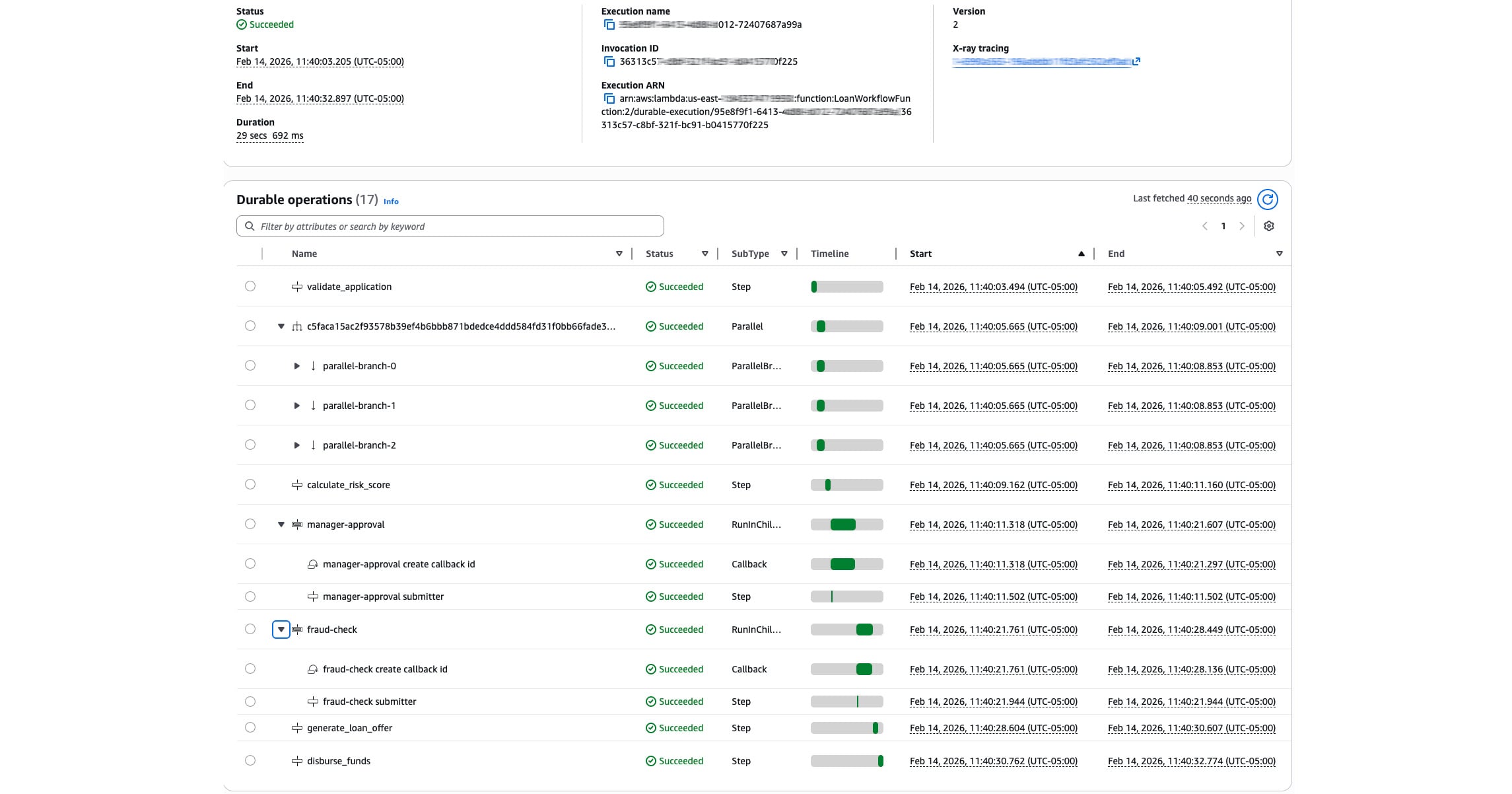
AWS Lambda Durable Functions - Build a Loan Approval Workflow with Checkpoints, Callbacks, and a React Frontend
I have been using AWS Step Functions for workflow orchestration for a long time now. I used it in my Serverless Data Processor project to coordinate batch data processing and in the Serverless Cloud Pizzeria to manage pizza order progress with task tokens. Step Functions is a solid service that does a lot of things well, especially when you want visual observability and native AWS service integrations.
When AWS announced Lambda Durable Functions at re:Invent 2025, I was immediately curious about how it compared and whether it could handle the kind of workflows I typically build. After spending some time reading the docs, community articles, and building a demo project, I wanted to share what I learned and walk through a working example.
The full source for this project can be found here on GitHub: https://github.com/RDarrylR/lambda-durable-demo
The Problem with Long-Running Lambda Workflows
If you have spent any time building serverless applications on AWS you have likely run into the Lambda 15-minute timeout limit. For many use cases this is fine. But as soon as you need to do things like wait for a human to approve something, call an external service that takes a while, or string together a pipeline with multiple steps that could take varying amounts of time you start running into challenges.
Before durable functions the typical options were:
-
Build your own state machine using DynamoDB and SQS to track progress and resume work across multiple Lambda invocations. This works but involves a lot of glue code that has nothing to do with your actual business logic.
-
Use Step Functions to define your workflow as a state machine in Amazon States Language (ASL). Step Functions handles the orchestration, retries, and state management for you. This is a great option and one I have used many times. The tradeoff is you are writing Amazon States Language (ASL) state machine definitions rather than code, and local testing can be more involved. I really do not like fighting with ASL.
Lambda Durable Functions give you a third option, keep writing normal Python or Node.js and let Lambda handle the checkpointing and replay mechanics for you.
What Are Lambda Durable Functions?
The core idea behind durable functions is based on four concepts:
-
Checkpoint: Every time you complete a step the result is persisted automatically
-
Replay: If the function gets interrupted it re-runs your handler from the top but skips any step that already has a cached result
-
Suspend: Wait operations pause the execution entirely, with zero compute charges while the clock ticks
-
Resume: A new Lambda invocation picks up where the last one left off with all context restored
The mental model is this: your code runs many times, but each step only executes once. Once you internalize that, everything else clicks.
The service launched in December 2025 with support for Python 3.13 and 3.14, and Node.js 22 and 24. The SDKs are open source on GitHub. Total execution time can be up to one year spread across many invocations even though each individual invocation is still subject to the standard 15-minute Lambda timeout.
The Demo Project - Loan Approval Workflow
To really understand how this works I built a full-stack loan approval workflow with a React frontend. This demonstrates checkpoints, parallel execution, two different callback patterns, DynamoDB progress tracking, and real-time frontend updates.
Architecture
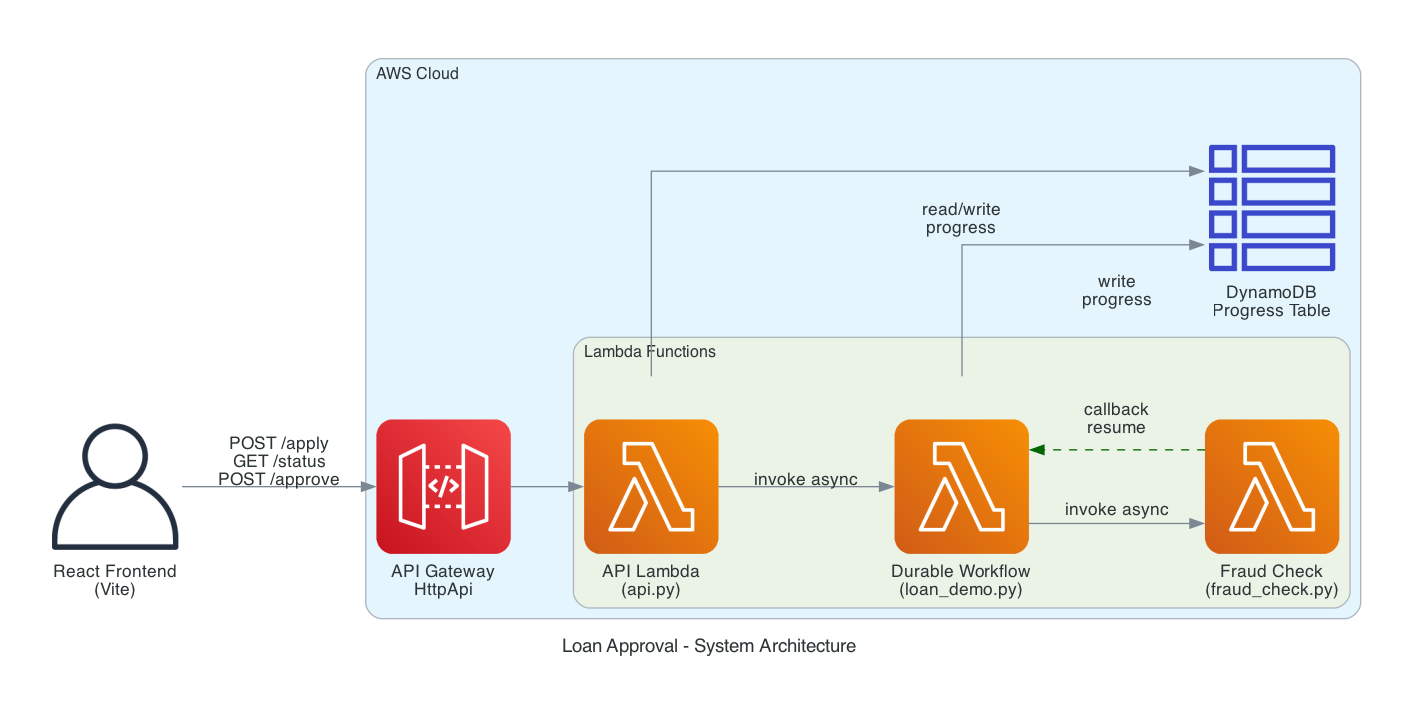
The project has four AWS resources defined in a SAM template:
-
LoanProgressTable - DynamoDB table for tracking workflow progress that the frontend polls
-
LoanWorkflowFunction - The durable function that runs the entire loan approval workflow
-
FraudCheckFunction - A separate Lambda that simulates an external fraud check service and demonstrates the callback pattern
-
LoanApi + LoanApiFunction - API Gateway HttpApi with a Lambda handler that exposes
POST /apply,GET /status/{id}, andPOST /approve/{id}
The Workflow
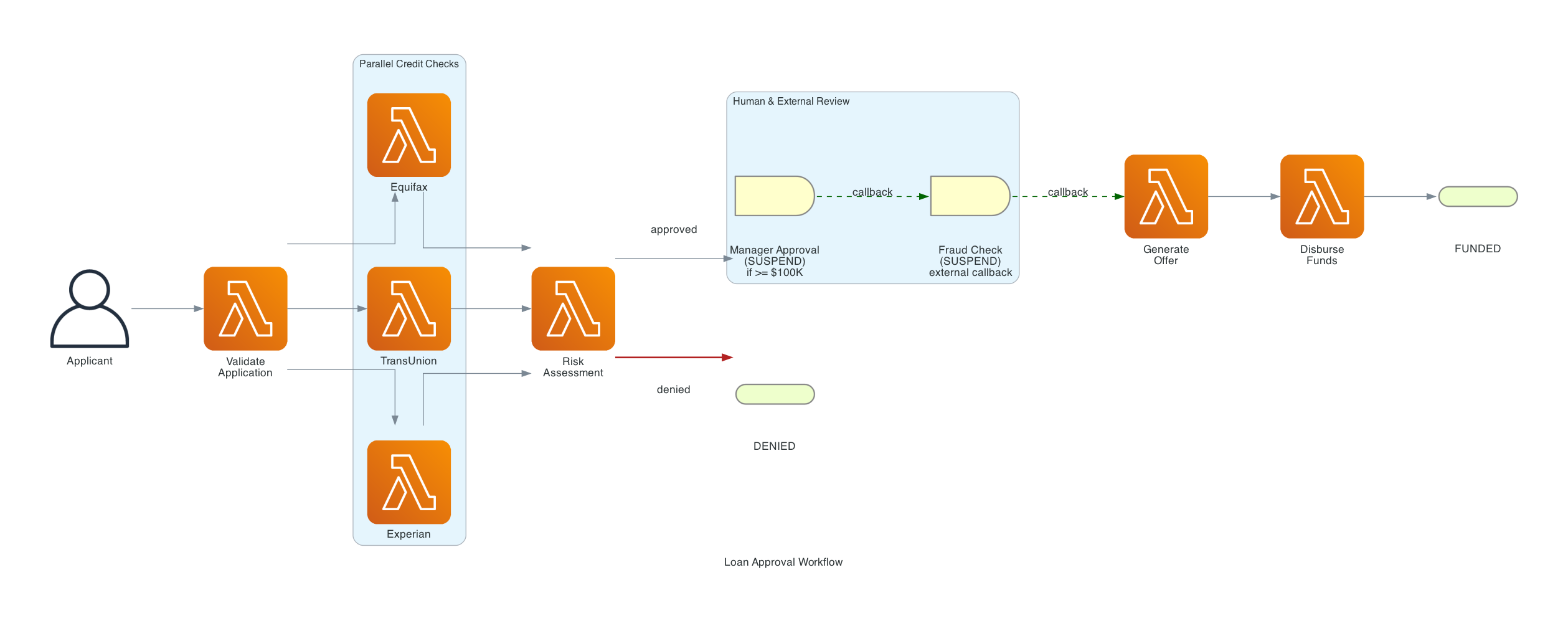
There are three hardcoded demo profiles that produce predictable outcomes so you can demonstrate all the paths:
| Profile | SIN (last 4) | Default Amount | Outcome |
|---|---|---|---|
| Alice Johnson | 1111 | $150,000 | Always approved (triggers manager approval for amounts >= $100K) |
| Bob Martinez | 2222 | $50,000 | Always denied (credit score too low) |
| Charlie Wilson | 3333 | $25,000 | Approved if <= $25,000, denied if above |
The Code - Walking Through the Durable Workflow
Let's look at the key parts of the code. I will focus on the durable function itself since that is where all the interesting stuff happens.
Making a Function Durable
The first thing you need to know is that making a Lambda function durable requires two things. In your code you use the @durable_execution decorator on the handler and the @durable_step decorator on each step function:
from aws_durable_execution_sdk_python import (
    DurableContext,
    StepContext,
    durable_execution,
    durable_step,
)

@durable_step
def validate_application(step_context: StepContext, application: dict) -> dict:
    """Validate the loan application fields."""
    required = [
        "application_id", "applicant_name", "ssn_last4",
        "annual_income", "loan_amount", "loan_purpose",
    ]
    missing = [f for f in required if f not in application]
    if missing:
        raise ValueError(f"Missing required fields: {missing}")

    # ... validation logic ...

    return {
        "application_id": application["application_id"],
        "status": "validated",
        "estimated_dti": round(dti_estimate, 2),
        # ... more fields ...
    }
This is just a normal Python function with a decorator. It receives a StepContext as the first argument and returns a result. That result gets checkpointed automatically. If the Lambda replays later this step will return the cached result instead of running the validation logic again.
In the SAM template you add DurableConfig to the function resource:
LoanWorkflowFunction:
  Type: AWS::Serverless::Function
  Properties:
    FunctionName: LoanWorkflowFunction
    CodeUri: src/
    Handler: loan_demo.lambda_handler
    Timeout: 300
    AutoPublishAlias: live
    DurableConfig:
      ExecutionTimeout: 3600           # 1 hour total workflow time
      RetentionPeriodInDays: 3        # Keep checkpoint history 3 days
Two important things to notice here. DurableConfig is what enables the feature and it cannot be added to existing functions, you have to create the function with it from the start. And AutoPublishAlias: live gives us a qualified ARN. You should always invoke durable functions via a version or alias, never $LATEST, because suspended executions need to replay against the same code that started them.
The Main Handler - Orchestrating the Workflow
Here is the core of the handler that ties everything together:
@durable_execution
def lambda_handler(event: dict, context: DurableContext) -> dict:
    table = get_progress_table()
    application_id = event["application_id"]

    try:
        # Step 1: Validate Application
        validated = context.step(validate_application(event))

        # Step 2: Parallel Credit Bureau Checks
        bureaus = ["equifax", "transunion", "experian"]
        credit_results = context.parallel([
            lambda ctx, b=b: ctx.step(
                pull_credit_report(b, validated["ssn_last4"])
            )
            for b in bureaus
        ])
        credit_reports = credit_results.get_results()

        # Step 3: Risk Assessment
        risk = context.step(calculate_risk_score(
            credit_reports, validated["ssn_last4"], validated["loan_amount"]
        ))

        # Denied path
        if risk["decision"] == "denied":
            return {"status": "denied", "reason": f"Risk tier: {risk['risk_tier']}"}

        # Step 4: Manager Approval (if >= $100,000)
        if validated["loan_amount"] >= 100000:
            approval_result = context.wait_for_callback(
                submit_manager_approval,
                name="manager-approval",
                config=WaitForCallbackConfig(timeout=Duration.from_minutes(30)),
            )
            if not approval_result.get("approved"):
                return {"status": "denied", "reason": "Manager denied"}

        # Step 5: External Fraud Check (Callback)
        fraud_result = context.wait_for_callback(
            submit_fraud_check,
            name="fraud-check",
            config=WaitForCallbackConfig(timeout=Duration.from_minutes(5)),
        )

        # Step 6: Generate Offer and Disburse
        offer = context.step(generate_loan_offer(validated, risk))
        disbursement = context.step(disburse_funds(offer))

        return {"status": "approved", "disbursement_ref": disbursement["disbursement_ref"]}

    except Exception as error:
        raise
I want to call out a few things that I found really interesting while building this.
Parallel Execution
The context.parallel() call runs three credit bureau checks concurrently. Each one is checkpointed independently. If two of the three bureaus succeed and the third fails on the first invocation, when Lambda replays only the failed one re-executes. The other two return their cached results instantly.
credit_results = context.parallel([
    lambda ctx, b=b: ctx.step(
        pull_credit_report(b, validated["ssn_last4"])
    )
    for b in bureaus
])
credit_reports = credit_results.get_results()
I have done parallel execution in Step Functions before using the Parallel state and it works well. But here it just feels more natural, it is a list comprehension that produces concurrent work. No separate branch definitions needed.
Two Callback Patterns
The demo uses context.wait_for_callback() in two places and they demonstrate two different real-world patterns.
Manager Approval - Human-in-the-Loop
For loans of $100K or more the workflow suspends and waits for a manager to approve. The setup function stores the callback ID in DynamoDB so the React frontend can read it and show an approval modal:
def submit_manager_approval(callback_id, _ctx):
    """Store callback_id in DynamoDB so the frontend can send the approval."""
    tbl = get_progress_table()
    tbl.update_item(
        Key={"application_id": validated["application_id"]},
        UpdateExpression="SET callback_id = :cid",
        ExpressionAttributeValues={":cid": callback_id},
    )

approval_result = context.wait_for_callback(
    submit_manager_approval,
    name="manager-approval",
    config=WaitForCallbackConfig(timeout=Duration.from_minutes(30)),
)
When the manager clicks approve in the React UI the API Lambda reads the callback ID from DynamoDB and calls send_durable_execution_callback_success to resume the workflow:
lambda_client.send_durable_execution_callback_success(
    CallbackId=callback_id,
    Result=json.dumps({"approved": approved}),
)
The Lambda that runs the durable workflow is completely idle during this time with zero compute cost. The manager could take 5 minutes or 5 hours but you only pay when the workflow actually resumes.
I have done something similar with Step Functions task tokens in my pizza ordering project where the token was passed to a Fargate container to call back when processing was complete. The concept is the same but with durable functions the callback is part of the same Python file rather than requiring coordination between separate state machine definitions and external compute.
Fraud Check - External Service Callback
The second callback demonstrates integrating with an external service. The workflow invokes a separate Lambda asynchronously and passes it the callback ID:
def submit_fraud_check(callback_id, _ctx):
    """Invoke the external fraud check Lambda, passing the callback_id."""
    fraud_lambda = boto3.client("lambda")
    fraud_lambda.invoke(
        FunctionName=os.environ["FRAUD_CHECK_FUNCTION"],
        InvocationType="Event",
        Payload=json.dumps({
            "callback_id": callback_id,
            "application_id": validated["application_id"],
            "applicant_name": validated["applicant_name"],
        }),
    )
The fraud check Lambda does its processing (simulated with a 5-second delay in the demo) and then sends the callback:
# fraud_check.py
def lambda_handler(event, context):
    callback_id = event["callback_id"]

    # Simulate processing
    time.sleep(5)

    result = {
        "fraud_check": "passed",
        "risk_indicators": 0,
        "checked_by": "FraudCheckService-v2",
    }

    # Resume the suspended durable execution
    lambda_client.send_durable_execution_callback_success(
        CallbackId=callback_id,
        Result=json.dumps(result),
    )
This pattern works for any external system - a microservice, a webhook handler, a third-party API that calls you back. The important thing is that the calling system has the callback ID and the IAM permission to call SendDurableExecutionCallbackSuccess on the durable function.
Real-Time Progress Tracking
One thing I wanted in this demo was the ability to see the workflow progressing in real time from the frontend. The durable workflow writes progress entries to DynamoDB at each step:
def log_progress(table, application_id, step, message, status, level="info", result=None):
    """Append a log entry and update status in DynamoDB."""
    timestamp = datetime.now(timezone.utc).isoformat()
    log_entry = {
        "timestamp": timestamp,
        "step": step,
        "message": message,
        "level": level,
    }
    table.update_item(
        Key={"application_id": application_id},
        UpdateExpression=(
            "SET #logs = list_append(if_not_exists(#logs, :empty_list), :new_log), "
            "current_step = :step, #status = :status, updated_at = :ts"
        ),
        # ...
    )
The React frontend polls GET /status/{applicationId} every couple of seconds and updates the UI as each step completes. There is nothing durable-function-specific about this, it is just polling a DynamoDB table. But it makes the demo much more compelling because you can watch the workflow progress through each checkpoint.
Handling Replays
One subtle issue I had to deal with was replay detection for the progress logging. Remember that when the durable function resumes after a callback the handler re-executes from the top and completed steps return their cached results. But the log_progress calls between steps are not inside steps, they are regular Python code that runs again on every replay.
I solved this with a counter-based approach:
from collections import Counter
existing = table.get_item(Key={"application_id": application_id}).get("Item", {})
prior_counts = Counter(entry["step"] for entry in existing.get("logs", []))
call_counts = Counter()

def log(step, message, status, level="info", result=None):
    call_counts[step] += 1
    if call_counts[step] <= prior_counts.get(step, 0):
        message = f"[REPLAY] {message}"
        level = "replay"
    log_progress(table, application_id, step, message, status, level, result)
This compares how many times each step has been logged before versus how many times we have called log in the current invocation. If we have already logged that many entries for a step it must be a replay and we tag it accordingly. This is a good example of the kind of thing you need to think about with the replay model that you don't have to worry about with Step Functions.
The SAM Template
The full SAM template sets up everything: a DynamoDB table, three Lambda functions, API Gateway with CORS, and all the IAM permissions. Here is the key section for the durable workflow function:
LoanWorkflowFunction:
  Type: AWS::Serverless::Function
  Properties:
    FunctionName: LoanWorkflowFunction
    CodeUri: src/
    Handler: loan_demo.lambda_handler
    Timeout: 300
    AutoPublishAlias: live
    DurableConfig:
      ExecutionTimeout: 300
      RetentionPeriodInDays: 3
    Environment:
      Variables:
        PROGRESS_TABLE: !Ref LoanProgressTable
        FRAUD_CHECK_FUNCTION: !Ref FraudCheckFunction
    Policies:
      - AWSLambdaBasicExecutionRole
      - Statement:
          - Effect: Allow
            Action:
              - lambda:ManageDurableState
              - lambda:GetDurableExecution
              - lambda:ListDurableExecutions
            Resource: !Sub "arn:aws:lambda:${AWS::Region}:${AWS::AccountId}:function:LoanWorkflowFunction*"
      - DynamoDBCrudPolicy:
          TableName: !Ref LoanProgressTable
      - Statement:
          - Effect: Allow
            Action:
              - lambda:InvokeFunction
            Resource: !GetAtt FraudCheckFunction.Arn
Notice the lambda:ManageDurableState permission - the function needs this to manage its own checkpoint data. The fraud check function needs a separate permission, lambda:SendDurableExecutionCallbackSuccess, to send the callback that resumes the workflow.
Durable Functions vs Step Functions - When Each Wins
After building this project and spending time with both services I have a much clearer picture of when each one makes sense. Here is how I think about it.
Choose Durable Functions When:
-
Your workflow is code-centric business logic. If the interesting part is the Python code between steps: validation rules, scoring algorithms, data transformations, durable functions keep everything in one place.
-
You need third-party libraries. In this demo I used AWS Lambda Powertools for logging, tracing, and metrics. In a real-world scenario you might need pandas for data processing, the Stripe SDK for payments, or an AI SDK for model calls. With durable functions you just add them to
requirements.txt. In Step Functions each dependency would need its own Lambda function. -
You have complex branching and looping. An AI agent that chains LLM calls, branches on model output, and retries on rate limits is just a while loop in Python. Expressing that as an ASL state machine means fighting the declarative model.
-
You want local testing. The durable execution testing SDK simulates the checkpoint engine in-process with pytest. No Docker containers, no local Lambda emulator, no AWS credentials needed.
Choose Step Functions When:
-
You are orchestrating across native AWS services. If your workflow is Glue crawler → Athena query → S3 export → SNS notification with zero custom logic between steps, Step Functions calls those services directly without Lambda. You can't beat zero-compute orchestration.
-
Visual observability matters. When the ETL pipeline fails at 2 AM, the on-call engineer opens the Step Functions console and sees one red box. They click it and see the error. No log searching.
-
You have compliance requirements. SOC 2 auditors can review a visual state machine. They can see every step, every permission, every error path without reading Python code.
-
The workflow is mostly waiting. A notification workflow that waits 30 days, checks something, and sends an email, five state transitions over a month, costs essentially nothing in Step Functions. No Lambda overhead during the waits.
The Hybrid Pattern
Worth mentioning that the best architecture often uses both. Step Functions for the macro-orchestration (routing, cross-service coordination, audit trail) and durable functions for the micro-orchestration (complex business logic inside individual steps). Step Functions calls a Lambda, that Lambda happens to be a durable function with its own internal workflow. Best of both worlds.
Things to Watch Out For
There are a few key things to watch out for that I ran into or learned about while building this that are worth being aware of.
Replay demands determinism. Since your code runs multiple times you cannot branch on things like random numbers, timestamps, or any mutable external state outside of steps. Everything non-deterministic must go inside a @durable_step. In my credit bureau check I generate scores using a seeded random number generator based on the SSN, the seed ensures the same score every time for the same input which keeps the replay deterministic.
The 15-minute invocation limit still applies. Each individual replay invocation has the standard Lambda timeout. Durable functions do not change that. What changes is the total execution can span many invocations over up to a year. Use waits between long steps to reset the window.
Version pinning is essential. If your code changes while an execution is suspended for three days waiting for a manager approval, the replay will run different code than the original. The AutoPublishAlias: live in the SAM template handles this by always creating a new version on deploy.
Observability is still maturing. Logging across replays can be confusing, you see the same log lines from both the original execution and the replay. The Durable Executions tab in the Lambda console is helpful but there is no jump-to-logs feature yet. I recommend investing in structured logging from day one with something like AWS Lambda Powertools.
This is a new service. Launched December 2025. You cannot convert existing functions. The SDKs are evolving. Pin your SDK versions and bundle them with your deployment package.
Try It Out
If you want to try this out for yourself the full source code is available on GitHub: https://github.com/RDarrylR/lambda-durable-demo
# Clone the repo
git clone https://github.com/RDarrylR/lambda-durable-demo
cd lambda-durable-demo

# Build and deploy the backend
sam build
sam deploy --guided   # first time

# Note the LoanApiUrl output, then setup the frontend
cd frontend
npm install
echo "VITE_API_URL=https://YOUR-API-ID.execute-api.us-east-1.amazonaws.com" > .env
npm run dev
The frontend runs at http://localhost:5173. Click one of the demo profiles (Alice, Bob, or Charlie), submit the application, and watch the workflow progress in real time. For Alice's $150K loan you will see the manager approval modal pop up, approve it and watch the rest of the workflow complete through the fraud check and disbursement.
I have lots of plans to expand on this in the future including adding automated tests with the durable execution testing SDK and exploring the hybrid pattern with Step Functions.
For more articles from me please visit my blog at Darryl's World of Cloud or find me on Bluesky, X, LinkedIn, Medium, Dev.to, or the AWS Community.
For tons of great serverless content and discussions please join the Believe In Serverless community we have put together at this link: Believe In Serverless Community
Comments
Loading comments...