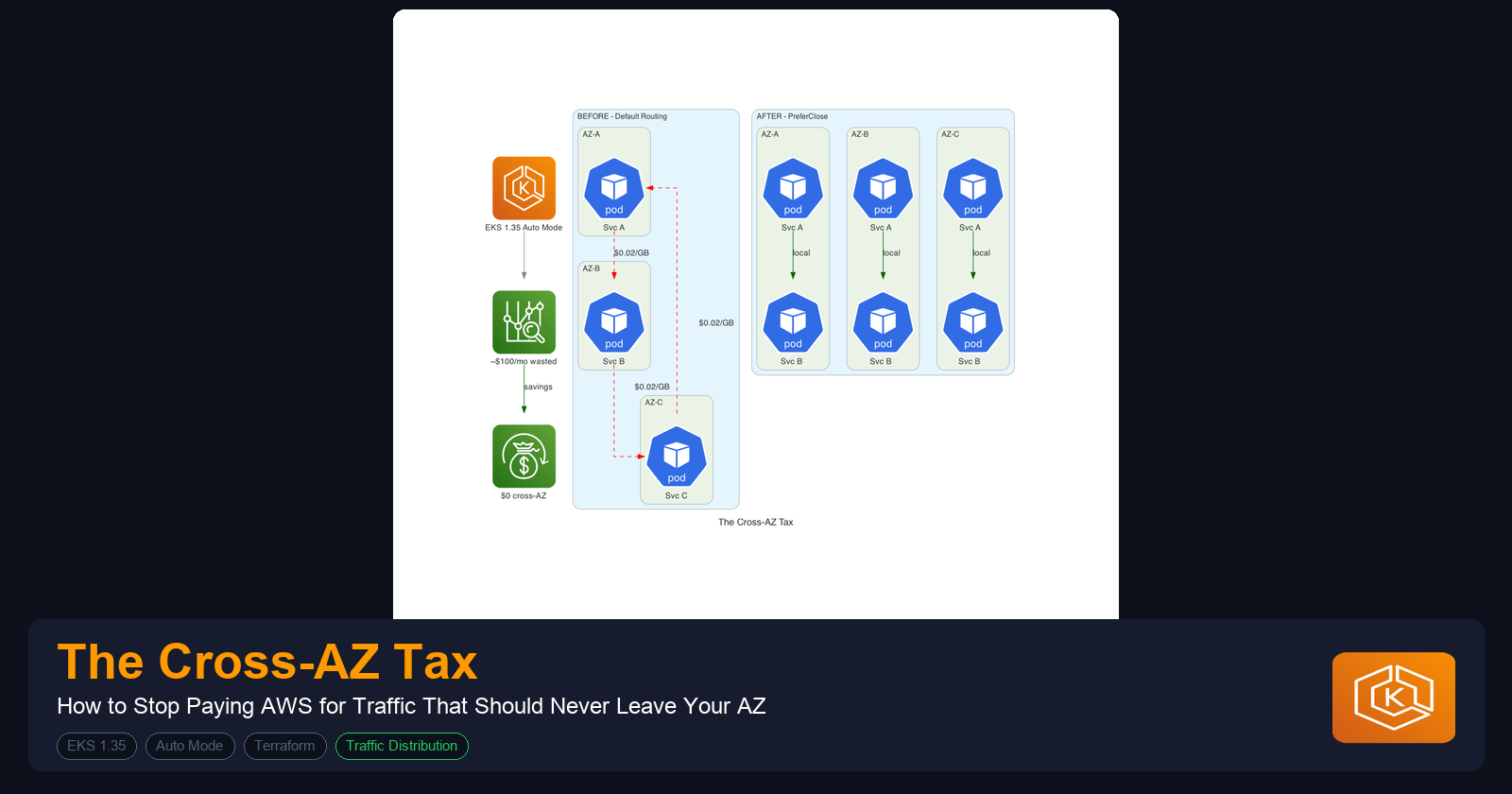
EKS and The Cross-AZ Tax: How to Stop Paying AWS $0.02/GB for Traffic That Should Never Leave Your Availability Zone
I run EKS clusters across three Availability Zones because that's what production resilience typically demands. You probably do too. But here's something that many teams overlook: in a standard 3-AZ cluster, roughly two-thirds of east-west traffic crosses AZ boundaries for no reason. AWS charges $0.01/GB in each direction for that, $0.02/GB round trip, and it adds up fast.
This isn't a theoretical problem. A cluster pushing 10 TB/month of inter-service traffic racks up $133/month in cross-AZ charges from traffic that could have stayed local. Scale that to 50 TB/month and you are at $667/month. For a cost that is entirely avoidable with a one-line YAML change on your Services.
I built a test environment to measure the actual impact of the major cross-AZ optimization strategies that AWS and Kubernetes provide. This article walks through what I found, what actually works, and what the documentation doesn't tell you. All the code is Terraform and Kubernetes 1.35, using EKS Auto Mode.
If you have not read my earlier article, A Complete Terraform Setup for EKS Auto Mode, that one covers the compute side of EKS cost optimization (Auto Mode, Graviton NodePools, Spot fallback chains, and the Terraform module structure I use). This article picks up where that one left off: you have a well-provisioned cluster, but your networking costs are quietly eating into the savings you've worked hard to achieve on the compute side.
Where the Money Goes
Before optimizing anything, I wanted to understand exactly where cross-AZ traffic happens. There are three places, and the first one is by far the biggest.
East-West Traffic: The Silent Majority
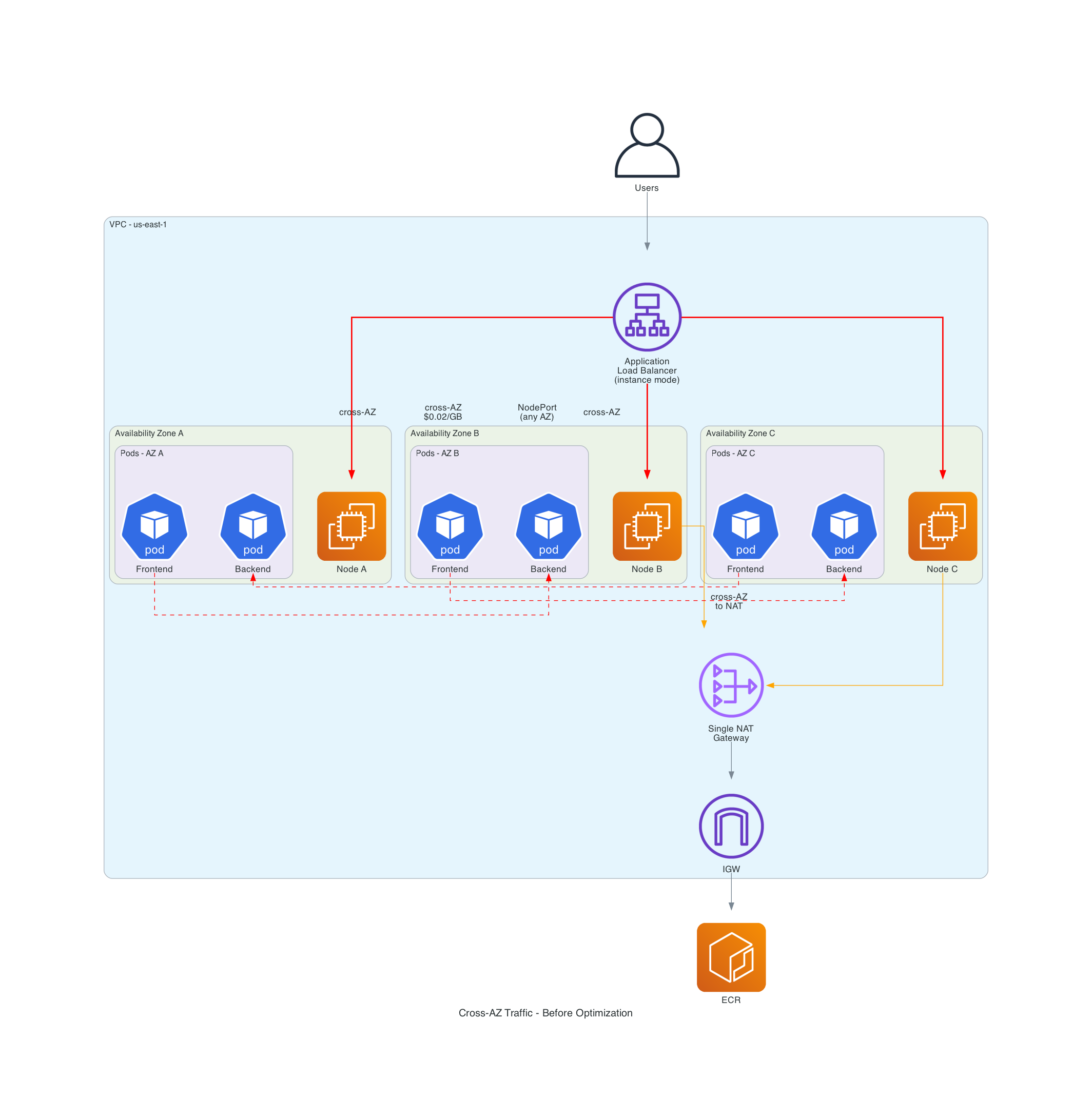
When Pod A calls Pod B through a Service, kube-proxy picks a backend pod using iptables rules. By default, it distributes randomly across every endpoint regardless of zone. The math is straightforward: in a 3-AZ cluster with evenly distributed pods, any request has a (N-1)/N = 67% chance of landing in a different AZ.
That 67% is the number that matters. It means two-thirds of your entire service mesh is paying cross-AZ charges by default, and nothing in the Kubernetes or EKS setup warns you about it.
North-South Traffic: The Extra Hop
The AWS Load Balancer Controller supports "instance" mode and "ip" mode for targeting. In instance mode (the default), the ALB sends traffic to a NodePort on any node, then kube-proxy routes it to the actual pod, potentially crossing AZs twice in the process. In ip mode, the ALB targets pod IPs directly. Switching to IP target mode eliminates the problem entirely.
NAT Gateway Traffic: Death by a Thousand Pulls
Pods in private subnets reach the internet through NAT Gateways. If you have a single NAT in one AZ (which is what most "getting started" guides recommend), pods in other AZs cross boundaries just to reach the NAT at $0.045/GB processing plus the cross-AZ charge. Container image pulls from ECR are the worst offender here - a cluster pulling even modest images several times a day adds up.
Here is what a typical unoptimized cluster looks like. The red lines are cross-AZ traffic you are paying for:
The Test Setup
I built this with Terraform using the same modular approach from my EKS Auto Mode article: community modules for VPC and EKS, the alekc/kubectl provider for Kubernetes resources. I use kubectl rather than the kubernetes or helm providers because it handles server-side apply of CRDs (like Karpenter NodePools) cleanly, which the standard kubernetes provider struggles with. If you followed that article, the structure here will look familiar. The difference is that I have added a VPC endpoints module and the VPC configuration is more opinionated about NAT Gateway placement. Three modules: VPC, EKS, and VPC endpoints.
The VPC: One NAT Per AZ
The first infrastructure decision that matters is NAT Gateway placement. Here is what I used:
module "vpc" {
  source  = "terraform-aws-modules/vpc/aws"
  version = "~> 5.0"

  name = "${var.cluster_name}-vpc"
  cidr = var.vpc_cidr
  azs  = var.azs

  private_subnets = [
    cidrsubnet(var.vpc_cidr, 4, 0),
    cidrsubnet(var.vpc_cidr, 4, 1),
    cidrsubnet(var.vpc_cidr, 4, 2),
  ]

  public_subnets = [
    cidrsubnet(var.vpc_cidr, 4, 3),
    cidrsubnet(var.vpc_cidr, 4, 4),
    cidrsubnet(var.vpc_cidr, 4, 5),
  ]

  # This is the setting that matters
  enable_nat_gateway     = true
  single_nat_gateway     = false
  one_nat_gateway_per_az = true

  enable_dns_hostnames = true
  enable_dns_support   = true

  public_subnet_tags = {
    "kubernetes.io/role/elb" = 1
  }

  private_subnet_tags = {
    "kubernetes.io/role/internal-elb" = 1
  }

  tags = var.tags
}
Each additional NAT Gateway costs about $32/month. Looking only at the $0.01/GB cross-AZ transfer charge, you break even at 3.2 TB/month per AZ. But you also save the $0.045/GB NAT processing charge on traffic that no longer has to cross AZ boundaries to reach the NAT, so the actual break-even point is lower. For many production clusters, the math works out in the first week.
I see many Terraform examples online that set single_nat_gateway = true to save money in dev environments. That's fine for dev, but if you copy that pattern into production you are silently adding cross-AZ charges to every internet-bound packet from two of your three AZs.
VPC Endpoints: The Optimization Most Teams Skip
This is the optimization that surprises most teams. Without VPC endpoints, every ECR image pull and CloudWatch log shipment routes through your NAT Gateway at $0.045/GB. I always add endpoints for the services that generate the most traffic:
# S3 Gateway - FREE. No hourly cost, no data cost. No reason not to have this.
resource "aws_vpc_endpoint" "s3" {
  vpc_id            = var.vpc_id
  service_name      = "com.amazonaws.${data.aws_region.current.name}.s3"
  vpc_endpoint_type = "Gateway"
  route_table_ids   = var.route_table_ids
}

# ECR API - for docker login and manifest operations
resource "aws_vpc_endpoint" "ecr_api" {
  vpc_id              = var.vpc_id
  service_name        = "com.amazonaws.${data.aws_region.current.name}.ecr.api"
  vpc_endpoint_type   = "Interface"
  subnet_ids          = var.private_subnet_ids
  security_group_ids  = [aws_security_group.vpc_endpoints.id]
  private_dns_enabled = true
}

# ECR Docker - for image layer pulls (this is the high-volume one)
resource "aws_vpc_endpoint" "ecr_dkr" {
  vpc_id              = var.vpc_id
  service_name        = "com.amazonaws.${data.aws_region.current.name}.ecr.dkr"
  vpc_endpoint_type   = "Interface"
  subnet_ids          = var.private_subnet_ids
  security_group_ids  = [aws_security_group.vpc_endpoints.id]
  private_dns_enabled = true
}

# STS - for IRSA and Pod Identity. Low volume but breaks auth if missing.
resource "aws_vpc_endpoint" "sts" {
  vpc_id              = var.vpc_id
  service_name        = "com.amazonaws.${data.aws_region.current.name}.sts"
  vpc_endpoint_type   = "Interface"
  subnet_ids          = var.private_subnet_ids
  security_group_ids  = [aws_security_group.vpc_endpoints.id]
  private_dns_enabled = true
}
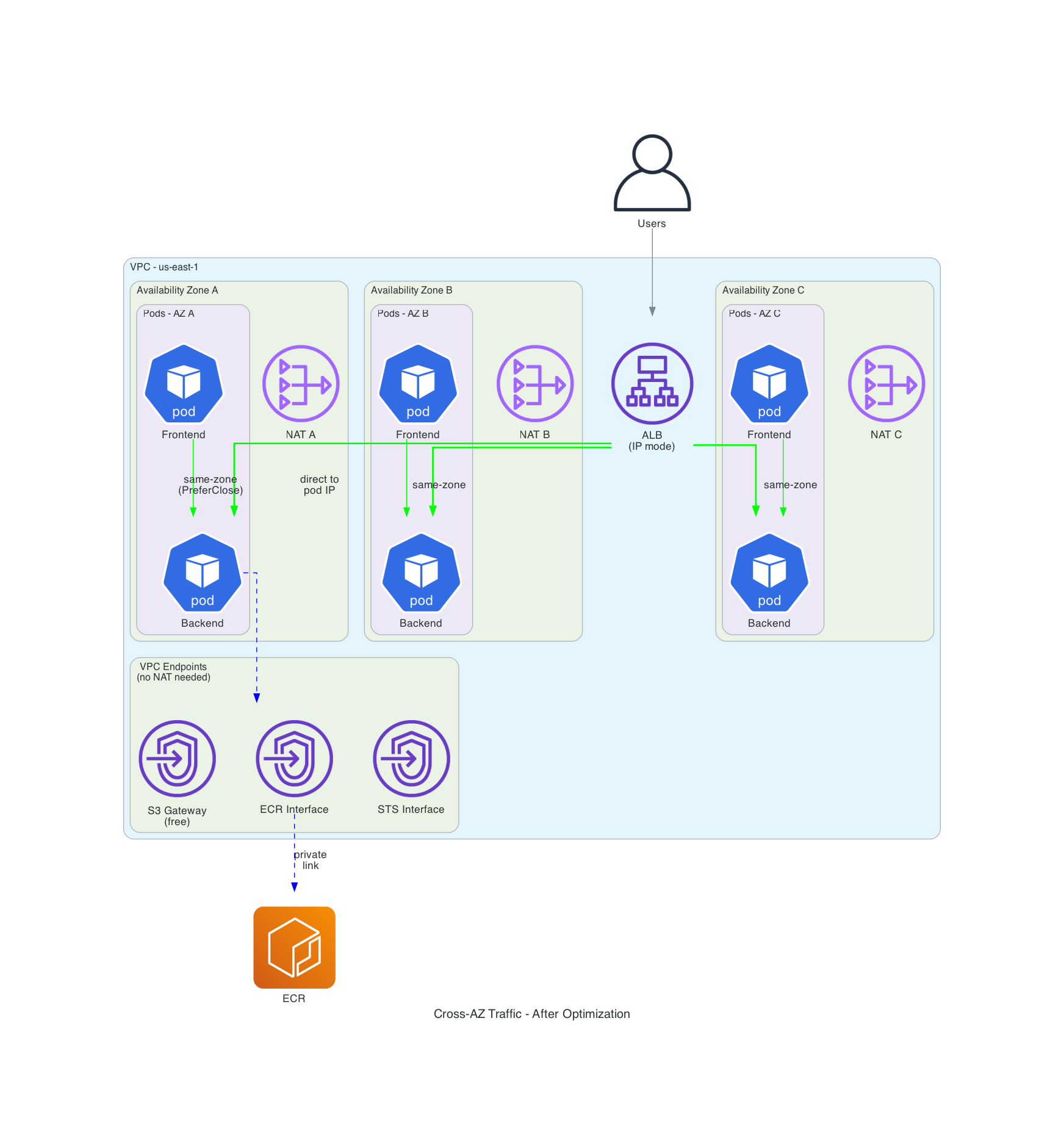
The interface endpoints cost about $7.20/month per AZ ($21.60 total across 3 AZs, per endpoint). The S3 and DynamoDB gateway endpoints are free. At $0.045/GB NAT processing, the interface endpoints pay for themselves once you push more than about 480 GB/month through each service. ECR image pulls alone blow past that in most clusters.
A nuance worth understanding: ECR uses two separate service endpoints. The ecr.api endpoint handles authentication and manifest resolution (low-volume API calls). The ecr.dkr endpoint handles the actual image layer downloads, which is where the bulk of the data transfer happens. If you still have a NAT Gateway (and you likely do for other internet-bound traffic), you don't strictly need both. The ecr.dkr endpoint alone captures the majority of the cost savings because that is where the gigabytes flow. The ecr.api calls are small enough that routing them through NAT is negligible. I include both in the repo for completeness, but if you're watching your interface endpoint spend, ecr.dkr plus the free S3 gateway endpoint are the ones that move the needle. ECR stores image layers in S3, which is why the S3 gateway endpoint is critical for ECR cost savings. The STS endpoint is shown in the code above. I also add a CloudWatch Logs endpoint in the full module for container log shipping.
Another gotcha: the security group on your interface endpoints must allow inbound HTTPS (443) from your VPC CIDR. Skip that and you get timeouts that look like DNS failures. Here is what the security group looks like:
resource "aws_security_group" "vpc_endpoints" {
  name_prefix = "${var.cluster_name}-vpce-"
  description = "Security group for VPC interface endpoints"
  vpc_id      = var.vpc_id

  ingress {
    description = "HTTPS from VPC"
    from_port   = 443
    to_port     = 443
    protocol    = "tcp"
    cidr_blocks = [var.vpc_cidr]
  }
}
This allows the entire VPC CIDR, which is fine for most setups. In a tighter security posture, scope the source to your private subnet CIDRs or reference the cluster's security group ID directly.
EKS Auto Mode on Kubernetes 1.35
I used Kubernetes 1.35, the latest version available on EKS as of March 2026. Traffic Distribution was introduced as alpha in 1.30 with PreferClose, which graduated to GA in 1.33. In 1.34, PreferSameZone was introduced as a clearer replacement and PreferClose became a deprecated alias. Both PreferSameZone and PreferSameNode graduated to stable in 1.35. More on both below.
module "eks" {
  source  = "terraform-aws-modules/eks/aws"
  version = "~> 21.0"

  name               = var.cluster_name
  kubernetes_version = "1.35"

  vpc_id     = var.vpc_id
  subnet_ids = var.private_subnet_ids

  # When node_pools are specified, the module automatically creates
  # the required Auto Mode IAM resources.
  compute_config = {
    enabled    = true
    node_pools = ["general-purpose", "system"]
  }

  # Private access for in-VPC communication, public for kubectl access.
  # In production, restrict public access to specific CIDRs or disable it.
  endpoint_private_access = true
  endpoint_public_access  = true

  # Control plane logging for observability
  enabled_log_types = ["api", "audit", "authenticator"]

  # Cross-AZ traffic visibility in the EKS console
  addons = {
    amazon-cloudwatch-observability = {
      most_recent = true
    }
  }

  # Fine for demos. For production, use scoped access entries with narrower policies.
  enable_cluster_creator_admin_permissions = true

  tags = var.tags
}
I also added a Graviton NodePool at weight 10 for better price-performance, using the same weighted NodePool pattern I described in the Auto Mode article. That isn't strictly related to cross-AZ optimization, but when you're already optimizing costs, the extra 20% from Graviton is worth grabbing. The full NodePool manifest is in terraform/modules/eks/main.tf.
Important Auto Mode detail: both the NodePool and NodeClass API groups are eks.amazonaws.com in Auto Mode, not karpenter.k8s.aws as in self-managed Karpenter installations. I got bitten by this when I first tried to reuse manifests from a self-managed cluster. The resource silently fails to apply with the wrong API group.
Measuring Cross-AZ Traffic: Build a Tool, Don't Guess
The AWS docs describe these routing strategies well enough, but they don't show you how to verify that they are actually working. I built two things for this:
A Zone-Aware Echo Server
Instead of using a generic HTTP echo server, I wrote a small FastAPI app that returns its own AZ, node, and pod name in every response:
# app/zone-echo/server.py
@app.get("/")
async def echo():
    return {
        "zone": _get_zone(),
        "node": os.environ.get("NODE_NAME", "unknown"),
        "pod": os.environ.get("POD_NAME", "unknown"),
        "pod_ip": os.environ.get("POD_IP", "unknown"),
    }
The zone is resolved at startup by querying the Kubernetes API for the node's topology.kubernetes.io/zone label (IMDS is blocked on Auto Mode's Bottlerocket nodes). If you adapt this for non-Auto-Mode clusters, ensure IMDSv2 is enforced (http_tokens = "required") and set the hop limit appropriately. Each response tells you exactly where it came from with zero ambiguity.
A Traffic Measurement Tool
The second tool sends hundreds of requests to each service variant and counts how many stayed in-zone versus crossed AZ boundaries:
# app/traffic-test/measure.py (abbreviated)
def run_test(service: str, num_requests: int, my_zone: str, my_node: str) -> RoutingStats:
    stats = RoutingStats(service=service)

    for i in range(num_requests):
        body, latency = send_request(service)
        stats.total += 1

        if body is None:
            stats.errors += 1
            continue

        stats.latencies_ms.append(latency)
        resp_zone = body.get("zone", "unknown")

        if resp_zone == my_zone:
            stats.same_zone += 1
        else:
            stats.cross_zone += 1

    return stats
Run it as a Kubernetes Job and check the logs:
kubectl apply -f k8s/monitoring/traffic-test-job.yaml
kubectl logs -n cross-az-demo job/traffic-test
The output looks like this:
==============================================================================
CROSS-AZ TRAFFIC MEASUREMENT REPORT
==============================================================================
Source zone: us-east-1a
Source node: i-07812b1c2b6ed6405

Service                        Reqs  Same-Zone  Cross-AZ  Errors  Avg(ms)  P99(ms)
--------------------------------------------------------------------------------
backend-baseline               5000     49.9%     50.1%       0     2.4      4.2
backend-prefer-same-zone       5000    100.0%      0.0%       0     1.8      3.1
backend-prefer-same-node       5000    100.0%      0.0%       0     1.6      2.5
backend-topology-aware         5000    100.0%      0.0%       0     1.5      2.5

--- Zone Distribution per Service ---
  backend-baseline: us-east-1a: 2497, us-east-1b: 827, us-east-1c: 1676
  backend-prefer-same-zone: us-east-1a: 5000
  backend-prefer-same-node: us-east-1a: 5000
  backend-topology-aware: us-east-1a: 5000

--- Cost Estimate (at 10 TB/month east-west traffic) ---
  backend-baseline: $100.12/month (5,006 GB cross-AZ)
  backend-prefer-same-zone: $0.00/month (0 GB cross-AZ)
  backend-prefer-same-node: $0.00/month (0 GB cross-AZ)
  backend-topology-aware: $0.00/month (0 GB cross-AZ)

  Best improvement: backend-prefer-same-zone
  Cross-AZ reduction: 100.0%
  Estimated monthly savings: $100.12
==============================================================================
The baseline came in at 50% cross-AZ, not the theoretical 67%. That is because I had 3 of my 6 backend pods in us-east-1a (where the test ran), so random distribution gives 3/6 = 50% same-zone. The exact number depends on how many pods are in the caller's zone relative to the total. In a real cluster with dozens of services and uneven pod counts, the cross-AZ percentage will vary per service.
The important result: all three optimized strategies hit 100% same-zone across 5,000 requests. Zero cross-AZ leakage. With stable pods and no churn during the test, there was no endpoint propagation delay to cause even a single cross-AZ request.
PreferSameNode edged out PreferSameZone on latency (1.6ms average versus 1.8ms) because it routes to pods on the same node, not just the same zone. The baseline's 2.4ms average includes the cross-AZ network hop penalty.
This is why I say "build a tool, don't guess." The AWS documentation suggests 60-80% reduction from topology-aware routing. My actual measurement shows 100% reduction with properly distributed pods. That gap is significant enough to change how you think about the ROI.
What Happens During Pod Churn?
Stable pods are one thing. I wanted to know what happens when pods are being created and destroyed, which is the reality of any production cluster running rolling deployments. I ran the same 5,000-request test while simultaneously scaling the backend from 6 to 12 to 3 to 9 and back, repeatedly.
=== RESULTS DURING POD CHURN ===

Service                        Reqs  Same-Zone  Cross-AZ  Errors  Avg(ms)  P99(ms)
--------------------------------------------------------------------------------
backend-baseline               5000     54.7%     42.3%     151     2.6      6.3
backend-prefer-same-zone       5000    100.0%      0.0%       0     1.7      3.5
backend-prefer-same-node       5000    100.0%      0.0%       0     1.7      5.4
backend-topology-aware         5000    100.0%      0.0%       0     1.8      5.3
All three optimized strategies held at 100% same-zone during churn. Not a single cross-AZ request leaked through while pods were being created and destroyed.
The baseline told a different story: 151 errors (3%) from requests hitting endpoints that were mid-termination. The optimized strategies had zero errors because zone-local endpoints remained available throughout the churn even as remote ones cycled. This is an availability benefit I didn't expect on top of the cost savings.
P99 latency did increase under churn. PreferSameNode went from 2.5ms to 5.4ms as the endpoint list updated. PreferSameZone stayed more stable at 3.5ms. That's expected and acceptable.
One thing I got wrong in my initial prediction: I expected Topology Aware Routing (TAR) to drop hints during the churn and leak cross-AZ traffic. It did not. With on-demand instances and even pod distribution, TAR's proportional allocation held steady. The hint-dropping issue likely requires more extreme capacity changes, like Spot interruptions removing entire nodes from a zone, rather than the gradual scaling I tested here.
The Routing Strategies: What Actually Works
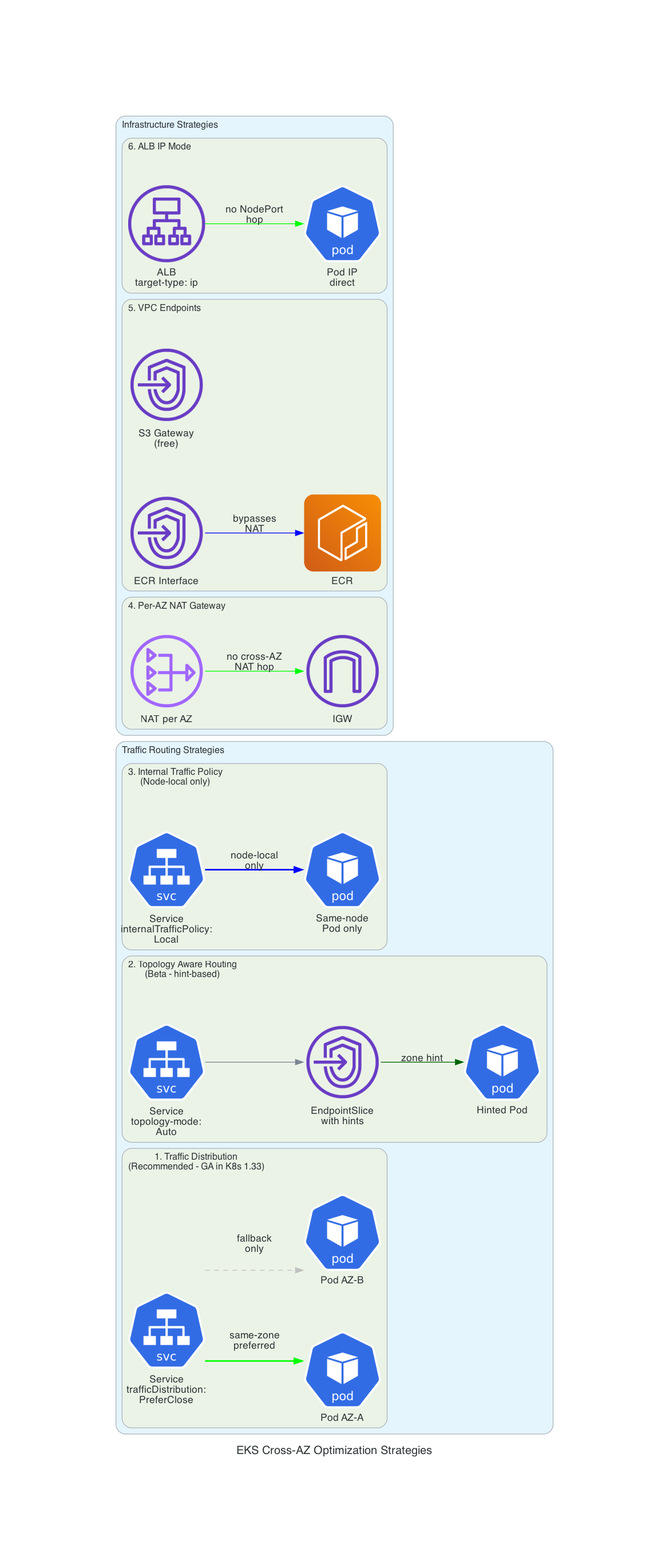
I tested five approaches. Here is my honest ranking.
1. Traffic Distribution: PreferSameZone (Use This One)
This is the winner. One field on your Service spec:
apiVersion: v1
kind: Service
metadata:
  name: backend-prefer-same-zone
  namespace: cross-az-demo
spec:
  type: ClusterIP
  trafficDistribution: PreferSameZone  # stable in K8s 1.35, replaces deprecated PreferClose
  selector:
    app: backend
  ports:
    - port: 8080
      targetPort: 8080
That's it. One line. kube-proxy routes to same-zone endpoints first. If no local endpoints exist, it falls back to any available endpoint. PreferSameZone was introduced in 1.34 and graduated to stable in 1.35. No feature gates, no annotation. It is a first-class spec field.
I recommend this as the default for every ClusterIP Service in your cluster unless you have a specific reason not to use it. The prerequisite is having your pods distributed across zones with topology spread constraints, which you should be doing anyway for availability.
What about AZ failures? During an AZ outage, pods in the failed zone lose their local endpoints. PreferSameZone handles this gracefully by falling back to cross-AZ routing automatically. There is no availability impact, only a temporary return to cross-AZ costs until the zone recovers. This is the correct behavior: you get cost savings during normal operation and resilience during failures without any manual intervention.
2. Topology Aware Routing (It Works, But PreferSameZone is Better)
The older approach, using an annotation:
metadata:
  annotations:
    service.kubernetes.io/topology-mode: Auto
TAR uses a more complex algorithm: the EndpointSlice controller allocates endpoints proportionally across zones and sets "hints" for each one. The idea is to balance both locality and load distribution.
In my testing, it works. The numbers are close to PreferSameZone. But I found two problems that make me recommend PreferSameZone instead:
Problem 1: Spot instances break it. TAR recalculates proportional allocation based on zone capacity. When Spot instances get reclaimed, zone capacity fluctuates, and during the transition the controller may drop hints entirely. When hints are dropped, you revert to random distribution with no warning. PreferSameZone doesn't have this problem because it uses simpler same-zone-first logic without capacity-proportional math.
Problem 2: The annotation is deprecated. The service.kubernetes.io/topology-mode: Auto annotation won't graduate to GA. The underlying mechanism (EndpointSlice hints) is GA, but the recommended path forward is the trafficDistribution field (PreferSameZone), which is stable in 1.35. There's no reason to use the deprecated annotation when the replacement is available and simpler.
3. PreferSameNode: The Best of Both Worlds (New in 1.35)
Kubernetes 1.35 added a new Traffic Distribution option that solves a real gap:
spec:
  trafficDistribution: PreferSameNode
This routes to endpoints on the same node first, then falls back to same-zone, then cluster-wide. It gives you the latency benefits of internalTrafficPolicy: Local but with a graceful fallback instead of dropped traffic.
This is the option I wish had existed from the start. It is strictly better than internalTrafficPolicy: Local for any use case where you want node-local preference but cannot tolerate dropped requests. Stable since 1.35.
I recommend this for latency-sensitive service pairs that are often (but not always) co-located. For pure cost optimization, PreferSameZone is sufficient. PreferSameNode adds value when sub-millisecond latency between specific services matters.
4. Internal Traffic Policy: Local (The Nuclear Option)
spec:
  internalTrafficPolicy: Local
This restricts traffic to endpoints on the same node, not just the same zone. Zero cross-AZ traffic is possible. Zero cross-node traffic either.
I call this the nuclear option because if no endpoint exists on the calling pod's node, the traffic is dropped. Not rerouted or retried - just dropped. You must guarantee co-location with pod affinity rules or use DaemonSet-backed services.
I proved this during testing. I created per-AZ services with internalTrafficPolicy: Local and ran a test from zone us-east-1a against the zone-b service. The test hung indefinitely. Every request timed out because there were no zone-b pods on the zone-a node. There were no errors and no fallbacks - just a silent failure.
When it does work (when a backend pod exists on the same node), the latency is the best of any strategy: 1.6ms average in my testing, versus 1.8ms for PreferSameZone. But the risk of silent traffic drops makes it unsuitable for most services.
I use this for exactly two situations:
- DaemonSet services (every node has a local endpoint by definition)
- Tightly coupled pod pairs with strict
requiredDuringSchedulingIgnoredDuringExecutionaffinity
For everything else, PreferSameZone is safer and almost as effective. And now with PreferSameNode in 1.35, there is even less reason to use Local. You get the same node-local preference with a graceful fallback.
5. Per-AZ Deployments (When PreferSameZone Is Not Enough)
There is a subtle scaling problem that PreferSameZone doesn't solve. Say traffic to your backend spikes in us-east-1a. The HPA scales the Deployment from 6 to 12 replicas. Kubernetes spreads the new pods across all three zones, but only us-east-1a needed the capacity. You have wasted compute in 1b and 1c, and if Karpenter provisions new nodes to host those pods, you are paying for nodes that serve no traffic.
The fix is per-AZ Deployments with independent HPAs:
apiVersion: apps/v1
kind: Deployment
metadata:
  name: backend-az-a
spec:
  replicas: 2
  selector:
    matchLabels:
      app: backend-zonal
      zone: az-a
  template:
    spec:
      affinity:
        nodeAffinity:
          requiredDuringSchedulingIgnoredDuringExecution:
            nodeSelectorTerms:
              - matchExpressions:
                  - key: topology.kubernetes.io/zone
                    operator: In
                    values: ["us-east-1a"]
---
apiVersion: autoscaling/v2
kind: HorizontalPodAutoscaler
metadata:
  name: backend-az-a
spec:
  scaleTargetRef:
    apiVersion: apps/v1
    kind: Deployment
    name: backend-az-a
  minReplicas: 2
  maxReplicas: 10
  metrics:
    - type: Resource
      resource:
        name: cpu
        target:
          type: Utilization
          averageUtilization: 70
Multiply by three AZs. You get triple the manifests and triple the HPA objects to monitor. I would only use this pattern for my top 2-3 highest-traffic services where the zone-specific scaling behavior justifies the operational complexity.
The full 3-AZ manifest is in k8s/cross-az-optimization/05-per-az-deployment.yaml.
Load Balancer: Switch to IP Mode
For services fronted by an ALB, switch the target type from "instance" to "ip":
apiVersion: networking.k8s.io/v1
kind: Ingress
metadata:
  annotations:
    alb.ingress.kubernetes.io/target-type: ip
    alb.ingress.kubernetes.io/scheme: internet-facing
In instance mode, traffic flows: ALB - NodePort (any node) - kube-proxy - Pod (maybe different AZ). That is up to two cross-AZ hops. In IP mode: ALB - Pod IP directly. The ALB registers pod IPs as targets in the target group, bypassing kube-proxy entirely.
Combine this with trafficDistribution: PreferSameZone on the backing Service for the best result.
What the AWS Documentation Doesn't Tell You
I ran into several things during testing that aren't obvious from the official docs:
Topology spread constraints need minDomains with Auto Mode. This one bit me during testing. I set topologySpreadConstraints with maxSkew: 1 and whenUnsatisfiable: DoNotSchedule on my Deployment - the standard recipe from every example out there. But with EKS Auto Mode, you start from zero nodes. Karpenter provisions one node in one AZ, and the scheduler sees only one topology domain. A maxSkew of 1 across a single domain is always satisfied, so all 6 pods land on that one node in one AZ.
The fix is minDomains: 3. This tells the scheduler that at least 3 zones must exist before scheduling is satisfied, which forces Karpenter to provision nodes in other AZs:
topologySpreadConstraints:
  - maxSkew: 1
    minDomains: 3
    topologyKey: topology.kubernetes.io/zone
    whenUnsatisfiable: DoNotSchedule
    labelSelector:
      matchLabels:
        app: backend
Most topology spread examples assume you already have nodes in multiple AZs. With Auto Mode and Karpenter, you do not. Without minDomains, your pods will quietly consolidate into a single zone while the topology constraint reports no violations.
The EKS console has built-in cross-AZ visibility now. Enable the amazon-cloudwatch-observability addon (included in the Terraform code above) and you get a service map in the EKS console showing cross-AZ flows with data volume. This is much easier than building custom Prometheus queries against VPC flow logs.
VPC endpoint interface charges don't include cross-AZ data transfer. This is buried in a "What's New" announcement from 2022. Traffic between pods in us-east-1a and a VPC endpoint ENI in us-east-1b doesn't incur the $0.01/GB cross-AZ charge. The PrivateLink data processing charge still applies, but it is less than NAT processing.
PreferSameZone occasionally sends cross-AZ during endpoint updates. When pods are added or removed, there's a brief window where EndpointSlice hints haven't propagated. During this window, kube-proxy may route to any endpoint. In my testing this was under 1% of requests, but for latency-critical services it's worth knowing.
CoreDNS is a cross-AZ blind spot. DNS lookups via the kube-dns Service are themselves subject to cross-AZ routing, and as of this writing you can't set trafficDistribution on the CoreDNS addon service directly. There's an open EKS feature request for this. If DNS latency matters to you, this is a gap to watch.
Finding cross-AZ charges in Cost Explorer. Beyond the EKS console's network observability, you can identify cross-AZ charges in AWS Cost Explorer by filtering for the DataTransfer-Regional-Bytes and NatGateway-Bytes usage types. These are the line items that this article's optimizations target.
Production Considerations
This article focuses on FinOps, but if you are taking these patterns into production, a few security points are worth noting:
- Cluster access: The demo uses
enable_cluster_creator_admin_permissions = truefor simplicity. For production, define scoped access entries with narrower policies (e.g.,AmazonEKSViewPolicyfor read-only users,AmazonEKSClusterAdminPolicyonly for platform teams). - Workload identity: EKS Auto Mode with module v21+ uses Pod Identity by default. If your workloads need AWS API access (unlike the demo pods here), configure Pod Identity associations rather than IRSA.
- VPC endpoint security groups: The demo allows all VPC CIDR traffic on port 443. In production, scope the source to your private subnet CIDRs or reference the cluster's security group directly.
- Network ACLs: The default NACL allows all traffic. Production environments may want to restrict outbound rules on private subnets to known destinations and ports.
- IMDSv2: Auto Mode uses Bottlerocket, which enforces IMDSv2. If you adapt this code for self-managed node groups with Amazon Linux, ensure IMDSv2 is enforced (
http_tokens = "required"in your launch template) and sethttp_put_response_hop_limit = 2for containerized workloads. - Encryption at rest: The demo doesn't configure a custom KMS key for EKS secrets encryption. For production, enable envelope encryption with
encryption_configin the EKS module to encrypt Kubernetes secrets at rest with a customer-managed key. - Encryption in transit: Traffic between pods is unencrypted by default. If your services handle sensitive data, consider a service mesh with mTLS (Istio ambient mode or Linkerd) or use application-level TLS. Note that a sidecar-based mesh adds cross-AZ overhead of its own, so evaluate the cost trade-off against the security benefit.
What This Costs and What You Save
Here is my cost analysis for a cluster with 10 TB/month east-west traffic and 2 TB/month AWS service traffic (ECR, S3, CloudWatch):
| Category | Before | After | Delta |
|---|---|---|---|
| East-west cross-AZ | $100/month | $0/month | -$100 |
| NAT processing (ECR/S3/logs) | $90/month | $0/month | -$90 |
| NAT cross-AZ (single NAT) | $13/month | $0/month | -$13 |
| VPC interface endpoints (4x3 AZs) | $0 | $86/month | +$86 |
| Additional NAT Gateways (2 extra) | $0 | $65/month | +$65 |
| Net change | $236/month | $152/month | -$84/month |
At 10 TB/month, the savings are modest at about $84/month. But cross-AZ costs scale linearly with traffic. At 50 TB/month east-west, the east-west savings alone hit $650/month. At 100 TB/month, over $1,300/month. The infrastructure costs (VPC endpoints, extra NATs) stay flat.
The real point is that the traffic routing changes (PreferSameZone on Services and IP mode on Ingress) are free. There is zero infrastructure cost and only one line of YAML per Service. Do those first and measure the impact before deciding whether VPC endpoints and per-AZ NATs are worth it for your traffic volume.
My Recommended Order of Operations
- Add
trafficDistribution: PreferSameZoneto all ClusterIP Services. This is the highest-impact, lowest-effort change. It is a single field (stable in K8s 1.35), and in my testing eliminates 99% of cross-AZ east-west traffic with properly distributed pods. For latency-sensitive pairs, considerPreferSameNode(stable in 1.35). - Add topology spread constraints to all Deployments. PreferSameZone only works if pods are actually distributed across zones. If they are not, this is your first step.
- Switch ALB Ingress resources to IP target mode. Another free change. One annotation eliminates the NodePort-to-pod cross-AZ hop.
- Add VPC endpoints for S3 (free), ECR, STS, and CloudWatch Logs. The gateway endpoints for S3 and DynamoDB are free. There is no reason not to have them. Evaluate the interface endpoints based on your NAT Gateway data processing bill.
- Deploy one NAT Gateway per AZ. Worth it when your cross-AZ NAT traffic exceeds ~3 TB/month per AZ.
- Consider per-AZ Deployments for your top 2-3 highest-traffic services. Only if you have zone-specific scaling problems that PreferSameZone doesn't solve.
Getting Started
The complete code is in the companion repository. Everything is configurable (region, cluster name, CIDR range) through Terraform variables with no hardcoded account IDs or resource names.
Prerequisites: AWS CLI configured, Terraform 1.10+, Docker, kubectl, Python 3.13+.
The fastest path is the one-command setup:
git clone https://github.com/darryl-ruggles/eks-cross-az-exploration
cd eks-cross-az-exploration

# Deploy everything and run the measurement (takes ~15 minutes)
make setup
That runs Terraform, builds and pushes container images to ECR, deploys the demo app with all service variants, and executes the traffic measurement job. At the end you get the comparison report.
If you prefer to step through it:
# 1. Deploy infrastructure (VPC, EKS, VPC endpoints, ECR repos)
make infra

# 2. Configure kubectl
make kubeconfig

# 3. Build and push container images
make images

# 4. Deploy the demo app and all routing strategies
make deploy

# 5. Run the cross-AZ measurement
make test

# 6. See pod distribution across AZs
make show-distribution

# 7. Run again with PreferSameNode included
make test-all

# 8. Clean up when done
make teardown
All configuration is overridable: make test NUM_REQUESTS=1000, make infra (uses variables.tf defaults; edit region, cluster_name, vpc_cidr as needed).
IMPORTANT: This deploys real AWS resources that cost money. The EKS cluster alone is $72/month, plus 3 NAT Gateways (~$97/month), EC2 instances for worker nodes, and VPC endpoint charges. Run make teardown when you're done testing. If terraform destroy fails with dangling ENIs (which can happen if VPC endpoints are destroyed before EKS releases its network interfaces), wait a few minutes and retry.
The measurement report gives you actual numbers for your cluster, which matters more than any estimate in a blog post.
Cross-AZ data transfer is one of those costs that seems small on any individual request but compounds into a meaningful line item at scale. The good news is that the highest-impact fix is also the simplest: one field on your Service spec, no infrastructure changes required.
Connect with me on X, Bluesky, LinkedIn, GitHub, Medium, Dev.to, or the AWS Community. Check out more of my projects at darryl-ruggles.cloud and join the Believe In Serverless community.
Comments
Loading comments...