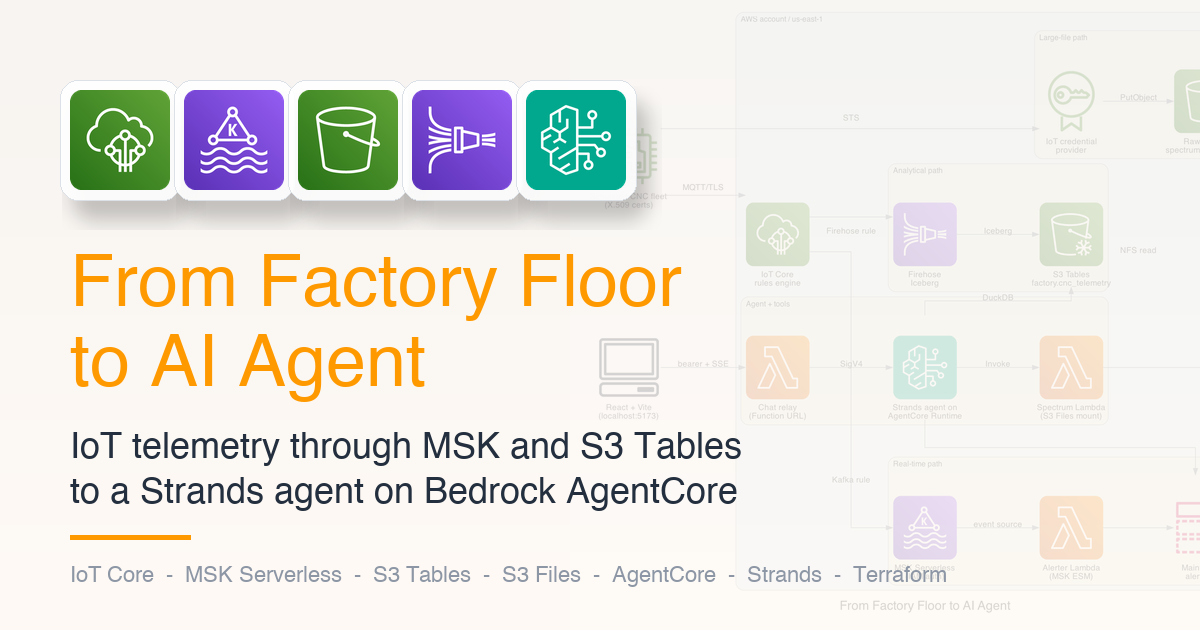
From Factory Floor to AI Agent: An IoT Data Pipeline with MSK, S3 Tables, S3 Files, and Strands Agents (Terraform)
I have used AWS IoT Things before for getting credentials to upload to S3 from the field and also have used Kinesis for streaming. I wanted to build something that uses Kafka as many cases require it and also pull in some GenAI queries.
This post builds a smart-manufacturing data pipeline end to end. Simulated CNC machines authenticate to AWS IoT Core with X.509 certificates and stream telemetry over MQTT. The IoT Core rules engine forks the same MQTT topic into two paths: a real-time path through Amazon MSK Serverless for low-latency alerting, and an analytical path through Amazon Data Firehose into Amazon S3 Tables (Apache Iceberg). A separate large-file path lets devices upload vibration spectrum captures directly to S3 by exchanging their X.509 certificate for short-lived AWS credentials. On top of all that data sits a Strands agent on Bedrock AgentCore Runtime, with custom tools that query S3 Tables through DuckDB, analyze vibration spectra by mounting S3 Files in a Lambda, and publish maintenance alerts.
Everything's Terraform-managed, the supporting Lambdas ship with AWS Lambda Powertools wired in, and the local UI is a small React + Vite app that talks to a Lambda Function URL with response streaming. The full repo is at github.com/RDarrylR/iot-data-pipeline.
Why this combination
There are good AWS blog posts on most of the individual pieces. What's harder to find is a single end-to-end build that wires them together with the right IAM, networking, and Lake Formation glue, and that uses an AI agent as the consumer rather than a notebook or a dashboard.
The use case I picked is a standard one for industrial IoT: a manufacturing facility with a fleet of CNC machines, each producing high-frequency telemetry (vibration, spindle temperature, load, power, feed rate) plus periodic vibration captures large enough that they can't fit inside MQTT's 128 KiB message size cap. The plant needs:
- Sub-second alerting when telemetry crosses thresholds (the real-time path).
- Durable, queryable history for trend analysis ("which machines have been drifting on bearing-band frequencies this week?") - the analytical path.
- Easy access to the raw spectrum captures for offline analysis - the large-file path.
- A natural-language interface for maintenance engineers who don't want to write SQL.
That last bullet is the one that makes the agent earn its place. With Strands and AgentCore Runtime you can hand operators a chat box that translates "compare CNC-002's vibration profile this hour to its baseline" into a DuckDB query against S3 Tables, an FFT inside a spectrum Lambda, and a structured maintenance alert.
Architecture
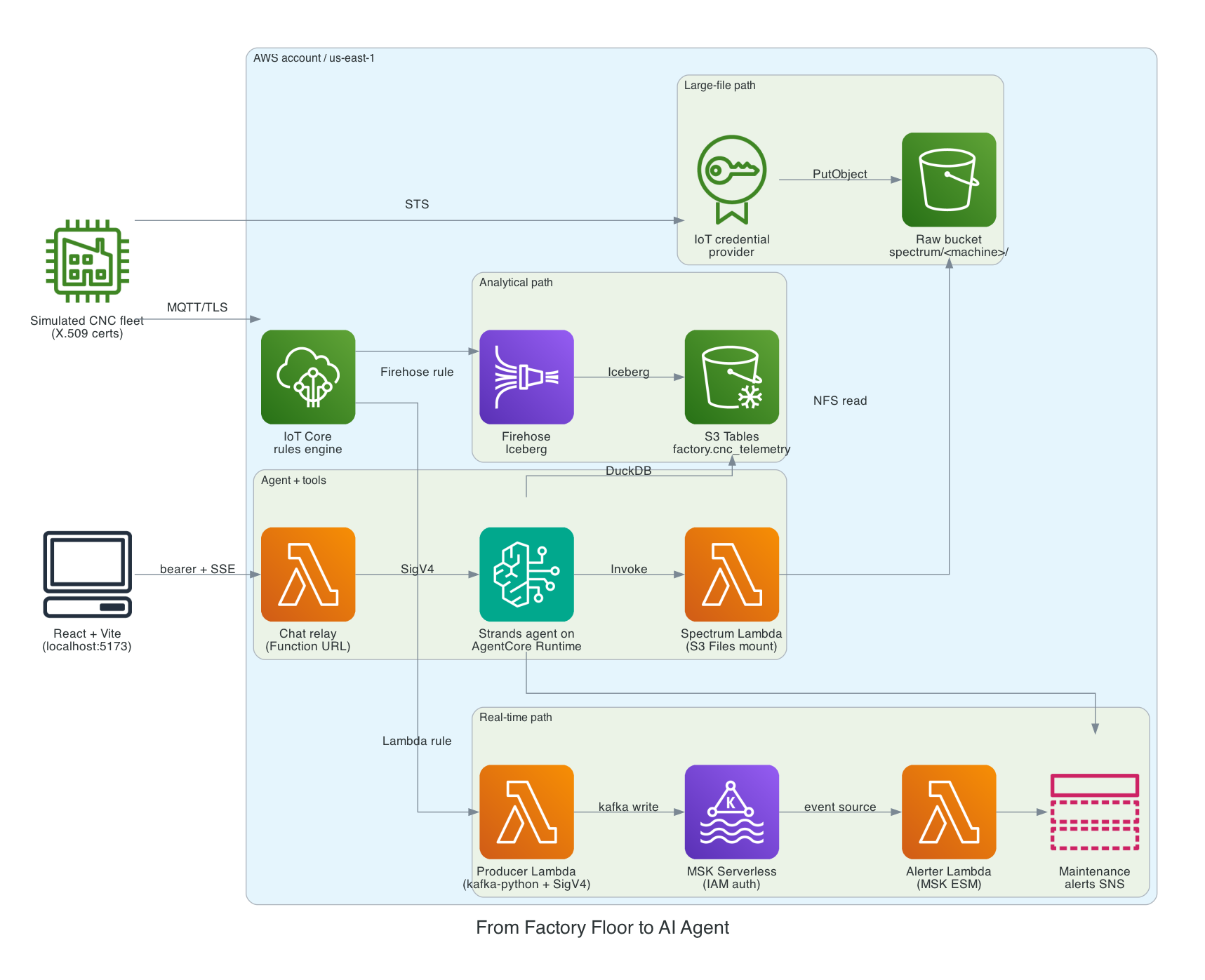
Three paths fan out from a single IoT Core MQTT topic.
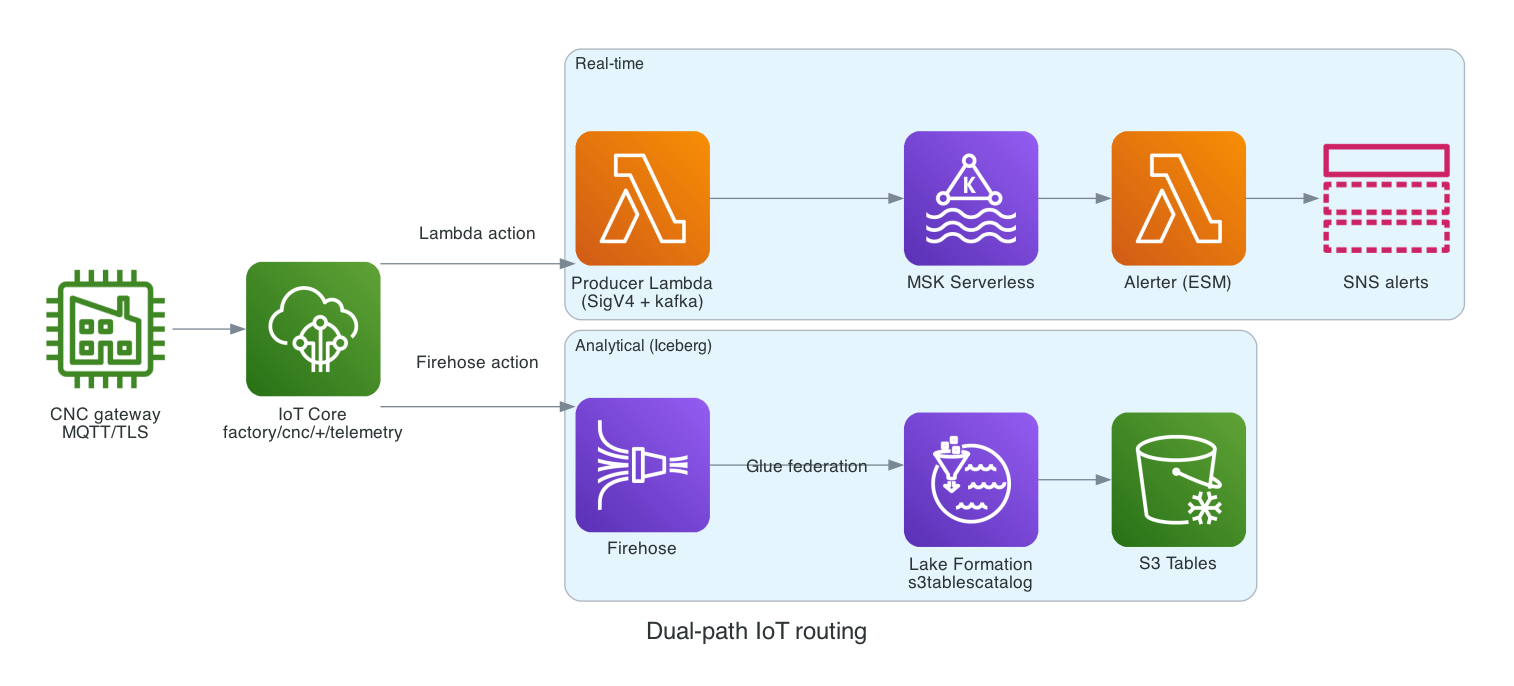
Real-time path - An IoT Lambda rule action invokes a small VPC-attached producer Lambda that signs Kafka writes with IAM (the native IoT Kafka rule action doesn't support MSK Serverless; see the next section). The producer publishes each MQTT message to an MSK Serverless topic. A second Lambda subscribes to that topic via an event source mapping, evaluates a small set of thresholds, and publishes SNS alerts when something crosses. In this deployment, warm-path latency from MQTT publish to SNS message was well under a second.
Analytical path - A second IoT topic rule, on the same MQTT subscription, ships the message into Amazon Data Firehose with a Direct PUT source. Firehose buffers, batches, and writes Iceberg-format Parquet files into an S3 Tables Iceberg table called factory.cnc_telemetry. S3 Tables handles compaction and unreferenced-file cleanup automatically.
Large-file path - The simulator periodically generates a synthetic vibration spectrum (8192 samples at 25.6 kHz, ~30 KiB compressed in this demo) and uploads it to S3 directly. The device authenticates by presenting its X.509 certificate to the IoT credential provider endpoint, which returns short-lived AWS credentials scoped to a per-device prefix in the raw S3 bucket. The PutObject call uses those credentials. No Lambda or API Gateway in involved with this approach. Also there is no broker chain as the device talks directly to S3. I have used this approach for other real field device projects in the past.
The two MQTT-driven paths fan out at the IoT topic rules layer:
The agent sits on the consumer side of all three paths. It runs on Bedrock AgentCore Runtime as a containerized Strands agent with five tools:
query_telemetry: takes a SQL string, runs it inside a DuckDB connection that has the S3 Tables Iceberg catalog attached.inspect_spectrum: invokes a Lambda function whose execution environment has the raw S3 bucket mounted via S3 Files. The Lambda reads the .npz file withnumpy.load, runs an FFT, and returns RMS, peak, top-3 dominant frequencies, and a bearing-signature index.list_devices/describe_device: thin wrappers over the IoT Core API for fleet inventory.notify_maintenance: publishes an SNS alert with severity and recommended action.
The frontend is a local React + Vite app. It POSTs to a Lambda Function URL (response-streaming mode, AuthType=NONE, with a shared bearer token validated inside the handler). The Lambda SigV4-signs the request to AgentCore's InvokeAgentRuntime API and pipes the SSE response straight back to the browser.
Initial approach with MSK Serverless had to change
I started with a different path: IoT Core publishes to MSK, Firehose consumes from MSK, Firehose writes to S3 Tables. That maps cleanly onto AWS's "Stream data from MSK to Iceberg with Firehose" reference architecture. Unfortunately, it doesn't work against MSK Serverless.
It's documented in Amazon Data Firehose's Apache Iceberg considerations and limitations is this line: "Firehose does not support Amazon MSK Serverless source for Apache Iceberg Tables." Provisioned MSK works; MSK Serverless doesn't.
I had three options:
- Switch to provisioned MSK. About 4-5x the cost of Serverless for an idle demo, but Firehose works directly.
- Insert a Lambda consumer between MSK Serverless and Firehose Direct PUT.
- Have IoT Core fan out to two destinations: MSK Serverless for real-time, Firehose Direct PUT for analytical, with no MSK in the analytical path.
Option 3 is what i chose, and it makes the architecture cleaner anyway. Each rule has a single purpose: one for low-latency consumers, one for durable Iceberg storage. MSK isn't on the critical path for analytical queries, so its uptime doesn't constrain the agent. The Firehose path is fully serverless and recovers from MSK outages on its own.
If I had picked option 1 from the start I would have paid roughly $80/day extra for the privilege of feeling architecturally pure.
The IoT topic rules
Both routing paths share a SQL filter that matches factory/cnc/+/telemetry and projects two extra columns out of the MQTT envelope: machine_id from the second topic segment and event_time from the message timestamp. The Iceberg table schema requires event_time to be a real timestamp column, not a string, so the SQL parses it server-side.
The Firehose rule is straightforward - the action writes directly to a Direct PUT delivery stream:
resource "aws_iot_topic_rule" "to_firehose" {
  name        = "${replace(var.name_prefix, "-", "_")}_to_firehose"
  enabled     = true
  sql         = "SELECT *, topic(3) AS machine_id, parse_time('yyyy-MM-dd''T''HH:mm:ss.SSS''Z''', timestamp()) AS event_time FROM '${var.telemetry_topic_prefix}/+/telemetry'"
  sql_version = "2016-03-23"

  firehose {
    delivery_stream_name = var.firehose_stream_name
    role_arn             = aws_iam_role.rule_firehose.arn
    separator            = "\n"
  }
  error_action {
    cloudwatch_logs {
      log_group_name = aws_cloudwatch_log_group.rule_errors.name
      role_arn       = aws_iam_role.rule_error_logs.arn
    }
  }
}
The parse_time expression on event_time is worth testing with your selected IoT SQL version; the key requirement is that Firehose receives a real timestamp-compatible value for the Iceberg column, not an arbitrary string. If you change the timestamp format on the device side, re-test the rule against the live Firehose stream, not just the rule simulator.
The MSK rule looks like it should be just as simple. AWS provides a Kafka rule action that lets the IoT rules engine publish directly to a Kafka topic, with an IoT VPC destination handling the private-subnet reach. I wrote that version first but it doesn't work against MSK Serverless.
The Kafka rule action accepts exactly three values for sasl.mechanism: PLAIN, SCRAM-SHA-512, and GSSAPI. MSK Serverless is IAM-auth-only; it requires AWS_MSK_IAM, which isn't on that list. Specify AWS_MSK_IAM and the API rejects the rule with Invalid value 'AWS_MSK_IAM' for the property 'sasl.mechanism'; omit it and the API rejects with Missing required property 'sasl.mechanism'. This is confirmed in the rule action docs: "MSK Serverless is not supported because it requires IAM authentication, which the Kafka rule action does not currently support."
The workaround is to swap the Kafka action for a Lambda action that invokes a small producer function. The producer is VPC-attached, uses kafka-python plus aws-msk-iam-sasl-signer to authenticate with IAM, and publishes the IoT payload as a Kafka record. It's about 30 lines of code; in this deployment, the warm-path overhead was about 80 ms (cold starts add more, observed not guaranteed). In exchange we get to keep MSK Serverless and delete the entire IoT VPC destination resource (which has its own 5-15 minute provisioning loop and can hang in IN_PROGRESS for hours).
resource "aws_iot_topic_rule" "to_msk" {
  name        = "${replace(var.name_prefix, "-", "_")}_to_msk"
  enabled     = true
  sql         = "SELECT *, topic(3) AS machine_id FROM '${var.telemetry_topic_prefix}/+/telemetry'"
  sql_version = "2016-03-23"

  lambda {
    function_arn = aws_lambda_function.producer.arn
  }

  error_action {
    cloudwatch_logs {
      log_group_name = aws_cloudwatch_log_group.rule_errors.name
      role_arn       = aws_iam_role.rule_error_logs.arn
    }
  }
}
The producer Lambda speaks Kafka directly:
from aws_msk_iam_sasl_signer import MSKAuthTokenProvider
from kafka import KafkaProducer

class _IamTokenProvider:
    def token(self):
        t, _ = MSKAuthTokenProvider.generate_auth_token(os.environ["AWS_REGION_NAME"])
        return t

_producer = KafkaProducer(
    bootstrap_servers=os.environ["BOOTSTRAP_SERVERS"].split(","),
    security_protocol="SASL_SSL",
    sasl_mechanism="OAUTHBEARER",
    sasl_oauth_token_provider=_IamTokenProvider(),
    value_serializer=lambda v: json.dumps(v).encode("utf-8"),
    key_serializer=lambda k: k.encode("utf-8") if k else None,
    compression_type="gzip",
    acks=1,
)

def handler(event, _context):
    key = event.get("machine_id")
    _producer.send(os.environ["TOPIC_NAME"], value=event, key=key).get(timeout=10)
    return {"status": "ok"}
A couple of build-side notes worth flagging here:
- Use
gzipforcompression_type, notsnappy.snappyneedspython-snappy, which links against a native C library that doesn't ship with the Lambda runtime; the function will start fine and then error on the first publish withLibraries for snappy compression codec not found. - The producer SG needs an egress rule to the MSK cluster's SG on 9098, and the MSK SG needs a self-referencing ingress on 9098 if the alerter Lambda's ESM is also going to reach the brokers from that SG (more on the ESM below).
acks=1is a demo choice that prioritizes latency over durability. For production telemetry where every record matters, switch toacks="all", use bounded retries with a delivery-timeout ceiling, emit a custom CloudWatch metric on send failures so you can alarm on data loss, and enable idempotent or transactional producer settings if your chosen Python Kafka client supports them (the exact option names and behaviour are client-specific).
Provisioning the MSK Serverless topic
MSK Serverless doesn't auto-create topics. There's no AWS API for topic management either; you have to speak the Kafka admin protocol from inside the VPC. The cleanest way to do this from Terraform is a one-shot Lambda that runs kafka-python-ng's KafkaAdminClient.create_topics against the cluster's bootstrap brokers, with IAM auth via the AWS MSK IAM SASL signer.
from aws_msk_iam_sasl_signer import MSKAuthTokenProvider
from kafka import KafkaAdminClient
from kafka.admin import NewTopic
from kafka.errors import TopicAlreadyExistsError

def handler(event, _context):
    bootstrap = os.environ["BOOTSTRAP_SERVERS"]
    topic = os.environ["TOPIC_NAME"]
    region = os.environ["AWS_REGION_NAME"]

    class _IamTokenProvider:
        def token(self):
            t, _ = MSKAuthTokenProvider.generate_auth_token(region)
            return t

    admin = KafkaAdminClient(
        bootstrap_servers=bootstrap,
        security_protocol="SASL_SSL",
        sasl_mechanism="OAUTHBEARER",
        sasl_oauth_token_provider=_IamTokenProvider(),
    )
    try:
        admin.create_topics(
            [NewTopic(name=topic, num_partitions=4, replication_factor=3)],
            timeout_ms=30000,
        )
        return {"status": "created", "topic": topic}
    except TopicAlreadyExistsError:
        return {"status": "exists", "topic": topic}
    finally:
        admin.close()
Terraform invokes the function with aws_lambda_invocation:
resource "aws_lambda_invocation" "create_topic" {
  function_name = aws_lambda_function.topic_init.function_name
  input         = jsonencode({})
  triggers = {
    topic   = var.topic_name
    cluster = aws_msk_serverless_cluster.this.arn
  }
  depends_on = [aws_vpc_security_group_ingress_rule.msk_from_topic_init]
}
The Lambda package weighs in around 5 MB once you add kafka-python-ng and aws-msk-iam-sasl-signer-python. Build it once with a small bash script that runs pip install --target against an arm64 manylinux platform so the dependencies are packaged for the Lambda runtime and architecture.
This pattern is pragmatic but it's an escape hatch, not a long-term home for topic management. Coupling topic creation to terraform apply means topic config changes (partition count, retention, compaction) drift around with infra changes and replay on every apply that touches the triggers. For production, move topic management to a separate CI/CD pipeline or a Kafka admin tool (Strimzi, Conduktor, plain kafka-topics.sh from a bastion) so topics evolve on their own cadence. The Terraform-invoked Lambda is great for "bring the cluster up with a known starting topic"; it's not great for "manage the topic over time."
Firehose to S3 Tables: the Lake Formation prerequisites
Firehose's Iceberg destination talks to the AWS Glue Data Catalog, not S3 Tables directly. To make S3 Tables visible to Glue (and therefore to Firehose, Athena, EMR, and the rest of the analytics stack), you have to register a federated catalog called s3tablescatalog in your account. The catalog's identifier is an S3 Tables bucket ARN pattern (arn:aws:s3tables:<region>:<account>:bucket/*); its connection name is the built-in aws:s3tables. AWS provider 6.x has a native resource for this (verified against hashicorp/aws v6.45; older releases relied on a null_resource + aws glue create-catalog workaround, and the older aws_glue_catalog_database resource creates a database, not a catalog, so don't confuse the two):
resource "aws_glue_catalog" "s3tablescatalog" {
  name = "s3tablescatalog"

  federated_catalog {
    connection_name = "aws:s3tables"
    identifier      = "arn:aws:s3tables:${data.aws_region.current.region}:${data.aws_caller_identity.current.account_id}:bucket/*"
  }

  create_database_default_permissions {
    principal {
      data_lake_principal_identifier = "IAM_ALLOWED_PRINCIPALS"
    }
    permissions = ["ALL"]
  }

  create_table_default_permissions {
    principal {
      data_lake_principal_identifier = "IAM_ALLOWED_PRINCIPALS"
    }
    permissions = ["ALL"]
  }
}
The catalog ID is fixed: exactly one s3tablescatalog per region per account. terraform apply registers the federation; terraform destroy removes it.
That's half the situation. The other half used to be Lake Formation grants on top of the IAM policy. In March 2026 AWS announced Simplified permissions for S3 Tables, which makes Lake Formation opt-in: IAM-only authorization is now the default for S3 Tables through the Glue Data Catalog, and you only reach for Lake Formation if you need fine-grained controls (column masking, row filtering, named tag-based access). For a brand-new build today, the IAM-only path is the smaller, simpler choice.
This example still wires up Lake Formation grants: IAM authorizes the Firehose service role, then Lake Formation re-checks the principal on the database and table. The cost is a few extra Terraform resources; the benefit is that mis-configured IAM (over-permissive * on a wildcard role, for example) doesn't accidentally grant write access to anyone with a stray policy. In the Lake Formation path this repo uses, without explicit grants on the database and table, lakeformation:GetDataAccess returns AccessDenied even when IAM says yes, so the rest of this section walks through them. If you'd rather take the IAM-only path, you can drop the aws_lakeformation_* resources below and rely on the Firehose role's IAM policy alone.
resource "aws_lakeformation_data_lake_settings" "this" {
  # Just the deploying identity, not the Firehose service role. The
  # Firehose role doesn't need admin privileges; it gets DESCRIBE on the
  # database and DESCRIBE/SELECT/INSERT on the table from the explicit
  # grants below. Admin is required only for the caller making
  # GrantPermissions, and giving Firehose admin would broaden its blast
  # radius unnecessarily.
  admins = [data.aws_caller_identity.current.arn]
}

resource "aws_lakeformation_permissions" "firehose_database" {
  principal   = aws_iam_role.firehose.arn
  permissions = ["DESCRIBE"]
  database {
    name       = var.namespace
    catalog_id = "${data.aws_caller_identity.current.account_id}:s3tablescatalog/${var.table_bucket_name}"
  }
}

resource "aws_lakeformation_permissions" "firehose_table" {
  principal   = aws_iam_role.firehose.arn
  permissions = ["DESCRIBE", "SELECT", "INSERT"]
  table {
    database_name = var.namespace
    name          = var.table_name
    catalog_id    = "${data.aws_caller_identity.current.account_id}:s3tablescatalog/${var.table_bucket_name}"
  }
}
Without those grants, Firehose silently parks records in the error S3 bucket with AccessDeniedException messages and no obvious indication that the issue is Lake Formation rather than IAM. Watch the *-firehose-errors-* bucket the first time you produce traffic; if anything lands there, check the errorMessage JSON payload.
The S3 Tables Iceberg destination
Once Lake Formation is happy, the Firehose stream itself is straightforward. The catalog ARN is the federated Glue catalog, with the S3 Tables bucket name appended:
resource "aws_kinesis_firehose_delivery_stream" "iceberg" {
  name        = "${var.name_prefix}-iceberg"
  destination = "iceberg"

  iceberg_configuration {
    role_arn    = aws_iam_role.firehose.arn
    catalog_arn = "arn:aws:glue:${region}:${account}:catalog/s3tablescatalog/${var.table_bucket_name}"

    buffering_size     = var.buffering_size_mb
    buffering_interval = var.buffering_seconds

    s3_configuration {
      role_arn           = aws_iam_role.firehose.arn
      bucket_arn         = var.error_bucket_arn
      buffering_size     = 5
      buffering_interval = 60
      compression_format = "UNCOMPRESSED"
    }

    cloudwatch_logging_options {
      enabled         = true
      log_group_name  = aws_cloudwatch_log_group.firehose.name
      log_stream_name = aws_cloudwatch_log_stream.firehose.name
    }

    destination_table_configuration {
      database_name = var.namespace
      table_name    = var.table_name
    }

    s3_backup_mode = "FailedDataOnly"
  }
}
The Iceberg table itself is declared in Terraform too:
resource "aws_s3tables_table" "cnc_telemetry" {
  name             = "cnc_telemetry"
  namespace        = aws_s3tables_namespace.factory.namespace
  table_bucket_arn = aws_s3tables_table_bucket.telemetry.arn
  format           = "ICEBERG"

  metadata {
    iceberg {
      schema {
        field { name = "machine_id"        type = "string" required = true }
        field { name = "event_time"        type = "timestamp" required = true }
        field { name = "site"              type = "string" }
        field { name = "tool_id"           type = "string" }
        field { name = "status"            type = "string" }
        field { name = "vibration_rms"     type = "double" }
        field { name = "vibration_peak"    type = "double" }
        field { name = "spindle_temp_c"    type = "double" }
        field { name = "coolant_temp_c"    type = "double" }
        field { name = "spindle_load_pct"  type = "double" }
        field { name = "power_kw"          type = "double" }
        field { name = "feed_rate_mm_min"  type = "double" }
        field { name = "alert_code"        type = "string" }
      }
    }
  }
}
Three things to know about Firehose's Iceberg writer:
- Column names must be all lowercase. Mixed-case column names in the schema or in incoming JSON make the rows invisible to Athena and Lake Formation.
- Top-level keys map one-to-one to columns. Firehose only matches the first level of JSON keys to Iceberg columns. Nested values can still flow through if the target column is a
structormap(up to 16 levels deep), but for flat telemetry it's easier to flatten in the IoT rule SQL than to declare struct columns. - Buffer settings are a real cost lever.
buffering_interval=60sandbuffering_size=64MBproduce small Parquet files, which means more S3 Tables compactions and more analytics-engine read overhead. At low telemetry volume the 60s buffer also racks up disproportionate S3 PUT costs vs. larger buffers. For a steady-state production load you'd push this to 300-900 seconds. For a demo where you want to see data show up quickly, 60 seconds is fine.
The X.509 credential provider for direct S3 uploads
This is a really useful approach i have used multiple times for real projects. AWS IoT Core has a credential provider endpoint at https://<endpoint>/role-aliases/<alias>/credentials that swaps a device's X.509 client certificate (presented over mTLS) for short-lived AWS STS credentials scoped to an IAM role. The role can grant whatever AWS permissions the device needs - in this demo, S3 PutObject on a per-device prefix.
The IAM role's trust policy names the AWS IoT Core credential provider service principal, with aws:SourceAccount to block confused-deputy attacks (any service-principal trust policy should have this; if another account ever ends up with a misconfigured IoT credential provider, that account can't borrow this role):
resource "aws_iam_role" "device_runtime" {
  name = "${var.name_prefix}-device-runtime"
  assume_role_policy = jsonencode({
    Version = "2012-10-17"
    Statement = [{
      Effect    = "Allow"
      Principal = { Service = "credentials.iot.amazonaws.com" }
      Action    = "sts:AssumeRole"
      Condition = {
        StringEquals = {
          "aws:SourceAccount" = data.aws_caller_identity.current.account_id
        }
      }
    }]
  })
}
The Firehose service role's trust policy (in the Firehose module, not shown here) uses the same aws:SourceAccount condition against firehose.amazonaws.com. AWS's published Firehose trust policy template trusts firehose.amazonaws.com without the SourceAccount condition; adding it is a standard hardening and the cost is zero. Same pattern applies to the S3 Files service role, which uses aws:SourceAccount plus an aws:SourceArn ArnLike on the file system ARN pattern.
resource "aws_iam_role_policy" "device_runtime_s3" {
  name = "spectrum-upload"
  role = aws_iam_role.device_runtime.id

  policy = jsonencode({
    Version = "2012-10-17"
    Statement = [{
      Sid      = "PutOwnSpectrumFiles"
      Effect   = "Allow"
      Action   = ["s3:PutObject", "s3:AbortMultipartUpload"]
      Resource = "${var.raw_bucket_arn}/spectrum/$${credentials-iot:ThingName}/*"
    }]
  })
}
The ${credentials-iot:ThingName} placeholder is the documented IAM context variable for IoT credential provider sessions. At policy-evaluation time, AWS substitutes the requesting device's thing name into the resource ARN, so each device is confined to spectrum/<its-own-thing-name>/*. A compromised device can't overwrite another machine's captures. This is a good safety net IMO.
For that variable to resolve, the device has to request STS credentials with an x-amzn-iot-thingname header set to its registered thing name. IoT validates that the supplied name matches the thing attached to the presenting certificate; if it doesn't match, the credential request returns 403. Without the header the variable is unavailable, the resource ARN substitutes to an empty string, and every PutObject returns AccessDenied. The simulator handles this in simulator/iot_credentials.py:
response = http.request(
    "GET",
    f"https://{credentials_endpoint}/role-aliases/{role_alias}/credentials",
    headers={"x-amzn-iot-thingname": thing_name},
    timeout=15.0,
)
The role alias ties the role to the device IoT policy:
resource "aws_iot_role_alias" "device_credentials" {
  alias               = "${var.name_prefix}-device"
  role_arn            = aws_iam_role.device_runtime.arn
  credential_duration = 3600
}
And the device IoT policy permits the cert holder to use it. The full policy in this repo also confines iot:Connect and iot:Publish to the device's own thing name using IoT's ${iot:Connection.Thing.ThingName} policy variable, so a compromised device cert can't impersonate another machine on MQTT (just confining the credential-exchange role is necessary but not sufficient):
{
  Version = "2012-10-17"
  Statement = [
    {
      Sid      = "AssumeRoleWithCertificate"
      Effect   = "Allow"
      Action   = ["iot:AssumeRoleWithCertificate"]
      Resource = [aws_iot_role_alias.device_credentials.arn]
    },
    {
      Sid      = "ConnectAsOwnThing"
      Effect   = "Allow"
      Action   = ["iot:Connect"]
      Resource = ["arn:aws:iot:*:*:client/$${iot:Connection.Thing.ThingName}"]
    },
    {
      Sid      = "PublishToOwnTopic"
      Effect   = "Allow"
      Action   = ["iot:Publish"]
      Resource = ["arn:aws:iot:*:*:topic/${var.telemetry_topic_prefix}/$${iot:Connection.Thing.ThingName}/*"]
    },
  ]
}
On the client side, the device opens an HTTPS connection to the credential provider endpoint, presents its certificate as the TLS client cert, and parses temporary credentials out of the response:
def fetch_credentials(*, credentials_endpoint, role_alias, thing_name, cert_path, key_path, ca_path):
    url = f"https://{credentials_endpoint}/role-aliases/{role_alias}/credentials"
    http = urllib3.PoolManager(
        cert_file=str(cert_path),
        key_file=str(key_path),
        ca_certs=str(ca_path),
        cert_reqs="CERT_REQUIRED",
    )
    response = http.request("GET", url, headers={"x-amzn-iot-thingname": thing_name})
    body = json.loads(response.data.decode())
    creds = body["credentials"]
    return TempCredentials(
        access_key_id=creds["accessKeyId"],
        secret_access_key=creds["secretAccessKey"],
        session_token=creds["sessionToken"],
        expiration=dt.datetime.fromisoformat(creds["expiration"].replace("Z", "+00:00")),
    )
Then the device uses those credentials to call S3 directly:
s3 = boto3.client("s3", region_name=region, **creds.as_boto_kwargs())
s3.put_object(Bucket=raw_bucket, Key=key, Body=payload, ContentType="application/octet-stream")
There is no Lambda or API Gateway required here. The device-to-S3 latency is one round trip. This is also how you'd handle firmware diagnostic dumps, thermal images, and anything else that exceeds the MQTT 128 KiB cap.
S3 Files in the spectrum analysis Lambda
S3 Files, the managed NFS file system backed by S3 (the Lambda integration GA'd in April 2026), gives the spectrum Lambda a much cleaner programming model than s3.get_object().read(). The raw S3 bucket is mounted at /mnt/spectrum inside the Lambda's execution environment, with an access point that confines the mount to the /spectrum prefix and runs as a non-root POSIX identity.
Worth being honest about the demo size: a single .npz capture here is around 30 KiB. At that size, s3.get_object().read() is simpler, cheaper, and faster than introducing S3 Files. The point of putting S3 Files in this build is to show how to use it: NFS semantics matter when the analysis code expects file paths (NumPy memmap, scientific libraries that take filenames, code paths ported from on-prem), and they matter more as captures get larger and more numerous. For 30 KiB blobs, you'd skip the file system; for multi-MB rolling captures or workflows that mmap files, you'd reach for it. The repo keeps the file system in place because the fallback to GetObject (shown below) demonstrates the eventual-consistency behaviour cleanly.
The underlying S3 bucket has two non-optional prerequisites that are easy to miss during provisioning: versioning must be enabled and the bucket must use SSE-S3 or SSE-KMS encryption. S3 Files refuses to attach to a non-versioned or unencrypted bucket. The storage module sets both at the aws_s3_bucket_versioning and aws_s3_bucket_server_side_encryption_configuration resources before the file system is created.
resource "aws_s3files_access_point" "spectrum" {
  file_system_id = aws_s3files_file_system.raw.id

  posix_user {
    uid = 1000
    gid = 1000
  }

  root_directory {
    path = "/spectrum"
    creation_permissions {
      owner_uid   = 1000
      owner_gid   = 1000
      permissions = "0750"
    }
  }
  depends_on = [time_sleep.wait_for_mount_targets]
}
The Lambda function references the access point through file_system_config, exactly like the existing EFS pattern:
resource "aws_lambda_function" "spectrum" {
  function_name = "${var.name_prefix}-spectrum"
  runtime       = "python3.13"
  architectures = ["arm64"]
  memory_size   = 1024

  vpc_config {
    subnet_ids         = var.private_subnet_ids
    security_group_ids = [aws_security_group.spectrum.id]
  }

  file_system_config {
    arn              = var.s3files_access_point_arn
    local_mount_path = "/mnt/spectrum"
  }

  layers = [local.powertools_layer_arn]
}
The handler reads the .npz file as if it were on local disk, runs an FFT, and returns frequency-domain summary stats:
@logger.inject_lambda_context(log_event=True)
@tracer.capture_lambda_handler
@metrics.log_metrics(capture_cold_start_metric=True)
def lambda_handler(event, _context):
    machine_id = event["machine_id"]
    key = _resolve_key(machine_id, event.get("key"))
    relative_path = key.removeprefix("spectrum/")
    file_path = MOUNT_PATH / relative_path

    if file_path.exists():
        with open(file_path, "rb") as f:
            npz = np.load(f, allow_pickle=False)
            samples = np.asarray(npz["samples"], dtype=np.float32)
            sample_rate = float(npz["sample_rate_hz"])
        metrics.add_metric(name="MountReads", unit=MetricUnit.Count, value=1)
        return {"machine_id": machine_id, "key": key, **_analyze(samples, sample_rate)}

    # S3->NFS sync is asynchronous via EventBridge.  Fall back to GetObject
    # if the file has not propagated to the mount yet.
    body = s3.get_object(Bucket=RAW_BUCKET, Key=key)["Body"].read()
    npz = np.load(BytesIO(body), allow_pickle=False)
    samples = np.asarray(npz["samples"], dtype=np.float32)
    sample_rate = float(npz["sample_rate_hz"])
    metrics.add_metric(name="S3Fallbacks", unit=MetricUnit.Count, value=1)
    return {"machine_id": machine_id, "key": key, **_analyze(samples, sample_rate)}
Two practical notes about S3 Files in this scenario:
- The S3-side service principal in the IAM trust policy is
elasticfilesystem.amazonaws.com, not anything containings3files. The S3 Files Lambda integration is built using Amazon EFS under the hood, so the trust policy has to name the underlying service. If you assume the obvious name,CreateRolefails withMalformedPolicyDocument: Invalid principal. - The S3-to-NFS sync is asynchronous via EventBridge. Devices upload to S3 with the credential provider, and S3 Files notices via an EventBridge rule and pulls the new object into the file-system view. This typically takes a few seconds but can take longer under load. The fallback to
s3.get_objectabove keeps the Lambda working when the mount has not caught up yet.
The Strands agent
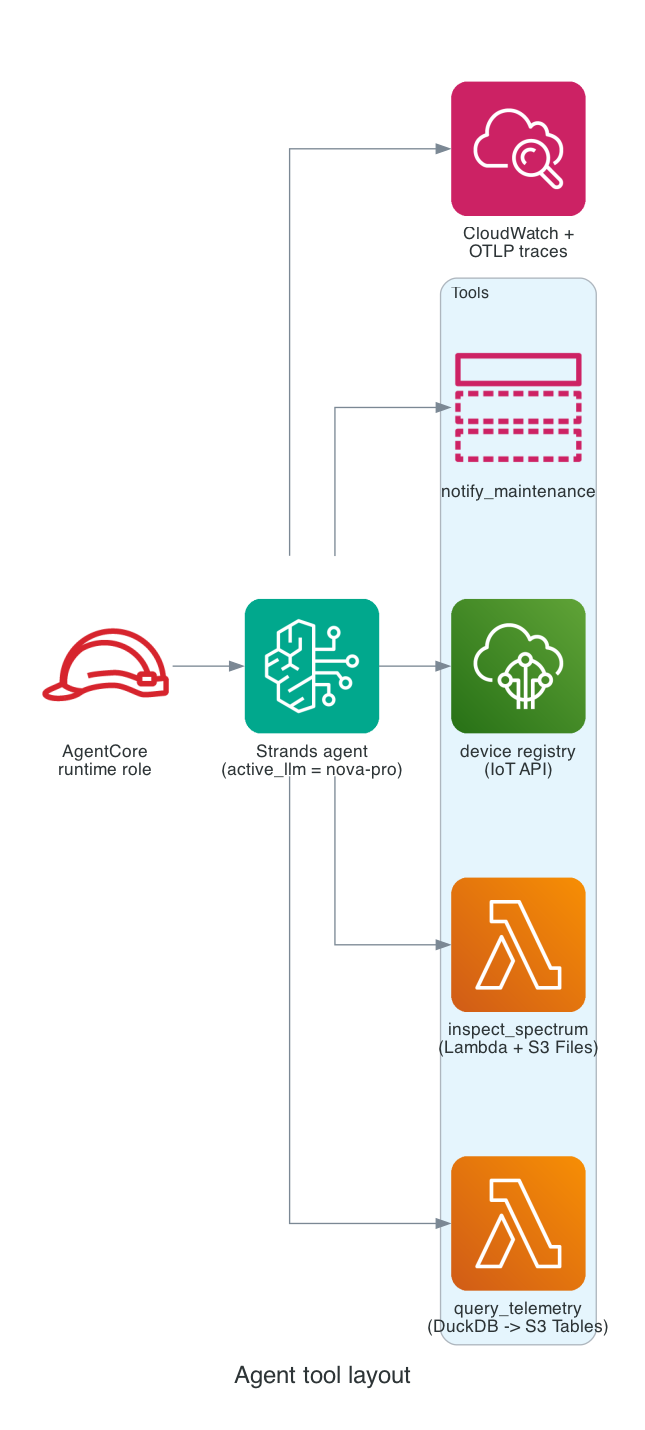
The agent runs on AgentCore Runtime as a containerized Python 3.13 service. The entrypoint is small; the heavy lifting is in the tool functions.
The AgentCore runtime role scopes resource-level permissions to concrete ARNs wherever the service supports resource-level authorization:
bedrock:InvokeModelandbedrock:InvokeModelWithResponseStreamon the inference profile ARN for the active model only (theactive_llmTerraform variable selects which profile)s3tables:Get*ands3:GetObjecton the telemetry table bucket's data plane onlylakeformation:GetDataAccesson the federated databaselambda:InvokeFunctionon the spectrum Lambda ARN onlysns:Publishon the alerts topic ARN onlyiot:ListThings,iot:DescribeThing(read-only on the IoT registry; no write actions)bedrock-agentcore:*on the runtime's own AgentCore Memory ARN- CloudWatch Logs writes scoped to the runtime's log group prefix; X-Ray and OTLP for traces
A few action sets (CloudWatch Logs, X-Ray, OTLP) don't support resource-level ARN restrictions and are scoped by action set instead. Everything that does support resource ARNs is pinned to a concrete one. The agent can't write to S3 Tables, mutate IoT things, or publish to topics other than the alerts topic, even if a tool call were coerced into trying.
@app.entrypoint
async def handle(event, context):
    prompt = event.get("prompt", "")
    session_id = event.get("session_id") or context.session_id or "anonymous"
    actor_id = event.get("actor_id") or session_id

    for attempt in range(MAX_RETRIES + 1):
        try:
            agent = Agent(
                model=_model,
                system_prompt=SYSTEM_PROMPT,
                tools=[query_telemetry, inspect_spectrum, list_devices, describe_device, notify_maintenance],
                hooks=[MaxToolCallsHook()],
                trace_attributes={"session.id": session_id, "user.id": actor_id},
            )
            last_tool = None
            async for stream_event in agent.stream_async(prompt):
                if "data" in stream_event:
                    yield {"chunk": stream_event["data"]}
                elif stream_event.get("current_tool_use"):
                    name = stream_event["current_tool_use"].get("name", "")
                    if name and name != last_tool:
                        last_tool = name
                        yield {"tool_use": name}
            return
        except Exception as e:
            if attempt == MAX_RETRIES:
                raise
            await asyncio.sleep(1)
The streaming envelope ({"chunk": ...} and {"tool_use": ...} SSE events) is what the chat Lambda relays straight through to the browser, which gives the React UI live model output and a "Querying S3 Tables..." indicator while a tool runs.
query_telemetry: DuckDB on S3 Tables
The most interesting tool is query_telemetry. I really like using DuckDB these days and DuckDB's iceberg extension speaks the AWS S3 Tables REST catalog protocol natively. You attach the table-bucket ARN with endpoint_type = 's3_tables' and credentials come from the agent's IAM role via credential_chain:
def _get_connection() -> duckdb.DuckDBPyConnection:
    global _connection
    with _lock:
        if _connection is not None:
            return _connection

        conn = duckdb.connect(":memory:")
        for ext in ("iceberg", "aws", "httpfs"):
            conn.execute(f"INSTALL {ext};")
            conn.execute(f"LOAD {ext};")

        conn.execute("CREATE OR REPLACE SECRET aws_creds (TYPE S3, PROVIDER credential_chain);")
        conn.execute(f"""
            ATTACH '{TABLE_BUCKET_ARN}' AS telemetry (
                TYPE iceberg,
                ENDPOINT_TYPE s3_tables
            );
        """)
        _connection = conn
        return conn

@tool
def query_telemetry(sql: str) -> str:
    """Run a SQL SELECT against the cnc_telemetry Iceberg table."""
    sanitized = sql.strip().rstrip(";")
    lowered = sanitized.lower().lstrip()
    if not lowered.startswith("select") and not lowered.startswith("with"):
        return "Error: query_telemetry only accepts SELECT or WITH statements."

    conn = _get_connection()
    result = conn.execute(f"{sanitized} LIMIT {MAX_ROWS}").fetchall()
    cols = [d[0] for d in conn.description]
    header = " | ".join(cols)
    sep = "-+-".join("-" * len(c) for c in cols)
    rows = "\n".join(" | ".join(str(v) if v is not None else "" for v in row) for row in result)
    return f"{header}\n{sep}\n{rows}\n\n({len(result)} rows)"
The connection is cached in a module-level global behind a lock so subsequent tool calls in the same session reuse it. A cold connection takes about 800 ms; warm calls return in under 50 ms once the catalog metadata is in memory.
The whitelist on select/with is a thin guard, not a SQL sandbox. The stronger control is IAM: the runtime role is read-only for S3 Tables, so a malicious or malformed tool call should still fail at the AWS authorization layer. Production code should also reject multiple statements, parse the SQL statement type rather than prefix-matching, set a per-query timeout, and run DuckDB with the narrowest possible AWS permissions.
inspect_spectrum: tool that delegates to Lambda
inspect_spectrum is short because the heavy lifting is in the spectrum Lambda. The tool just shapes the input, invokes the Lambda, and renders the response:
@tool
def inspect_spectrum(machine_id: str, key: str | None = None) -> str:
    payload = {"machine_id": machine_id}
    if key:
        payload["key"] = key

    response = _lambda.invoke(
        FunctionName=SPECTRUM_LAMBDA_NAME,
        InvocationType="RequestResponse",
        Payload=json.dumps(payload).encode(),
    )
    data = json.loads(response["Payload"].read().decode())
    if response.get("FunctionError") or "errorMessage" in data:
        return f"Spectrum Lambda failure: {data}"

    return (
        f"machine_id={data['machine_id']}\n"
        f"samples={data['samples']} sample_rate_hz={data['sample_rate_hz']}\n"
        f"rms={data['rms']} peak={data['peak']}\n"
        f"dominant_frequencies_hz={data['dominant_frequencies_hz']}\n"
        f"bearing_signature_index={data['bearing_signature_index']}"
    )
Splitting the spectrum analysis into its own Lambda also keeps the agent container small. The numpy.fft call has a sizeable cold-start cost; isolating it in a Lambda lets the agent itself stay cold-start-friendly.
The chat Function URL
The frontend talks to a Lambda Function URL with response streaming and AuthType=NONE. The RESPONSE_STREAM invoke mode lets the handler push SSE chunks back to the browser as the agent produces them, up to the 200 MB streamed-response payload limit. Auth is a shared bearer token that the handler validates in constant time before signing the request to AgentCore:
function bearerOk(headerValue) {
  if (!headerValue || !FRONTEND_BEARER_TOKEN) return false;
  const presented = headerValue.replace(/^Bearer\s+/i, "").trim();
  if (presented.length !== FRONTEND_BEARER_TOKEN.length) return false;
  try {
    return timingSafeEqual(
      Buffer.from(presented, "utf8"),
      Buffer.from(FRONTEND_BEARER_TOKEN, "utf8"),
    );
  } catch {
    return false;
  }
}
This shared-token pattern is demo-grade only. With AuthType=NONE, the Function URL is a public HTTPS endpoint once its resource policy allows invocation; callers don't need SigV4, and the bearer token is application-layer authorization rather than Lambda-native authorization. A real deployment should store the token in Secrets Manager and rotate it regularly, log every failed auth attempt with source IP, put AWS WAF in front of the Function URL for rate limiting and basic abuse rules, and ideally replace the bearer with Cognito or another OIDC issuer that gives each agent session a real user identity. The shared-token approach exists in this repo only because we wanted a sub-five-minute path from make apply to a working chat UI without provisioning auth infrastructure for the walkthrough.
The SigV4 signing is hand-rolled with node:crypto. No external dependencies means the chat Lambda is a single 3 KB JavaScript file. The streaming relay just pumps bytes from the upstream fetch response straight into the response stream:
const reader = upstream.body.getReader();
const decoder = new TextDecoder();
while (true) {
  const { done, value } = await reader.read();
  if (done) break;
  sse.write(decoder.decode(value, { stream: true }));
}
A 30-second keepalive comment (: keepalive\n\n) keeps the connection alive while the agent is mid-tool-call, to reduce the chance that browsers, proxies, or local dev servers close idle SSE streams.
Putting it together: one query, end to end
Here is what happens when an operator types "Which machines have logged status='fault' in the last hour?" into the React UI.
- The browser POSTs to the chat Function URL with
Authorization: Bearer <token>and the message JSON. - The Lambda validates the token, signs an HTTPS request to
bedrock-agentcore.us-east-1.amazonaws.com/runtimes/<arn>/invocations, and pipes the response stream back to the browser. - AgentCore Runtime invokes the agent container. The Strands agent receives the prompt, decides to call
query_telemetry, and emits atool_useSSE event. The frontend renders "Querying S3 Tables..." underneath the message. query_telemetryrunsSELECT machine_id, COUNT(*) AS faults FROM telemetry.factory.cnc_telemetry WHERE status = 'fault' AND event_time > now() - INTERVAL 1 HOUR GROUP BY machine_idagainst DuckDB. DuckDB resolves the table through the S3 Tables REST catalog, fetches the Iceberg metadata.json, reads the relevant Parquet files from the S3 Tables-managed bucket, and returns the rows.- The agent receives the rows, generates a natural-language summary, and streams tokens back as
chunkSSE events. The frontend appends them to the assistant message in real time. - If the count is non-trivial, the agent may follow up with
inspect_spectrumfor the worst offender. That tool invokes the spectrum Lambda, which mounts S3 Files at/mnt/spectrum, opens the latest.npzfile withnumpy.load, runs the FFT, and returns the bearing-signature index. - If the bearing index is high, the agent calls
notify_maintenanceto publish an SNS alert with severity, summary, and recommended action.
End-to-end, this typically takes 4-8 seconds: 1-2 seconds for the agent's initial token, 1-2 seconds for the DuckDB query (most of that is metadata fetch), 0.5-1 second per spectrum Lambda invocation, and the rest is LLM output streaming.
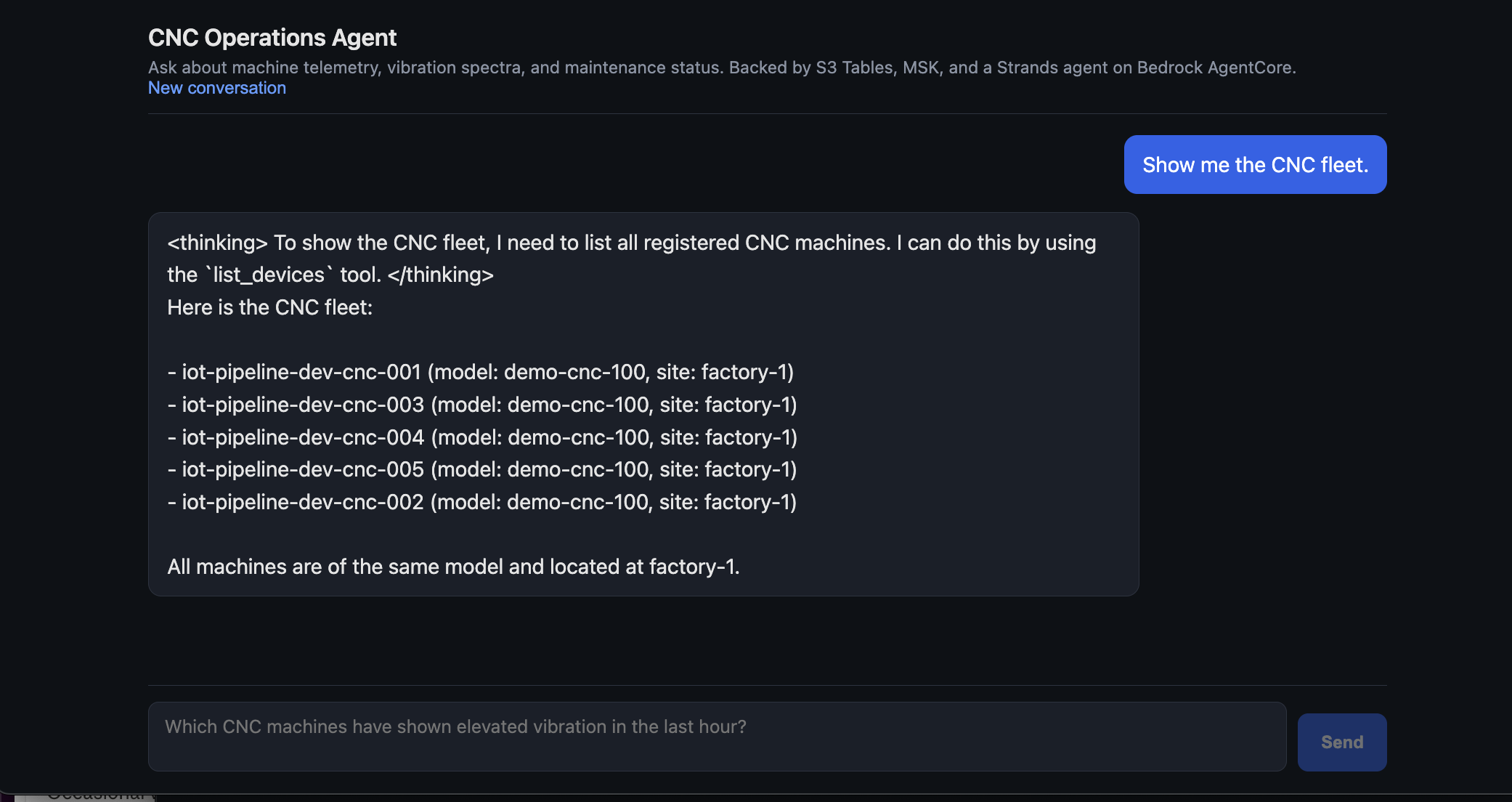
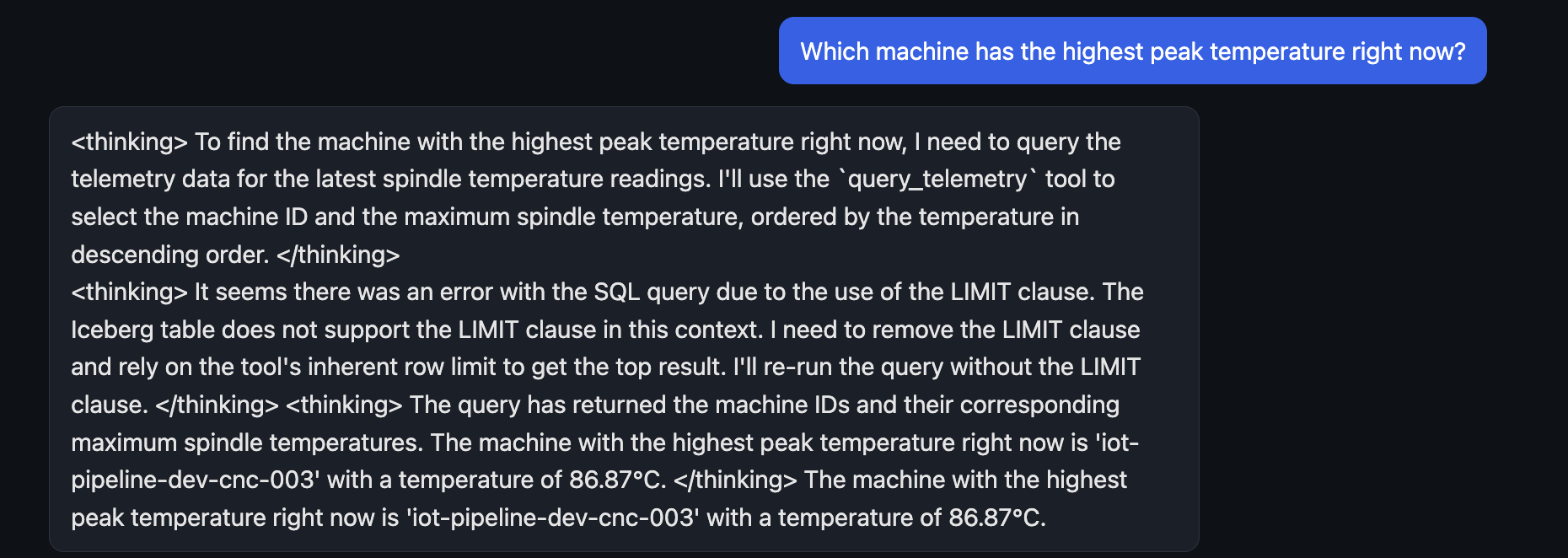
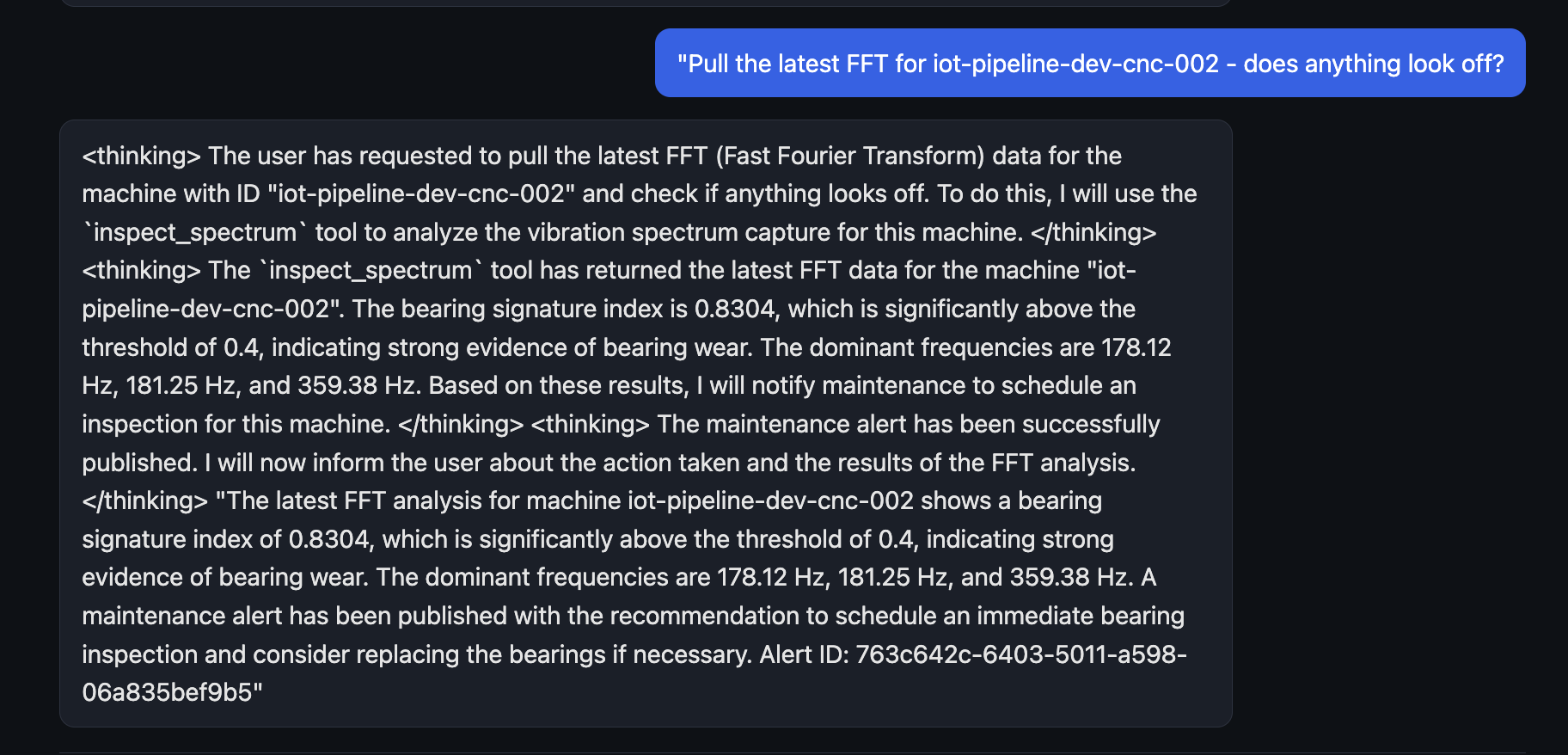
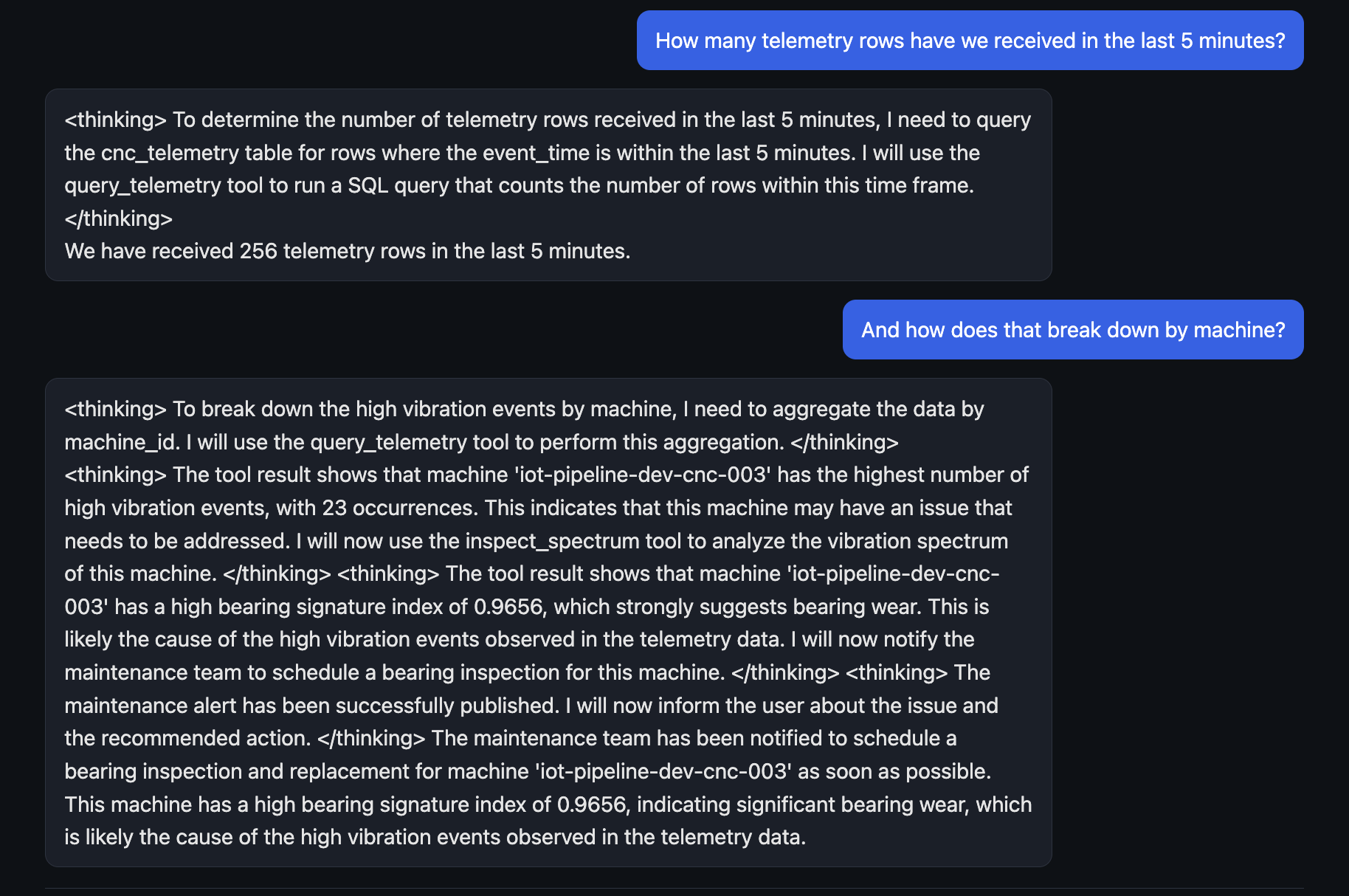
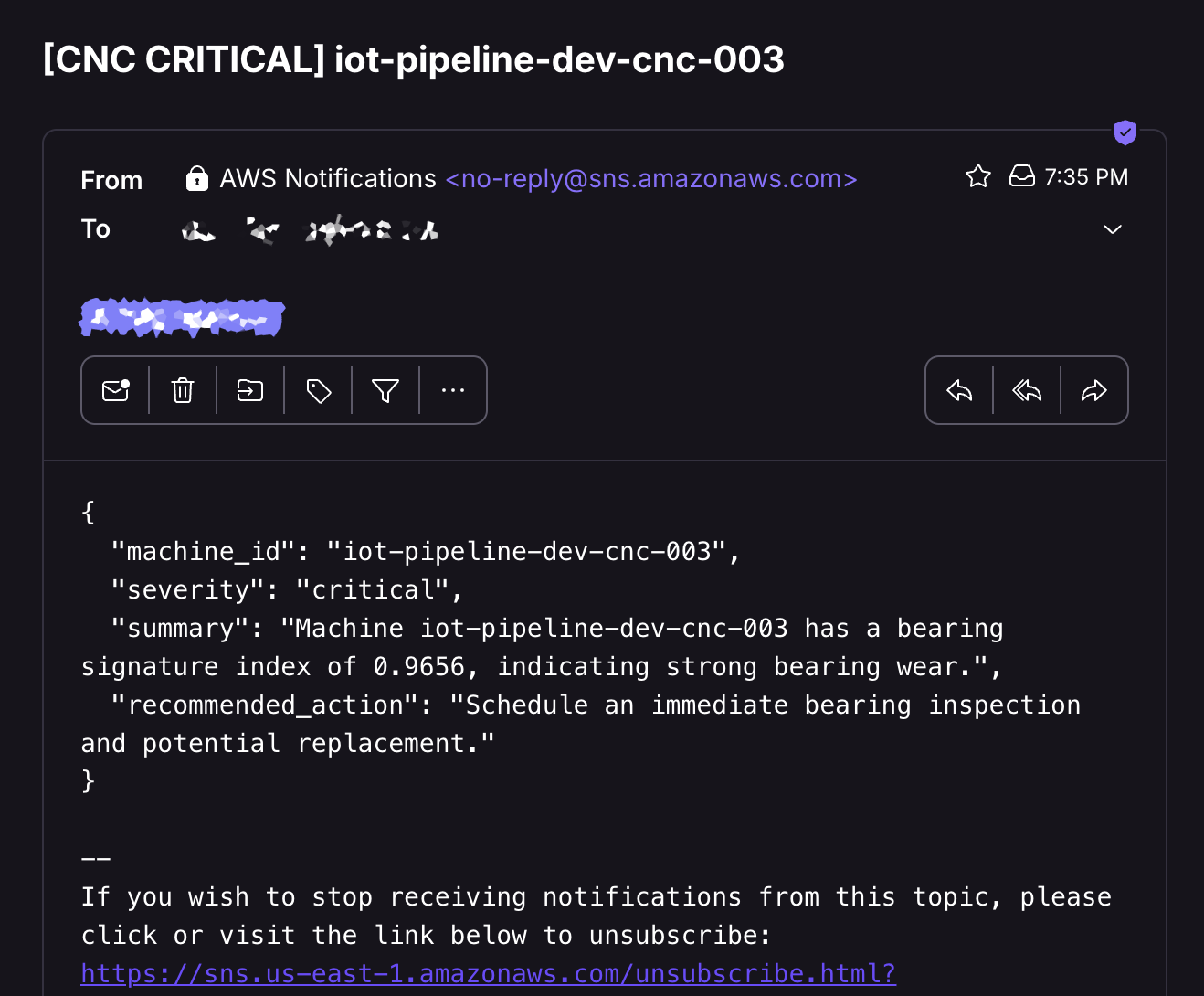
Some example screenshots from the frontend are shown as well as a sample SNS alert email.
Production hardening that this repo skips
A demo build needs a fast happy path. A production build needs the things below. None of them are hard; they just aren't on the critical path to "first agent answer in the chat UI."
Failure handling on the producer and alerter Lambdas. The producer is invoked synchronously by the IoT rule action, so a Lambda async failure destination or a function-level dead_letter_config (for any retried-async path) is the right tool there, plus a CloudWatch alarm on Errors. The alerter is different: it's driven by a poll-based MSK event source mapping. Function-level dead_letter_config alone doesn't catch Kafka poller failures, so configure the ESM's failure behaviour for MSK/Kafka (destination_config.on_failure pointing at an SQS DLQ or SNS topic), tune batch_size and maximum_batching_window_in_seconds, make the handler idempotent so retries are safe, and alarm on consumer lag (OffsetLag) and Errors.
Powertools for AWS Lambda on all four Python Lambdas, not just spectrum. The spectrum Lambda uses Logger, Tracer, and Metrics. The producer, alerter, and topic-init Lambdas don't, which means their logs aren't structured and they don't emit X-Ray spans that line up with the rest of the trace. Wiring Powertools into the others is a small change with a big payoff for incident triage.
CloudWatch alarms. The repo doesn't ship a dashboard or any alarms. For a real "smart manufacturing" pipeline I'd run, at minimum:
AWS/Firehose DeliveryToIceberg.DataFreshnessp95 > 120s (telemetry isn't landing in Iceberg fast enough)AWS/Firehose DeliveryToIceberg.FailedRowCountSum > 0 (any row failing conversion is a structural problem)AWS/Kafka BytesInPerSecper topic (sanity check that producer is publishing)AWS/Lambda ErrorsSum > 0 on each of the four Python functionsAWS/Lambda Durationp99 on the chat Lambda (catches AgentCore latency regressions)AWS/IoT RuleMessageThrottledSum > 0 (IoT rule action being throttled)- DLQ depth alarms once the DLQs above are in place
MSK at-rest encryption with a customer-managed KMS key. MSK Serverless defaults to an AWS-owned KMS key. For regulated environments you specify a customer-managed key on aws_msk_serverless_cluster.encryption_info.encryption_at_rest_kms_key_arn. The demo accepts the default.
CloudWatch Logs KMS encryption and explicit retention. Manufacturing telemetry can contain operational data that some customers treat as sensitive. The repo sets a 7-day retention on Lambda log groups, but doesn't attach a customer-managed KMS key. aws_cloudwatch_log_group.kms_key_id is a one-line addition once you have a key.
AgentCore Runtime cold starts. The first invocation after a long idle period takes longer than warm invocations because the runtime cold-starts the container. AgentCore provides session warmups; for production you'd enable that or accept the first-invocation latency.
KafkaProducer reuse across cold starts. The producer Lambda creates a module-level KafkaProducer so subsequent invocations reuse the connection. After a long idle period the broker connection can go stale (server-side keepalive timeout). For production add a periodic producer.flush() or recreate the producer when the underlying socket dies; for low-volume telemetry the current pattern is fine.
S3 bucket policy guardrails on the raw bucket. The repo enables versioning and SSE on the raw bucket but doesn't add a bucket policy. Production should deny non-TLS requests (aws:SecureTransport = false), enforce server-side encryption on every PUT (s3:x-amz-server-side-encryption condition), and optionally restrict writes to approved principals or prefix patterns so a leaked credential outside the IoT credential provider path can't add objects.
IoT Device Defender and certificate hygiene. For a real fleet, enable IoT Device Defender audit (root CA expiry, revoked-cert reuse, overly permissive policies) and detect (anomalous message rates, unauthorized topic access). Plan certificate rotation up front: short-lived device certs issued via Just-in-Time Provisioning or Fleet Provisioning, a clear revocation playbook, and a periodic aws iot list-certificates --status REVOKED audit. None of that is in this repo; the simulator uses long-lived per-device certs that make provision-fleet mints once.
CloudTrail data events for the raw bucket and the table bucket in regulated environments. CloudTrail records management events by default; S3 object-level reads and writes need an explicit data-events trail. The same applies to S3 Tables data plane calls. Without these, you can't reconstruct who read which spectrum capture or which device's data was queried by the agent.
Hand-rolled SigV4 needs its own tests. The chat Lambda signs requests to AgentCore with node:crypto directly rather than pulling in the AWS SDK. That's fine for a single endpoint, but the signing code should have unit tests covering canonical-header construction, payload hashing for both empty and large bodies, clock-skew handling, and the streaming-body path. SigV4 mistakes typically surface as SignatureDoesNotMatch only at deploy time against the real service, so the cheaper path is tests with AWS's published reference vectors.
Things to watch out for
A few things bit during the build that did not show up in any of the reference architectures. These are taken from my actual deployment notes - every one of them cost time on the way to a working pipeline.
MSK Serverless isn't a Firehose Iceberg source. Already covered above. If you skim the docs and assume it is, you'll spend a few hours wondering why your delivery stream creation keeps failing.
The s3tablescatalog federation is account-wide. Once you create it in a region, every S3 Tables bucket in that region+account is reachable through the federated catalog. The catalog ID is fixed - there can only be one s3tablescatalog per region per account - so two Terraform stacks racing to create it will collide with AlreadyExists from whichever one loses. If you have multiple stacks that each want the federation, give exactly one of them ownership and have the others depend on it (data source, remote state lookup, or skip the resource entirely and treat the catalog as a pre-condition).
Setting aws_lakeformation_data_lake_settings.admins replaces the entire admin list. If the IAM identity running terraform apply isn't in the new list, that identity loses admin status mid-apply and the next aws_lakeformation_permissions call in the same apply fails with Resource does not exist or requester is not authorized. The fix is to keep the deploy identity in the list. Don't add service roles like the Firehose role here; that broadens their blast radius and isn't needed because the explicit aws_lakeformation_permissions grants cover what the service actually needs.
resource "aws_lakeformation_data_lake_settings" "this" {
  admins = [data.aws_caller_identity.current.arn]
}
Lake Formation grants aren't optional if your S3 Tables catalog is using Lake Formation enforcement. In that mode, IAM permissions on Glue and S3 Tables are necessary but not sufficient. The Firehose role needs explicit DESCRIBE on the database and DESCRIBE + SELECT + INSERT on the table; the failure mode is silent (rows land in the error bucket with AccessDeniedException, and aws lakeformation get-data-access returns AccessDenied even when the IAM simulator says the call is allowed). If you're using the newer IAM-only S3 Tables path (March 2026 onwards), you can omit these grants, but verify the first ingestion by watching the Firehose error bucket and DeliveryToIceberg.FailedRowCount before declaring victory.
Firehose Iceberg destination may need explicit s3tables:* permissions in addition to the Glue ones AWS's sample policy lists. The AWS sample for Firehose-to-S3-Tables lists glue:GetTable, glue:GetDatabase, glue:UpdateTable, and lakeformation:GetDataAccess. Depending on when and how your account opted into the S3 Tables Glue federation, CreateDeliveryStream can still fail with "not authorized to perform: glue:GetTable for the given table or the table doesn't exist" until you also add s3tables:GetTable, s3tables:GetTableData, s3tables:PutTableData, s3tables:GetTableMetadataLocation, s3tables:UpdateTableMetadataLocation, s3tables:GetNamespace, s3tables:ListNamespaces, s3tables:ListTables, s3tables:GetTableBucket, and s3tables:GetTableBucketPolicy on the table-bucket ARN. Your mileage may vary depending on which path AWS has rolled you onto; if the simplified IAM-only setup works for you the first time, take it.
Iceberg column names must be lowercase. Mixed-case column names in aws_s3tables_table.metadata.iceberg.schema.field.name make rows invisible to Athena and Glue ("Unsupported Federation Resource - Invalid table or column names"). Terraform doesn't warn you. Make every column lowercase from the start.
MSK Serverless is "serverless" in name, not in billing shape. I'm a big fan of serverless services but the name here is misleading. The thing the name suggests (scale-to-zero, pay-per-event, no baseline charge) isn't what you get. An idle cluster bills ~$0.75/hour for the cluster itself plus $0.0015/hour per partition whether the partition is hot or empty, so a cluster that processes nothing still costs roughly $540/month and another $1-5 for typical partition counts. That's dramatically better than running provisioned brokers (no instance sizing, no patching, no broker capacity planning, storage scales on its own), but it isn't the price curve of Lambda or SNS. The right framing: MSK Serverless is "managed Kafka without instance choices," not "Kafka priced like an event bus." If you actually need Kafka semantics (ordered partitioned streams, consumer groups, idempotent or transactional producer/consumer workflows, long retention with replay) MSK Serverless is still the lowest-friction way to get there on AWS. If you just want fan-out or queue semantics, look at EventBridge, SNS-to-SQS, or Kinesis first; those are closer to the pricing model the word "serverless" implies.
The producer Lambda's compression_type can't be snappy. kafka-python lists snappy as an option, but it requires the python-snappy package, which links against a native C library that isn't on the Lambda runtime image. The function deploys cleanly and then errors on the first publish with Libraries for snappy compression codec not found. Use gzip for the simplest Lambda packaging path, or package lz4 explicitly for your Lambda runtime and architecture.
Lambda MSK event source mapping in on-demand mode needs THREE things from your VPC, and all three failure modes look like the same misleading "Connection error".
The ESM lives in an AWS-managed VPC. To poll MSK and invoke your function, it needs to:
- Reach the MSK brokers from a hyperplane ENI in your private subnet. AWS places that ENI in the MSK cluster's security group, not the Lambda function's - so the MSK SG has to allow port 9098 from itself (a self-referencing ingress rule). The function's SG ingress is irrelevant for this path; the SG that matters is the MSK cluster's.
- Reach the Lambda invoke endpoint to deliver records. That's a path back from the hyperplane ENI to
lambda.<region>.amazonaws.com- requires either a NAT gateway in a public subnet or acom.amazonaws.<region>.lambdaPrivateLink endpoint in the private subnet. - Reach AWS STS to validate the function's role on each poll. STS PrivateLink endpoint or NAT.
Missing any one of those produces the same PROBLEM: Connection error... message, with a hint that mentions "STS, Secrets Manager, and Lambda" only as a side note. I hit all three in sequence: added the Lambda interface endpoint, fixed STS coverage, then realised the actual MSK reach itself was failing because the MSK SG had no self-reference. The full fix is documented in Configuring your Amazon MSK cluster and Amazon VPC network for Lambda. For our setup the endpoint set ended up being four interface endpoints in the private subnets (logs, sts, lambda, sns) plus the self-referencing 9098 ingress on the MSK SG. The sns endpoint is needed by the alerter handler itself, not the ESM - without it sns:Publish from a VPC-attached function silently hangs until the function times out.
OPTIONS isn't a valid Lambda Function URL allow_methods value. The accepted set is GET, PUT, HEAD, POST, PATCH, DELETE, and * (this is an enumeration, not a string-length rule; the 6 in the docs is the maximum array size). If you put "OPTIONS" in the list, the resource fails to create with a validation error. Use allow_methods = ["*"] or stick with ["POST"] and let the browser preflight follow the wildcard.
Don't let the Lambda handler add its own Access-Control-* response headers when the Function URL's CORS block is configured. Both layers will emit Access-Control-Allow-Origin, the response carries the header twice, and every browser rejects the call with a CORS error; in the React UI it surfaces as a plain TypeError: Failed to fetch with no clue what's wrong. curl doesn't enforce CORS, so server-side smoke tests pass. Diagnose with curl -sN -D - -o /dev/null -X POST ...; if you see access-control-allow-origin twice in the response headers, that's the bug. Fix by deleting the CORS headers from the Lambda code and letting the Function URL config own them entirely.
Don't trust a local IoT cert cache after make destroy. make destroy deletes the X.509 certs from AWS but leaves the per-device PEMs under certs// on disk (they are gitignored and outside Terraform state). If make provision-fleet only checks "does a PEM file exist?" before deciding to skip cert creation, the next deploy creates IoT things with zero attached principals. MQTT connect then fails with an opaque AWS_ERROR_MQTT_UNEXPECTED_HANGUP and no IoT-side Connect.Success metric data, so it looks like the device-side handshake is broken when really there is no certificate registered. The fix in scripts/provision_fleet.py is to call iot.list_thing_principals(thingName=...) first and only trust the cache if AWS still has a principal attached - otherwise wipe the local PEMs and regenerate.
agentcore destroy --force doesn't delete the runtime's CloudWatch log groups. AgentCore creates /aws/bedrock-agentcore/runtimes/<runtime>-DEFAULT and /aws/codebuild/bedrock-agentcore-<runtime>-builder implicitly on first write; neither is Terraform-managed, and agentcore destroy removes the runtime but leaves these behind. One orphan log group per deploy adds up. scripts/destroy_agent.py in this repo sweeps them after the CLI returns by enumerating log groups with the matching prefixes and calling logs delete-log-group on each.
The S3 Files trust policy service principal is elasticfilesystem.amazonaws.com. The S3 Files Lambda integration is built using Amazon EFS. If you assume s3files.amazonaws.com, role creation fails with MalformedPolicyDocument: Invalid principal.
MSK Serverless doesn't auto-create topics. Bake topic creation into your deployment, either as a Lambda-based provisioner like this repo or a CI step that runs the Kafka admin client from inside the VPC.
Mount targets take longer to become available than to be created. The S3 Files mount-target API call returns in seconds, but the lifecycle state stays in creating for several minutes. If you create a Lambda that references the access point immediately, the function creation fails with not all are in the available life cycle state yet. The repo wires this up with an explicit time_sleep of 120 seconds between mount targets and the access point.
The agentcore CLI auto-detects the AWS account from the default profile. Even with AWS_PROFILE=blog_admin exported, agentcore configure writes the default-profile account ID into .bedrock_agentcore.yaml, and the subsequent agentcore deploy builds CodeBuild projects in that wrong account. Workarounds: clear AWS_ACCESS_KEY_ID / AWS_SECRET_ACCESS_KEY / AWS_SESSION_TOKEN before invoking the CLI, set both AWS_PROFILE and AWS_DEFAULT_PROFILE, and (if needed) hand-edit the account: field in the yaml after configure. The deploy script in this repo handles all three.
The agentcore CLI configure step doesn't guarantee a usable Dockerfile in the build context for every project shape and deployment mode. When the deployment path uses CodeBuild to build a container image, CodeBuild expects a Dockerfile in the uploaded build context. If configure didn't generate one, or if .dockerignore excludes it from the archive uploaded to CodeBuild, the build fails with failed to read dockerfile: open Dockerfile: no such file or directory. Both failure modes have been reported against AgentCore Starter Toolkit versions in 2026. The reliable fix is to commit an explicit Dockerfile at the project root, make sure it isn't excluded by .dockerignore, and keep it small and predictable. AgentCore containers must be linux/arm64, expose port 8080, and implement the required /ping and /invocations endpoints. The 12-line Dockerfile in this repo is enough to make the CodeBuild path deterministic.
Bedrock inference profile IDs change with every minor model release. The Claude Sonnet family in particular ships new date-suffixed builds frequently, so a profile ID that worked last quarter may not be active in your account today. The agent fails every invocation with ValidationException: The provided model identifier is invalid until you match the exact suffix that's currently active. The repo exposes active_llm as a Terraform variable that selects between nova-pro (default), nova-lite, and claude-sonnet; each maps to an inference profile ID in agent/config.py. Before you publish, run aws bedrock list-inference-profiles --region us-east-1 and confirm the IDs there match what's pinned in the repo, especially if you're picking up the Claude option.
Set max_tokens (or maxTokens in the Converse API) explicitly on every Bedrock call. Unset values reserve the model's full output ceiling against your account quota, which can trigger ThrottlingException even on otherwise low-volume calls. The Strands agent in this repo sets a per-tool ceiling and a global default; if you're rolling your own loop, don't skip this.
The aws_lambda_invocation resource holds Terraform's apply hostage if your function panics on cold start. The MSK topic-init Lambda has a 60-second timeout; if for any reason the Kafka admin client can't reach the brokers, Terraform sits there for the full minute on every apply. Worth setting the timeout to something low and using triggers carefully to avoid re-invoking on every plan.
Cost
PLEASE NOTE!!! This isn't a free-tier-friendly demo. Approximate run-cost while everything is up, in us-east-1. Prices vary by Region and can change; verify against the AWS pricing pages before leaving the stack running:
| Resource | Approximate cost |
|---|---|
| MSK Serverless cluster (idle) | ~$0.75/hour cluster + $0.0015/partition-hour |
| Firehose Direct PUT (60 records/min) | < $0.05/day |
| S3 Tables storage + maintenance | < $0.05/day at demo volume |
| S3 Files file system | $0.30/GB-month + read access fees |
| AgentCore Runtime | ~$0 idle, ~$0.001/sec while a session is active |
| 4x VPC interface endpoints (logs, sts, lambda, sns) | ~$28/month |
| Lambda + SNS + CloudWatch + IoT messages | < $0.01/day |
Bedrock inference (depends on active_llm) | Nova Pro ~$0.80/M input, ~$3.20/M output; Nova Lite ~$0.06/M input, ~$0.24/M output; Claude Sonnet (current 4.x family) ~$3/M input, ~$15/M output. Confirm with current Bedrock pricing before publishing. |
A daily run-cost of $20-30 is realistic if you leave everything on. The MSK cluster baseline plus the interface endpoints are the bulk; everything else is in the noise at demo volumes. With five simulated devices publishing every five seconds, my actual measured Firehose throughput was 60 records per minute, all delivered to S3 Tables with zero failed rows on DeliveryToIceberg.SuccessfulRowCount.
Cleanup
make destroy
That tears down everything in three phases, no manual steps. It took me a while to get the cleanup to work well:
make destroy-agentcallsagentcore destroy --forceto remove the AgentCore runtime, ECR images, and CodeBuild project, then sweeps the runtime's CloudWatch log groups (AgentCore creates them implicitly on first write and they aren't Terraform-managed).make pre-destroydeletes the IoT things, certificates, and policy attachments thatmake provision-fleetcreated outside Terraform state, and empties versioned objects from the raw bucket so Terraform can delete it.terraform destroy -auto-approveremoves the rest, including thes3tablescatalogGlue federation (managed natively viaaws_glue_catalog).
The destroy itself takes 25-40 minutes end-to-end; the MSK Serverless cluster delete (~5-10 min) and the Lambda hyperplane ENI cooldown (15-30 min before SGs in those subnets can be deleted) dominate. If it errors out partway through (lock conflict, transient AWS issue), just re-run make destroy - every step is idempotent.
Wrapping up
The pieces of this stack have all been documented separately. What's harder to find is a single Terraform-managed build that wires them together in a way that compiles without surprises: the IoT-to-MSK producer Lambda, the MSK Serverless topic provisioner, the Lake Formation grants for Firehose to S3 Tables, the EventBridge plumbing for S3 Files, the cross-tool IAM for the Strands agent.
MSK Serverless is great for low-latency consumers and not great for everything downstream of that. Splitting paths at the IoT topic rule layer keeps each one focused on what it's good at.
The full Terraform code, agent, simulator, spectrum Lambda, chat relay, and React UI are in the iot-data-pipeline repository.
Resources
- IoT Core Apache Kafka rule action
- IoT Core credential provider (X.509 to STS)
- Amazon MSK Serverless
- Amazon S3 Tables
- Amazon S3 Files
- Streaming data to S3 Tables with Amazon Data Firehose
- Apache Iceberg considerations and limitations on Firehose
- Bedrock AgentCore Runtime
- Strands Agents SDK
- DuckDB Iceberg extension
- Powertools for AWS Lambda - observability patterns used in this project
- S3 Files: The End of Download-Process-Upload - my deep dive on S3 Files
- Lambda Managed Instances with Terraform - related compute story
Connect with me on X, Bluesky, LinkedIn, GitHub, Medium, Dev.to, or the AWS Community. Check out more of my projects at darryl-ruggles.cloud and join the Believe In Serverless community.
Comments
Loading comments...