Lambda Managed Instances with Terraform: Multi-Concurrency, High Memory, and Compute Options
Lambda has always been one request at a time per execution environment. Your function starts, processes a single invocation, and sits idle until the next one arrives. If you need to handle a thousand concurrent requests, Lambda spins up a thousand execution environments - each with its own memory, its own cold start, and its own per-GB-second bill.
Lambda Managed Instances changes that model. Announced at re:Invent 2025 and expanded with 32 GB memory / 16 vCPU support in March 2026, LMI runs your functions on EC2 instances in your VPC with AWS handling provisioning, patching, scaling, and load balancing. Each execution environment handles multiple concurrent requests. You keep the Lambda programming model and gain EC2 hardware selection and pricing.
I built a product similarity engine to explore how this works in practice. The handler loads a product catalog with Nova embeddings via Bedrock into memory, uses Amazon Nova Multimodal Embeddings to embed incoming search queries, and computes cosine similarity across categories in parallel using ThreadPoolExecutor. It's the kind of workload that doesn't fit well on standard Lambda - sustained throughput, memory-intensive, with a mix of I/O (Bedrock API calls) and CPU (vector math) that benefits from multi-concurrency and configurable memory-to-vCPU ratios. The project uses Terraform for infrastructure, Python 3.14 with Powertools for observability, and the embedding model is configurable (Nova by default, Titan Text Embeddings V2 as an alternative).
The source code is on GitHub: lambda-managed-instances-similarity-engine
The AWS Compute Continuum
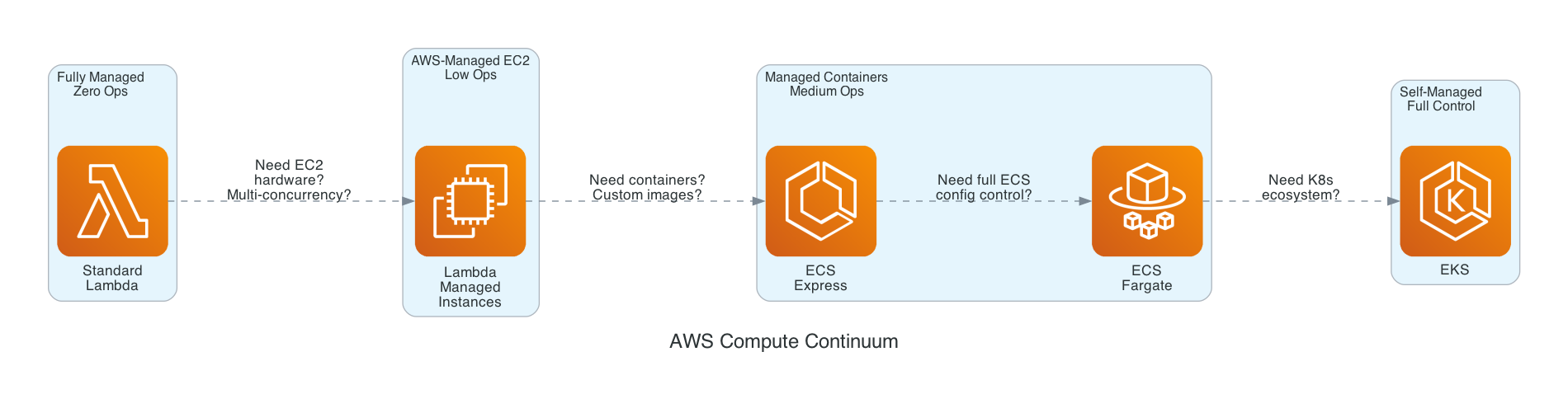
Before diving into the implementation, it helps to understand where Lambda Managed Instances fits in the AWS compute landscape. The options form a continuum from fully managed to fully self-managed:
| Standard Lambda | Lambda Managed Instances | ECS Express Mode | ECS Fargate | EKS | |
|---|---|---|---|---|---|
| Scaling | Per-invocation, instant | Async, CPU-based and concurrency saturation | Traffic-based, auto | Task-based, minutes | Pod-based, minutes |
| Concurrency | 1 per environment | Multiple per environment | Configurable | Configurable | Configurable |
| Pricing | Per-request + GB-second | Per-request + EC2 + 15% mgmt fee | Fargate + ALB | Per-vCPU-hour | EC2/Fargate + control plane |
| Commitment discounts | None | Savings Plans, Reserved Instances | Fargate Savings Plans | Fargate Savings Plans | EC2 Savings, RIs |
| Cold start | Milliseconds-seconds | Tens of seconds (new instances) | Minutes | Minutes | Minutes |
| Max invocation | 15 minutes | 15 minutes (environments long-lived, instances rotated by Lambda) | No limit | No limit | No limit |
| VPC | Optional | Required | Required | Required | Required |
| Memory | Up to 10 GB | Up to 32 GB (configurable vCPU ratio) | Configurable | Configurable | Configurable |
| Ops burden | Zero | Low | Low | Medium | High |
When to choose Lambda Managed Instances:
- Sustained, predictable throughput (hundreds or thousands of requests per second)
- Workloads that benefit from specific EC2 instance types (Graviton4, high-bandwidth networking)
- Memory-intensive functions that exceed standard Lambda's 10 GB limit or need configurable memory-to-vCPU ratios
- Cost optimization at scale (10M+ invocations/month where EC2 pricing with Savings Plans beats per-GB-second)
- Functions that load large datasets into memory and reuse them across requests (embeddings, models, reference data)
When standard Lambda is still better:
- Bursty, unpredictable traffic patterns
- Low to moderate throughput (standard Lambda's per-invocation pricing wins)
- Functions that need instant scaling (LMI scales asynchronously based on CPU utilization and execution-environment saturation; if traffic more than doubles within 5 minutes you may see throttles while capacity catches up)
I've written about several of these compute options in previous projects. My ECS deep dive covers Fargate and ECS Express Mode. The Serverless Data Processor demonstrates Step Functions with both Lambda and Fargate. My Powertools best practices article covers the observability patterns used in this project.
Architecture
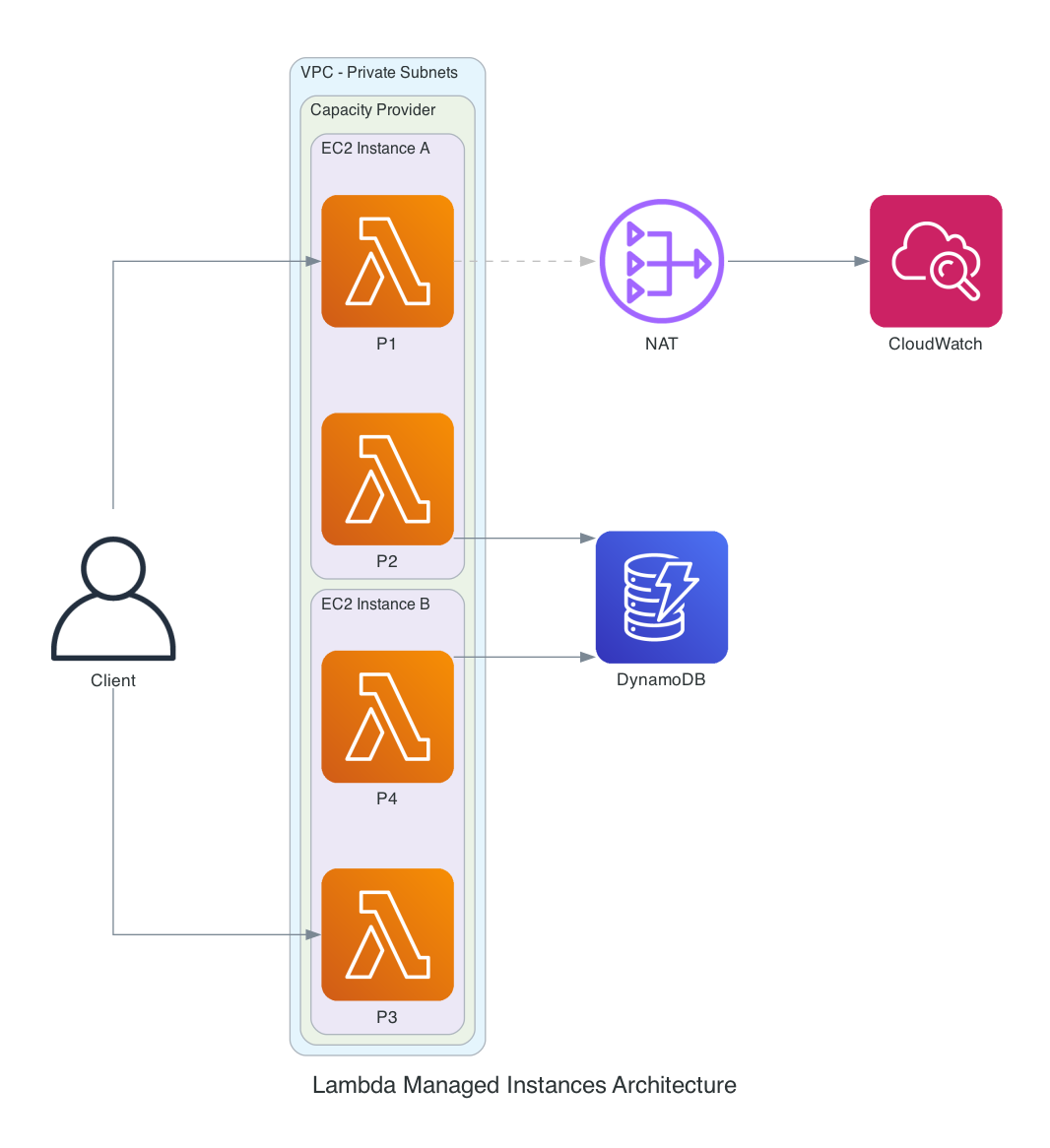
The architecture has three layers:
Capacity Provider - The foundation. Defines the VPC configuration, instance requirements (architecture, instance types), and scaling policies. Capacity providers define both the security boundary and the failure blast radius of your workload. All functions assigned to the same capacity provider share EC2 instances and must be mutually trusted. This uses container-based isolation, not Firecracker. A compromised function on a shared capacity provider can affect every other function on the same instances. Separate untrusted workloads, regulated workloads, and production from non-production into distinct capacity providers.
Managed Instances - EC2 instances launched and managed by Lambda in your VPC. They're visible in the EC2 console (tagged as managed by Lambda) but you don't SSH into them, patch them, or configure autoscaling groups - Lambda handles all of that. The lifecycle includes a 14-day rotation for security compliance.
Execution Environments - Containers running your function code on the managed instances. Each environment handles multiple concurrent requests. For Python, each concurrency slot is a separate process with its own memory space.
Networking - VPC connectivity is mandatory. Without proper outbound connectivity, functions execute but logs and traces are silently lost. This project uses private subnets with a NAT Gateway for telemetry transmission and Bedrock API access. For production, consider VPC endpoints to keep traffic on the AWS network.
Two-Level Concurrency
This is what makes Lambda Managed Instances architecturally different from standard Lambda. There are two levels of parallelism:
Level 1 - LMI manages for you: Multiple processes handle concurrent requests. Python's LMI runtime spawns a separate process for each concurrency slot (default: 16 per vCPU). Each process has its own memory space, its own global variables, and its own boto3 clients. No shared mutable state between processes. Scaling decisions are based on both execution environment saturation and CPU utilization, not request count alone.
Level 2 - You manage yourself: Within each request, you can use ThreadPoolExecutor to parallelize I/O operations. If your handler needs to search 5 product categories, you can search them in parallel rather than sequentially.
Combined, this means a single execution environment with 1 vCPU and 10 concurrent processes, each running 4 search threads, can have 40 category searches in flight concurrently. On standard Lambda, you'd need 10 separate execution environments to handle those 10 concurrent requests, each paying per-GB-second for its own copy of the catalog in memory.
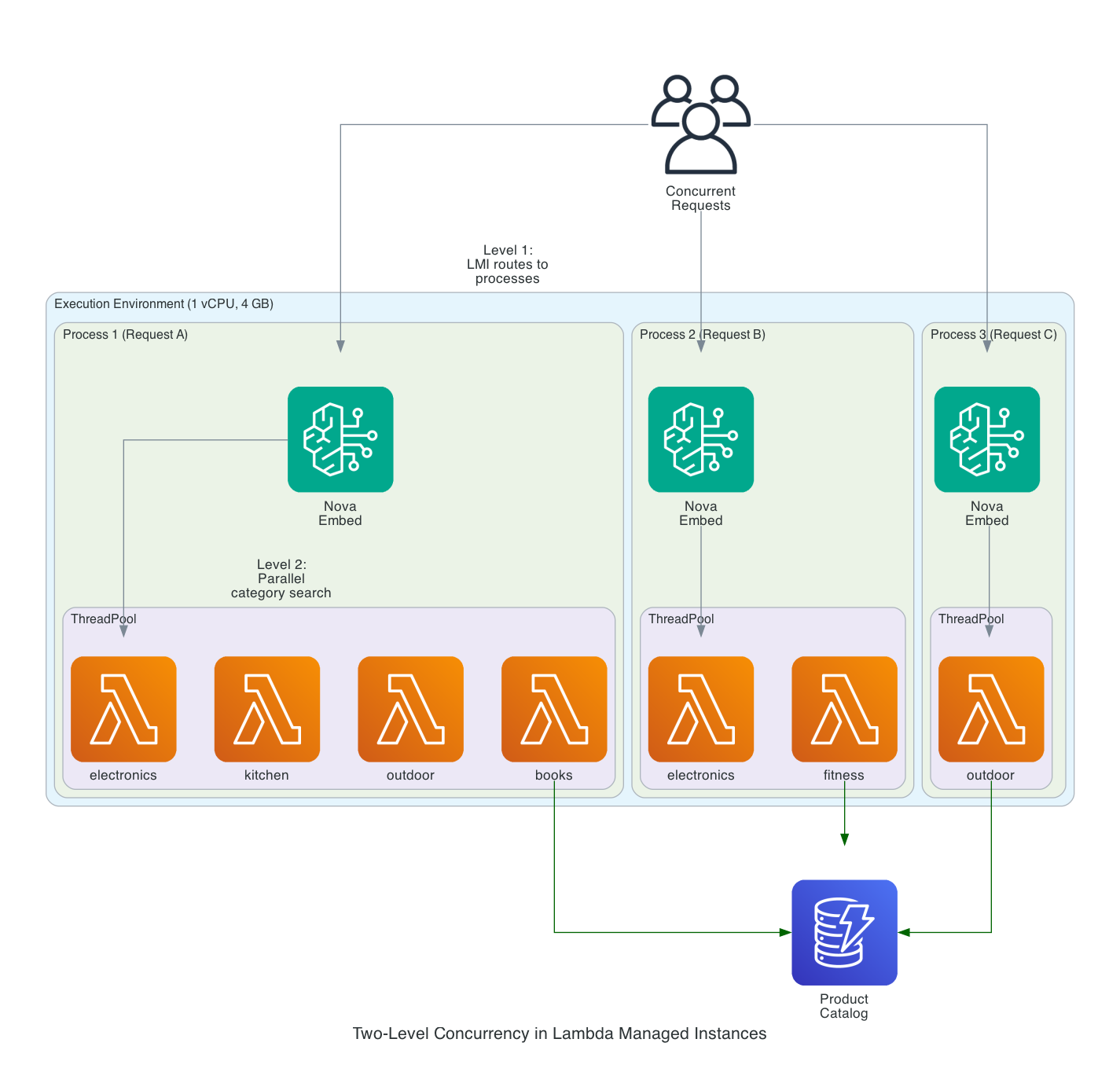
Each process receives a request, calls Bedrock to embed the query text, then fans out across categories using ThreadPoolExecutor. The catalog data (loaded from DynamoDB at process init) stays in memory across all requests handled by that process.
Why LMI Instead of Standard Lambda
This workload is a poor fit for standard Lambda and a strong fit for LMI. Here's why:
In-memory catalog at scale. Each process loads the product catalog with embedding vectors into memory at initialization. A 100K product catalog with 384-dimensional vectors is roughly 150 MB per process. With 10 concurrent processes, that's 1.5 GB for catalog data alone. Standard Lambda's maximum is 10 GB total, and you pay per-GB-second for every millisecond of that memory. LMI gives you up to 32 GB with configurable memory-to-vCPU ratios, and you pay EC2 instance pricing regardless of how much memory your function uses.
Multi-concurrency amortizes catalog loading. On standard Lambda, 10 concurrent requests means 10 independent execution environments, each cold-starting and loading the catalog into its own memory, each paying per-GB-second. On LMI, those 10 requests run as 10 processes on one EC2 instance. The catalog loads once per process at init time and stays warm for all subsequent requests routed to that process. At sustained throughput, this eliminates the repeated cold-start penalty.
Sustained throughput economics. A product recommendation API serving a storefront has predictable, sustained traffic - hundreds of requests per second during business hours. Each request involves a Bedrock API call for query embedding (I/O), cosine similarity across categories (CPU), and structured logging (I/O). At 10M+ invocations per month, EC2 pricing with Savings Plans is 60-72% cheaper than standard Lambda's per-GB-second model.
Configurable memory-to-vCPU ratio. This workload is memory-heavy (large catalog) with moderate CPU needs (vector math on 384 dimensions). The 4:1 memory-to-vCPU ratio gives 4 GB of memory per vCPU - enough for the catalog plus Bedrock client overhead. Standard Lambda locks you into a fixed ratio where more memory always means proportionally more CPU and higher cost.
Why Not Fargate?
This project could run on ECS Fargate. The handler logic would move into a FastAPI app, the catalog would load at container startup, and an ALB would handle routing. It would work fine. But the infrastructure footprint would be significantly larger:
| Lambda Managed Instances | ECS Fargate | |
|---|---|---|
| Application code | Single handler function | Web framework + Dockerfile + health checks |
| Infrastructure | Capacity provider + function | Cluster + task def + service + ALB + target group + listener rules |
| Auto-scaling | Built into capacity provider | Application Auto Scaling policies (target tracking, step scaling) |
| Event triggers | Native (SQS, EventBridge, API Gateway, S3) | Requires separate wiring per trigger |
| Terraform lines | ~200 across 4 modules | ~400-500 with ALB, ECR, auto-scaling |
| Container image | Not needed (zip deployment) | Required (Dockerfile, ECR push, image lifecycle) |
For teams already comfortable with Lambda, LMI is the path of least resistance to get EC2 pricing and multi-concurrency without learning container orchestration. You keep the programming model you know and gain the hardware flexibility you need. The reverse is also true: for teams already invested in ECS, Fargate may remain the more operationally familiar choice - the muscle memory, dashboards, deployment pipelines, and on-call runbooks are already in place.
Where Fargate or EKS would be the better choice: custom native dependencies that exceed Lambda layer limits (PyTorch, large ML models), persistent connections (WebSocket, gRPC), specialized instance types not supported by LMI, or workloads that need the Kubernetes ecosystem. I covered Fargate patterns in my ECS deep dive and Kabob Store projects. My EKS Auto Mode article covers Karpenter-based scaling.
One specific area where EKS with Karpenter is significantly more sophisticated: scaling down and cost optimization at idle. LMI's scale-down is conservative - in my testing, 2 EC2 instances remained running overnight with zero traffic (1 per AZ). There's no minimum instance setting, no consolidation, and no way to force scale-to-zero short of deleting the function version or capacity provider. Karpenter, by contrast, actively consolidates workloads onto fewer nodes, replaces larger instances with smaller ones when demand drops, and can use Spot instances for fault-tolerant workloads. If your traffic has significant idle periods (nights, weekends), this difference matters for cost. LMI's simplicity comes at the price of less intelligent scaling.
Setting It Up with Terraform
The complete infrastructure is organized into four Terraform modules: networking, IAM, capacity provider, and Lambda. Every IAM policy follows least privilege, and the configuration follows the AWS Well-Architected Framework Security and Cost Optimization pillars. All resources use official HashiCorp providers (hashicorp/aws and hashicorp/archive where applicable) - no community modules or third-party providers.
For a fully production-hardened deployment, you'd also want to address the Reliability, Performance Efficiency, and Operational Excellence pillars more explicitly. The AWS Serverless Applications Lens emphasizes thinking in concurrent requests, sharing nothing, designing for failures and duplicates, and using versions and aliases for safe reversible deployments. Concretely:
- Multi-AZ deployment - subnets in at least two AZs (this demo does)
- Encryption at rest with customer-managed KMS keys - on the capacity provider (
kms_key_arnonaws_lambda_capacity_provider), DynamoDB (server_side_encryptionwithkms_key_arn), and CloudWatch Logs (kms_key_idon the log group) - VPC endpoints instead of NAT Gateway (covered later in this article)
- Invoke through an alias, not the published version directly - The demo invokes the qualified ARN of the published function version (
function:name:1). For production, create an alias (prod,live,stable) pointing to a specific version and have callers invoke the alias ARN. Aliases enable instant rollback by updating one pointer, support traffic-shifting deployments (10% to a new version, then 50%, then 100%), and decouple caller code from version numbers. - Idempotency for downstream side effects - Because Lambda may retry or duplicate events, handlers must remain idempotent - even when using long-lived in-memory state. The Powertools idempotency utility uses DynamoDB to deduplicate requests by a configurable key. For this similarity engine the Bedrock embedding call is a read operation and the only state change is logging, so idempotency is less critical. For handlers that write to DynamoDB, send notifications, or charge a payment, idempotency is essential because LMI's at-least-once delivery semantics mean retries can produce duplicate side effects. The in-memory catalog is read-only and shared across requests, but any per-request state that produces side effects needs deduplication.
- CloudWatch alarms on LMI-specific metrics (covered in the Observability section)
The demo includes the basics. The production hardening above is straightforward incremental work.
Provider Configuration
terraform {
  required_version = ">= 1.11.0"

  required_providers {
    aws = {
      # Validated with AWS provider v6.x (tested with 6.31+)
      source  = "hashicorp/aws"
      version = "~> 6.31"
    }
    archive = {
      source  = "hashicorp/archive"
      version = "~> 2.7"
    }
  }
}

provider "aws" {
  region  = var.aws_region
  profile = var.aws_profile  # Set via AWS_PROFILE env var or -var flag

  default_tags {
    tags = {
      Project     = "lambda-managed-instances"
      Environment = var.environment
      ManagedBy   = "terraform"
    }
  }
}
The ~> 6.31 constraint pins to the current stable major (6.31.0 at the time of writing) without locking too tightly. memory_size values above 10240 MB require hashicorp/aws 6.29.0 or later - earlier releases had a schema validator that capped memory_size at 10 GB even for LMI functions (fixed in #46065). Without a recent provider, attempting to set 16 GB or 32 GB on an LMI function fails at terraform plan with a confusing validation error.
IAM: The Two-Role Model
Lambda Managed Instances requires two separate IAM roles - a deliberate separation of concerns:
Operator Role - Allows Lambda to manage EC2 instances on your behalf. Your function code never gets these permissions.
resource "aws_iam_role" "operator" {
  name = "${var.project_name}-${var.environment}-operator"

  assume_role_policy = jsonencode({
    Version = "2012-10-17"
    Statement = [{
      Effect = "Allow"
      Principal = {
        Service = "lambda.amazonaws.com"
      }
      Action = "sts:AssumeRole"
      Condition = {
        StringEquals = {
          "aws:SourceAccount" = var.account_id
        }
      }
    }]
  })
}

resource "aws_iam_role_policy_attachment" "operator" {
  role       = aws_iam_role.operator.name
  policy_arn = "arn:aws:iam::aws:policy/service-role/AWSLambdaManagedEC2ResourceOperator"
}
Execution Role - Scoped to only what the function needs. No EC2 permissions, no wildcard resources. Bedrock access is limited to specific embedding model families.
# DynamoDB - least privilege: handler only does Query on the category-index GSI.
# The seed script runs locally with the operator's credentials and uses its own
# IAM identity for PutItem - not this role.
resource "aws_iam_role_policy" "execution_dynamodb" {
  name = "dynamodb-access"
  role = aws_iam_role.execution.id

  policy = jsonencode({
    Version = "2012-10-17"
    Statement = [{
      Effect = "Allow"
      Action = ["dynamodb:Query"]
      Resource = [
        var.dynamodb_table,
        "${var.dynamodb_table}/index/*"
      ]
    }]
  })
}

# Bedrock - scoped to the specific configured embedding model
resource "aws_iam_role_policy" "execution_bedrock" {
  name = "bedrock-embeddings"
  role = aws_iam_role.execution.id

  policy = jsonencode({
    Version = "2012-10-17"
    Statement = [{
      Effect   = "Allow"
      Action   = ["bedrock:InvokeModel"]
      Resource = [
        "arn:aws:bedrock:${var.aws_region}::foundation-model/${var.embedding_model_id}"
      ]
    }]
  })
}
The runtime function only needs dynamodb:Query because _load_catalog() queries the category-index GSI rather than scanning the table. No PutItem, no GetItem, no Scan. The seed script (scripts/seed_catalog.py) runs locally on the developer's machine with their own IAM identity - it never assumes the function execution role, so the runtime role doesn't need write permissions. The Bedrock policy is scoped to the exact model ARN configured via var.embedding_model_id, not a wildcard. This is what "least privilege" looks like when you actually walk through the code.
Capacity Provider
The capacity provider defines the EC2 infrastructure where your functions run. The scaling_mode = "Manual" with a target CPU utilization policy gives you control over scaling behavior while still letting Lambda handle the mechanics.
resource "aws_lambda_capacity_provider" "main" {
  name = "${var.project_name}-${var.environment}"

  vpc_config {
    subnet_ids         = var.subnet_ids
    security_group_ids = [var.security_group_id]
  }

  permissions_config {
    capacity_provider_operator_role_arn = var.operator_role_arn
  }

  instance_requirements {
    architectures = [var.instance_architecture]  # "arm64" for Graviton
  }

  capacity_provider_scaling_config {
    max_vcpu_count = var.max_vcpu_count
    scaling_mode   = "Manual"

    scaling_policies = [{
      predefined_metric_type = "LambdaCapacityProviderAverageCPUUtilization"
      target_value           = var.target_cpu_utilization
    }]
  }
}
The capacity provider supports two scaling modes: Auto and Manual. Auto mode is hands-off - Lambda picks an internal target CPU utilization and scales based on AWS-chosen defaults, with no explicit scaling_policies block needed. I chose Manual mode for this project because it lets me set an explicit target (50% in the demo config) so the scaling behavior is predictable and tunable. With a lower target, the capacity provider scales out faster and maintains more headroom for traffic bursts. For a production workload where you trust AWS to pick reasonable defaults, Auto mode is simpler and a valid choice.
Lambda Function with Capacity Provider
Four key differences from a standard Lambda function:
capacity_provider_configattaches the function to LMIpublish = trueis required - LMI runs on published versionsmemory_sizeminimum is 2048 MB (2 GB / 1 vCPU)execution_environment_memory_gib_per_vcpucontrols the memory-to-vCPU ratio (new in March 2026)
locals {
  powertools_layer_arn = (
    var.instance_architecture == "arm64"
    ? "arn:aws:lambda:${var.aws_region}:017000801446:layer:AWSLambdaPowertoolsPythonV3-python314-arm64:${var.powertools_layer_version}"
    : "arn:aws:lambda:${var.aws_region}:017000801446:layer:AWSLambdaPowertoolsPythonV3-python314-x86_64:${var.powertools_layer_version}"
  )

  powertools_env_vars = {
    POWERTOOLS_SERVICE_NAME      = "${var.project_name}-handler"
    POWERTOOLS_METRICS_NAMESPACE = var.metrics_namespace
    POWERTOOLS_LOG_LEVEL         = var.log_level
  }
}

resource "aws_lambda_function" "handler" {
  function_name = "${var.project_name}-${var.environment}-handler"
  role          = var.execution_role_arn
  handler       = "handler.lambda_handler"
  runtime       = "python3.14"
  architectures = [var.instance_architecture]
  memory_size   = var.lambda_memory_size
  timeout       = 30
  publish       = true

  filename         = data.archive_file.function.output_path
  source_code_hash = data.archive_file.function.output_base64sha256

  layers = [local.powertools_layer_arn]

  capacity_provider_config {
    lambda_managed_instances_capacity_provider_config {
      capacity_provider_arn                    = var.capacity_provider_arn
      execution_environment_memory_gib_per_vcpu = var.memory_gib_per_vcpu
      per_execution_environment_max_concurrency = var.max_concurrency_per_environment
    }
  }

  logging_config {
    log_format            = "JSON"
    application_log_level = var.log_level
    system_log_level      = "WARN"
    log_group             = aws_cloudwatch_log_group.function.name
  }

  tracing_config {
    mode = "Active"
  }

  environment {
    variables = merge(local.powertools_env_vars, {
      DYNAMODB_TABLE      = aws_dynamodb_table.products.name
      ENVIRONMENT         = var.environment
      EMBEDDING_MODEL_ID  = var.embedding_model_id
      EMBEDDING_DIMENSION = tostring(var.embedding_dimension)
    })
  }
}
The memory_gib_per_vcpu setting is powerful. LMI enforces a minimum of 1 vCPU per execution environment, so the ratio determines how much memory you get for that minimum. Examples at the 8 GB level:
- 2:1 ratio = 8 GB / 4 vCPUs (compute-heavy: batch processing, data crunching)
- 4:1 ratio = 8 GB / 2 vCPUs (balanced: API handlers, typical workloads)
- 8:1 ratio = 8 GB / 1 vCPU (memory-heavy: large in-memory datasets, caching)
The product similarity engine uses 4 GB at 4:1 - 1 vCPU per environment, which is the smallest balanced configuration that fits the catalog plus 10 worker processes.
A Note on Packaging Dependencies
The Powertools layer is pinned to a specific version (minimum 3.23.0 - the first release that officially supports LMI). For everything else, follow AWS's guidance for Python Lambda functions: package all dependencies, including boto3 and botocore, with the function rather than relying on the runtime's bundled copies. Even though boto3 is available in the runtime, package it with your function to avoid version drift. The runtime's boto3 is updated on AWS's schedule, not yours, and version drift between local development and the runtime can produce subtle bugs that are hard to reproduce. For production zip deployments, pip install --target build/ boto3 botocore and ship them in the zip. The demo uses the runtime's boto3 for simplicity, but production code should not.
Multi-Concurrency by Language
LMI supports five runtimes today: Python 3.13+, Node.js 22+, Java 21+, .NET 8+, and Rust on the OS-only runtime. All modern runtimes (Python 3.12+) are based on Amazon Linux 2023, replacing AL2 ahead of its June 2026 end-of-life. Every language handles multi-concurrency differently, and the differences matter - they change how you write the handler, what concurrency bugs you have to worry about, and how memory scales.
| Runtime | Concurrency Model | What This Means for Your Handler |
|---|---|---|
| Python | Multiple processes per environment | Full isolation - each process has its own memory, globals, and boto3 clients. No thread-safety concerns. Memory multiplies linearly with concurrency. |
| Node.js | Worker threads with async dispatch | Each worker thread can also handle async requests concurrently. Requires safe handling of shared state. |
| Java | Single process with OS threads | Multiple threads execute the handler simultaneously in shared memory. Requires explicit thread-safe code: synchronized collections, no shared mutable state, atomic operations. The hardest model to get right. |
| .NET | .NET Tasks with async processing | Same patterns as ASP.NET Core - thread-safe data structures, no static mutable state. |
| Rust | Single process, Tokio async tasks | Compile-time enforcement: handlers must implement Clone + Send. The compiler catches concurrency bugs that other languages catch at runtime (or in production). |
Python is the simplest model because there's no shared memory between concurrent requests. The trade-off is per-process memory multiplication. Java is the hardest because thread safety becomes a concern on every line that touches shared state. Rust is the safest because the compiler refuses to let you write non-thread-safe code in the first place.
This blog focuses on the Python implementation. The patterns shown here (process isolation, ThreadPoolExecutor for parallel I/O within a request, memory tuning around per_execution_environment_max_concurrency) are specific to how Python's LMI runtime works. The architecture concepts (capacity providers, scaling, networking, IAM) apply identically across all five languages, but the handler code patterns would differ if you were writing in Java or Rust.
The Python Handler
Python's LMI runtime uses multiple processes (not threads) for multi-concurrency. Each concurrent request runs in a separate process with its own memory space. Global variables, module-level caches, and boto3 clients are completely isolated between processes. This is simpler than the thread-based and async models above because there are no shared-memory concurrency concerns.
This blog uses Python 3.14, the newest supported version. Note that Lambda's Python 3.14 ships with the JIT and free-threaded mode disabled, so the GIL is still in effect.
The one shared resource: /tmp. All processes in an execution environment share the same /tmp directory. Use request-scoped filenames to prevent collisions.
Handler Structure with Powertools
Following the Powertools best practices pattern - Logger, Tracer, and Metrics decorators in the correct order:
import json
import math
import os
from concurrent.futures import ThreadPoolExecutor, as_completed
import boto3
from aws_lambda_powertools import Logger, Metrics, Tracer
from aws_lambda_powertools.metrics import MetricUnit
from aws_lambda_powertools.utilities.typing import LambdaContext

logger = Logger()
tracer = Tracer()
metrics = Metrics()

# Module-level init runs ONCE PER PROCESS.
# With 10 concurrent processes, this runs 10 times.
# Each process loads its own catalog copy and boto3 clients.
PROCESS_ID = os.getpid()
AWS_REGION = os.environ.get("AWS_REGION", "us-east-1")
EMBEDDING_MODEL_ID = os.environ.get(
    "EMBEDDING_MODEL_ID", "amazon.nova-2-multimodal-embeddings-v1:0"
)
EMBEDDING_DIMENSION = int(os.environ.get("EMBEDDING_DIMENSION", "384"))

dynamodb = boto3.resource("dynamodb", region_name=AWS_REGION)
table = dynamodb.Table(os.environ["DYNAMODB_TABLE"])
bedrock_runtime = boto3.client("bedrock-runtime", region_name=AWS_REGION)
_catalog: dict[str, list[dict]] = {}


@tracer.capture_method
def _load_catalog() -> None:
    """Load product catalog once per process. Uses Query (least privilege)."""
    if _catalog:  # already loaded in this process
        return
    # ... query DynamoDB by category and populate _catalog ...


@logger.inject_lambda_context(log_event=True)
@tracer.capture_lambda_handler
@metrics.log_metrics(capture_cold_start_metric=True)
def lambda_handler(event: dict, context: LambdaContext) -> dict:
    logger.append_keys(process_id=PROCESS_ID)
    _load_catalog()  # no-op after first call in this process

    # Extract params from event body or direct invocation
    body = event.get("body")
    params = json.loads(body) if isinstance(body, str) else (body or event)
    top_k = int(params.get("top_k", 5))

    # Step 1: Embed the query text via Bedrock (I/O-bound)
    query_embedding = _embed_query(params["query"])

    # Step 2: Search categories in parallel (CPU-bound)
    results: dict = {}
    categories = params.get("categories", list(_catalog.keys()))
    with ThreadPoolExecutor(max_workers=4) as executor:
        futures = {
            executor.submit(_search_category, cat, query_embedding, top_k): cat
            for cat in categories
        }
        for future in as_completed(futures):
            results[futures[future]] = future.result()

    metrics.add_metric(name="SearchRequests", unit=MetricUnit.Count, value=1)
    return {"statusCode": 200, "body": json.dumps({"results": results})}
Bedrock Embedding - Configurable Model
The query text is embedded via Amazon Bedrock before similarity search. The model is configurable via the EMBEDDING_MODEL_ID environment variable - Nova Multimodal Embeddings by default, with Titan Text Embeddings V2 as an alternative:
@tracer.capture_method
def _embed_query_nova(text: str) -> list[float]:
    """Nova Multimodal Embeddings request format."""
    request_body = {
        "taskType": "SINGLE_EMBEDDING",
        "singleEmbeddingParams": {
            "embeddingPurpose": "TEXT_RETRIEVAL",
            "embeddingDimension": EMBEDDING_DIMENSION,
            "text": {"truncationMode": "END", "value": text},
        },
    }
    response = bedrock_runtime.invoke_model(
        body=json.dumps(request_body),
        modelId=EMBEDDING_MODEL_ID,
        accept="application/json",
        contentType="application/json",
    )
    response_body = json.loads(response["body"].read())
    return response_body["embeddings"][0]["embedding"]
Product embeddings are generated at seed time using GENERIC_INDEX purpose and stored in DynamoDB alongside the product data. Query embeddings use TEXT_RETRIEVAL purpose at runtime. Nova supports 4 dimension sizes (256, 384, 1024, 3072) - trading off accuracy against memory and compute cost. The demo uses 384 dimensions as a practical balance.
Cosine Similarity - The CPU Bottleneck
The vector similarity computation is the compute-intensive core after the Bedrock call returns. For production, use NumPy - it's 10-50x faster than a pure Python loop and releases the GIL during C-level operations, which makes the ThreadPoolExecutor pattern actually parallel:
import numpy as np

def _cosine_similarity(query: np.ndarray, catalog: np.ndarray) -> np.ndarray:
    """Production version: batch operation across all products in a category."""
    # query shape: (D,), catalog shape: (N, D)
    norms = np.linalg.norm(catalog, axis=1) * np.linalg.norm(query)
    return np.dot(catalog, query) / np.where(norms == 0, 1, norms)
The pure Python version is included in the demo as an educational fallback (no NumPy dependency, easier to read):
def _cosine_similarity_pure(vec_a: list[float], vec_b: list[float]) -> float:
    """Educational version: shows the math, no dependencies."""
    dot = sum(a * b for a, b in zip(vec_a, vec_b))
    norm_a = math.sqrt(sum(a * a for a in vec_a))
    norm_b = math.sqrt(sum(b * b for b in vec_b))
    if norm_a == 0 or norm_b == 0:
        return 0.0
    return dot / (norm_a * norm_b)
The handler code, the capacity provider, the Terraform - none of it would need to change to run on an instance type with hardware-accelerated vector operations. The capacity provider's instance type selection is the only variable.
Process Memory Multiplication
This is the most important thing to understand about Python LMI. Each process loads its own copy of the catalog:
10 concurrent processes x 200 MB catalog = 2 GB just for catalog data
The MemoryUtilization CloudWatch metric tracks total memory consumption across all processes. If you're loading large datasets and running high concurrency, you'll hit memory limits. Tune with:
- Reduce
PerExecutionEnvironmentMaxConcurrency(fewer processes, less memory) - Increase
memory_size(more memory per environment) - Use 8:1
memory_gib_per_vcpuratio (more memory, fewer vCPUs) - Use shared
/tmpas a cross-process cache (load once, read from all processes)
Observability
LMI publishes its own CloudWatch metrics in the AWS/Lambda namespace at 5-minute granularity. The capacity-provider-level metrics describe overall instance utilization; the execution-environment-level metrics describe per-function resource consumption.
Capacity provider metrics (dimensions: CapacityProviderName, InstanceType):
CPUUtilization- CPU usage across all instances in the capacity providerMemoryUtilization- Memory usage across all instancesvCPUAllocated/vCPUAvailable- Used vs available vCPU countMemoryAllocated/MemoryAvailable- Used vs available memory
Execution environment metrics (dimensions: FunctionName, CapacityProviderName, Resource):
ExecutionEnvironmentConcurrency- Active concurrent requests per environmentExecutionEnvironmentConcurrencyLimit- Configured maximum concurrency per environmentExecutionEnvironmentCPUUtilization- CPU usage of this function's environmentsExecutionEnvironmentMemoryUtilization- Memory usage of this function's environments
Alarms to Set First
If you only set three alarms when adopting LMI, set these:
- Capacity provider CPU utilization - Alarm when sustained CPU exceeds your scaling target (e.g., > 80% for 10 minutes if your target is 50%). This indicates the capacity provider is failing to scale out fast enough or has hit
max_vcpu_count. - Execution environment concurrency vs limit - Alarm when
ExecutionEnvironmentConcurrencyreachesExecutionEnvironmentConcurrencyLimitfor sustained periods. This means processes are saturated and incoming requests are being throttled or queued. - Execution environment memory utilization - Alarm when memory exceeds 80%. With Python's per-process memory multiplication, hitting memory limits causes new process spawns to fail (
InitResourceExhausted) rather than gradual degradation. Catch this before it happens.
These three cover the LMI-specific failure modes that standard Lambda alarms (Errors, Throttles, Duration) won't catch.
Deployment
Prerequisites
- AWS CLI configured with a profile (
export AWS_PROFILE=your-profile) - Terraform >= 1.11
- Python 3.14+ with boto3 (for the seed script)
- Amazon Nova Multimodal Embeddings model enabled in your AWS account (Bedrock console, Model Access)
Deploy
# Clone the repo
git clone https://github.com/RDarrylR/lambda-managed-instances-similarity-engine.git
cd lambda-managed-instances-similarity-engine

# Configure
cp infrastructure/terraform.tfvars.example infrastructure/terraform.tfvars
# Edit terraform.tfvars with your values

# Deploy infrastructure
make init
make apply

# Seed the product catalog
make seed

# Invoke
make invoke
Cost Analysis
Lambda Managed Instances pricing is fundamentally different from standard Lambda. Understanding when each model wins is the key decision.
Standard Lambda pricing (arm64/Graviton):
- $0.20 per million requests
- $0.0000133334 per GB-second (arm64)
- No minimum charge, no idle cost
Lambda Managed Instances pricing:
- $0.20 per million requests (same)
- EC2 on-demand instance pricing (varies by type)
- 15% management fee on the EC2 on-demand price
- No per-invocation duration charge
The critical difference: standard Lambda charges per GB-second of execution. LMI charges for EC2 time regardless of how many requests you serve. At low volume, you're paying for idle EC2 capacity. At high volume, that fixed EC2 cost is amortized across millions of requests.
Break-Even: Standard Lambda vs LMI
Consider this workload: 4 GB memory, 200ms average duration, sustained traffic.
Standard Lambda cost per request (arm64):
- Compute: 4 GB x 0.2s = 0.8 GB-seconds x $0.0000133334 = $0.00001067
- Request: $0.0000002
- Total: ~$0.0000109 per request
LMI on a c7g.medium (1 vCPU, 2 GB, ~$0.034/hr on-demand):
- EC2 + 15% fee: $0.034 x 1.15 = $0.0391/hr
- With 10 concurrent processes and 200ms per request, each process handles ~5 req/sec
- Instance throughput: ~50 req/sec = ~180,000 req/hr
- Cost per request: $0.0391 / 180,000 = ~$0.000000217
At this throughput, LMI is roughly 50x cheaper per request than standard Lambda. But the EC2 cost runs 24/7 whether you have traffic or not.
Monthly Cost Comparison
| Monthly Requests | Instances Needed | Standard Lambda (arm64) | LMI On-Demand (c7g.medium) | LMI + 1yr Savings Plan |
|---|---|---|---|---|
| 1M | 1 | $11 | $28 + $0.20 = $28 | ~$18 |
| 10M | 1 | $109 | $28 + $2.00 = $30 | ~$20 |
| 50M | 1 | $546 | $28 + $10.00 = $38 | ~$28 |
| 100M | 1 | $1,091 | $28 + $20.00 = $48 | ~$38 |
| 500M | 4 | $5,456 | $112 + $100.00 = $212 | ~$172 |
A single c7g.medium tops out around ~130M requests/month at 50 req/sec sustained. Beyond that, instance count scales roughly linearly with load - 500M req/month requires approximately 4 instances. The LMI columns reflect the actual instance count needed at each volume.
The break-even is around 2.5M requests/month at this memory and duration profile. Below that, standard Lambda wins because you pay nothing when idle. Above that, LMI wins and the advantage grows with volume.
Commitment Discounts Change the Math
LMI supports EC2 Savings Plans and Reserved Instances. Standard Lambda supports Compute Savings Plans (up to 17% discount on duration). The discount gap is significant:
| Commitment | Standard Lambda Discount | LMI Discount (EC2) |
|---|---|---|
| None (on-demand) | 0% | 0% |
| 1-year Compute Savings Plan | Up to 17% | Up to 36% |
| 3-year Compute Savings Plan | Up to 17% | Up to 56% |
| 1-year EC2 Reserved Instance | N/A | Up to 40% |
| 3-year EC2 Reserved Instance | N/A | Up to 60% |
For predictable production workloads with steady traffic, a 3-year commitment on LMI can reduce costs by 60% on the EC2 portion. Standard Lambda's maximum discount is 17%. This difference widens the gap at scale.
Hidden Costs
Don't forget the supporting infrastructure that LMI requires and standard Lambda doesn't:
- NAT Gateway: ~$32/month + $0.045/GB data transfer (required for VPC telemetry)
- VPC endpoints (if used instead of NAT): ~$7.20/month per endpoint per AZ
- DynamoDB: On-demand reads for catalog loading (minimal for small catalogs, significant at scale)
- Bedrock: Nova Multimodal Embeddings per-token pricing for each query embedding
- CloudWatch: Log storage and metric costs increase with concurrency
For low-volume workloads, these fixed costs can exceed the compute savings. Factor them into your total cost of ownership.
When Each Pricing Model Wins
Standard Lambda wins when:
- Traffic is bursty or unpredictable (you pay nothing at zero traffic)
- Monthly volume is below the break-even threshold (~2-3M requests for this workload profile)
- You can't commit to 1-year or 3-year terms
- You don't need VPC connectivity (avoids NAT Gateway cost)
LMI wins when:
- Traffic is sustained and predictable (the EC2 cost is fully amortized)
- Monthly volume exceeds 5-10M requests
- You can commit to Savings Plans or Reserved Instances
- You need more than 10 GB memory or specific instance types
- You're already paying for VPC infrastructure
For this demo, expect to pay for:
- NAT Gateway (~$0.045/hour + data transfer)
- EC2 instances (varies by type, auto-selected by Lambda)
- DynamoDB on-demand reads (minimal for this catalog size)
- Bedrock embedding calls (per-token pricing for each query)
CLEANUP (IMPORTANT!!)
This infrastructure costs real money while running - approximately $2-4/day even with zero traffic (NAT Gateway + EC2 managed instances). Don't forget about it.
Make sure to destroy all resources when you're done:
make destroy
If the capacity provider fails to delete (it can take a few minutes to drain instances), wait and retry. Verify in the AWS console that no EC2 instances tagged with your project name are still running.
Networking: Three Supported Patterns
LMI requires VPC connectivity - the function execution environments need outbound network access for telemetry transmission and any AWS service calls. AWS documents three supported connectivity patterns:
- Public subnets with an internet gateway - simplest, suitable for dev/test only
- Private subnets with NAT Gateway - the pattern this demo uses
- Private subnets with VPC endpoints - the most AWS-aligned production pattern
NAT Gateway (used in this demo)
- Simple to set up - one resource, all outbound traffic routes through it
- ~$32/month base + $0.045/GB data transfer
- Traffic leaves your VPC, crosses the public internet (encrypted), then re-enters AWS
- Single point of failure unless you deploy one per AZ (~$64/month for 2-AZ HA)
VPC Endpoints (recommended for production)
For production, the most AWS-aligned pattern is one VPC endpoint per service per AZ. Traffic stays entirely on the AWS network and never touches the public internet. The endpoint set must cover every service the function calls - if you forget one, the function fails silently or hangs. For this workload, that means:
| Endpoint | Type | Required For |
|---|---|---|
com.amazonaws.{region}.logs | Interface | CloudWatch Logs (Powertools logger output) |
com.amazonaws.{region}.monitoring | Interface | CloudWatch Metrics (Powertools metrics) |
com.amazonaws.{region}.xray | Interface | X-Ray tracing (Powertools tracer) |
com.amazonaws.{region}.bedrock-runtime | Interface | Bedrock embedding API calls |
com.amazonaws.{region}.dynamodb | Gateway | DynamoDB catalog queries (free, no per-AZ charge) |
Critical security group detail: Interface endpoints have their own security groups. They must allow inbound HTTPS (port 443) from the function's security group. The function security group must allow outbound HTTPS to the endpoint security groups. If you skip this, DNS resolves but the connection is silently blocked.
Endpoints should be deployed in each AZ used by the capacity provider to avoid cross-AZ latency and data transfer costs. If your capacity provider has subnets in us-east-1a and us-east-1b, every interface endpoint also needs ENIs in both AZs. This is the same Cross-AZ Tax pattern from my previous blog - cross-AZ data transfer charges apply when traffic from a function in us-east-1a hits an endpoint ENI in us-east-1b. Provision endpoints per AZ to keep traffic local.
Cost math: ~$7.20/month per interface endpoint per AZ. With 4 interface endpoints across 2 AZs, that's ~$58/month - roughly double the single NAT Gateway, but cheaper than 2-AZ NAT Gateway HA. The DynamoDB gateway endpoint is free. At high data transfer volumes (more than ~900 GB/month through the NAT Gateway), endpoints become cheaper because there's no per-GB data transfer surcharge for in-region traffic.
When endpoints win on security: Always. Traffic never leaves the AWS network. You can attach endpoint policies to restrict which resources each endpoint can access (e.g., limit the Bedrock endpoint to specific model ARNs). This aligns with the AWS Well-Architected Security Pillar - minimize the attack surface.
The Terraform for VPC endpoints is straightforward but verbose. I left it out of this demo to keep the focus on LMI itself. A follow-up project could add a networking_mode variable that switches between NAT Gateway and VPC endpoints.
Gotchas
A few things to watch for:
- VPC connectivity isn't optional. Lambda Managed Instances requires a VPC. Without outbound connectivity (NAT Gateway or VPC endpoints), your function executes but logs and traces are silently lost. You'll debug a working function with no visible output. This is documented but easy to miss.
- Scaling is asynchronous. LMI scales based on CPU utilization and execution-environment saturation, not per-invocation demand. Unlike standard Lambda, scaling isn't triggered by incoming requests - it's driven by resource consumption inside existing execution environments. Because scaling reacts to resource pressure instead of incoming traffic, inefficient code or high memory usage can delay scaling and increase throttling risk. The Scaler component decides when to add or remove instances, and instance launches aren't instant. Lambda maintains headroom so traffic can roughly double within minutes without immediate throttling, but if your traffic more than doubles within 5 minutes, you may see 429 throttles while capacity catches up. This is fundamentally different from standard Lambda's near-instant scaling. Plan for it with the target CPU utilization setting - lower values maintain more headroom.
- Process memory multiplies. With Python, each concurrency slot is a separate process. Because Python uses process-based concurrency, memory usage scales linearly with concurrency - each worker process consumes its own memory. With Python, concurrency isn't "free" - each additional request increases memory consumption linearly. If your function uses 500 MB of memory and you set concurrency to 16, that's 8 GB of memory consumed per execution environment. Monitor the
MemoryUtilizationmetric and tune accordingly. publish = trueis required. LMI runs on published function versions, not$LATEST. If you forget this, Terraform applies successfully but the function doesn't run on managed instances. Every code change needs a new published version.- Capacity providers are security boundaries, not isolation boundaries. Functions sharing a capacity provider run in containers on the same EC2 instances. This isn't Firecracker isolation. Separate untrusted workloads into separate capacity providers.
- Powertools minimum version matters. Lambda Managed Instances requires Powertools for AWS Lambda (Python) version 3.23.0 or later. Pin the layer version in Terraform rather than using latest.
- LMI doesn't scale to zero. Unlike standard Lambda where you pay nothing at zero traffic, LMI keeps a baseline of warm EC2 instances running for high availability. AWS launches a baseline of three managed instances for availability across AZs when you publish a function version with a capacity provider. In my testing with 2 AZs configured, 2 instances remained active overnight with zero traffic, but the documented baseline is three. There's no minimum instance setting, no Karpenter-style consolidation, and no way to force scale-to-zero short of deleting the function version or capacity provider. This is a meaningful cost difference for dev/test environments where you might leave infrastructure running between sessions. Run
make destroywhen you're not actively using the infrastructure, or design your dev environments to use standard Lambda where idle cost is zero. - Quotas to plan around. LMI has its own service quotas: 1 request per second on capacity provider write APIs (Create/Update/Delete - rate-limited to prevent infrastructure churn), 100 function versions per capacity provider, and 1,000 capacity providers per account per region. These are soft limits but worth knowing when you start automating capacity provider management or running multiple environments.
SAM Support
If you came in from the AWS Serverless plugin angle and are wondering whether SAM supports LMI - yes, it does. AWS::Serverless::CapacityProvider is the SAM resource equivalent to aws_lambda_capacity_provider. The SAM template syntax is more concise but follows the same model: capacity provider definition, function with CapacityProviderConfig property, and IAM roles. I chose Terraform for this project because the LMI Terraform path is less documented in the wild and I wanted to fill that gap, but SAM is a perfectly valid choice if your team already uses it.
Instance Type Selection
The capacity provider's instance_requirements block controls which EC2 instance types Lambda selects. By default, Lambda chooses the best fit automatically. You can constrain this with allowed_instance_types or excluded_instance_types.
Today, the interesting choice is between arm64 (Graviton4 - better price/performance for most workloads) and x86_64. But the architecture of Lambda Managed Instances - your function code running in containers on EC2 instances you specify - means the compute capabilities available to your functions expand with every new EC2 instance type AWS makes available for LMI.
The product similarity engine in this project calls Bedrock for query embeddings (I/O-bound) and then computes cosine similarity on CPU (compute-bound). The handler code isn't coupled to a specific compute architecture. The embedding call is behind a clean interface (_embed_query). The similarity computation is pure math. The instance type is a configuration parameter, not an application concern.
This is the practical difference between Lambda Managed Instances and standard Lambda. Standard Lambda abstracts the hardware entirely - you get what AWS gives you. Lambda Managed Instances lets you choose, and that choice extends to whatever EC2 instance types AWS makes available.
Wrapping Up
Lambda Managed Instances fills the gap between standard Lambda and ECS Fargate. The handler function and event-driven invocation pattern stay the same, but you gain EC2 hardware selection, multi-concurrency, configurable memory-to-vCPU ratios, and commitment-based pricing.
The key decisions:
- Use it for sustained, predictable throughput where EC2 pricing beats per-GB-second
- Choose your memory-to-vCPU ratio based on whether your workload is compute-bound or memory-bound
- Understand the process model for your language - Python uses processes (simple, no shared-memory concerns), Java uses OS threads (requires thread-safe code), Node.js uses worker threads with async dispatch, .NET uses Tasks, and Rust uses Tokio async tasks (handlers must be
Clone + Send) - Monitor
MemoryUtilizationbecause process memory multiplies with concurrency
The full Terraform configuration, Python handler, seed script, and Makefile are in the GitHub repository.
Resources
- Lambda Managed Instances Documentation
- Lambda Managed Instances - Python Runtime Guide
- 32 GB Memory / 16 vCPU Announcement (March 2026)
- Capacity Provider Documentation
- Amazon Nova Multimodal Embeddings - Embedding model used in this project
- Terraform aws_lambda_capacity_provider
- Powertools for AWS Lambda Best Practices - Observability patterns used in this project
- Elastic Container Service - My Default Choice for Containers on AWS - ECS Fargate and Express Mode comparison
- Serverless Data Processor - Step Functions with Lambda and Fargate
Connect with me on X, Bluesky, LinkedIn, GitHub, Medium, Dev.to, or the AWS Community. Check out more of my projects at darryl-ruggles.cloud and join the Believe In Serverless community.
Comments
Loading comments...