It's All About That Memory - Using Long and Short Term Memory with Agents
Building a multi-session detective game with AgentCore Memory's 4 built-in strategies
Every AI memory demo starts the same way. "Hi, my name is Bob." Close the session, open a new one. "What's my name?" "Your name is Bob!" Confetti. Blog post done.
That's not interesting.
What if memory wasn't a feature bolted onto an agent - what if it was the entire product? What if the agent couldn't function without it? I wanted to build something where forgetting wasn't a minor inconvenience but a catastrophic failure. A detective who forgets the alibi they just disproved. A narrator who can't recall which suspects have been interviewed. A case file that resets to blank every time you close your browser.
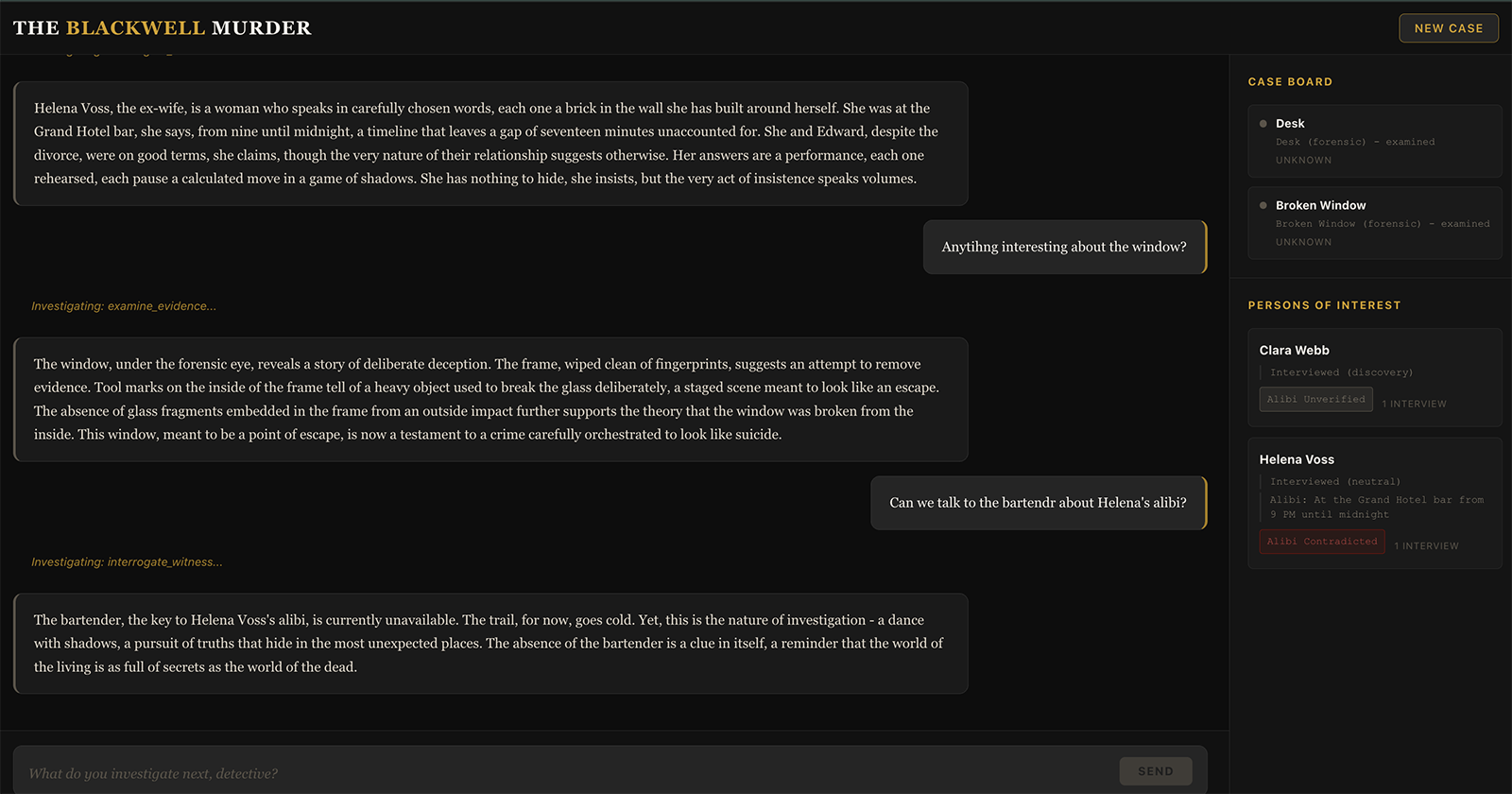
That's the project: a noir detective mystery game called "The Blackwell Murder," built on Amazon Bedrock AgentCore, where all 4 long-term memory strategies plus short-term memory work together to make the investigation feel continuous across sessions. The detective arrives at a crime scene, interviews suspects, examines evidence, and builds a case - and when they come back the next day, the narrator picks up exactly where they left off.
The source code is on GitHub: agentcore-memory-murder-mystery
Architecture Overview
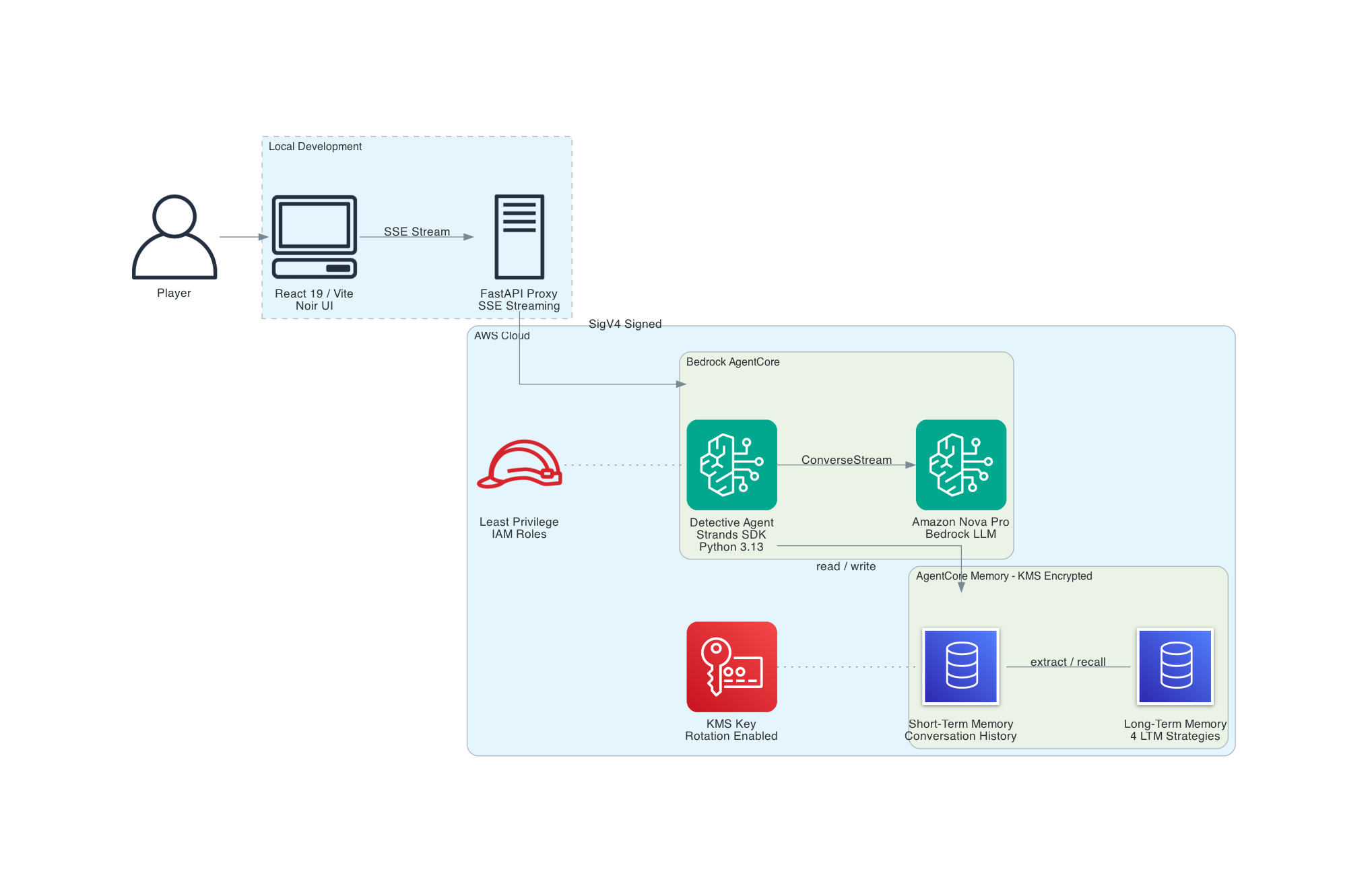
The key mental model: STM is working memory within a conversation, LTM is the case file that persists between sessions. The agent needs both.
The architecture is deliberately simple. It uses a local FastAPI proxy that sits between the React frontend and AgentCore. The example doesn't include CloudFront, Lambda, or API Gateway. The point of this project is memory rather than AWS networking. If you have AWS credentials and Terraform installed, you can clone the repo and be playing in 15 minutes.
This demo uses PUBLIC network mode with no authentication on the proxy for simplicity. Production deployments should use VPC mode with private subnets, authentication on the proxy layer, and VPC endpoints for Bedrock and AgentCore services.
Why a local proxy? The browser can't call AgentCore directly - it requires IAM SigV4 signing. The FastAPI server handles that, plus it gives us a clean place to filter out model artifacts like `` tags before they reach the UI. In production, this proxy would need authentication (Cognito, API keys, or similar) - the demo version accepts any request from localhost.
Why not the agentcore invoke CLI? The Python SDK (bedrock-agentcore) supports streaming and integrates cleanly with FastAPI's StreamingResponse. No subprocess overhead, no output parsing.
AgentCore Memory - The 4 Strategies
AgentCore Memory has two layers: short-term memory (STM) that handles turn-by-turn conversation within a session, and long-term memory (LTM) with four built-in strategies that extract, organize, and recall information across sessions.
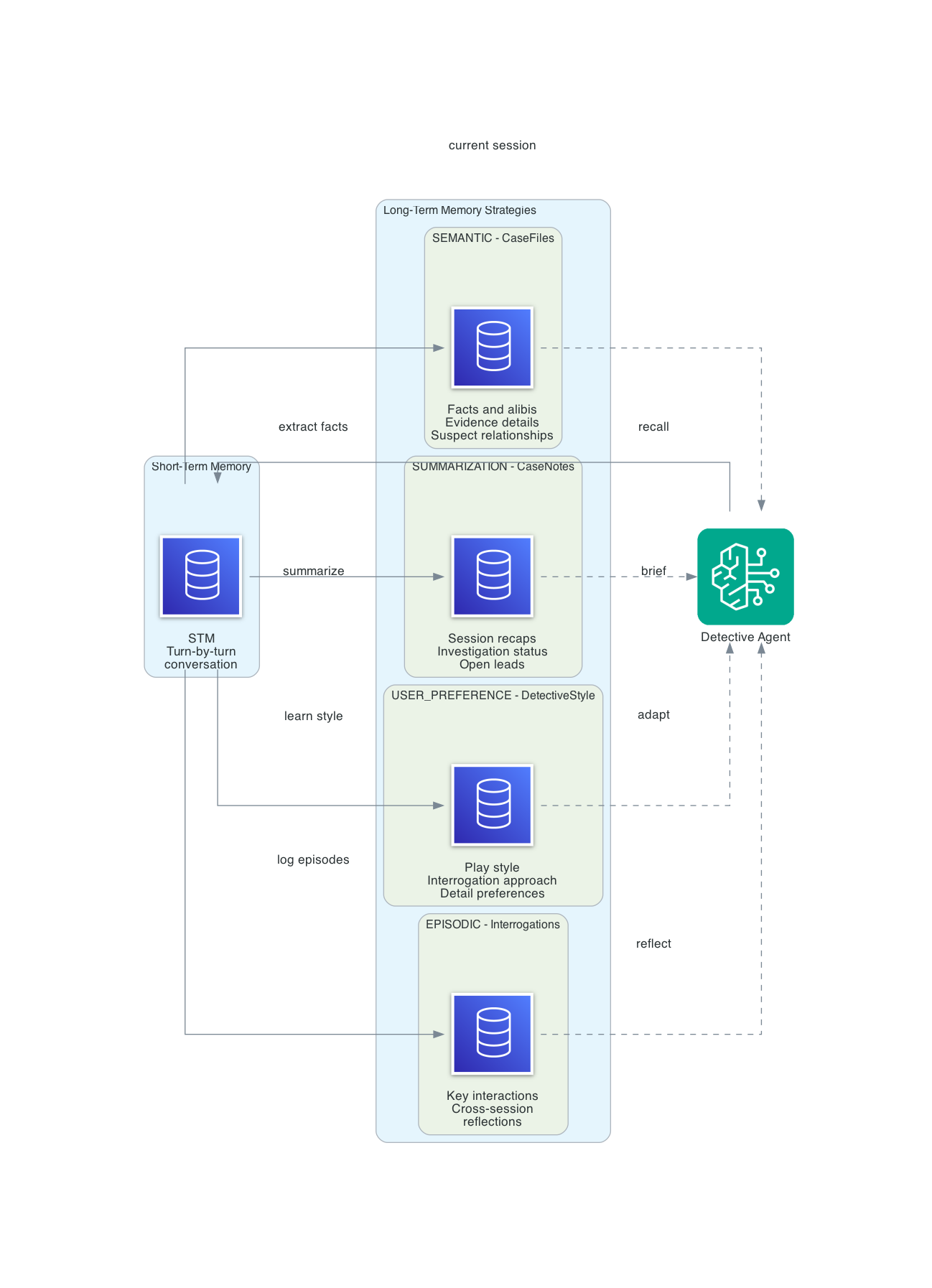
What makes this interesting for a detective game is that every strategy maps naturally to how real investigators work. Detectives maintain fact files, write case summaries, track interrogation patterns, and adapt their approach based on what is working. The four LTM strategies do exactly this.
Short-Term Memory (STM)
STM captures the raw conversation - detective actions, narrator descriptions, tool calls and results - within a single session. The agent reads back the last few turns automatically so it knows what just happened.
When the detective says "examine the broken window" and then follows up with "check for fingerprints on the frame," STM is why the agent knows which window you're talking about without you having to repeat the context. STM events in this project expire after 30 days (configurable from 7 to 365 via the event_expiry_duration parameter).
Semantic Strategy - "CaseFiles"
Extracts and indexes factual information from conversations for retrieval by meaning, not keywords.
Namespace: /cases/{actorId}/facts/
This is the detective's fact file. Every time the agent learns something concrete - a suspect's alibi, a piece of evidence, a relationship between characters - the semantic strategy extracts it and stores it as a retrievable fact.
When the detective returns 3 sessions later and asks "what do we know about Helena's alibi?", the agent retrieves everything related to Helena: she claims she was at the Grand Hotel bar until midnight, the bartender says she left at 11:30 PM, there's a 17-minute gap, and the hotel security cameras had a convenient "glitch" during that window. No contradictions slip through. No established facts get lost.
Summary Strategy - "CaseNotes"
Creates condensed summaries of each session - the detective's case notes.
Namespace: /cases/{actorId}/{sessionId}/
At the end of each session, the summary strategy distills the conversation into a concise case update: what evidence was discovered, which suspects were interviewed, what leads are open, and where the investigation stands.
When the player starts a new session, the agent retrieves the last summary and opens with a case file briefing: "Case #1247 - The Blackwell Murder. Day 3. Last session you discovered the staged break-in and the 17-minute gap in Helena's alibi. Two leads remain open..." This is how real detectives work. They write case notes so they can pick up where they left off.
User Preferences Strategy - "DetectiveStyle"
Automatically identifies and tracks the player's investigation approach.
Namespace: /detectives/{actorId}/preferences/
This strategy watches how the player investigates and adapts the experience. If the player consistently chooses indirect questioning over confrontation, the narrator starts offering more subtle conversation options. If they prefer forensic evidence over witness interviews, crime scenes get richer physical detail.
It picks up on investigation style (methodical vs. intuitive), interrogation preference (confrontational, sympathetic, indirect), detail level (forensic deep-dives vs. big-picture summaries), and pacing preference (slow reveals vs. rapid progress).
The preference strategy is subtle. You don't notice it working until the third or fourth session, when the narrator's suggestions start feeling tailored to exactly how you like to play.
Episodic Strategy - "Interrogations"
Captures key interactions as structured episodes, then generates cross-session reflections.
Namespace: /episodes/{actorId}/{sessionId}/
Reflection namespace: /episodes/{actorId}/
This is the most compelling strategy, and the one that makes the detective game feel genuinely intelligent. Episodic memory doesn't just store what happened - it reflects on patterns across interactions.
An episode captures structured fields - the AWS docs define these as situation, intent, assessment, justification, and episode-level reflection. In practice, the output for this project looks like:
- Situation: Interrogation of Helena Voss regarding her whereabouts
- Intent: Catch Helena in a lie about the hotel bar timeline
- Assessment: Presented the bartender's statement showing she left at 11:30, not midnight
- Justification: Helena became defensive, changed story to "went for a walk," refused further questions
Reflections synthesize across episodes:
- "This detective excels at catching timeline inconsistencies - present evidence contradictions early"
- "Direct confrontation causes suspects to shut down - this player gets better results with patience"
- "Helena's changing story pattern matches classic alibi fabrication - flag for cross-reference"
The practical result is detective intuition. The narrator can say things like "You have noticed Helena's story shifts every time you press on the timeline. Your instinct says the 17 minutes matter." The player didn't ask for that observation - the episodic reflection surfaced it automatically.
How the Strategies Map to the Investigation
| Strategy | Detective Equivalent | What Gets Stored | When It Matters |
|---|---|---|---|
| STM | Working memory | Current conversation | Within a session - "which window?" |
| Semantic | Fact file | Suspects, alibis, evidence, relationships | Re-interviewing a suspect 3 sessions later |
| Summary | Case notes | Per-session investigation summary | Opening a new session - "where were we?" |
| User Preference | Detective instinct | Play style, interrogation approach | Narrator adapts tone and suggestions |
| Episodic | Interrogation log + intuition | Key interactions + cross-session reflections | "Helena's story keeps changing..." |
A Note on Namespace Design
The AWS docs recommend a default namespace pattern like /strategy/{memoryStrategyId}/actor/{actorId}/session/{sessionId}/. This project uses custom descriptive namespaces instead - /cases/{actorId}/facts/, /detectives/{actorId}/preferences/, etc. - because they map directly to how a detective organizes information. When you're debugging and see a record in /cases/sloane/facts/, you immediately know what it is.
The tradeoff is that without {memoryStrategyId} in the path, multiple strategies could theoretically write to overlapping namespaces if you configure them carelessly. In practice, each strategy in this project has a distinct namespace root (/cases/, /detectives/, /episodes/), so there's no overlap. If you're building a system with many strategies, the AWS-recommended pattern with strategy IDs in the path is safer.
Where Does the Extraction Logic Live?
This is the thing that took me the longest to internalize: you don't write extraction logic. There's no code in this project that says "pull out facts for semantic memory" or "summarize this session." The platform does all of it.
When you define a strategy, you provide a type, a name, a description, and namespaces. That's it. The extraction pipeline reads your STM events - the raw conversation messages - and applies each strategy's built-in logic to decide what to extract. You never see the extraction prompt. For the built-in strategies used in this project, customization is limited to the strategy description field. AWS also offers built-in overrides (custom prompts, custom model selection) and self-managed strategies (full pipeline control) for deeper customization - see the AgentCore Memory documentation for details.
For built-in strategies, your actual levers for influencing LTM quality are indirect:
- Strategy descriptions - the only direct hint you give the extraction model. "Extracts and indexes case facts for semantic retrieval" tells it to focus on facts. "Tracks detective communication style and investigation preferences" tells it to watch for behavioral patterns.
- Your system prompt - shapes how the agent talks, which shapes what the extraction pipeline has to work with. A system prompt that produces atmospheric noir prose gives the summarization strategy rich material. A prompt that produces terse responses gives it less.
- Your tools - return structured data that becomes part of the conversation. When
examine_evidencereturns forensic details about tool marks on a window frame, that structured output gives the semantic strategy concrete facts to extract. Wheninterrogate_witnessreturns a suspect's shifting alibi, the episodic strategy captures it as a meaningful interaction. - The conversation itself - longer, richer conversations produce more extraction material. A single-turn "look at the window" produces less than a multi-turn investigation where the detective examines evidence, cross-references alibis, and confronts a suspect with contradictions.
The practical implication is that designing good prompts and tools is indirectly designing your memory. I didn't set out to optimize for LTM quality, but the debug watch tool showed me that conversations where the detective digs deeper - following up on inconsistencies, asking witnesses about specific details, comparing evidence across locations - produce significantly richer LTM records than surface-level interactions. The extraction pipeline rewards conversational depth.
Building the Agent
The agent runs on AgentCore via the Strands SDK. Three things matter: the system prompt, the tools, and the memory integration.
System Prompt - Noir Narrator Persona
The agent isn't the detective. It's the narrator - the voice in the dark that describes what the detective sees, hears, and feels. The system prompt establishes this firmly:
You are the narrator for "The Blackwell Murder," a noir detective mystery.
You speak in the style of classic noir fiction - rain-slicked streets, long
shadows, moral ambiguity, and the kind of truth that cuts deeper than any blade.
You are not the detective. You are the voice in the dark that describes what
the detective sees, hears, and feels.
The prompt also includes the full case briefing (locations, suspects, the solution), narrator rules, and memory integration instructions. Two rules that matter the most:
- Never break character. The model must never mention tools, functions, errors, or its own reasoning. If a tool fails, the narrator says "the trail goes cold" - not "there was an error in the category specified."
- Memory integration on session start. On the first message in a new session with no prior history, set the scene. On returning sessions where memory context is available, open with a case file briefing.
Custom Tools
Four tools drive the investigation. Each is a @tool-decorated function that returns narrative text and silently tracks state in a case file:
examine_evidence(item, method) - Three examination methods (visual, forensic, compare) reveal different details about the same evidence. The broken window looks suspicious on visual inspection, reveals tool marks under forensic analysis, and confirms the staged break-in on comparison.
interrogate_witness(witness, approach, topic) - Four interview approaches (neutral, sympathetic, confrontational, indirect) produce different responses from the same witness. Confrontation shuts Marcus down. Sympathy gets Clara to reveal the shadow she saw. Indirect questioning catches Marcus mentioning the service passage he claims was sealed.
search_location(location, area) - Five locations with multiple searchable areas. The study alone has the desk, window, bookcase, safe, and floor - each hiding different clues.
check_case_file(query, category) - The detective's notebook. Reviews all discovered evidence, suspect information, alibis, timeline events, and connections between suspects. Supports free-text search across all categories.
Every tool call that discovers something new pushes a notification to the frontend, which updates the Case Board and Persons of Interest panels in real time.
Memory Integration with Strands
The Strands SDK's AgentCoreMemorySessionManager handles the memory lifecycle:
config = AgentCoreMemoryConfig(
    memory_id=MEMORY_ID,
    session_id=session_id,
    actor_id=detective_id,
    retrieval_config={
        f"/cases/{detective_id}/facts/": RetrievalConfig(top_k=5),
        f"/detectives/{detective_id}/preferences/": RetrievalConfig(top_k=3),
        f"/episodes/{detective_id}/": RetrievalConfig(top_k=3),
    },
)

with AgentCoreMemorySessionManager(config, region_name=REGION) as session_manager:
    agent = Agent(
        model=model,
        system_prompt=SYSTEM_PROMPT,
        tools=[examine_evidence, interrogate_witness, check_case_file, search_location],
        session_manager=session_manager,
    )
The retrieval_config tells the session manager which LTM namespaces to query when loading context for a new request. Without it, the agent only gets STM conversation history - it wouldn't recall facts, preferences, or episode patterns from prior sessions.
The session manager does two things: on entry, it loads relevant memories (STM conversation history, LTM strategy results) into the agent's context. On exit, it persists the current conversation as new memory events. The actor_id is the detective's name, which namespaces all memory operations so multiple detectives could theoretically investigate the same case without cross-contamination.
Model Configuration
Nova Pro is the default because it has good narrative quality and is the most cost-effective option for iterative development. But the model is switchable at deploy time via the ACTIVE_LLM environment variable:
| Model | Model ID | Use Case |
|---|---|---|
| Nova Pro | us.amazon.nova-pro-v1:0 | Default - good balance of quality and cost |
| Nova 2 Lite | us.amazon.nova-2-lite-v1:0 | 1M context, optional extended thinking |
| Nova Lite | us.amazon.nova-lite-v1:0 | Fastest, lowest cost |
| Claude Sonnet 4.6 | us.anthropic.claude-sonnet-4-6 | Best narrative quality |
| Claude Haiku 4.5 | us.anthropic.claude-haiku-4-5-20251001-v1:0 | Fast and affordable |
The difference in narrative quality between Nova Pro and Claude Sonnet is noticeable. Claude produces more atmospheric prose and stays in character more consistently. Nova Pro occasionally breaks the fourth wall by mentioning tool names or its own reasoning process - something I had to filter out in the proxy server. For a polished demo, Claude Sonnet is the better choice. For development and iteration, Nova Pro keeps costs low. A typical 15-20 minute play session (10-15 turns, 4 tool calls per session) costs roughly $0.02-0.05 in model inference alone with Nova Pro. Claude Sonnet runs about 5-10x that. Memory operations and KMS add negligible cost on top.
Infrastructure as Code
All durable infrastructure is managed by Terraform using the AWS provider (~> 6.35). The agent itself is deployed via the agentcore CLI, which handles the zip packaging and runtime provisioning. This is a clean separation: Terraform manages what persists (Memory, IAM, KMS, S3), the CLI manages what deploys (agent code, runtime configuration).
Memory and KMS
AgentCore Memory requires a KMS key for encryption. The memory resource itself is straightforward:
resource "aws_bedrockagentcore_memory" "detective" {
  name                      = "${var.memory_name}_${var.name_suffix}"
  description               = "Persistent memory for the AI detective agent"
  event_expiry_duration     = var.event_expiry_duration_days
  encryption_key_arn        = aws_kms_key.memory.arn
  memory_execution_role_arn = var.memory_execution_role_arn
}
Note the variable name event_expiry_duration_days - the Terraform attribute is event_expiry_duration (which takes a value in days), and the variable adds the _days suffix for clarity so readers don't have to guess the unit.
The KMS key policy grants three principals access: the root account for administration (full kms:*), the AgentCore service for memory encryption operations (kms:Encrypt, kms:Decrypt, kms:GenerateDataKey, kms:DescribeKey), and the memory execution role for runtime access (same encryption actions). All policies use aws_iam_policy_document data sources - never inline JSON strings. This gives you compile-time validation and readable diffs. Note: resources = ["*"] in a KMS key policy means "this key" - it's not a wildcard across all keys.
A random_id suffix is appended to all AWS resources (S3 buckets, KMS aliases, memory names) to ensure global uniqueness. The suffix is generated once and shared across all modules.
Three Strategies via Terraform, One via CLI
Here's the real-world gotcha. The aws_bedrockagentcore_memory_strategy resource supports three of the four strategy types:
resource "aws_bedrockagentcore_memory_strategy" "case_files" {
  name        = "CaseFiles"
  memory_id   = aws_bedrockagentcore_memory.detective.id
  type        = "SEMANTIC"
  description = "Extracts and indexes case facts for semantic retrieval"
  namespaces  = ["/cases/{actorId}/facts/"]
}

resource "aws_bedrockagentcore_memory_strategy" "case_notes" {
  name        = "CaseNotes"
  memory_id   = aws_bedrockagentcore_memory.detective.id
  type        = "SUMMARIZATION"
  description = "Summarizes investigation sessions into concise case notes"
  namespaces  = ["/cases/{actorId}/{sessionId}/"]
}

resource "aws_bedrockagentcore_memory_strategy" "detective_style" {
  name        = "DetectiveStyle"
  memory_id   = aws_bedrockagentcore_memory.detective.id
  type        = "USER_PREFERENCE"
  description = "Tracks detective communication style and investigation preferences"
  namespaces  = ["/detectives/{actorId}/preferences/"]
}
The EPISODIC type isn't yet supported in the Terraform provider as of March 2026. This is tracked in terraform-provider-aws #45599. The workaround is a make target that calls the AWS CLI:
aws bedrock-agentcore-control update-memory \
  --memory-id $(MEMORY_ID) \
  --memory-strategies '{
    "addMemoryStrategies": [{
      "episodicMemoryStrategy": {
        "name": "Interrogations",
        "description": "Key interrogation episodes with cross-case reflections",
        "namespaces": ["/episodes/{actorId}/{sessionId}/"],
        "reflectionConfiguration": {
          "namespaces": ["/episodes/{actorId}/"]
        }
      }
    }]
  }'
Three things to note about the episodic strategy. First, it requires a reflectionConfiguration with its own namespace - this is where cross-session reflections are stored. Second, the reflection namespace must be at or above the episode namespace's depth - meaning reflections are less nested than episodes. In practice, this means the reflection namespace must be a prefix of the episode namespace (e.g., /episodes/{actorId}/ works as a reflection namespace for episodes stored in /episodes/{actorId}/{sessionId}/). Get this wrong and the API returns a validation error that doesn't clearly explain the constraint.
Third, because the episodic strategy lives outside Terraform, terraform destroy won't clean it up. If you destroy and recreate the infrastructure, you'll get a naming collision or an orphaned strategy. The project includes a corresponding make remove-episodic-strategy target for teardown. On the Terraform side, the memory resource's attributes don't reflect CLI-managed strategy state, so terraform plan won't show unexpected diffs after you add the episodic strategy via the CLI - no ignore_changes block is needed.
A Note on IAM Permissions
When you deploy an agent with the agentcore CLI, it auto-creates an IAM role (AmazonBedrockAgentCoreSDKRuntime-*) with a baseline policy. This policy covers what the agent needs to run - model invocation, memory read/write, and the basics. The agent works fine out of the box.
Where you will need extra IAM permissions is if you build debug tools that call the boto3 memory APIs directly - like the watch script in this project. Those tools run under your own IAM identity, not the agent's runtime role, and need explicit permissions for ListMemoryRecords, RetrieveMemoryRecords, ListEvents, and KMS decrypt on the memory encryption key. In production, create a separate narrowly-scoped IAM role for debug tools rather than granting these permissions to developer identities. Budget 15 minutes to set this up if you plan to inspect memory outside the agent.
A note on the auto-created runtime role. The agentcore CLI generates a role with broad permissions - for example, bedrock:InvokeModel with Resource: * rather than scoped to specific model ARNs. This is fine for a demo, but for production deployments, create a custom IAM role with explicitly scoped permissions. At minimum, scope bedrock:InvokeModel to the specific model ARNs your agent uses and ensure memory access policies reference only the memory resources that agent needs.
Naming Constraints
AgentCore resource names must match [a-zA-Z][a-zA-Z0-9_]{0,47} - letters, numbers, and underscores only, starting with a letter. No hyphens. This tripped me up repeatedly: case-files fails, CaseFiles works. detective-memory-abc123 fails, detective_memory_abc123 works. KMS aliases are fine with hyphens, but everything else in AgentCore isn't.
The Frontend
A noir-themed React 19 SPA with four components: the narrative log (the main detective story), the detective input, the Case Board (discovered evidence), and the Persons of Interest panel (suspect information with alibi status).
The narrative log displays the agent's noir prose as it streams in via SSE. Tool use events show as gold italic indicators - "Examining evidence...", "Interrogating witness..." - so the player knows the agent is working.
The Case Board and Persons of Interest panels update in real time as the investigation progresses. When the agent examines evidence or interviews a suspect, the tools push structured notifications through the SSE stream. New evidence items appear with an amber highlight that fades after a few seconds. Suspects show their interview count and alibi verification status (verified, contradicted, or unverified).
SSE streaming deserves a note. AgentCore returns the response as a StreamingBody - but when accessed through the invoke_agent_runtime API, the entire response arrives as a single read. The SSE events are concatenated inside it, sometimes without newline separators:
data: {"chunk": "The rain"}data: {"chunk": " hasn't stopped"}data: {"chunk": " for three days."}
The proxy server splits on data: boundaries using a regex, reassembles all chunk text, strips tags and `</tool>` XML artifacts that occasionally leak through, and re-emits clean SSE events to the browser. This filtering is model-agnostic - Nova Pro produces these artifacts most often, but any model with reasoning capabilities (including Nova 2 Lite with extended thinking enabled) can emit blocks. This two-pass approach - collect everything, clean it, then emit - is more reliable than trying to filter partial tags from individual chunks.
Demo Walkthrough
Session 1: The Crime Scene
The player opens the app. The narrator sets the scene:
The rain has not stopped for three days. You step under the police tape at 42 Ashford Lane, the collar of your coat turned up against the damp. The study door is open now - the locksmith saw to that this morning - but inside, everything is exactly as Edward Blackwell left it. Or as someone left it for him.
The player types "search the study." The agent calls search_location and describes the room - the scattered desk, the broken window, the bookcase. The Case Board lights up: "Broken Window - glass fragments outside, break pattern radiates outward."
They examine the broken window forensically. The narrator reveals the wiped frame, the tool marks. The Case Board updates: "Broken Window (forensic) - frame wiped clean, tool marks from inside."
They interview Clara Webb sympathetically. She breaks down and admits she heard arguing at 11:15 PM. The Persons of Interest panel shows Clara with her first interview note.
All of this - the evidence, the suspect information, the timeline - flows into AgentCore Memory. STM keeps the turn-by-turn conversation. The semantic strategy extracts the facts. The episodic strategy logs Clara's interrogation.
Session 2: The Case Continues
The player closes the browser, has lunch, and comes back. They start a new session with the same detective ID. The narrator opens differently now:
Case #1247 - The Blackwell Murder. Your notebook is open on the desk, the pages curling at the edges from the rain. Last time, you found the staged break-in - glass broken outward, frame wiped clean, tool marks from inside. Clara Webb heard arguing at 11:15 PM. Two voices. One was Blackwell. The other was a man she could not identify, but she said the shadow was tall, broad-shouldered. Like Marcus.
The summary strategy provided the session recap. The semantic strategy filled in the specific details. The player picks up where they left off and starts pressing on Marcus's alibi. Three sessions in, when the player consistently uses indirect questioning instead of confrontation, the narrator starts offering subtler options - the preference strategy at work.
And when the player catches Helena in another timeline inconsistency, the narrator adds: "Her story shifts every time you push on the timeline. Your instinct says the 17 minutes matter more than she is letting on." That is the episodic reflection - pattern recognition across sessions that makes the detective feel like they are building real intuition.
Observing Memory in Real Time
Understanding LTM is abstract until you watch it happen. The project includes a debug watch command that polls AgentCore Memory every 5 seconds and prints new STM events and LTM records as they appear:
make debug-memory-watch
This runs python server/debug_memory.py --watch 5, which seeds with the current state (so you only see new additions) and then streams changes. A typical session looks like this:
  Seeding current state... done (652 STM events, 156 LTM records)
  Watching for new additions...

[20:11:01] [STM] [fe400085] [user] Use a firm and aggressive approach with Clara
[20:11:11] [STM] [fe400085] [assistant] A confrontational approach with Clara Webb proves
  ineffective. She flinches at the sharp tone and retreats into monosyllables...

[20:11:59] [LTM] [USER_PREFERENCE (DetectiveStyle)]
{"context":"The user initially requested a softer approach when interrogating Clara Webb
but later explicitly requested to use a firm and aggressive approach, indicating a shift
toward more confrontational interrogation tactics with witnesses.",
"preference":"Prefers firm and aggressive interrogation approach with witnesses"}

[20:12:38] [LTM] [SUMMARIZATION (CaseNotes)]
<topic name="Witness Interview - Clara Webb (Confrontational Approach - Failed)">
Detective Sloane attempted a firm and aggressive approach with Clara Webb. The
confrontational strategy proved completely ineffective. Clara flinched at the sharp
tone and retreated into monosyllables. This failed interrogation confirms Clara's
fear is a significant barrier and indicates a gentler approach is necessary.
</topic>
STM events appear immediately as the conversation flows. LTM records follow 30-60 seconds later as the platform's extraction pipeline processes the events. You can see exactly what each strategy produces:
- SEMANTIC records are plain factual statements - "Helena Blackwell was found dead in the study at 10:42 PM"
- SUMMARIZATION records are topic-tagged XML with detailed session notes
- USER_PREFERENCE records are structured JSON with context, preference, and categories
- EPISODIC records come in two flavors: situation recaps (
"situation": "A detective begins investigating...") and cross-session strategy patterns ("title": "Escalating Interrogation Pressure with Evidence Leverage")
Seeing these raw values is what made the strategies click for me. Reading the documentation, I understood that "semantic extracts facts" and "episodic captures patterns." But watching the actual output - seeing the platform independently decide that a failed interrogation was worth logging as an episode, or that a shift from soft to aggressive questioning counted as a preference change - made the system feel real. The extraction isn't just summarizing what happened. It's interpreting the conversation through each strategy's lens and producing genuinely different representations of the same events.
The watch also exposed a debugging gotcha. As of bedrock-agentcore SDK version 1.4.4, the AgentCore list_memory_records and retrieve_memory_records APIs return results under the key memoryRecordSummaries, not memoryRecords. The SDK's retrieve_memories() method handles this correctly, so the agent works fine - but if you write your own debug scripts using boto3 directly, you'll get empty results and spend hours investigating an extraction pipeline that was working all along. The watch script in this repo has the correct key. Check the latest SDK docs if you're reading this in the future - response key names can change between versions.
Other debug modes are available:
# Dump everything - strategies, STM events, and LTM records
uv run python server/debug_memory.py

# Only LTM records (skip raw conversation events)
uv run python server/debug_memory.py --ltm-only

# Only STM events
uv run python server/debug_memory.py --stm-only

# Show all sessions (default: most recent only)
uv run python server/debug_memory.py --all-sessions
What I Learned
STM vs LTM isn't either/or - they serve completely different functions. STM is working memory within a conversation. LTM is the case file that persists between sessions. You need both, and trying to use one for the other's job leads to problems. STM without LTM means the detective forgets everything between sessions. LTM without STM means the agent can't follow a multi-turn investigation within a single session.
Episodic reflections are the most compelling strategy. The semantic strategy is the workhorse - it stores facts and retrieves them reliably. But the episodic strategy's cross-session reflections are what make the agent feel genuinely intelligent. When the narrator surfaces a pattern the player didn't explicitly ask about, it creates a moment that feels like the detective is actually thinking. This is the strategy I would lead with in any demo.
Model choice matters more than I expected for character consistency. Nova Pro occasionally breaks character - mentioning tool names, exposing its reasoning process, or dropping the noir tone mid-paragraph. Claude Sonnet stays in character almost perfectly. For a narrative application where immersion matters, the model's ability to maintain a persona is as important as its raw capability. I ended up adding server-side filtering to strip `` tags and </tool> XML artifacts that leaked through from Nova Pro.
Prompt engineering is still the job - the prompt is the product. The system prompt went through more revisions than any other file in this project. The first version let the model call six tools in a single turn, drowning the player in information before they had asked a single question. Another version produced beautiful prose but kept breaking character to mention tool names. Getting the narrator to call exactly one tool per turn, stay in character when tools error, and set the scene without immediately investigating required specific, firm language - "do not chain multiple tool calls" works where "one action per turn" didn't. If you're building an agent-based application, expect to spend as much time tuning the system prompt as you do writing the code around it.
The Terraform provider gap is a real-world pattern. Three of four strategies are supported in Terraform. The fourth requires a CLI workaround. This is a common pattern with new AWS services - Terraform support lags behind the API by weeks or months. The pragmatic approach is to manage what you can in Terraform and script the rest in your Makefile, documenting the gap clearly so your future self (or your team) knows what to update when provider support arrives.
Build a memory watch tool early. The single most useful debugging aid was a script that polls memory and prints new STM events and LTM records in real time. Without it, memory's a black box - events go in, and you hope the right things come out. With it, you can see exactly what the platform extracts, how long extraction takes (30-60 seconds typically), and whether your namespace configuration is producing records where you expect them. I would build this before writing any agent code on my next project.
Going to production would add several layers. This demo runs in PUBLIC network mode with an unauthenticated local proxy. A production deployment would need: VPC mode with private subnets, VPC endpoints for Bedrock and AgentCore services (avoiding public internet for API calls), CloudFront distribution with WAF, Cognito or API key authentication on the proxy, a custom IAM role with least-privilege permissions (scoped bedrock:InvokeModel to specific model ARNs, scoped memory access to specific resources), an S3 backend for Terraform state, and Bedrock Guardrails for input validation. The architecture section of this post shows the demo setup. The production architecture is a different article.
The full source code, Terraform configurations, and Makefile workflow are available on GitHub. Clone the repo, run make init && make apply && make deploy-agent && make serve, and start investigating. The rain is still falling on Ashford Lane.
Connect with me on X, Bluesky, LinkedIn, GitHub, Medium, Dev.to, or the AWS Community. Check out more of my projects at darryl-ruggles.cloud and join the Believe In Serverless community.
Comments
Loading comments...