Aurora PostgreSQL Express Configuration: From Zero to Production Database in 30 Seconds
I've created a number Aurora clusters over the years. It involves a VPC, multiple private subnets spread across AZs, a DB subnet group, a security group with a tightly scoped 5432 ingress rule, a bastion or a Session Manager tunnel so my laptop can actually reach the thing, a master password rotated through Secrets Manager, and then finally the aws_rds_cluster resource that kicks off a ten-minute provisioning cycle. Production-quality? Yes. Fast? Not at all!
When AWS previewed express configuration for Aurora PostgreSQL at re:Invent 2025, I was curious but skeptical. Aurora DSQL had already shown up earlier in the year with near instant cluster creation (I wrote about DSQL in March) and it was genuinely impressive. A standard Aurora cluster, though, has always lived inside a VPC. Making one appear in seconds sounded hard to believe.
Express configuration reached GA on March 25, 2026. I've had a few weeks with it now, and the short version is that the friction really is gone. The cluster is created outside my VPCs, there's a new managed internet access gateway in front of it, IAM authentication is on by default, and my laptop connects directly over TLS using a 15-minute auth token. I went from aws rds create-db-cluster to SELECT version() in under 45 seconds, and that includes the time to pip install psycopg[binary].
This post walks through what I built: an end-to-end hands-on demo of Aurora Express with Terraform, Python 3.14, a small FastAPI notes app, and a direct comparison against the traditional full-VPC Aurora setup and against the other AWS database options I reach for. The full source is at the bottom.
What express configuration actually changes
Let me start with the mental model, because I think it's the most interesting thing about this launch and it's not obvious without fully reading the docs.
A standard Aurora PostgreSQL cluster has always been a set of database nodes attached to a shared cluster volume inside your VPC. You own the network plumbing around it. That's what makes it "production-quality" (you control everything) and also what makes it slow to stand up (you have to control everything).
Express configuration changes the shape of that box. The cluster still has a writer, a serverless v2 instance, and the same distributed storage that makes Aurora Aurora. What's new is the connectivity layer. Instead of attaching to your VPC, the cluster sits behind a managed internet access gateway that AWS runs and distributes across AZs. You never manage it as a resource in your account. Clients speak the PostgreSQL wire protocol through it, TLS is terminated at the gateway, and every connection is authenticated with IAM.
Here is the architecture side by side.
Aurora Express (new)
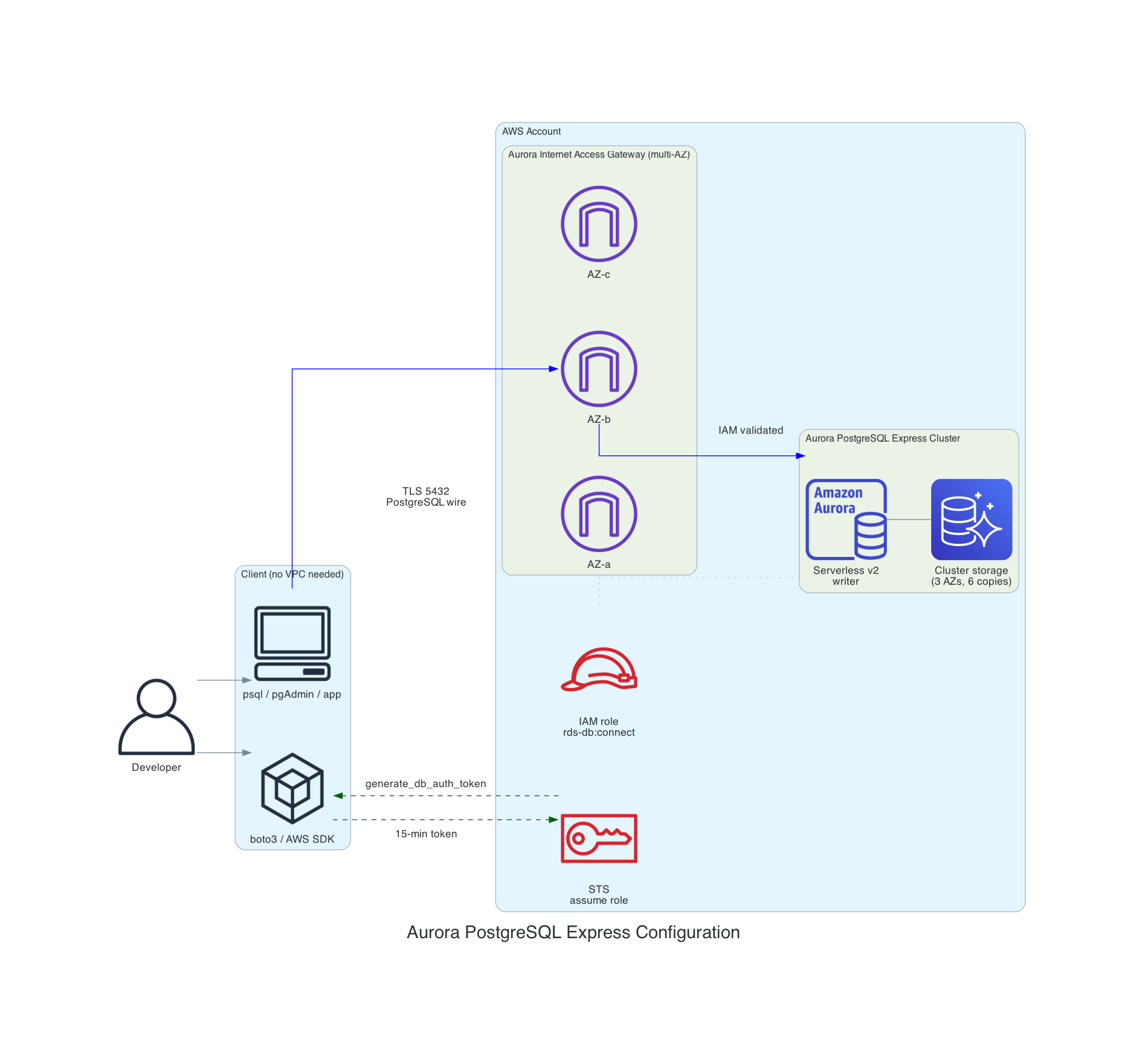
There is no VPC, no subnets, and no security groups. You don't use a bastion to connect. The client, whether it's psql, pgAdmin, or your application, connects over the internet using TLS on port 5432, authenticates with an IAM token generated by boto3's generate_db_auth_token, and lands on the writer. The admin user (postgres) is granted the rds_iam role automatically.
Traditional Aurora (for comparison)
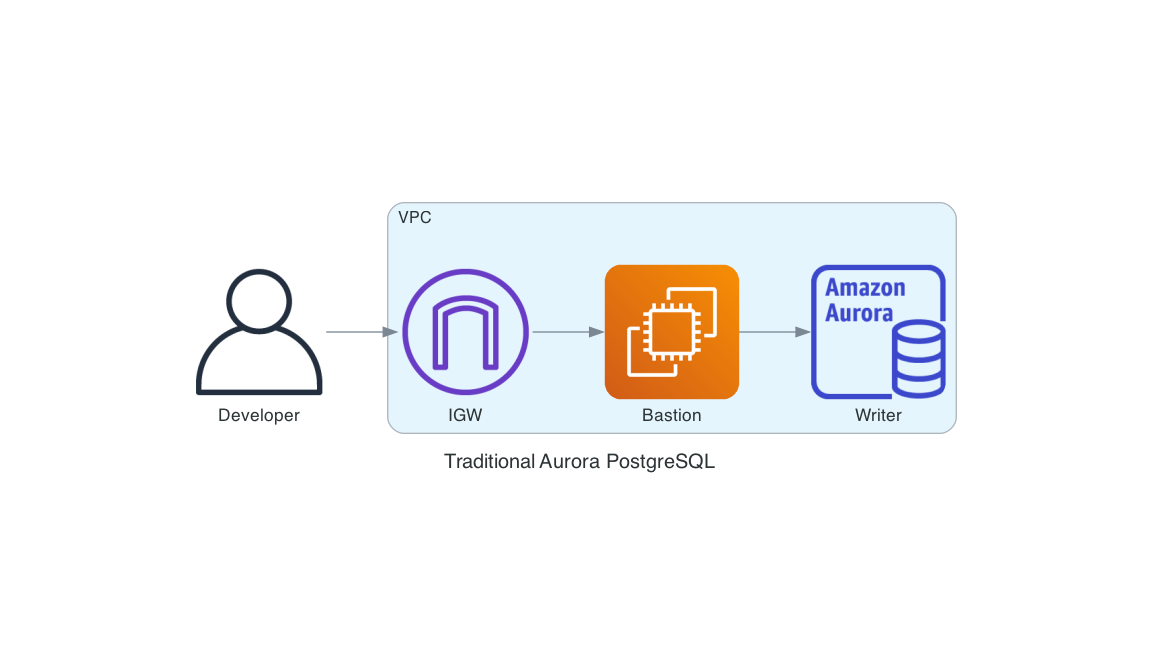
Everything outside the database itself, the VPC, the IGW, the bastion, the subnet group, the security group rules, the master password stored in Secrets Manager, is stuff you stand up to make the database reachable and authenticated. It's legitimate work, but it's work that isn't about your application.
I'm not saying one of these replaces the other. Some of the work in the second diagram exists because of real compliance requirements. Private connectivity, VPC flow logs, encryption with a customer-managed KMS key, and fixed engine versions are good to have when an auditor asks for them. Express configuration explicitly doesn't support any of those, and I think that's the right call. The feature is sharp-edged and opinionated. We'll get to the limitations later.
The AWS CLI one-liner
Before showing any Terraform, let me show the shortest possible thing that creates an Aurora cluster you can actually query.
aws rds create-db-cluster \
    --db-cluster-identifier sample-express-cluster \
    --engine aurora-postgresql \
    --with-express-configuration
That's it. A single API call creates the cluster, provisions the writer instance, sets up the internet access gateway, configures IAM auth on the admin user, and returns while the whole thing reaches Available. In my testing the cluster is query-ready inside 30 to 45 seconds (the "30 Seconds" in the title is aspirational but close).
You can then pull the endpoint out of describe-db-clusters and connect. There are no security group rules and no password to store. I included this CLI flow as a standalone script in the demo repo at scripts/create-express-cluster.sh.
Doing it in Terraform (and why it's slightly ugly)
Here's where reality bites (for now at least). As of April 2026, the Terraform AWS provider (hashicorp/aws ~> 6.40, which is the current release) doesn't yet expose the --with-express-configuration flag on aws_rds_cluster. The feature is three weeks out of GA. I checked both the AWS provider and the AWSCC provider (which derives from CloudFormation resource schemas, though there's no guarantee of how quickly new properties are surfaced). Neither has it yet.
There is an open enhancement request tracking it: hashicorp/terraform-provider-aws#47117, filed March 26, 2026, one day after GA. It's worth subscribing to if you want to know when native support lands.
The issue also has a telling comment from a community contributor who tried to implement it and hit a design wall: create-db-cluster --with-express-configuration creates two resources (the cluster and a serverless writer instance) from a single API call, but Terraform's resource model expects a one-to-one mapping. On destroy, the orphan instance blocks the cluster delete. The maintainers haven't weighed in yet. I ran into the same thing, which is why the destroy provisioner below explicitly lists and deletes the child instance before it deletes the cluster.
If you're like me, this is a dealbreaker for "put it in the demo." I am a big advocate of always using Infrastructure as Code (IaC) and want the whole setup to be reproducible from one terraform apply. I considered wrapping the call in an aws_cloudformation_stack resource instead, which would give real lifecycle tracking if CloudFormation supports the express flag. I couldn't confirm whether the AWS::RDS::DBCluster schema has been updated yet, so I went with the simpler null_resource with a local-exec provisioner, and used a data "aws_rds_cluster" source to read the cluster attributes back into Terraform state for everything downstream.
The module pins to the current provider versions:
terraform {
  required_version = ">= 1.11"

  required_providers {
    aws = {
      source  = "hashicorp/aws"
      version = "~> 6.40"
    }
    null = {
      source  = "hashicorp/null"
      version = "~> 3.2"
    }
  }
}
Here is the relevant piece from terraform/aurora-express.tf:
resource "null_resource" "aurora_express_cluster" {
  triggers = {
    cluster_identifier = local.express_cluster_identifier
    region             = var.aws_region
    min_acu            = var.min_acu
    max_acu            = var.max_acu
  }

  provisioner "local-exec" {
    interpreter = ["/bin/bash", "-c"]
    command     = <<-EOT
      set -euo pipefail

      aws rds create-db-cluster \
        --region "${var.aws_region}" \
        --db-cluster-identifier "${local.express_cluster_identifier}" \
        --engine aurora-postgresql \
        --with-express-configuration \
        --serverless-v2-scaling-configuration \
          '{"MinCapacity":${var.min_acu},"MaxCapacity":${var.max_acu}}' \
        ${var.deletion_protection ? "--deletion-protection" : "--no-deletion-protection"} \
        > /dev/null

      aws rds wait db-cluster-available \
        --region "${var.aws_region}" \
        --db-cluster-identifier "${local.express_cluster_identifier}"
    EOT
  }

  # Uses a portable while-read loop instead of mapfile (bash 4+).
  # macOS ships bash 3.2 by default, which does not have mapfile.
  provisioner "local-exec" {
    when        = destroy
    interpreter = ["/bin/bash", "-c"]
    command     = <<-EOT
      set -euo pipefail
      CLUSTER_ID="${self.triggers.cluster_identifier}"
      REGION="${self.triggers.region}"

      aws rds describe-db-instances \
        --region "$REGION" \
        --filters "Name=db-cluster-id,Values=$CLUSTER_ID" \
        --query 'DBInstances[].DBInstanceIdentifier' \
        --output text | tr '\t' '\n' | while read -r INSTANCE_ID; do
        [ -z "$INSTANCE_ID" ] && continue
        aws rds delete-db-instance --region "$REGION" \
          --db-instance-identifier "$INSTANCE_ID" --skip-final-snapshot || true
      done

      aws rds delete-db-cluster --region "$REGION" \
        --db-cluster-identifier "$CLUSTER_ID" --skip-final-snapshot || true

      aws rds wait db-cluster-deleted --region "$REGION" \
        --db-cluster-identifier "$CLUSTER_ID" || true
    EOT
  }
}

data "aws_rds_cluster" "express" {
  cluster_identifier = local.express_cluster_identifier

  depends_on = [null_resource.aurora_express_cluster]
}
I want to be upfront about the limits of this workaround - using null_resource is really a hack. The null_resource only re-runs its provisioner when the triggers map changes. If someone tweaks min_acu or max_acu outside Terraform, or the default Aurora PostgreSQL major version rolls forward, Terraform will report "no changes." Don't treat this module as drift-safe. It's a creation-time orchestrator, not a managed resource. The moment the provider adds with_express_configuration = true (or whatever they call it), I can swap the null_resource for a real aws_rds_cluster and the rest of the module doesn't change.
Everything downstream in terraform/iam.tf is normal HCL and uses the cluster_resource_id from the data source to scope the rds-db:connect permission. Notice there are two separate roles. The app role can only connect as app_user. The bootstrap role can connect as postgres for one-time schema setup and nothing else. Keeping admin access out of the application role is the single most important IAM decision here.
# App role: least-privilege for application code (app_user only, not postgres)
data "aws_iam_policy_document" "app_assume_role" {
  statement {
    effect  = "Allow"
    actions = ["sts:AssumeRole"]

    # Narrow this to your specific compute principal in production.
    principals {
      type        = "AWS"
      identifiers = ["arn:aws:iam::${local.account_id}:root"]
    }
  }
}

data "aws_iam_policy_document" "app_db_connect" {
  statement {
    effect  = "Allow"
    actions = ["rds-db:connect"]
    resources = [
      "arn:aws:rds-db:${local.region}:${local.account_id}:dbuser:${data.aws_rds_cluster.express.cluster_resource_id}/${var.db_user}",
    ]
  }
}

resource "aws_iam_role" "app" {
  name                 = "${local.cluster_id}-app"
  assume_role_policy   = data.aws_iam_policy_document.app_assume_role.json
  max_session_duration = 3600
}

resource "aws_iam_role_policy" "app_db_connect" {
  name   = "db-connect"
  role   = aws_iam_role.app.id
  policy = data.aws_iam_policy_document.app_db_connect.json
}

# Bootstrap role: one-time schema setup as admin (postgres user)
resource "aws_iam_role" "bootstrap" {
  name                 = "${local.cluster_id}-bootstrap"
  assume_role_policy   = data.aws_iam_policy_document.bootstrap_assume_role.json
  max_session_duration = 3600
}
The trust policy on both roles uses arn:aws:iam::ACCOUNT:root as the principal for this demo. In production, narrow that to the specific compute principal that runs your app - an ECS task role, a Lambda execution role, an EC2 instance profile. The wider the trust, the wider the blast radius if any IAM key in the account is compromised.
One thing to keep straight: var.db_user in the Terraform defaults to app_user, which must match the PostgreSQL role created in schema.sql. If you change one, change the other, or the app's IAM token will authenticate against a role that doesn't exist.
For comparison, the demo repo also has a terraform-traditional/ directory with the full VPC-based Aurora Serverless v2 cluster. It's about 150 lines of HCL across five files (VPC, subnets, route table, DB subnet group, security group, random password, aws_rds_cluster, aws_rds_cluster_instance). The express version is around 60 lines and most of them are variable declarations and outputs.
Connecting with Python 3.14 and psycopg 3
With the cluster up, a client needs three things: the endpoint, a TLS connection, and a 15-minute IAM auth token to pass as the password. The boto3 generate_db_auth_token call signs the request and returns a token I hand to psycopg. psycopg 3 is the current PostgreSQL library for modern Python, and it plays nicely with asyncio if you want it later (we're not using it here, but it's a nice property).
Here's python/connect.py:
"""Minimal connection example for Aurora PostgreSQL Express."""

from __future__ import annotations

import os

import boto3
import certifi
import psycopg


def build_auth_token(endpoint: str, port: int, user: str, region: str) -> str:
    """Generate a short-lived IAM authentication token for Aurora."""
    rds = boto3.client("rds", region_name=region)
    return rds.generate_db_auth_token(
        DBHostname=endpoint,
        Port=port,
        DBUsername=user,
        Region=region,
    )


def connect() -> psycopg.Connection:
    endpoint = os.environ["DB_ENDPOINT"]
    port = int(os.environ.get("DB_PORT", "5432"))
    user = os.environ.get("DB_USER", "postgres")
    database = os.environ.get("DB_NAME", "appdb")
    region = os.environ.get("AWS_REGION", "us-east-1")

    token = build_auth_token(endpoint, port, user, region)

    # psycopg[binary] bundles its own OpenSSL which does not read the
    # macOS Keychain or the system trust store that psql uses. We use
    # certifi.where() for a portable CA bundle that includes Amazon
    # Root CAs. certifi is already a transitive dependency of boto3.
    return psycopg.connect(
        host=endpoint,
        port=port,
        user=user,
        password=token,
        dbname=database,
        sslmode="verify-full",
        sslrootcert=certifi.where(),
        connect_timeout=10,
    )
A few things worth calling out here that caught me the first time.
TLS is libpq, not Python. psycopg 3 delegates all TLS handling to libpq. There's no ssl.SSLContext involved. The sslmode and sslrootcert parameters are libpq connection string options, not Python-level configuration. If you see old psycopg2 examples that pass an ssl context object, don't carry that pattern forward - it will either error or silently do nothing.
For the CA bundle, I use certifi.where() instead of sslrootcert="system". Here's why: psycopg[binary] bundles its own OpenSSL, which doesn't read the macOS Keychain or the system trust store that psql uses. The sslrootcert="system" option works great for psql (linked against system OpenSSL) but fails with certificate verify failed from the bundled binary. The certifi package provides the Mozilla CA bundle which includes the Amazon Root CAs needed for the internet access gateway, and it's already installed as a transitive dependency of boto3. This is the most portable approach across macOS, Linux, and CI environments.
The token I get back from generate_db_auth_token is a large URL-encoded string that contains an AWS SigV4 signature. It's valid for 15 minutes from generation. psycopg passes it as the password field, the internet access gateway validates the signature against IAM, and the user is granted access if the IAM caller has rds-db:connect on the right resource ARN.
The boto3.client("rds", region_name=region) call doesn't actually hit the network. generate_db_auth_token is a local signing operation on top of your current credentials. This is why you can create the token in a Lambda cold start without adding meaningful latency.
A small app: FastAPI notes on Aurora Express
To prove the whole thing works end-to-end I wired up a tiny FastAPI service that stores notes. Nothing fancy, just a four-endpoint CRUD app that hits Aurora Express over the same IAM-authenticated connection.
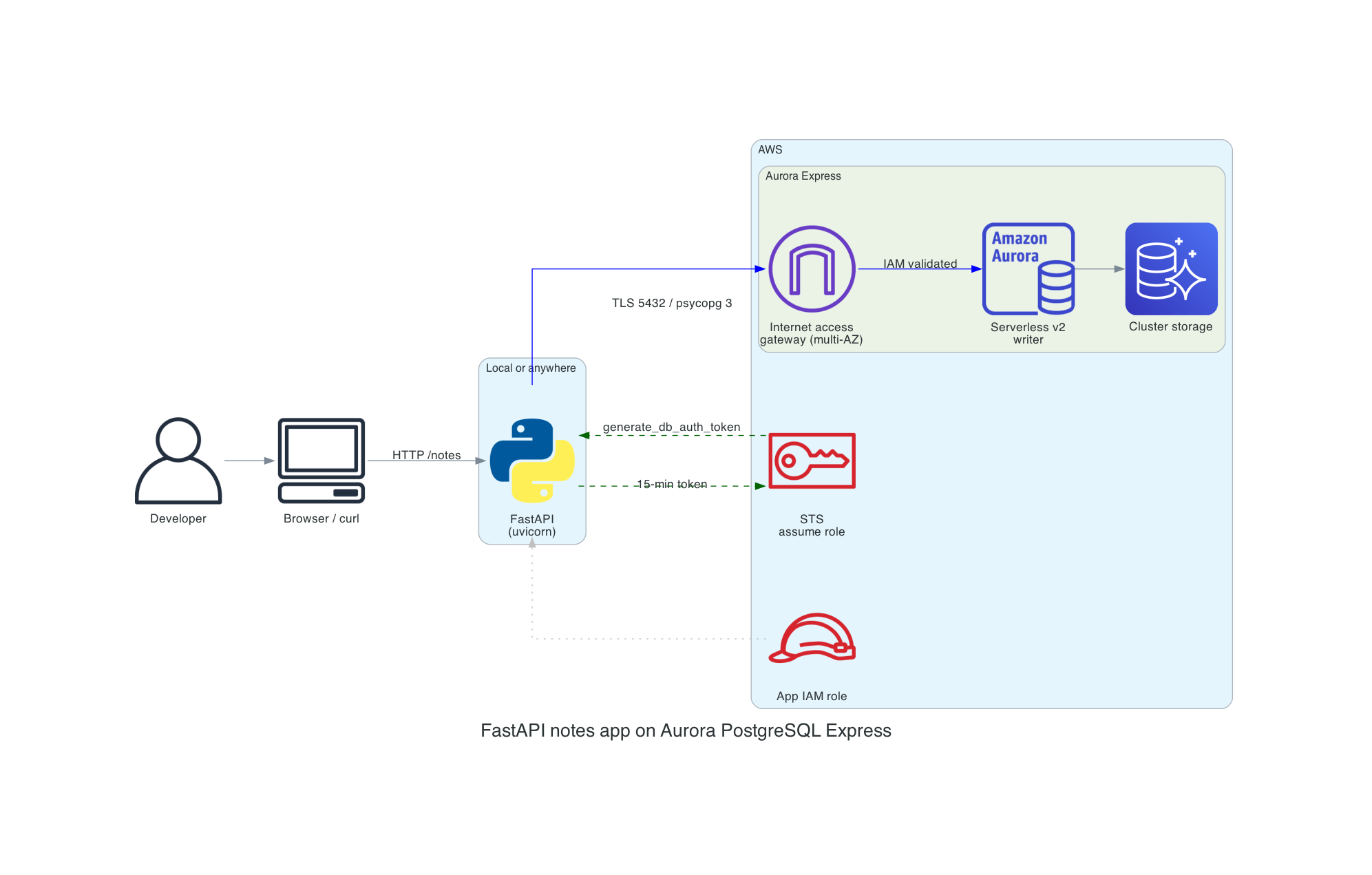
The schema is one table:
CREATE TABLE IF NOT EXISTS notes (
    id         BIGSERIAL PRIMARY KEY,
    title      TEXT        NOT NULL,
    body       TEXT        NOT NULL DEFAULT '',
    created_at TIMESTAMPTZ NOT NULL DEFAULT now(),
    updated_at TIMESTAMPTZ NOT NULL DEFAULT now()
);

DO $$
BEGIN
    IF NOT EXISTS (SELECT 1 FROM pg_roles WHERE rolname = 'app_user') THEN
        CREATE ROLE app_user WITH LOGIN;
    END IF;
END
$$;

GRANT rds_iam TO app_user;
GRANT USAGE ON SCHEMA public TO app_user;
GRANT SELECT, INSERT, UPDATE, DELETE ON notes TO app_user;
GRANT USAGE, SELECT ON SEQUENCE notes_id_seq TO app_user;
The interesting line is GRANT rds_iam TO app_user. Express configuration automatically grants rds_iam to the admin user (postgres). If you want a separate, narrower role for your application code (you do), you need to create that PostgreSQL role yourself and grant it rds_iam the first time you apply the schema. The admin user is powerful enough to run destructive operations, so running the app itself as postgres is a bad habit I've been breaking.
The FastAPI handlers are unremarkable, which is kind of the point:
@app.get("/notes/{note_id}")
def read_note(note_id: int) -> dict[str, Any]:
    note = crud.get_note(note_id)
    if note is None:
        raise HTTPException(status_code=404, detail="Note not found")
    return note


@app.post("/notes", status_code=201)
def create_note(payload: NoteCreate) -> dict[str, Any]:
    note_id = crud.create_note(payload.title, payload.body)
    return crud.get_note(note_id) or {"id": note_id}
And crud.py is plain psycopg 3 without any magic:
def create_note(title: str, body: str) -> int:
    with connect() as conn, conn.cursor() as cur:
        cur.execute(
            "INSERT INTO notes (title, body) VALUES (%s, %s) RETURNING id",
            (title, body),
        )
        (note_id,) = cur.fetchone()
        conn.commit()
        return note_id
Since this is a demo I'm opening a new connection per request. For anything real you would want psycopg_pool.ConnectionPool with a configure callback that regenerates the IAM auth token before each connection is handed out. A naive pool that caches the token at pool-creation time will silently break after 15 minutes when the token expires and the gateway starts rejecting connections. The pool should also be sized against your max ACUs rather than your client count, because Aurora Serverless v2 can throttle connections if it scales down. For a demo-scale FastAPI service with uvicorn --workers 2, a fresh connection per request is fine.
Aurora Express vs the alternatives
Once I had this working, I spent some time thinking about where it fits in the AWS database lineup. The AWS story for "give me a database in seconds" has three parts now: DynamoDB (always instant), Aurora DSQL (GA earlier this year, instant distributed SQL), and Aurora PostgreSQL Express (instant single-region relational). They sound similar on the surface and they are genuinely different underneath. Here's how I think about which one to reach for:
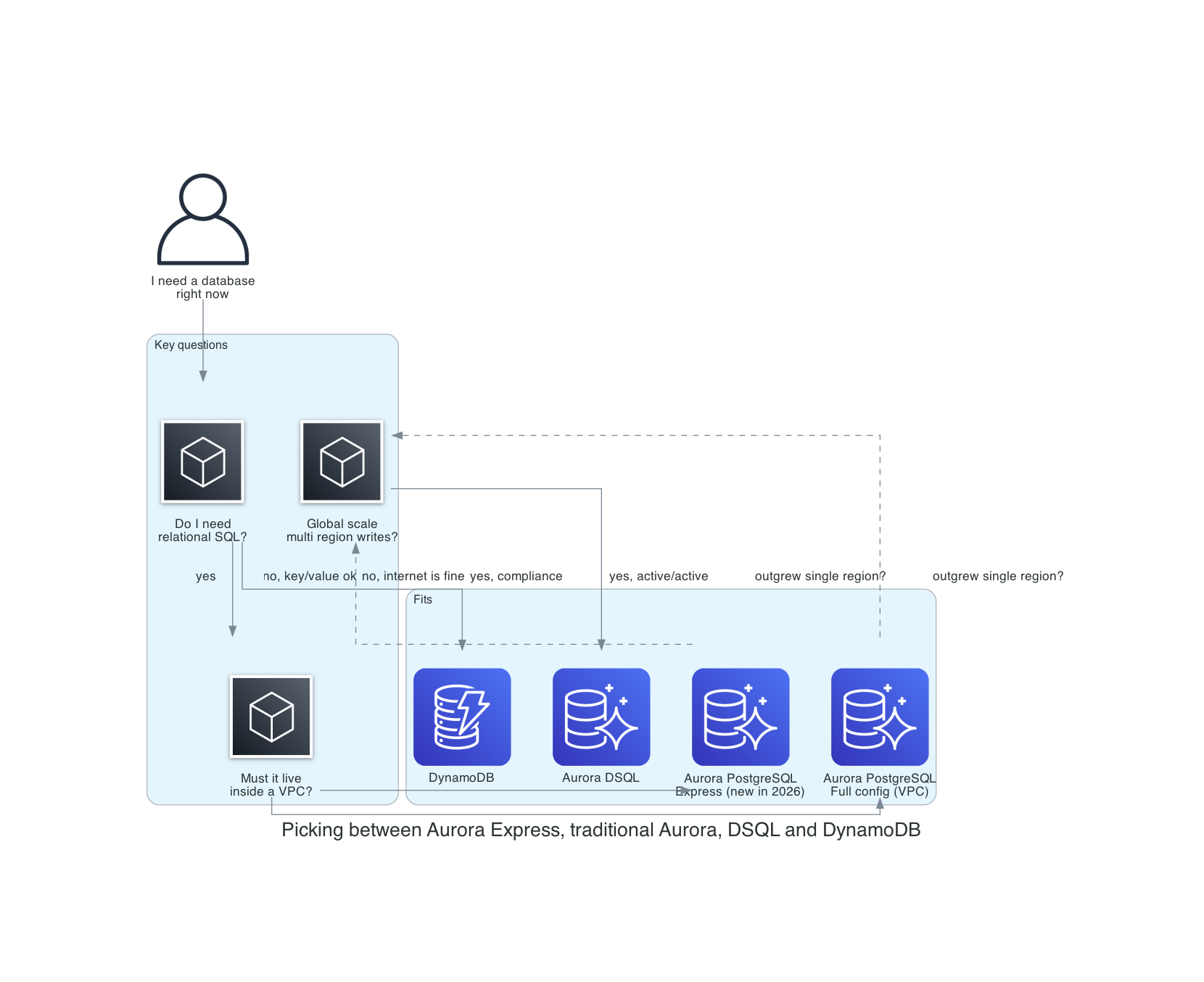
Aurora Express vs traditional Aurora PostgreSQL
This one is easy. Use Express when you can. It's the same engine, the same storage, the same serverless v2 compute, just with the ops burden around it stripped away. Then move to full configuration when you outgrow it, which means one of these is true:
- You need a customer-managed KMS key. Express uses the AWS-owned RDS service key, full stop. If your compliance posture requires CMK with bring-your-own-key, you need the full configuration path.
- You need private-only connectivity with no path to the internet. Express clusters are always addressable through the internet access gateway. IAM auth gates access, but the TCP endpoint resolves on the public internet. That's fine for a lot of threat models and unacceptable for others.
- You need to pin an engine version, or need a specific engine version that isn't the default. Express always uses the latest default major and minor version.
- You need Aurora Global Database, RDS Proxy, Limitless Database, Zero-ETL, Blue/Green Deployments, Database Activity Streams, or Zero Downtime Patching. None of these are currently supported in express configuration.
Everything else, including read replicas, Aurora I/O-Optimized, backup retention, deletion protection, parameter group changes, and scaling from zero to 256 ACUs, is available post-creation. The express flag is a creation-time shortcut, not a permanent mode.
Aurora Express vs DynamoDB
DynamoDB's also instant and also requires no VPC. The difference is the data model. If your access pattern is a handful of known primary keys, your data is denormalized (or willing to be), and you're happy to design your indexes up front, DynamoDB is extraordinary. It scales further than Aurora, it costs less at low volume (25 GB of always-free storage plus 25 RCUs/WCUs per region, still intact as of April 2026), and it doesn't have a cold start.
Aurora Express wins the moment you want an actual SQL query. Joins across entities, window functions, ad-hoc WHERE clauses, GROUP BY, full-text search via pg_trgm, JSONB columns, referential integrity, transactions that span multiple rows across multiple tables. All of that is there at the SQL layer, and it's the PostgreSQL query model you already know.
I think the interesting framing now is that "give me a database in seconds" isn't a DynamoDB-only property anymore. If I need a relational model and I want it immediately, I no longer have to pay the VPC tax or reach for DSQL.
Aurora Express vs Aurora DSQL
Aurora DSQL is my other recent favourite. I covered DSQL in detail earlier this year, so I won't rehash the whole architecture. The short version: DSQL is active-active multi-region PostgreSQL with Optimistic Concurrency Control, designed for workloads that need strong consistency across geographies.
DSQL and Aurora Express overlap on the surface ("serverless, instant, PostgreSQL-compatible, IAM auth") and diverge quickly under the hood. DSQL uses its own query processor and commit protocol; it's not Aurora's storage engine. It has real transaction limits (3,000 rows, 10 MiB, 5 minutes) because of the OCC commit path. It doesn't yet support the full PostgreSQL extension catalog. In exchange, it gives you synchronous replication across AZs and regions with 99.99% single-region and 99.999% multi-region SLAs.
My rule of thumb:
- Single-region, one writer, standard PostgreSQL features: Aurora Express.
- Multi-region active-active, OCC-friendly workload, no exotic extensions: Aurora DSQL.
- Single-region, needs custom KMS or Global Database or private-only: traditional Aurora.
Nobody will pick one of these for every application. You pick per workload, and that's how it should be. It's great having lots of choices.
Is it actually as secure as a VPC cluster?
This is the question I got from people the first time I showed them the demo, and it's the right question to ask. The speed is great. The long-term security and operational posture matters more. Let me be direct: Aurora Express isn't equivalent to a properly locked-down VPC Aurora cluster. It trades defense-in-depth for operational simplicity. Whether that tradeoff's acceptable depends on your threat model. Use the right tool for the situation you're in!
Where Express is at parity with or arguably better than a VPC cluster
Authentication is IAM-only. No master password to leak, rotate, or find in an old .env file. Tokens are 15-minute SigV4 signatures over the current IAM caller. If I'm being honest with myself, the single biggest cause of real RDS incidents I've seen over the years is "we put the master password in a Slack message." Express removes that failure mode entirely.
TLS is the default, not opt-in. Connections go through the internet access gateway using TLS and AWS root certificates. This isn't the same opt-in SSL posture as many traditional PostgreSQL deployments, where you have to set rds.force_ssl = 1 in the parameter group. In my experience about half the time I audit a VPC cluster, nobody has done that.
Misconfiguration surface is much smaller. A large share of the exposed-database incidents you see on Shodan are VPC RDS clusters with a security group open to 0.0.0.0/0 on 5432 because somebody needed to test from a hotel WiFi once and forgot to revert it. Express has no security group to misconfigure. The gateway-plus-IAM model is one working path or zero working paths; there's no middle state of "accidentally open to the world."
Where Express is materially weaker
The network layer is gone. This is the important one. On a VPC cluster you have three gates stacked: a network path must exist (route table, IGW, NAT, PrivateLink, peering, whatever), the security group must permit the source, and IAM (or a password) must authenticate. On Express there is exactly one gate, IAM. If a credential with rds-db:connect leaks, the attacker has a direct line to port 5432. There's no CIDR allowlist, no SG, no private subnet to slow them down. Note that even a VPC cluster with publicly_accessible = true still has a security group where you can lock ingress to specific CIDRs - Express has no security-group-style network allowlist.
No customer-managed KMS key. Encryption at rest uses the AWS-owned RDS service key. Fine for most workloads, but commonly a blocker in stricter regulated environments where CMK and network isolation are mandatory controls.
No VPC Flow Logs. You lose the network-layer audit trail. You still have RDS CloudTrail events, Performance Insights, and PostgreSQL logs, but if your SIEM pipeline expects to see source IPs and connection attempts at the network layer, Express doesn't give you that.
Public DNS is by design. The endpoint is publicly resolvable. A VPC cluster in a private subnet with publicly_accessible = false isn't even reachable for a port scan.
No PrivateLink, no VPN, no Direct Connect. You can't force traffic to never touch the internet. Some threat models require that and no amount of IAM rigor substitutes.
No egress controls, no WAF, no Network Firewall in front of it. You can't put a security appliance in the path. AWS operates the gateway and that's the only thing between the internet and your database.
No control over TLS cipher suite. The ssl_ciphers parameter is ignored on clusters with the internet access gateway; the gateway uses a fixed cipher suite managed by AWS. This matters if your compliance regime requires a specific cipher policy (for example, FIPS-only ciphers) - you can't enforce one here.
IPv4 only. Express clusters don't support IPv6. If your infrastructure has moved to dual-stack or IPv6-only networking, you'll need a VPC-based cluster.
Long-term usability considerations
Express is opinionated and you can't later convert it into a fully custom deployment model. If your security posture tightens and an auditor asks for network isolation, a CMK, or a specific engine version pin, you can't modify the cluster into compliance. You migrate to a full-configuration cluster. That's a real operational cost to plan for if there's any chance your threat model changes.
The other long-term watchouts are features that the AWS documentation lists as unsupported on express clusters. These are documented as current limitations, not a roadmap:
- Global Database for cross-region DR
- RDS Proxy for connection management
- Zero-ETL integrations for analytics pipelines
- Blue/Green Deployments for safe upgrades
- Zero Downtime Patching
- Database Activity Streams for audit
- Babelfish for SQL Server compatibility
- RDS Query Editor
- Aurora Limitless Database
These matter for production posture and are part of why I wouldn't put a revenue-critical system on Express today.
My plan for picking relational databases
Reach for Express when:
- You are building internal tools, developer sandboxes, prototypes, side projects, or SaaS workloads where the application tier handles all auth and the database is behind your own API gateway anyway.
- The threat model already assumes the database endpoint is "reachable but authenticated." Keep in mind that a
publicly_accessible = trueVPC cluster still has a security group for IP-level filtering; Express does not. But if your SG was going to be wide open anyway, Express removes the VPC work without meaningfully changing the exposure. - Speed of provisioning is a real constraint (review apps per branch, ephemeral preview environments, CI test databases).
- You want to stop writing security group rules for your tenth toy project this year.
Stay on full-configuration Aurora (or Aurora DSQL) when:
- You handle regulated data (cardholder data in scope, PHI at scale, FedRAMP, banking regulators) where CMK or network-level isolation is a compliance requirement rather than a preference.
- Your security team requires VPC Flow Logs, network-level allowlists, or a "no public DNS path to the database" policy.
- You need Global Database, RDS Proxy, Zero-ETL, Blue/Green Deployments, or Database Activity Streams today.
- You need to pin a specific engine version or control the TLS cipher suite for change-management or compliance reasons.
If you do use Express, harden around it
IAM is the single gate, so treat it like the single gate. Concretely:
- Scope
rds-db:connectto a specific database user on a specific cluster resource ID, never*. The Terraform module in this repo does this. - Use IAM roles with short
max_session_durationand assume-role policies that require MFA and tightly constrain who can assume the role, from where, and under what session conditions. - Run IAM Access Analyzer and stare at who actually has
rds-db:connecton your clusters. Prune. - Create a narrower PostgreSQL role for the application rather than running as
postgres. Theschema.sqlin the demo shows the pattern. - For observability, use IAM DB auth error logs (the
iam-db-auth-errorlog type exported to CloudWatch Logs), CloudWatch metrics, PostgreSQL logs, and standard RDS control-plane events in CloudTrail. The key metrics areIamDbAuthConnectionSuccess,IamDbAuthConnectionFailure,IamDbAuthConnectionFailureInsufficientPermissions,IamDbAuthConnectionRequests,IamDbAuthConnectionFailureInvalidToken,IamDbAuthConnectionFailureThrottling, andIamDbAuthConnectionFailureServerError. Note thatgenerate_db_auth_tokenis a local SigV4 signing operation and isn't logged in CloudTrail, and IAM DB authentication itself also isn't logged in CloudTrail. The CloudWatch metrics are your primary signal for connection-level monitoring. - Add
aws:SourceIpconditions on therds-db:connectIAM policy to restrict which source IPs can use a token. This isn't a security group, but it meaningfully reduces blast radius if a key leaks. - Rotate IAM credentials at the caller end with the same rigor you would rotate a master password. The fact that tokens are 15 minutes doesn't help you if the underlying IAM key is permanent.
The short version: Express is secure by a different model, not by the same model with less friction. If you understand the model you can build on it safely for a lot of workloads. If your compliance regime requires the VPC model specifically, Express won't get you there no matter how carefully you configure it.
Putting it all together
The full flow is: terraform apply to create the cluster and IAM roles, CREATE DATABASE appdb; against the default postgres database (express config doesn't support --database-name at creation time), psql -f schema.sql to bootstrap the schema as postgres via the bootstrap role, then uvicorn app:app to run the FastAPI service as app_user via the app role. See the repo README for the complete step-by-step commands, or just run make apply && make install && make schema && make run-app.
Operational notes
A couple of things to set up post-creation that are easy to miss because express configuration doesn't enable them by default.
Enable Enhanced Monitoring and Performance Insights. Both can be turned on after creation (the AWS docs settings table confirms they are modifiable). Enhanced Monitoring gives you OS-level metrics on the serverless instances. Performance Insights gives you SQL-level wait analysis. (AWS is increasingly using "Database Insights" as the umbrella term above Performance Insights; same underlying data, newer console branding.) These are free at basic retention levels and well worth enabling on any cluster you intend to keep running.
Enable CloudWatch log exports. The postgresql log group can be exported to CloudWatch Logs after creation. This is your primary visibility into query performance and connection errors. Express creates the cluster with the default parameter group, so to set log_min_duration_statement you need to create a custom parameter group and associate it with the cluster post-creation first.
Backups and PITR. Express clusters inherit standard RDS automated backups. Point-in-time restore works the same as on VPC clusters, with one wrinkle: when restoring into an express configuration you need to pass VPCNetworkingEnabled=false and InternetAccessGatewayEnabled=true to the restore call. Worth knowing so you don't get surprised during a recovery drill.
Add a reader for automatic failover. The writer is a single Serverless v2 instance at creation time. If you want automated failover (and you probably do outside of a dev sandbox), add at least one reader post-creation. This works the same as on any Aurora cluster.
Scale-to-zero and sustainability. With min_capacity = 0, the cluster can scale to zero ACUs when idle, meaning zero compute cost while idle. Storage and any other applicable charges remain, so it's not literally free, but the compute bill drops to nothing. This is the sustainability story alongside the cost story - idle compute is genuinely gone, not just throttled. The tradeoff is a cold-start wake-up on the first query after idle. In my testing this was a few hundred ms to a second, but your mileage will vary depending on workload and region.
Things to watch out for
A few additional sharp edges beyond the security tradeoffs above that are worth knowing before you reach for express configuration.
No --database-name at creation time. Express configuration doesn't support creating an initial database as part of the create-db-cluster call. The cluster starts with only the default postgres database. You create your app database post-creation with CREATE DATABASE appdb; and then apply your schema. A minor inconvenience, but it tripped me up on the first terraform apply.
IAM auth is the only auth, even for your tools. Express clusters don't support password authentication for the admin user. If you have a pgAdmin or DBeaver or Retool setup that expects a static username and password, you will need the "Get token" utility in the RDS console to mint a 15-minute password on demand, or your tooling needs to call the AWS SDK natively. Most modern database clients can do this now. It's still a workflow change for teams used to a vault-backed password.
Terraform support is catching up. As covered above, the --with-express-configuration flag isn't in the AWS provider at the time of writing. Track issue #47117 for progress. My null_resource workaround is fine for a demo and functional for production if you accept that the cluster creation is opaque to Terraform. I fully expect a native argument within a provider release or two, at which point I'll replace the wrapper.
The free tier is generous but narrow. New AWS accounts get $100 in sign-up credits with an additional $100 earnable through service usage. The Aurora free plan caps you at 4 ACUs and 1 GB of storage per cluster, with a max of two clusters and two instances per account. Plenty for a demo. Not enough for sustained production workloads.
Data API works but with a caveat. The RDS Data API can be enabled post-creation, but on express clusters it doesn't work with master username/password authentication. You need to configure it with non-master-user credentials.
Engine version is pinned to the latest default. If your application is sensitive to a specific PostgreSQL minor version, or you have a pin from a regulated environment, you can't set it at creation time. You can upgrade after creation but you can't downgrade to an older supported version.
Connection pooling is your problem. RDS Proxy isn't yet available for Express clusters. Combine that with token generation per connection and you probably want psycopg_pool or PgBouncer in your application tier, sized against your max ACUs rather than your client count.
Cleanup
Don't forget to destroy resources when you're done. Even with min_capacity = 0, the cluster still incurs storage charges and remains active until explicitly destroyed. The Makefile wraps the teardown:
make destroy        # Aurora Express
make trad-destroy   # Traditional Aurora (if deployed)
make cli-delete     # CLI-created cluster
make clean          # Local venv and build artifacts
An idle Express cluster with an empty demo database costs under $0.10/month in storage, but it will stay on your bill until you tear it down. One surprise: deletion isn't fast. In my testing the Express cluster took 5-11 minutes to fully delete. The "30 seconds" speed advantage is creation-only.
Try it yourself
All the code from this post is in the companion repo: github.com/RDarrylR/aurora-postgres-express. It includes both Terraform layouts (terraform/ for Aurora Express, terraform-traditional/ for the VPC comparison), the Python samples, the FastAPI app, the shell scripts for the pure CLI path, and the architecture diagrams. See the repo README for the full step-by-step quickstart.
I'll keep iterating on it as the Terraform provider catches up and as AWS closes the gaps in the limitations list. If you try it out and hit something weird, open an issue.
For more articles from me please visit my blog at Darryl's World of Cloud or find me on:
For tons of great serverless content and discussions please join the Believe In Serverless community we have put together at this link: Believe In Serverless Community
Comments
Loading comments...