S3 Files: The End of Download-Process-Upload (with Terraform)
On April 7, 2026, AWS launched S3 Files - a managed NFS v4.1/4.2 layer built on Amazon EFS that provides file-system semantics on top of S3, including read-after-write consistency, advisory file locking, and POSIX permissions. (AWS Storage Gateway's File Gateway has offered NFS-over-S3 for years, but as a caching gateway appliance, not a native file system with these guarantees.) You can mount S3 Files from EC2, Lambda, EKS, and ECS (Fargate and ECS Managed Instances launch types; EC2 launch type is not yet supported). Your code reads and writes files with open(), os.rename(), and os.listdir(). No boto3 for the data path. No /tmp juggling. No copy-then-delete to simulate a rename.
In this post, I'll build two identical document-processing Lambda functions - one using the traditional S3 API approach and one using S3 Files - deploy them with Terraform, and benchmark the difference.
The Long Road to a Real S3 File System
For nearly two decades, developers have been trying to use S3 as a file system. Here's how the tools evolved:
| s3fs-fuse (2010) | Mountpoint for S3 (2023) | S3 Files (2026) | |
|---|---|---|---|
| Protocol | FUSE | FUSE | NFS 4.1/4.2 (managed) |
| Write support | Full (but slow) | Sequential/append only | Full read/write |
| Rename | Copy + delete (slow) | Not supported | Instant from the NFS client's perspective (async S3 sync) |
| File locking | No | No | Advisory locks |
| Consistency | Eventual | Eventual | Read-after-write |
| Dir listing (1000 files) | Slow | 163ms | 39ms |
| Small file reads (1000 files) | Very slow | 87.1s | 4.3s |
| Sequential write (100MB) | ~100 MB/s | I/O errors | 273 MB/s |
| AWS managed | No (community) | Client only | Yes |
| Max throughput | ~100 MB/s | GB/s | TB/s aggregate |
Performance figures from published launch-day benchmarks; see S3 Files vs Mountpoint vs s3fs-fuse comparison and DevelopersIO GA walkthrough.
Each generation solved the previous one's biggest limitation. s3fs-fuse gave you a file system but was slow and unreliable. Mountpoint gave you speed but restricted writes to append-only - ruling out most real applications. S3 Files closes the remaining gaps: file-system semantics including advisory file locking and POSIX permissions, managed infrastructure, and strong performance for both small and large file workloads.
The "Before" Pattern: Download-Process-Upload
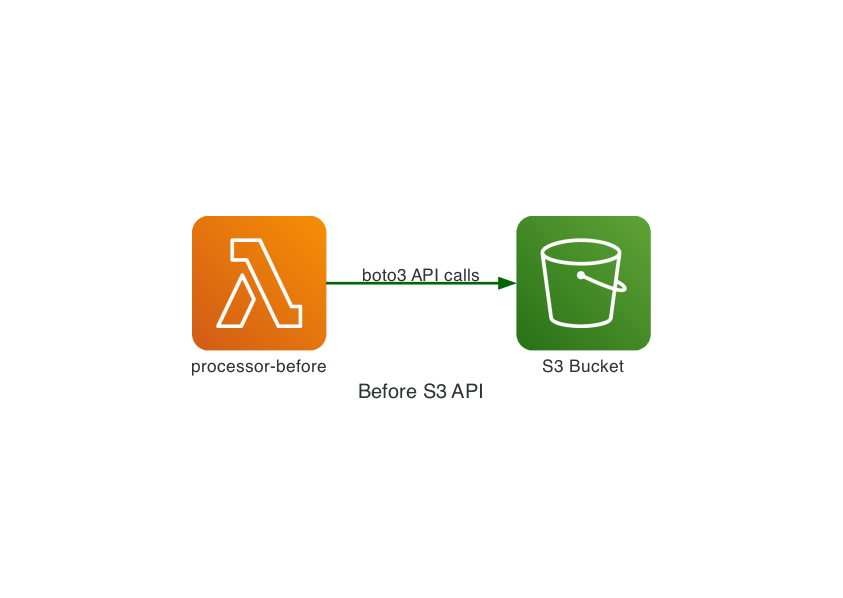
If you've written a Lambda function that processes files in S3, you've written this pattern:
import boto3
import os
import json

s3 = boto3.client("s3")

def lambda_handler(event, context):
    # 1. List files in the inbox
    response = s3.list_objects_v2(Bucket=BUCKET, Prefix="inbox/")

    for obj in response.get("Contents", []):
        key = obj["Key"]
        filename = key.removeprefix("inbox/")

        # 2. Download to /tmp (the only writable space Lambda gives you)
        s3.download_file(BUCKET, key, f"/tmp/{filename}")

        # 3. Process the file
        with open(f"/tmp/{filename}", "r") as f:
            content = f.read()
        result = {"word_count": len(content.split()), "lines": content.count("\n")}

        # 4. Upload processed file (S3 has no rename - copy then delete)
        s3.copy_object(
            Bucket=BUCKET,
            CopySource={"Bucket": BUCKET, "Key": key},
            Key=f"processed/{filename}",
        )

        # 5. Upload metadata
        s3.put_object(
            Bucket=BUCKET,
            Key=f"processed/{filename}.meta.json",
            Body=json.dumps(result),
        )

        # 6. Delete the original
        s3.delete_object(Bucket=BUCKET, Key=key)

        # 7. Clean up /tmp (Lambda reuses containers)
        os.remove(f"/tmp/{filename}")
Every step is an S3 API call. Every file passes through /tmp. "Renaming" a file requires a full copy followed by a delete - two API calls for something that should be instant. If your function processes 100 files, that's hundreds of API calls, each adding latency.
And /tmp itself is limited. Lambda gives you 512MB by default (up to 10GB at extra cost). If you're processing large files or many files concurrently, you'll hit that ceiling.
The "After" Pattern: Just Use the File System
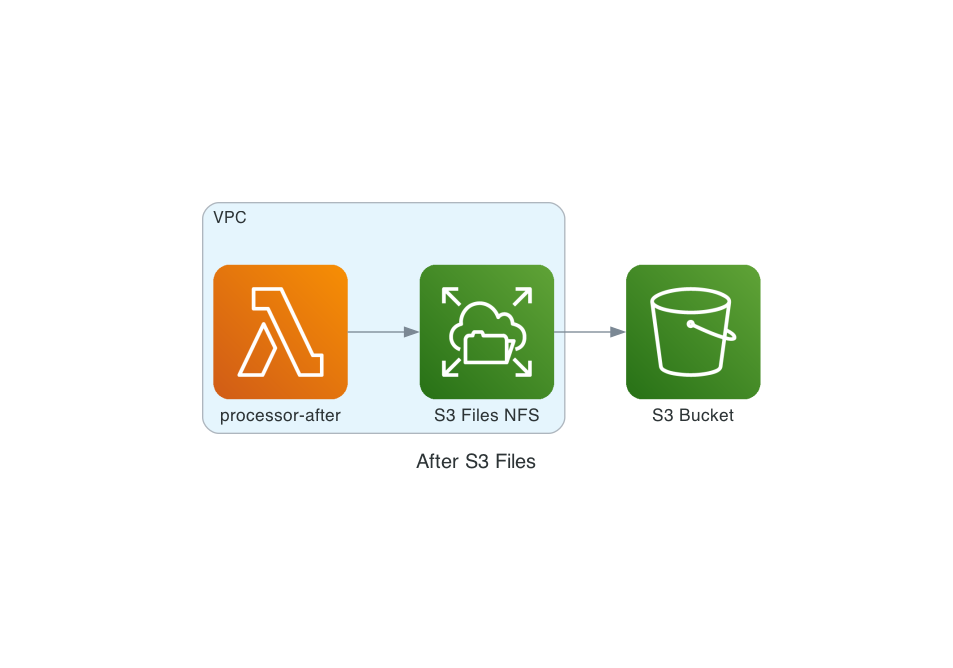
With S3 Files mounted at /mnt/docs, the same logic becomes:
import os
import json
from aws_lambda_powertools import Logger, Tracer, Metrics
from aws_lambda_powertools.metrics import MetricUnit

logger = Logger()
tracer = Tracer()
metrics = Metrics()

MOUNT_PATH = os.environ["MOUNT_PATH"]

@logger.inject_lambda_context
@tracer.capture_lambda_handler
@metrics.log_metrics(capture_cold_start_metric=True)
def lambda_handler(event, context):
    inbox = os.path.join(MOUNT_PATH, "inbox")
    processed = os.path.join(MOUNT_PATH, "processed")
    os.makedirs(processed, exist_ok=True)

    count = 0
    for filename in os.listdir(inbox):
        src = os.path.join(inbox, filename)

        with open(src, "r") as f:
            content = f.read()
        result = {"word_count": len(content.split()), "lines": content.count("\n")}

        with open(os.path.join(processed, f"{filename}.meta.json"), "w") as f:
            json.dump(result, f)

        os.rename(src, os.path.join(processed, filename))
        count += 1

    metrics.add_metric(name="FilesProcessed", unit=MetricUnit.Count, value=count)
    logger.info("batch complete")
There is no boto3 import, no /tmp management, and no copy-then-delete dance. Powertools makes it easy to add structured logging, tracing, and EMF metrics - the decorators above wire all three into this handler. The rename returns instantly from the NFS client's perspective. The code is materially shorter and maps more directly to the workload.
One caveat: "instant" means instant from your code's perspective. Under the hood, S3 Files still has to copy + delete the S3 object to implement the rename - general-purpose S3 buckets have no native rename operation. (S3 Express One Zone directory buckets do have a RenameObject API, but S3 Files works with general-purpose buckets.) For single files, this happens fast enough to be invisible. For directory renames across thousands of objects, the S3-side sync can take a long time - AWS documentation warns about performance impact for large recursive rename operations on prefixes with many objects. Your NFS client sees the rename as complete immediately, but S3 API consumers see the old key until the background sync finishes.
This is not just cleaner code - it's a fundamentally different model. S3 remains the authoritative data store; the file system is a synchronized view. Your Lambda function sees files and directories. S3 sees objects and prefixes. Both are looking at the same data.
Building the Infrastructure with Terraform
Good news: the Terraform AWS provider shipped native S3 Files resources in v6.40.0 on April 8, 2026 - just one day after S3 Files went GA. The new resources are aws_s3files_file_system, aws_s3files_mount_target, and aws_s3files_access_point, plus corresponding data sources and aws_s3files_file_system_policy for resource-based policies.
The S3 Bucket (Versioning is Mandatory)
S3 Files requires bucket versioning to be enabled. This is how it tracks the relationship between file-system state and S3 object versions. The full bucket setup also includes SSE-S3 encryption (explicit, even though it's the default for new buckets), a public access block, and a bucket policy enforcing TLS-only access:
resource "aws_s3_bucket" "docs" {
  bucket = "${var.project_name}-${var.environment}-docs"
}

resource "aws_s3_bucket_versioning" "docs" {
  bucket = aws_s3_bucket.docs.id
  versioning_configuration {
    status = "Enabled"
  }
}

resource "aws_s3_bucket_server_side_encryption_configuration" "docs" {
  bucket = aws_s3_bucket.docs.id
  rule {
    apply_server_side_encryption_by_default {
      sse_algorithm = "AES256"
    }
  }
}

resource "aws_s3_bucket_public_access_block" "docs" {
  bucket                  = aws_s3_bucket.docs.id
  block_public_acls       = true
  block_public_policy     = true
  ignore_public_acls      = true
  restrict_public_buckets = true
}

# Disable ACLs - bucket-owner-enforced is the default for new buckets, but
# being explicit prevents readers from relying on defaults they may not understand.
resource "aws_s3_bucket_ownership_controls" "docs" {
  bucket = aws_s3_bucket.docs.id
  rule {
    object_ownership = "BucketOwnerEnforced"
  }
}

# Versioning is mandatory for S3 Files, so without lifecycle cleanup old
# versions accumulate silently during repeated benchmark runs.
resource "aws_s3_bucket_lifecycle_configuration" "docs" {
  bucket = aws_s3_bucket.docs.id
  rule {
    id     = "expire-noncurrent-versions"
    status = "Enabled"
    noncurrent_version_expiration {
      noncurrent_days = 7
    }
  }
}

resource "aws_s3_bucket_policy" "docs" {
  bucket = aws_s3_bucket.docs.id
  policy = jsonencode({
    Version = "2012-10-17"
    Statement = [{
      Sid       = "DenyNonTLS"
      Effect    = "Deny"
      Principal = "*"
      Action    = "s3:*"
      Resource  = [aws_s3_bucket.docs.arn, "${aws_s3_bucket.docs.arn}/*"]
      Condition = { Bool = { "aws:SecureTransport" = "false" } }
    }]
  })
}
Production hardening notes: For workloads that should stay private inside the VPC, you can go beyond TLS-only and restrict bucket access to your S3 VPC endpoint using aws:sourceVpce or aws:sourceVpc conditions in the bucket policy. This can prevent bucket access except through your approved VPC or VPC endpoint, even when credentials are otherwise valid. For SSE-KMS encrypted buckets, the S3 Files service role would also need kms:GenerateDataKey, kms:Encrypt, kms:Decrypt, kms:ReEncryptFrom, and kms:ReEncryptTo scoped with kms:ViaService = s3.<region>.amazonaws.com. This demo uses SSE-S3 (AES256), so KMS permissions are not needed here.
The S3 Files Service Role
S3 Files needs an IAM role it can assume to read and write your bucket. This is separate from your Lambda's execution role. First surprise: the service principal is elasticfilesystem.amazonaws.com, not s3files.amazonaws.com. S3 Files is built on EFS, and the trust policy has to name the underlying service. If you guess the obvious name, CreateRole fails with MalformedPolicyDocument: Invalid principal.
resource "aws_iam_role" "s3files_service" {
  name = "${var.project_name}-${var.environment}-s3files-service"

  assume_role_policy = jsonencode({
    Version = "2012-10-17"
    Statement = [{
      Sid       = "AllowS3FilesAssumeRole"
      Effect    = "Allow"
      Principal = { Service = "elasticfilesystem.amazonaws.com" }
      Action    = "sts:AssumeRole"
      Condition = {
        StringEquals = {
          "aws:SourceAccount" = data.aws_caller_identity.current.account_id
        }
        ArnLike = {
          "aws:SourceArn" = "arn:aws:s3files:${data.aws_region.current.region}:${data.aws_caller_identity.current.account_id}:file-system/*"
        }
      }
    }]
  })
}

resource "aws_iam_role_policy" "s3files_bucket_access" {
  name = "s3-bucket-access"
  role = aws_iam_role.s3files_service.id

  policy = jsonencode({
    Version = "2012-10-17"
    Statement = [{
      Effect = "Allow"
      Action = [
        "s3:ListBucket", "s3:ListBucketVersions",
        "s3:GetBucketLocation", "s3:GetBucketVersioning",
        "s3:AbortMultipartUpload", "s3:ListMultipartUploadParts",
        "s3:GetObject", "s3:GetObjectVersion", "s3:GetObjectTagging", "s3:GetObjectVersionTagging",
        "s3:PutObject", "s3:PutObjectTagging",
        "s3:DeleteObject", "s3:DeleteObjectVersion"
      ]
      Resource = [aws_s3_bucket.docs.arn, "${aws_s3_bucket.docs.arn}/*"]
      Condition = {
        StringEquals = {
          "aws:ResourceAccount" = data.aws_caller_identity.current.account_id
        }
      }
    }]
  })
}
The role also needs EventBridge permissions - this is the mechanism behind S3-to-NFS synchronization. S3 Files creates EventBridge rules (prefixed DO-NOT-DELETE-S3-Files*) to detect out-of-band bucket changes. Without these, S3-side writes never propagate to the NFS mount:
resource "aws_iam_role_policy" "s3files_eventbridge" {
  name = "eventbridge-sync"
  role = aws_iam_role.s3files_service.id

  policy = jsonencode({
    Version = "2012-10-17"
    Statement = [
      {
        Sid    = "EventBridgeManage"
        Effect = "Allow"
        Action = [
          "events:PutRule", "events:PutTargets",
          "events:DeleteRule", "events:DisableRule",
          "events:EnableRule", "events:RemoveTargets"
        ]
        Resource = "arn:aws:events:*:*:rule/DO-NOT-DELETE-S3-Files*"
        Condition = {
          StringEquals = {
            "events:ManagedBy" = "elasticfilesystem.amazonaws.com"
          }
        }
      },
      {
        Sid    = "EventBridgeRead"
        Effect = "Allow"
        Action = [
          "events:DescribeRule", "events:ListRules",
          "events:ListRuleNamesByTarget", "events:ListTargetsByRule"
        ]
        Resource = "arn:aws:events:*:*:rule/*"
      }
    ]
  })
}
If you use SSE-KMS encryption on the bucket, you'd also need kms:GenerateDataKey, kms:Encrypt, kms:Decrypt, kms:ReEncryptFrom, and kms:ReEncryptTo scoped with kms:ViaService = s3.<region>.amazonaws.com. This demo uses SSE-S3 (AES256), so KMS permissions aren't needed.
The aws:SourceArn condition and the full set of object/multipart/EventBridge actions are documented in the S3 Files prerequisites. The biggest risk from an incomplete policy isn't a permission error - it's silent failure. Missing EventBridge permissions mean the sync rules never get created, and S3-side changes simply don't appear on the mount. Missing multipart permissions cause large-file uploads to leak incomplete parts.
Creating the File System, Mount Targets, and Access Point
The aws_s3files_file_system resource takes just a bucket ARN and the service role ARN:
resource "aws_s3files_file_system" "docs" {
  bucket   = aws_s3_bucket.docs.arn
  role_arn = aws_iam_role.s3files_service.arn
}
Mount targets go in each subnet where your Lambda runs. One per AZ:
resource "aws_s3files_mount_target" "az" {
  count = length(var.private_subnet_ids)

  file_system_id  = aws_s3files_file_system.docs.id
  subnet_id       = var.private_subnet_ids[count.index]
  security_groups = [aws_security_group.mount_target.id]
}
Mount targets take about 5 minutes to create. Terraform's create timeout handles that wait - but there's a trap: the provider returns once the API call completes, which happens before the target reaches the available lifecycle state. If you create a Lambda that references the access point immediately after, CreateFunction fails with not all are in the available life cycle state yet. The fix is an explicit wait between mount targets and downstream consumers:
resource "time_sleep" "wait_for_mount_targets" {
  depends_on      = [aws_s3files_mount_target.az]
  create_duration = "90s"
}

resource "aws_s3files_access_point" "lambda" {
  file_system_id = aws_s3files_file_system.docs.id
  depends_on     = [time_sleep.wait_for_mount_targets]

  # DEMO SHORTCUT: uid 0:0 avoids ownership collisions during the side-by-side
  # comparison. In production, prefer a scoped access point path with a non-root
  # UID/GID (e.g., uid=1000), or grant s3files:ClientRootAccess on the Lambda
  # role instead. AWS's Lambda console defaults to UID/GID 1000:1000 with
  # root_directory.path = "/lambda" for good reason.
  posix_user {
    uid = 0
    gid = 0
  }

  root_directory {
    path = "/"
  }
}
The access point controls the POSIX UID/GID that all NFS operations execute as. The choice of 0:0 here is a demo compromise, not a recommendation - I'll explain the tradeoffs and better alternatives in the "Things to Look Out For" section.
Finally, add an aws_s3files_file_system_policy - the resource-based policy on the file system itself (equivalent to a bucket policy). Without this, any principal with s3files:ClientMount in their IAM policy can mount your file system:
resource "aws_s3files_file_system_policy" "docs" {
  file_system_id = aws_s3files_file_system.docs.id

  policy = jsonencode({
    Version = "2012-10-17"
    Statement = [
      {
        Sid       = "AllowMountFromKnownRoles"
        Effect    = "Allow"
        Principal = { AWS = [var.lambda_role_arn, var.ec2_role_arn] }
        Action    = ["s3files:ClientMount", "s3files:ClientWrite"]
        Resource  = aws_s3files_file_system.docs.arn
      },
      {
        Sid       = "EnforceTLS"
        Effect    = "Deny"
        Principal = "*"
        Action    = "s3files:*"
        Resource  = aws_s3files_file_system.docs.arn
        Condition = { Bool = { "aws:SecureTransport" = "false" } }
      }
    ]
  })
}
The VPC (No NAT Gateway Needed)
S3 Files requires your Lambda to be in a VPC - the NFS mount targets live inside your VPC subnets. But you don't need a NAT Gateway (which costs about $35/month). Instead, use a free S3 Gateway VPC endpoint for S3 API traffic:
resource "aws_vpc" "main" {
  cidr_block           = "10.0.0.0/16"
  enable_dns_support   = true   # Required for VPC endpoints
  enable_dns_hostnames = true
}

resource "aws_subnet" "private" {
  count             = 2
  vpc_id            = aws_vpc.main.id
  cidr_block        = var.private_subnet_cidrs[count.index]
  availability_zone = var.availability_zones[count.index]
}

# Free S3 Gateway endpoint - no NAT gateway needed
resource "aws_vpc_endpoint" "s3" {
  vpc_id            = aws_vpc.main.id
  service_name      = "com.amazonaws.${data.aws_region.current.region}.s3"
  vpc_endpoint_type = "Gateway"
  route_table_ids   = [aws_route_table.private.id]
}
Security groups allow NFS traffic (TCP 2049) between the Lambda and mount targets:
# Lambda can reach mount targets on NFS port
resource "aws_vpc_security_group_egress_rule" "lambda_to_nfs" {
  security_group_id            = aws_security_group.lambda_after.id
  referenced_security_group_id = aws_security_group.mount_target.id
  from_port                    = 2049
  to_port                      = 2049
  ip_protocol                  = "tcp"
}

# Mount targets accept NFS from Lambda
resource "aws_vpc_security_group_ingress_rule" "nfs_from_lambda" {
  security_group_id            = aws_security_group.mount_target.id
  referenced_security_group_id = aws_security_group.lambda_after.id
  from_port                    = 2049
  to_port                      = 2049
  ip_protocol                  = "tcp"
}
The Lambda Function with S3 Files Mount
The Lambda configuration uses the same file_system_config block as EFS. The key additions are the VPC config and the S3 Files-specific IAM permissions:
resource "aws_lambda_function" "processor_after" {
  function_name = "${var.project_name}-${var.environment}-after"
  runtime       = "python3.14"
  architectures = ["arm64"]
  memory_size   = 512    # >= 512MB enables direct S3 read optimization
  timeout       = 300
  handler       = "handler.lambda_handler"

  vpc_config {
    subnet_ids         = var.private_subnet_ids
    security_group_ids = [var.lambda_sg_id]
  }

  file_system_config {
    arn              = var.access_point_arn    # S3 Files access point
    local_mount_path = "/mnt/docs"            # Must start with /mnt/
  }

  environment {
    variables = {
      MOUNT_PATH = "/mnt/docs"
    }
  }
}
The Lambda execution role needs S3 Files mount permissions and S3 read permissions for the direct-read optimization:
resource "aws_iam_role_policy" "s3files_mount" {
  name = "s3files-mount"
  role = aws_iam_role.execution.id

  policy = jsonencode({
    Version = "2012-10-17"
    Statement = [{
      Effect   = "Allow"
      Action   = ["s3files:ClientMount", "s3files:ClientWrite"]
      Resource = var.access_point_arn
    }]
  })
}

# Required for the >=1 MiB direct-read bypass (streams from S3 at up to 3 GB/s).
# Without this, reads silently fall back to the cached path - the mount works
# but you lose the throughput optimization and pay S3 Files access charges.
resource "aws_iam_role_policy" "s3_direct_read" {
  name = "s3-direct-read"
  role = aws_iam_role.execution.id

  policy = jsonencode({
    Version = "2012-10-17"
    Statement = [{
      Effect   = "Allow"
      Action   = ["s3:GetObject", "s3:GetObjectVersion"]
      Resource = "${var.bucket_arn}/*"
    }]
  })
}
Note: s3files:ClientMount is required for all access. s3files:ClientWrite is only needed for read-write mounts. s3files:ClientRootAccess lets a non-root access point UID operate on root-owned entries (see the Access Point Ownership section below - it's the cleanest fix for mixed S3-API/NFS workflows). The s3:GetObject/s3:GetObjectVersion permissions are technically optional, but without them the direct-read bypass doesn't activate and your >=512MB memory setting buys you nothing.
Performance Comparison
I deployed both Lambda functions and ran them against 20 medium-sized text files (500-2000 words each) across 3 runs. The benchmark script seeds each approach into its own S3 prefix, invokes the relevant Lambda, and collects timing breakdowns from both handlers.
make benchmark
Actual results from a 20-file, 3-run benchmark (arm64 Lambda, 512MB, us-east-1):
| Metric | Before (S3 API) | After (S3 Files) | Speedup |
|---|---|---|---|
| List files | 80ms (min 74, max 92) | 152ms (min 8, max 440) | 0.5x |
| Read/Download (20 files) | 991ms (min 920, max 1096) | 139ms (min 124, max 146) | 7.1x |
| Process | 5ms | 3ms | 1.7x |
| Write metadata (20 files) | 1788ms (min 1574, max 2054) | 256ms (min 249, max 266) | 7.0x |
| Move/rename (20 files) | 530ms (min 465, max 647) | 114ms (min 112, max 116) | 4.6x |
| Lambda total | 3394ms (min 3037, max 3878) | 664ms (min 518, max 948) | 5.1x |
| Wall clock (including invoke) | 3505ms | 1132ms | 3.1x |
The Lambda-internal win is about 5x. Wall clock narrows the gap because the after-Lambda pays a VPC cold start penalty on its first invocation in each run (2.2s wall on run 1, ~600ms on runs 2-3 once the ENI is warm). For batch workloads you'd amortize that across many files; for sporadic triggers you'd feel it every time.
The single non-win - list time - is counterintuitive but worth calling out. os.listdir over NFS had a cold-run outlier of 440ms (vs ~80ms for a warm ListObjectsV2 call). I didn't chase this down, but it looks like metadata that hasn't been touched recently isn't in the S3 Files cache yet and needs to be hydrated from S3 on first access. After warmup, listdir settles at 8ms - 10x faster than the S3 API.
The biggest wins are in small file reads (no per-object HTTP round trip), writes (no multipart setup for small files), and rename (a single inode operation vs CopyObject + DeleteObject).
The Lambda Managed Instances Connection
In my previous post on Lambda Managed Instances, I explored how high-memory Lambda functions unlock new workload patterns. S3 Files adds another dimension to this.
When your Lambda function has 512MB or more memory, S3 Files enables direct S3 read routing: reads of 1 MiB or larger bypass the file system's high-performance storage entirely and stream directly from S3 at up to 3 GB/s per client (that's a throughput ceiling, not a typical number - actual throughput depends on file size, network, and concurrency). These direct reads don't incur S3 Files access charges - you only pay standard S3 GET pricing. (Your Lambda execution role needs s3:GetObject and s3:GetObjectVersion on the bucket for this to work - without them, reads silently fall back to the cached path.)
There's a separate threshold at play too: files smaller than 128 KiB are asynchronously imported into the high-performance storage on first access (a prefetch optimization, not a bypass). Files between 128 KiB and 1 MiB get metadata imported but data is fetched on demand. This creates a three-tier read architecture:
- Tiny files (under 128 KiB) (configs, metadata, indexes): prefetched into S3 Files cache, sub-millisecond on subsequent reads
- Mid-size files (128 KiB to 1 MiB): fetched on demand from the cache or S3, depending on access pattern
- Large files (1 MiB and above) (datasets, models, media): streamed directly from S3 at 3 GB/s, skipping the cache entirely
The 128 KiB import threshold is tunable per file system via aws_s3files_synchronization_configuration in Terraform (not shown in the demo). The 1 MiB direct-read bypass is not tunable.
For data-intensive Lambda workloads, combining Managed Instances (multi-concurrency, high memory) with S3 Files (mounted file system, direct S3 read bypass) is a compelling alternative to containerized processing.
The Three-Way EC2 Comparison: S3 API vs S3 Files vs Mountpoint
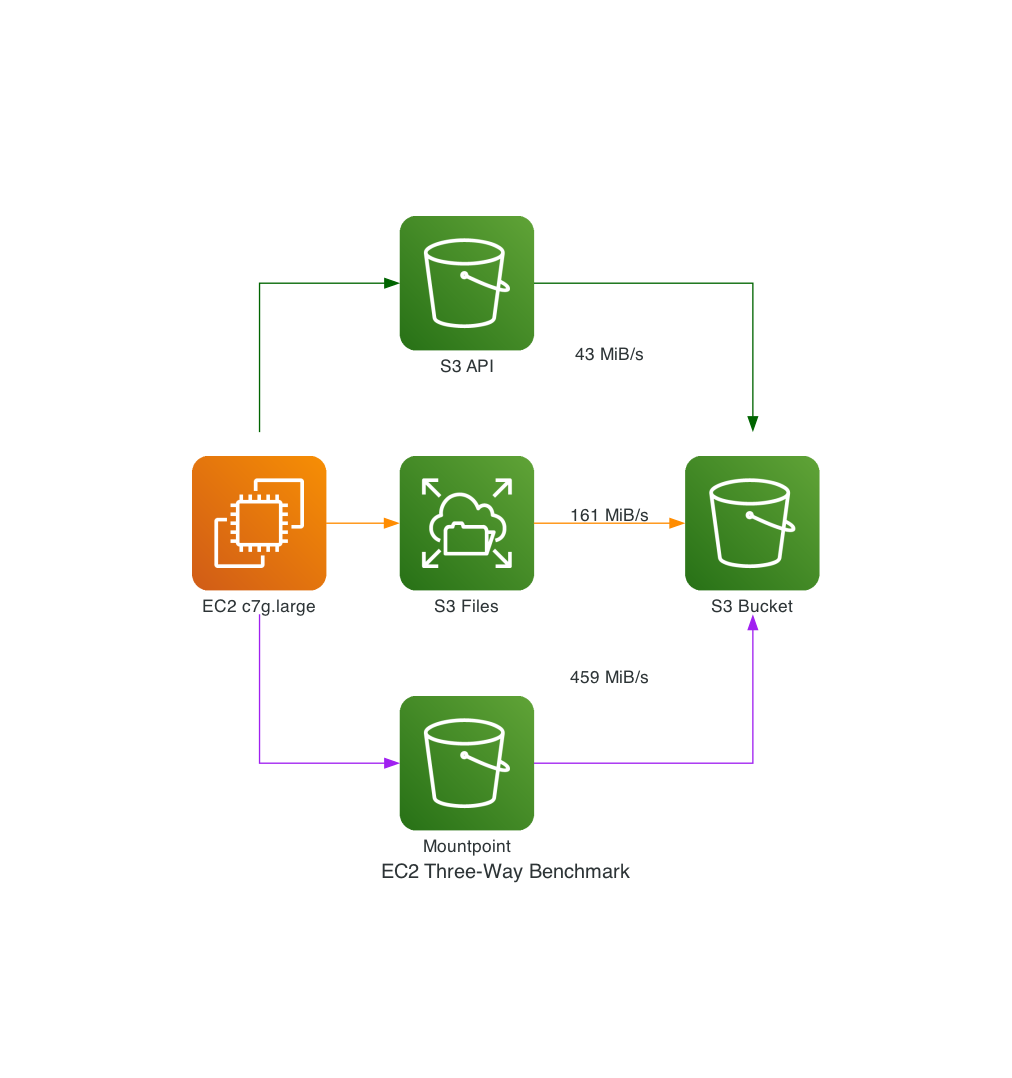
The Lambda benchmark above covers the serverless use case, but it doesn't include Mountpoint for Amazon S3 - AWS's FUSE-based file-system client. Mountpoint is widely used for analytics and ML workloads, so it's a natural comparison. There's just one problem: Mountpoint can't run on Lambda. It's FUSE-based, and Lambda's Firecracker microVM doesn't expose /dev/fuse or grant CAP_SYS_ADMIN - both required for userspace file-system mounts. S3 Files sidesteps this entirely by using NFS, which Lambda natively supports through its existing EFS mount infrastructure.
So for the three-way comparison, I added a Graviton EC2 instance (c7g.large, arm64, in the same VPC) with both S3 Files and Mountpoint mounted, plus direct S3 API access via boto3. Same bucket, same data, three different interfaces.
Large-Directory Walk (10,000 Small Files)
Seed 10,000 small text files under a single prefix, then enumerate every entry and stat each one:
| Approach | Mean | Min | Max |
|---|---|---|---|
S3 Files (NFS os.listdir + os.stat) | 905ms | 891ms | 924ms |
S3 API (ListObjectsV2, paginated) | 1,666ms | 1,637ms | 1,698ms |
Mountpoint (FUSE os.listdir + os.stat) | 175,847ms | 171,168ms | 179,002ms |
S3 Files is 1.8x faster than the S3 API. Mountpoint is 194x slower - nearly three minutes for 10,000 entries. This is Mountpoint's known weakness: it makes a ListObjectsV2 call per directory and then individual HeadObject calls for stat(), with no prefetching or metadata caching. If your workload involves browsing or enumerating directories, Mountpoint is the wrong tool.
Large-File Throughput (5 x 1 GiB Random Binary)
Seed five 1 GiB random binary files, stream-read each one into a SHA-256 hash, write the digest back:
| Approach | Read time (5 GiB) | Read throughput | Write time |
|---|---|---|---|
| Mountpoint (FUSE) | 11,158ms | 459 MiB/s | 1,469ms |
| S3 Files (NFS) | 32,356ms | 161 MiB/s | 71ms |
S3 API (GetObject stream) | 129,228ms | 43 MiB/s | 151ms |
For large sequential reads, Mountpoint dominates at 459 MiB/s - nearly 3x S3 Files and 10x the S3 API. This isn't an accident: Mountpoint splits each large read into parallel HTTP Range GET requests across multiple TCP connections, with aggressive read-ahead prefetching. A 1 GiB file read becomes many concurrent range fetches that saturate the network link. It's a purpose-built parallel download accelerator for large, sequential, read-heavy workloads (ML training data, analytics datasets, media processing).
S3 Files (161 MiB/s) goes through NFS 4.1/4.2 to a managed server that reads from its cache or S3 - the protocol framing and cache coherency tracking add overhead. The S3 API (43 MiB/s) is a single GetObject stream over one HTTP connection with no parallelism.
The same design that makes Mountpoint fast for large reads makes it very slow for directories: it has no metadata cache, so every stat() call becomes an individual HeadObject API call to S3. That's why 10,000 files takes 176 seconds.
Write time tells a similar story: Mountpoint takes 1,469ms to write five small digest files. S3 Files does it in 71ms. S3 API in 151ms. Mountpoint's FUSE-to-S3 translation adds high per-file overhead for small writes.
When to Use Which
The benchmark reveals that no single approach wins everywhere:
| Use case | Best tool | Why |
|---|---|---|
| Interactive file operations (rename, create, list) | S3 Files | File-system semantics, metadata caching, rename instant from the NFS client's perspective (S3-side sync is async) |
| Large sequential reads (datasets, models, media) | Mountpoint | Highest throughput, zero software cost, no VPC needed |
| Serverless (Lambda) | S3 Files | Mountpoint can't run on Lambda at all |
| Simplest deployment (no VPC, no mounts) | S3 API | Slowest but zero infrastructure - works anywhere with IAM credentials |
| Directory-heavy workloads | S3 Files | In this benchmark, Mountpoint's per-entry overhead made large directory walks much slower |
Things to Look Out For
S3 Files is impressive, but it's not magic. Here are the real-world constraints you need to know:
60-Second Commit Delay
S3 Files uses a "stage and commit" model. File-system writes are batched for approximately 60 seconds before committing to S3. Files you write are immediately visible through the NFS mount, but they won't appear in aws s3 ls or s3.list_objects_v2() for about a minute.
For the document processing use case, this is fine - the Lambda reads and writes through the mount, so consistency is maintained within the NFS view. But if you have a downstream process polling S3 directly for new objects, it will see a delay.
VPC Cold Starts
Putting Lambda in a VPC adds cold start latency. AWS has improved this significantly with Hyperplane ENI caching, but in this benchmark I observed roughly 1-2 seconds of additional cold start time compared to the non-VPC Lambda. For infrequently-invoked functions, this matters. For functions that process batches (like our document processor), the cold start is amortized across many files.
50 Million Object Limit
Each mounted file system supports up to 50 million objects. For most workloads this is generous, but if you're mounting a bucket with hundreds of millions of small objects, you'll need to scope the mount to a prefix. In Terraform, this is a creation-time argument on aws_s3files_file_system (not shown in the demo, which mounts the entire bucket). Via the CLI, use the --prefix flag on create-file-system.
Key Name Restrictions
S3 allows object keys that don't map cleanly to POSIX filenames. According to AWS documentation, keys with trailing slashes, path traversal patterns (../), or components longer than 255 characters will not appear in the file-system view. The objects remain accessible via the S3 API, but the file system won't show them. AWS recommends monitoring the CloudWatch ImportFailures metric to detect these cases, as there are no client-side errors.
Delete and Update Propagation
S3-side changes only propagate to the NFS mount for files whose data is currently in the high-performance storage (the "hot" cache). In testing, hot-file deletes via the S3 API remained readable on the mount for roughly 6-18 seconds before disappearing. Modifications followed the same pattern: the mount saw the stale version until the EventBridge notification arrived.
For files whose data has been expired out of the cache (cold files), S3-side changes don't propagate at all until the next NFS read, at which point S3 Files fetches the latest version from S3. So the 6-18 second range observed above is a hot-path number; cold-path updates are lazy and unbounded. If you're designing a pipeline that writes via the S3 API and reads via the mount, test both cases.
Access Point Ownership
This is the biggest surprise I hit, and it drove a design change in the demo.
Objects written through the NFS mount do carry POSIX ownership metadata - S3 Files stores it as user-defined S3 object metadata (file-permissions, file-owner, file-group, file-mtime) on every object it writes. But objects written via the S3 API - s3.put_object(), aws s3 cp, the before Lambda's boto3 calls - don't have that metadata. When S3 Files imports those API-written objects into the NFS view, they get default permissions: root:root (UID 0, GID 0) with mode 0644 for files and 0755 for directories. That asymmetry is the mechanism behind this issue: directories are traversable and readable by everyone (which is why the inbox reads worked), but only writable by root (which is why creating entries in processed/ failed). Those directories, incidentally, are just S3 prefixes materialized as zero-byte objects - which is why S3-API writes can create them as a side effect of PutObject and why they end up root-owned when imported.
The first time my after Lambda ran with posix_user { uid = 1000, gid = 1000 }, it failed with PermissionError: [Errno 13] Permission denied: '/mnt/docs/processed/.... The Lambda could read the inbox just fine, but it couldn't create anything under /mnt/docs/processed/ because S3 Files had reflected a previous before-Lambda PutObject into NFS as a root-owned directory.
Four ways out, ordered from best (least privilege) to most expedient:
- Use a scoped access point path (recommended for production). Set
root_directory.path = "/lambda-workspace"withcreation_permissions { owner_uid = 1000, owner_gid = 1000, permissions = "755" }andposix_user { uid = 1000, gid = 1000 }. S3 Files creates that path owned by your UID, and the Lambda only sees its owned subtree. The tradeoff: every S3 object the Lambda needs to see must be keyed underlambda-workspace/..., and a rawaws s3 cpinto any other prefix is invisible to the mount. This enforces least privilege at the access-point level. - Grant
s3files:ClientRootAccesson the Lambda's IAM role. This lets a non-root UID (stillposix_user { uid = 1000 }) perform operations against root-owned entries - including creating files inside root-owned directories imported from S3 - without running the entire Lambda as UID 0. It's the middle ground: keep least-privilege POSIX identity, elevate only for cross-boundary operations with S3-origin content. This permission is included in theAmazonS3FilesClientFullAccessmanaged policy, which is probably why I missed it - the demo's inline policy has onlyClientMount+ClientWrite. - Avoid path collisions: have each S3-API-side producer write to a prefix the NFS client never writes into. The demo does this - the
beforeLambda writes toprocessed-before/and theafterLambda writes toprocessed-after/- so their outputs never fight over directory ownership. - Run as root (access point
posix_user { uid = 0, gid = 0 }). The Lambda runs as "root" for NFS purposes and can write alongside S3-born files. This is what the demo uses because the side-by-side comparison needs both approaches to see the same bucket root. This is the opposite of least privilege - any NFS client can read, write, and delete anything on the mount. Last resort only.
If you're using S3 Files to replace an existing boto3 pipeline, plan this up front. Any prefix your NFS clients will write into should be created from the mount side first, or left entirely unpopulated from the S3 side. Anything written via PutObject will arrive in NFS as root-owned and block writes from non-root access points (unless you've granted ClientRootAccess).
Note: the demo pairs option 4 with an aws_s3files_file_system_policy that restricts which IAM principals can mount at all (deny-by-default, allow only the Lambda and EC2 benchmark roles, enforce TLS). If you use uid=0, this resource-based policy is your primary access control.
Related: don't pre-create "directory" marker objects (zero-byte inbox/, processed/, etc.) from Terraform. I had three aws_s3_object resources doing this and they turned out to be the exact cause of the ownership collision. The Lambda's os.makedirs(exist_ok=True) creates the directories over NFS with the correct access-point ownership - let it do its job.
S3-to-NFS Propagation Delay
Also worth knowing: writes go in both directions, but they don't propagate symmetrically. NFS writes commit to S3 on the 60-second schedule described above. S3 writes appear in the NFS view asynchronously via EventBridge notifications, which typically takes a few seconds but can take longer under load. If your benchmark seeds files via s3.put_object() and immediately invokes an NFS-mounted Lambda, the mount will see an empty inbox. The benchmark script in this project waits 60 seconds after S3-seeding to sidestep this.
Conflict resolution: if the same file is modified through both the NFS mount and the S3 API before synchronization completes, the S3 bucket version wins. The file-system copy is not silently overwritten - it gets moved to a .s3files-lost+found-<file-system-id> directory on the mount. Files in lost+found are not copied back to the S3 bucket and persist indefinitely on the file system, counting toward storage costs until explicitly deleted. This is important to understand for mixed API + file-system workflows: the S3 side is always authoritative, and your NFS edits may end up in lost+found if there's a race.
When NOT to Use S3 Files
S3 Files isn't always the right choice:
- Read-only analytics at lowest cost: Mountpoint for S3 adds zero software cost and is optimized for sequential reads of large files. If you're running Spark, Presto, or ML training jobs that only read data, Mountpoint is cheaper and simpler (no VPC required).
- Non-AWS or S3-compatible storage: s3fs-fuse works with MinIO, Ceph, and other S3-compatible object stores. S3 Files is AWS-only.
- Existing EFS mounts: Lambda supports one file-system mount - EFS or S3 Files, not both. For any new build where the backing data lives in S3, prefer S3 Files over EFS (you skip the EFS-to-S3 sync problem entirely). Only stick with EFS if the function needs a shared writable file system that multiple Lambda invocations coordinate through simultaneously.
- Latency-critical writes that must appear in S3 immediately: The 60-second commit delay means writes aren't visible to S3 API consumers right away. If you need sub-second S3 visibility, stick with direct S3 API calls.
Wrapping Up
S3 Files eliminates an entire category of boilerplate from AWS applications. The download-process-upload pattern that we've all written hundreds of times is no longer necessary. Your code just reads and writes files. The underlying storage happens to be S3.
The Terraform story is solid from day one - native provider resources shipped in v6.40.0, just one day after S3 Files went GA. Three resources (aws_s3files_file_system, aws_s3files_mount_target, aws_s3files_access_point) cover the full setup, and the file_system_config block on aws_lambda_function works identically to the existing EFS mount pattern.
All the code for this post - Terraform modules, Lambda handlers (with Powertools), the EC2 runner, benchmark scripts, and the Makefile - is available in the companion repository.
Cost Summary
For a demo deployment: approximately $75/month if you leave everything running. The EC2 instance (about $53/month) and SSM VPC interface endpoints (about $21/month, needed because the EC2 is in a private subnet with no NAT) are the bulk. Lambda and S3 costs are negligible. Stop the EC2 and run make destroy when done.
Cost note for production: S3 Files meters data reads and writes with a minimum of 32 KiB per operation, regardless of actual size. This benchmark's medium text files (500-2000 words) are above that threshold, so it didn't show up. But at scale with many tiny files - say 10,000 sub-1 KiB JSON configs read once each - you'd pay for 10,000 x 32 KiB = 320 MiB of reads, not 10 MiB. For small-file-heavy workloads, factor this into your cost model.
Key Takeaways
- S3 Files provides file-system semantics on S3 via NFS v4.1/4.2 - read, write, rename, advisory file locking
- Lambda functions with >=512MB memory get direct S3 read bypass for reads >=1 MiB (up to 3 GB/s ceiling) - but only if the execution role has
s3:GetObject - No NAT Gateway needed - use S3 Gateway VPC endpoints (but add SSM interface endpoints for EC2)
- Mountpoint can't run on Lambda (no FUSE) - S3 Files is the only file-system option for serverless
- For large sequential reads, Mountpoint still wins (459 MiB/s vs 161 MiB/s) - it was purpose-built for throughput
- For directory operations, Mountpoint is prohibitively slow (176s vs 0.9s for 10K entries) - use S3 Files
- The 60-second commit delay (NFS to S3) and the async EventBridge propagation (S3 to NFS) are the two consistency boundaries you have to design around
- Access point ownership interacts with S3-origin objects in ways that will surprise you - plan prefix ownership up front
- The trust policy service principal is
elasticfilesystem.amazonaws.com, nots3files.amazonaws.com- S3 Files is built on EFS - Native Terraform support shipped day one in AWS provider v6.40.0, but use a
time_sleepbetween mount targets and Lambda to avoid lifecycle state races
Resources
- Launching S3 Files, Making S3 Buckets Accessible as File Systems - AWS News Blog announcement
- Amazon S3 Files Documentation - Official user guide
- Configuring S3 Files Access for Lambda - Lambda-specific setup guide
- S3 Files Getting Started Tutorial - Step-by-step walkthrough
- Terraform aws_s3files_file_system Resource - Terraform provider docs
- Terraform aws_s3files_mount_target Resource - Mount target configuration
- Terraform aws_s3files_access_point Resource - Access point with POSIX user mapping
- AWS S3 Files Stress Test - The Register's independent stress test with edge case findings
- S3 Files vs Mountpoint vs s3fs-fuse Comparison - Detailed feature and performance comparison
- Architecture Layers That S3 Files Eliminates - Architectural patterns analysis
- Mountpoint for Amazon S3 - The read-heavy alternative for analytics workloads
- Lambda Managed Instances with Terraform - High-memory Lambda patterns that complement S3 Files
- Powertools for AWS Lambda - Best Practices By Default - Observability patterns for Lambda functions
Connect with me on X, Bluesky, LinkedIn, GitHub, Medium, Dev.to, or the AWS Community. Check out more of my projects at darryl-ruggles.cloud and join the Believe In Serverless community.
Comments
Loading comments...