Serverless Analytics from Your Laptop: S3 Tables, DuckDB, and an OpenAQ Lakehouse
On December 3, 2024, AWS shipped Amazon S3 Tables, a third bucket type purpose-built as storage for tabular analytics on Apache Iceberg. Compaction, snapshot expiry, and unreferenced-file cleanup all run automatically. Nine months later, DuckDB 1.4.0 added native write support to the Iceberg extension, and as of DuckDB 1.5.2 (April 13, 2026) it can INSERT, UPDATE, DELETE, time-travel, and migrate whole local databases into a managed Iceberg catalog with one copy statement after attaching the catalogs.
That combination is genuinely new. You can run an Iceberg lakehouse without a cluster, without an OPTIMIZE cron job, without a metastore to babysit, and without a query engine you have to operate. In this post, I'll build one end to end, with Terraform, a Python ingester on Lambda, and DuckDB on my laptop. The dataset is OpenAQ air quality observations, the language is Python 3.13 on Graviton, and the goal: serverless analytics from your laptop without most of the usual operational baggage. With S3 Tables specifically, treat the DuckDB write path as powerful but still labelled experimental in DuckDB's docs as of this writing. I'm a big fan of using DuckDB and really like how it works here.
The companion repo is at github.com/RDarrylR/s3-tables-duckdb. Clone it and make apply is two commands away from a working lakehouse.
The Long Road From Hadoop to Managed Iceberg
The reason this stack is interesting is that the alternatives are exhausting.
The "data lake" pattern hasn't fundamentally changed since 2011: dump Parquet on object storage, point a query engine at it, hope nobody asks for transactions. Apache Iceberg (and Delta Lake, Apache Hudi) finally fixed the transaction problem by maintaining metadata files alongside the data, but introduced a new one. Iceberg tables need maintenance. Compaction to merge small files. Snapshot expiry to keep metadata bounded. Orphaned-file cleanup. You either hand-rolled a Spark job for each, or you bought a vendor's "table service" (Tabular, Onehouse, Dremio) that did it for you.
S3 Tables is what happens when AWS finally decides "the maintenance is the product." A table bucket is a first-class resource type with the maintenance baked in. AWS triggers compaction asynchronously, often on a multi-hour cadence, when there are enough small files to merge; it expires snapshots according to your retention config and cleans up unreferenced data files on a schedule you control. You don't write the maintenance. You don't run the maintenance. You consume the maintenance as a managed feature.
DuckDB is the other half of this story. The Iceberg extension started as read-only in March 2025, gained INSERT and CREATE TABLE in v1.4.0 (September 2025), then UPDATE/DELETE in v1.4.2 (November 2025) for non-partitioned, non-sorted tables. v1.5.2 (April 2026) added updates and deletes from partitioned tables, plus TRUNCATE and bucket partitions, plus a curl-based network stack that's what you want when you're talking to AWS endpoints from a laptop on hotel wifi. None of this needs a JVM. None of this needs a coordinator. The whole engine is a single binary or a Python wheel.
So the laptop is back to being a real data engineering surface. The lakehouse lives in S3, the maintenance lives at AWS, the query engine lives next to your shell history.
The "Before" Pattern: Self-Managed Iceberg + a Cron Job
Here's what this used to look like. You provisioned an S3 bucket, picked Iceberg, and pointed a Spark job at it for writes. Then you added another job for OPTIMIZE compaction. Then a third for VACUUM to expire snapshots. The jobs ran on EMR or Glue, which meant Spark infrastructure to size or configure, job orchestration via Step Functions or Airflow, and runtime tuning every time the workload shape changed. Your "table" was now five concerns: storage, write engine, read engine, maintenance pipeline, and orchestration.
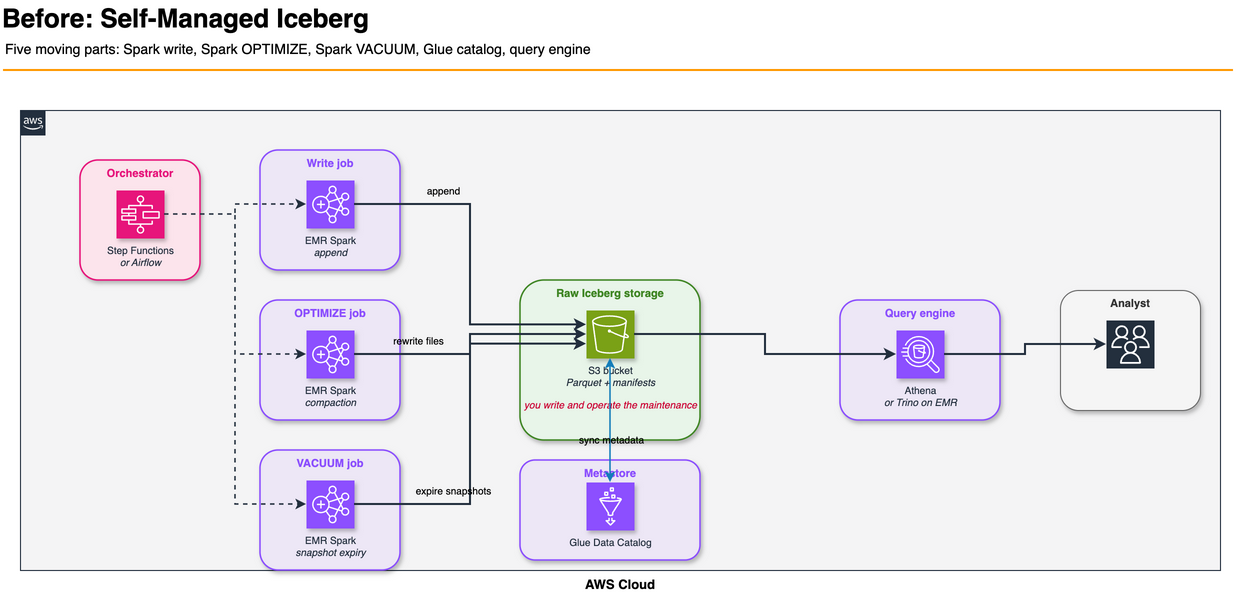
Five moving parts to query a table.
The "After" Pattern: Just Use the Catalog
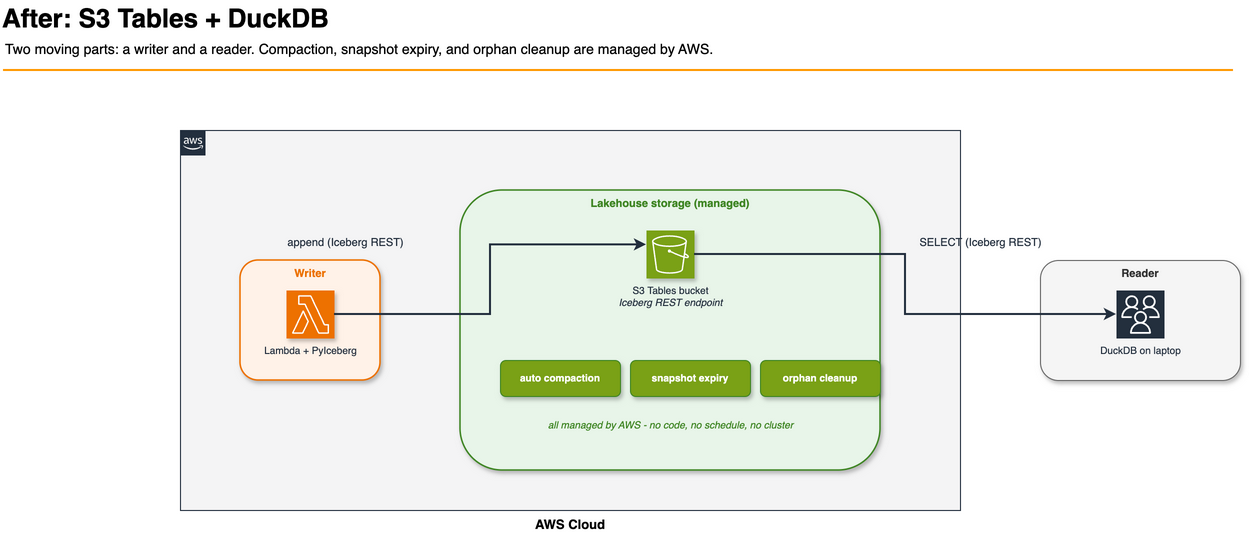
Two moving parts. The bucket holds the table. The clients (Lambda for writes, DuckDB for reads) talk to the same Iceberg REST endpoint AWS exposes per table bucket. There's no metastore to wire up, no compaction Lambda to author, no scheduled OPTIMIZE.
That's the pitch. The rest of the post is whether it actually holds up under a realistic workload.
The Use Case: OpenAQ Air Quality
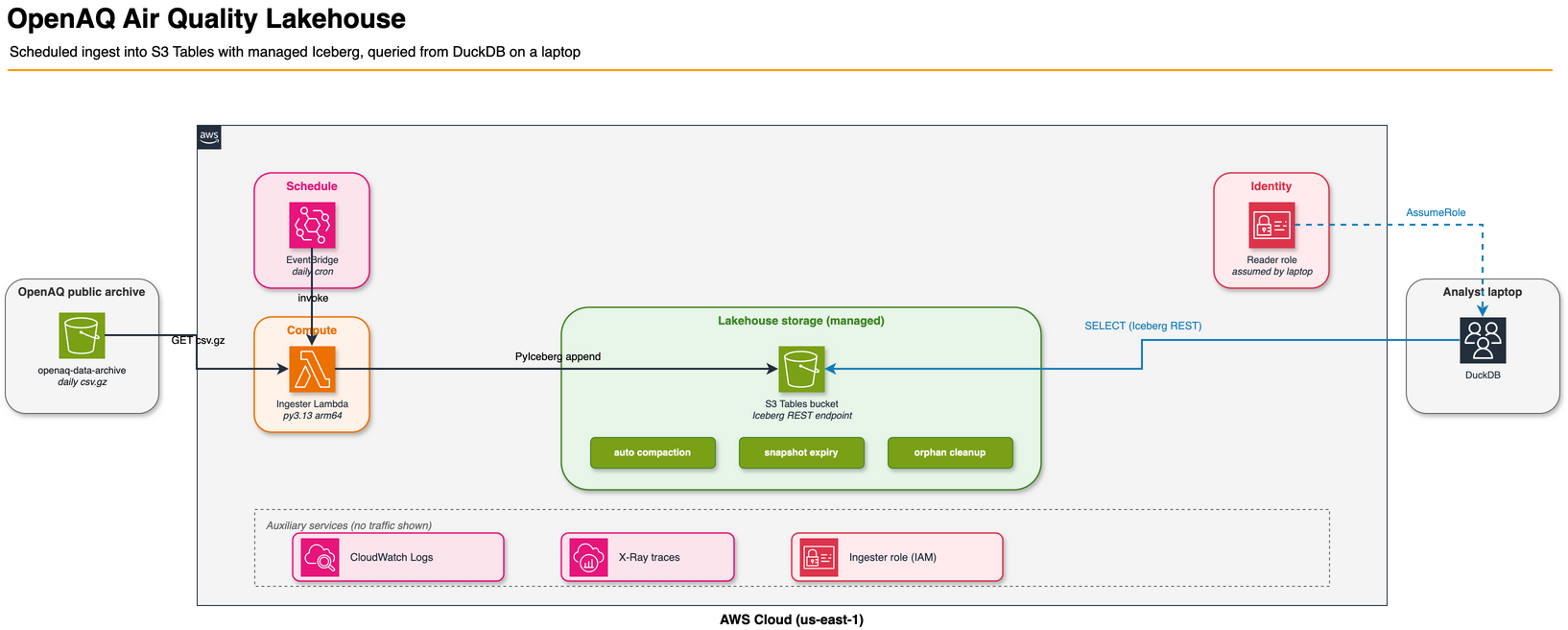
OpenAQ is a public-good nonprofit that aggregates air-quality readings from government and research sensors worldwide. They publish a daily archive of every measurement to a public S3 bucket (openaq-data-archive in us-east-1), structured as gzipped CSVs partitioned by station and date:
records/csv.gz/locationid=2178/year=2026/month=04/location-2178-20260415.csv.gz
Each daily file is a kilobyte or two of hourly readings: pm10, pm25, o3, no2, so2, and similar parameters. Tens of thousands of stations. Years of history. Free to read with no AWS account required.
That's a near-perfect demo dataset for this stack. The files are too small to query individually (most analytical engines lose efficiency when forced to plan and open thousands of tiny files), so compaction has a story to tell. The data is genuinely time-series, so partitioning and time travel both make sense. There are obvious aggregate questions ("what was the worst PM2.5 hour at this station last week?") that a data engineer would actually run.
The lakehouse has two tables:
| Table | Cardinality | Use |
|---|---|---|
airquality.measurements | many-to-many | one row per parameter reading at a station |
airquality.locations | one-per-station | slowly changing dimension |
Both are non-partitioned. That's a deliberate choice for this demo, not a hard requirement of the stack today; I'll come back to it in the limitations section.
Building the Infrastructure With Terraform
The whole stack is one Terraform module against hashicorp/aws ~> 6.43. Native aws_s3tables_* resources have been in the provider since the S3 Tables launch window in late 2024; later provider releases added the in-HCL Iceberg schema this post leans on, plus table-bucket tagging. v6.43 is just the version I'm pinning to.
Table bucket, namespace, and table schema in HCL
resource "aws_s3tables_table_bucket" "this" {
  name = "${local.name_prefix}-tb"

  encryption_configuration = {
    sse_algorithm = "AES256"
    kms_key_arn   = null
  }

  maintenance_configuration = {
    iceberg_unreferenced_file_removal = {
      status = "enabled"
      settings = {
        unreferenced_days = 3
        non_current_days  = 10
      }
    }
  }
}

resource "aws_s3tables_namespace" "airquality" {
  namespace        = "airquality"
  table_bucket_arn = aws_s3tables_table_bucket.this.arn
}

resource "aws_s3tables_table" "measurements" {
  name             = "measurements"
  namespace        = aws_s3tables_namespace.airquality.namespace
  table_bucket_arn = aws_s3tables_table_bucket.this.arn
  format           = "ICEBERG"

  metadata {
    iceberg {
      schema {
        field { name = "location_id"  type = "long"        required = true }
        field { name = "sensors_id"   type = "long" }
        field { name = "location"     type = "string" }
        field { name = "datetime"     type = "timestamptz" required = true }
        field { name = "lat"          type = "double" }
        field { name = "lon"          type = "double" }
        field { name = "parameter"    type = "string"      required = true }
        field { name = "units"        type = "string" }
        field { name = "value"        type = "double" }
        field { name = "ingested_at"  type = "timestamptz" required = true }
      }
    }
  }

  maintenance_configuration = {
    iceberg_compaction = {
      status   = "enabled"
      settings = { target_file_size_mb = 256 }
    }
    iceberg_snapshot_management = {
      status   = "enabled"
      settings = {
        max_snapshot_age_hours = 168
        min_snapshots_to_keep  = 5
      }
    }
  }
}
That's the entire schema. No metastore to provision, no Hive DDL, no CREATE EXTERNAL TABLE ceremony. Compaction and snapshot management are arguments on the resource. The 168-hour snapshot window is deliberate so the time-travel demo later in the post has runway. The 256MB compaction target sits in the middle of S3 Tables' 64-512MB range and gives DuckDB nice clean Parquet files to scan.
Three things to know if you're reading this configuration carefully:
- The mixed
{ ... }vs= { ... }syntax isn't a typo.metadatais an SDK-v2-style nested block;encryption_configurationandmaintenance_configurationuse the framework's object-attribute shape. Both are correct for this resource and reflect the schemas the AWS provider actually exposes. encryption_configurationrequireskms_key_arn = nullfor SSE-S3. The provider'sObjectAttributeschema demands every field be present, even when the field's meaningless for AES256.maintenance_configurationis set on the bucket AND on each table. They're separate resources with separate maintenance configs. Bucket-level handles unreferenced-file cleanup; table-level handles compaction and snapshot retention.
Lambda ingester on Graviton with Powertools
The ingester is a Python 3.13 Lambda on arm64. Graviton is the default for any new Lambda I write now: AWS publishes up to 60% better energy efficiency per workload vs. x86, Lambda prices are ~20% lower, and the wheel ecosystem caught up to arm64 a couple of years ago. It downloads OpenAQ daily files in parallel, parses them, and appends rows to the Iceberg tables via PyIceberg.
resource "aws_lambda_function" "ingester" {
  function_name = "${local.name_prefix}-ingester"
  role          = aws_iam_role.ingester.arn
  handler       = "handler.lambda_handler"
  runtime       = "python3.13"
  architectures = ["arm64"]
  memory_size   = 1769  # 1 vCPU break point
  timeout       = 900

  filename         = "${path.module}/../ingester/dist/ingester.zip"
  source_code_hash = filebase64sha256("${path.module}/../ingester/dist/ingester.zip")
  layers           = [aws_lambda_layer_version.deps.arn]

  tracing_config { mode = "Active" }

  logging_config {
    log_format            = "JSON"
    application_log_level = "INFO"
    system_log_level      = "WARN"
  }

  environment {
    variables = {
      POWERTOOLS_SERVICE_NAME      = "openaq-ingester"
      POWERTOOLS_METRICS_NAMESPACE = "OpenAQLakehouse"
      POWERTOOLS_LOG_LEVEL         = "INFO"
      TABLE_BUCKET_ARN             = aws_s3tables_table_bucket.this.arn
      NAMESPACE                    = aws_s3tables_namespace.airquality.namespace
      MEASUREMENTS_TABLE           = aws_s3tables_table.measurements.name
      LOCATIONS_TABLE              = aws_s3tables_table.locations.name
      OPENAQ_SOURCE_BUCKET         = "openaq-data-archive"
    }
  }
}
The handler uses the canonical Powertools pattern from my earlier post on Powertools defaults: three decorators, structured JSON logs, X-Ray tracing around the handler without hand-writing subsegments, and CloudWatch metrics via the Embedded Metric Format. EMF means metrics.add_metric() writes a structured log line that CloudWatch parses out as a real metric, so you don't pay a per-PutMetricData API call. The Lambda function's logging_config { log_format = "JSON" } is the AWS-managed alternative to the Powertools logger, but Powertools still wins because it adds correlation IDs and Lambda context automatically:
@logger.inject_lambda_context(log_event=True)
@tracer.capture_lambda_handler
@metrics.log_metrics(capture_cold_start_metric=True)
def lambda_handler(event, context):
    plan = build_plan(stations=event["stations"], days=event["days"], seed=event.get("seed"))
    fetch_result = fetch_records(bucket=SOURCE_BUCKET, keys=plan.s3_keys, max_workers=128)

    metrics.add_metric(name="FilesAttempted", unit=MetricUnit.Count, value=fetch_result.attempted)
    metrics.add_metric(name="FilesSucceeded", unit=MetricUnit.Count, value=fetch_result.succeeded)

    if not fetch_result.measurements:
        return _build_response(fetch_result, 0, 0, started)

    writer = IcebergWriter(table_bucket_arn=TABLE_BUCKET_ARN, namespace=NAMESPACE, region=AWS_REGION)
    measurements_written = writer.append_measurements(MEASUREMENTS_TABLE, fetch_result.measurements)
    locations_upserted   = writer.upsert_locations(LOCATIONS_TABLE, fetch_result.locations)
    return _build_response(fetch_result, measurements_written, locations_upserted, started)
The Iceberg writer is six lines that matter:
self._catalog = load_catalog(
    "s3tables",
    type="rest",
    warehouse=table_bucket_arn,
    uri=f"https://s3tables.{region}.amazonaws.com/iceberg",
    **{"rest.sigv4-enabled": "true",
       "rest.signing-name": "s3tables",
       "rest.signing-region": region},
)
That's PyIceberg's REST catalog talking to the S3 Tables Iceberg endpoint with SigV4 signing. The Lambda's IAM role provides the credentials transparently via the credential provider chain. Nothing else. No Glue catalog, no Lake Formation, no separate metastore.
Layer packaging on arm64
PyArrow and PyIceberg combined are a 200MB layer once trimmed. The Makefile builds it deterministically with uv pip install --python-platform aarch64-manylinux_2_28 --python-version 3.13 --only-binary=:all:, then strips a few bits the runtime doesn't need:
- Drop
boto3,botocore,s3transfer,jmespath. The Lambda runtime ships them. Including them again is dead weight. - Drop
libarrow_flight.so*and the matching_flight*.soPython module. We're not using Arrow Flight. - Keep
libarrow_substrait.so*even though we don't use Substrait. PyArrow imports the_substraitmodule at package init, and missing the shared library turnsimport pyarrowinto a ModuleNotFoundError at runtime.
The deps zip is 60MB compressed - past Lambda's 50MB direct-upload limit for PublishLayerVersion. The Terraform uploads the zip to a small artifacts bucket first, then references it via s3_bucket and s3_key. That's the pattern you want for any layer that's already past 50MB.
Least-privilege IAM
The ingester role gets exactly five things:
data "aws_iam_policy_document" "ingester" {
  # No logs:CreateLogGroup - Terraform owns the log group below, so the
  # function only needs stream + put-events.
  statement {  # CloudWatch Logs - own log group only
    actions   = ["logs:CreateLogStream", "logs:PutLogEvents"]
    resources = ["${aws_cloudwatch_log_group.ingester.arn}:*"]
  }
  # X-Ray actions don't support resource-level permissions; "*" is the
  # AWS-recommended pattern.
  statement {  # X-Ray
    actions   = ["xray:PutTraceSegments", "xray:PutTelemetryRecords"]
    resources = ["*"]
  }
  statement {  # OpenAQ public bucket (read)
    actions   = ["s3:GetObject", "s3:ListBucket"]
    resources = [local.openaq_bucket_arn, "${local.openaq_bucket_arn}/*"]
  }
  statement {  # S3 Tables bucket metadata
    actions = [
      "s3tables:GetTableBucket",
      "s3tables:GetNamespace",
      "s3tables:ListNamespaces",
      "s3tables:ListTables",
    ]
    resources = [aws_s3tables_table_bucket.this.arn]
  }
  # Resource list is the two specific table ARNs, not the bucket-wide
  # /table/* wildcard. A future table added by mistake won't inherit
  # write access.
  statement {  # Read+write the two known tables only
    actions = [
      "s3tables:GetTable",
      "s3tables:GetTableMetadataLocation",
      "s3tables:UpdateTableMetadataLocation",
      "s3tables:GetTableData",
      "s3tables:PutTableData",
    ]
    resources = [
      aws_s3tables_table.measurements.arn,
      aws_s3tables_table.locations.arn,
    ]
  }
}
Reading from the laptop uses a separate role with read-only s3tables:GetTable* and s3tables:GetTableData actions, no writes. The trust policy is the part to think about. The repo's terraform.tfvars.example provides a demo-friendly fallback to the account-root principal so a single-account lab is easy to run; don't keep that default for shared or production accounts. Set reader_principal_arns to a specific list of user or role ARNs:
variable "reader_principal_arns" {
  description = "IAM principal ARNs allowed to assume the reader role."
  type        = list(string)

  validation {
    condition     = length(var.reader_principal_arns) > 0
    error_message = "Set reader_principal_arns. For lab use, copy terraform.tfvars.example."
  }
}

data "aws_iam_policy_document" "reader_assume" {
  statement {
    effect  = "Allow"
    actions = ["sts:AssumeRole"]
    principals {
      type        = "AWS"
      identifiers = var.reader_principal_arns
    }
  }
}
You assume it from your local AWS profile, then DuckDB picks up the temporary credentials via the credential chain.
Querying the Lakehouse From DuckDB
Once make apply is done, make query regenerates a small .attach.sql from the Terraform outputs and drops you into a DuckDB session:
INSTALL aws;
INSTALL httpfs;
INSTALL iceberg;
LOAD aws; LOAD httpfs; LOAD iceberg;

CREATE OR REPLACE SECRET aws_creds (TYPE s3, PROVIDER credential_chain);
ATTACH 'arn:aws:s3tables:us-east-1:503927873387:bucket/openaq-lakehouse-...-tb'
    AS lake (TYPE iceberg, ENDPOINT_TYPE s3_tables);

USE lake.airquality;
SHOW ALL TABLES;
That's it. Three SQL statements after the one-time extension installs, and you are in. No JDBC driver. No Trino coordinator. No CREATE EXTERNAL TABLE.
A query that would have taken three pages of EMR setup to run looks like this:
SELECT
    parameter,
    AVG(value) AS mean_value,
    COUNT(*) AS readings,
    COUNT(DISTINCT location_id) AS distinct_stations
FROM lake.airquality.measurements
WHERE datetime >= NOW() - INTERVAL 7 DAY
GROUP BY parameter
ORDER BY mean_value DESC;
The Iceberg extension is doing the work: pulling the manifest list for the current snapshot, fetching the data files needed for the scan (with Iceberg-level partition pruning if there were partitions, plus row-group pruning inside Parquet), and streaming Parquet over HTTPS into DuckDB's vectorized executor. The S3 Tables endpoint is doing SigV4-signed catalog responses. Your laptop is the only compute.
Time travel
Every write creates a new Iceberg snapshot. With max_snapshot_age_hours = 168, you've got a week of history queryable any time. The snapshots view is one function call:
SELECT *
FROM iceberg_snapshots('lake.airquality.measurements')
ORDER BY timestamp_ms DESC;
Pinning a query to an old snapshot uses AT (VERSION => ...) or AT (TIMESTAMP => ...):
-- What did the table look like an hour ago?
SELECT *
FROM lake.airquality.measurements
AT (TIMESTAMP => NOW() - INTERVAL 1 HOUR)
LIMIT 20;

-- Diff: rows added in the most recent commit
WITH s AS (
    SELECT snapshot_id
    FROM iceberg_snapshots('lake.airquality.measurements')
    ORDER BY timestamp_ms DESC
    LIMIT 2
)
SELECT * FROM lake.airquality.measurements AT (VERSION => (SELECT MAX(snapshot_id) FROM s))
EXCEPT
SELECT * FROM lake.airquality.measurements AT (VERSION => (SELECT MIN(snapshot_id) FROM s))
LIMIT 50;
The post-incident debug use case is the one that earns its keep. A downstream pipeline consumed bad data at 09:30, and you want to know what rows it actually saw. Pin the table to 09:30 and re-run the same SQL. No backups to restore, no replay logs to parse.
Writes from DuckDB
INSERT, UPDATE, and DELETE all work, with one constraint I'll get to in the limitations section. INSERT is unsurprising:
INSERT INTO lake.airquality.measurements (
    location_id, sensors_id, location, datetime,
    lat, lon, parameter, units, value, ingested_at
) VALUES (
    9999999, NULL, 'manual-correction',
    TIMESTAMPTZ '2026-04-30 10:00:00+00',
    NULL, NULL, 'pm25', 'ug/m3', 27.4, NOW()
);
UPDATE on this table is a row-level statement. Under the hood it produces positional deletes for the old rows plus a new data file with the updated rows (merge-on-read semantics):
UPDATE lake.airquality.measurements
SET value = value / 1000.0,
    units = 'mg/m3'
WHERE location_id = 9999999
  AND parameter = 'pm10'
  AND units = 'ug/m3';
And DELETE works the same way:
DELETE FROM lake.airquality.measurements
WHERE location_id = 9999999
  AND datetime >= NOW() - INTERVAL 24 HOURS;
Each of these is a new snapshot. Each is queryable via time travel. Each gets compacted into clean Parquet by AWS in the background.
The local-to-cloud migration
This is the headline feature nobody's writing about. COPY FROM DATABASE migrates an entire local DuckDB database into the S3 Tables catalog in one copy statement, after you've attached both catalogs.
The scripts/seed_local.py helper builds a small .duckdb file from a handful of OpenAQ stations. Then:
ATTACH '/tmp/openaq_local.duckdb' AS local (READ_ONLY);
CREATE SCHEMA IF NOT EXISTS lake.airquality_local;
COPY FROM DATABASE local TO lake (SCHEMA airquality_local);
Three statements. Every table copied into the target schema is now a managed Iceberg table on S3, with auto-compaction and snapshot management running on top. That's the developer-experience story this stack tells: prototype on the laptop, push to production with COPY FROM DATABASE. The next iteration of the analytical workload runs against the same data your DuckDB session sees.
A browser UI for the analyst who doesn't want a SQL prompt
Not everybody on a team wants to live in a terminal. The repo ships a small React + Vite app under frontend/ that gives you a browser view of the lakehouse: a sidebar of pre-canned queries (lakehouse overview, top PM2.5 stations last 7 days, daily PM2.5 trend, Iceberg snapshots, time-travel count, most active locations), a SQL editor with Cmd/Ctrl+Enter to run, a results table, and a tiny SVG line chart for the time-series query.
The architecture is two processes on localhost:
Browser (localhost:5173, Vite) -> /api/* -> Python sidecar (localhost:8000) -> DuckDB -> S3 Tables
The sidecar (scripts/local_api.py, stdlib http.server only - no FastAPI dep) holds a single DuckDB process with the S3 Tables catalog attached. The browser sends SQL strings, the sidecar runs them, the response is JSON. AWS credentials never reach the browser, and you don't have to fight CORS against the S3 Tables Iceberg REST endpoint. make local-api and make frontend in separate terminals is the whole startup.
You could swap the sidecar for DuckDB-Wasm if you need a credential-free deployment - the same query strings work; only frontend/src/api.js changes.
Performance: Real Numbers From This Lakehouse
The benchmark in scripts/bench.py runs five queries five times each against the deployed lakehouse. To make the compaction story visible, I deliberately fragmented the table by firing 100 small Lambda invocations sequentially (each writing ~2,000 rows to a separate Iceberg snapshot), on top of 14 earlier larger writes. Final state: 580,870 rows across 136 small Parquet files. AWS triggered compaction 53 minutes after the last write and rewrote the data into a consolidated file. The current snapshot pointed at one consolidated data file in this benchmark; the old fragmented files stay on disk until the 168-hour snapshot expiry kicks in.
Same client, same query battery, before and after compaction:
Median latency (warm cache, ms)
| Query | Pre-compaction | Post-compaction | Improvement |
|---|---|---|---|
count_all | 83 | 79 | 5% |
pm25_last_7d (filter + group-by) | 110 | 94 | 15% |
param_breakdown (group-by) | 134 | 95 | 29% |
join_locations (join + filter) | 243 | 194 | 20% |
rolling_o3 (window function) | 144 | 101 | 30% |
Mean latency (includes cold-cache cost, ms)
| Query | Pre-compaction | Post-compaction | Improvement |
|---|---|---|---|
count_all | 100 | 96 | 4% |
pm25_last_7d | 688 | 257 | 63% |
param_breakdown | 375 | 127 | 66% |
join_locations | 1131 | 436 | 61% |
rolling_o3 | 217 | 109 | 50% |
Max latency (worst-case cold-cache, ms)
| Query | Pre-compaction | Post-compaction | Improvement |
|---|---|---|---|
count_all | 181 | 173 | 4% |
pm25_last_7d | 2937 | 847 | 71% |
param_breakdown | 1351 | 263 | 81% |
join_locations | 4661 | 1326 | 72% |
rolling_o3 | 542 | 150 | 72% |
Three things to take away.
Median (warm-cache) latencies are 80-200 ms across the board, on a laptop, over the public internet. That's the floor for this stack: SigV4 round-trip to the catalog, plus Parquet over HTTPS. You're not getting under that without colocating the client.
Compaction earns its keep on cold-cache work. Mean and max times are 50-80% better post-compaction on every query that actually touches data. Each fragmented file is at minimum one extra metadata read plus one Parquet GET; the engine pipelines and parallelizes these, but 136 files compounds quickly into multi-second worst cases. One consolidated file is far fewer object opens, manifest reads, and Parquet range requests.
COUNT(*) barely changes because Iceberg stores per-file row counts in the manifest. In this benchmark the query doesn't need to read the data files at all. A useful reminder that the right metric for "is compaction helping?" is your slowest query, not your fastest.
Compaction fired at 53 minutes, well under the multi-hour lag I expected from prior reports. The lag is real, but in practice it's been faster than the worst-case I'd budgeted for.
A note on the ingester's max_workers=128: that's intentionally aggressive and only works because OpenAQ files are 1-2 KB each. For larger source files you'd want to drop the worker count well into the low double digits. 128 concurrent connections to multi-MB objects would saturate Lambda's network or memory long before HTTP concurrency matters.
Cost: What You're Actually Paying For
S3 Tables pricing has three components beyond standard S3 storage:
| Charge | Rate (us-east-1, May 2026) |
|---|---|
| Storage | $0.0265/GB/month (vs. $0.023 for S3 Standard, ~15% premium) |
| Object monitoring | $0.025 per 1,000 objects/month |
| PUT / COPY / POST / LIST requests | $0.005 per 1,000 requests |
| GET / SELECT requests | $0.0004 per 1,000 requests |
| Compaction (binpack) | $0.002 per 1,000 objects + $0.005/GB processed |
| Compaction (sort/z-order) | $0.002 per 1,000 objects + ~$0.010/GB processed |
The July 2025 price cuts dropped binpack compaction from roughly $0.05/GB to $0.005/GB - a 90% reduction. Onehouse's original cost analysis showed S3 Tables compaction was 20-30x more expensive than self-managed alternatives at the old rates. The cuts addressed the worst of that.
Concrete cost for this demo, running the daily schedule (500 stations, 1 day backfill per run) for a month:
| Component | Estimate |
|---|---|
| S3 Tables storage (~50MB after compaction) | $0.001 |
| Object monitoring (~50 objects) | $0.001 |
| PUT requests (~30/day from Lambda writes + compaction) | $0.005 |
| GET requests (~100/day from a few interactive sessions) | $0.001 |
| Compaction (~50MB processed, ~50 objects) | $0.0004 |
| Lambda Graviton (1 run/day x ~10s x 1769MB) | $0.005 |
| EventBridge Scheduler (1 invocation/day) | free tier |
| CloudWatch Logs (1KB/day) | $0.001 |
| X-Ray traces (1/day) | free tier |
| Total | ~$0.015/month |
The bigger benchmark workload (make ingest-large, 5,000 stations x 365 days) is dominated by Lambda time, not storage or compaction. After OpenAQ's "this station was decommissioned" 404s, you're typically left with a few hundred MB of Parquet, which is well under a dollar of compaction at the post-July-2025 rates. Plan on tens of cents in Lambda plus a few cents in compaction for the one-time backfill, then pennies a month in storage.
If you want to estimate your own workload, the formula is straightforward:
compaction_per_run ~= data_written_GB * $0.005           (binpack)
                    + new_objects / 1000 * $0.002
requests_per_month ~= puts_per_month / 1000 * $0.005
                    + gets_per_month / 1000 * $0.0004
storage_per_month  ~= table_size_GB_after_compaction * $0.0265
                    + monitoring_objects / 1000 * $0.025
A formula travels better than a single dollar figure as prices change.
S3 Tables Intelligent-Tiering is also available and can knock the storage line down by ~40-68% on tables where data ages out of hot access. The trade-off is per-object monitoring fees, so it pays off when objects are large (post-compaction) and not when you've got a million tiny ones. Two caveats worth knowing up front: Intelligent-Tiering for an S3 Tables table has to be selected at table creation time (the storage class isn't modifiable later), and files smaller than 128 KB aren't eligible for auto-tiering at all - so compaction needs to do its job before tiering can save much money. For this demo it isn't worth turning on; for production tables in the multi-TB range it usually is.
The breakeven point for "is this stack cheaper than alternatives?" depends on how you'd otherwise host the table:
- Athena ($5/TB scanned) is cheaper for one-off queries against existing Parquet, but more expensive than DuckDB for repeated ad-hoc work where the data sits at hundreds of GBs. With S3 Tables, Athena and DuckDB read the same managed bucket, so you're not locked into either.
- EMR or Glue Spark is dramatically more expensive than DuckDB for laptop-scale interactive analytics, but wins decisively past ~1TB of in-memory join state.
- Self-managed Iceberg on regular S3 saves the 15% storage premium and the compaction charges, at the cost of authoring and operating the maintenance pipeline yourself.
For a single data engineer working with up to a few hundred GB, this stack is hard to beat on total cost of ownership.
When NOT to Use This Combination
- You're already on a Spark cluster. If you have an EMR or Databricks fleet that's running other jobs, the marginal cost of a Spark Iceberg table is near zero, and Spark's Iceberg writer is still the more mature path for complex partition specs, sort orders, and high-volume production mutations.
- You actually need POSIX file-system semantics over object storage. That's not what S3 Tables is. That's S3 Files, which is a different product solving a different problem.
- You need true write concurrency at high QPS. S3 Tables and DuckDB both work fine for "many writers, low QPS" or "one writer, any QPS." High-QPS multi-writer workloads can produce more conflicts than the optimistic Iceberg commit protocol handles gracefully.
- You need rock-solid partitioned-table mutations across many DuckDB versions. DuckDB 1.5.2 added UPDATE/DELETE on partitioned tables, but the DuckDB-Iceberg path is still moving quickly and the DuckDB docs continue to flag S3 Tables support as experimental. If your workload pre-dates 1.5.2 or you can't pin a DuckDB version, Spark/EMR/Athena are the safer mutation engines.
- Sub-second query latency. This is HTTPS to a managed catalog and HTTPS to Parquet. Networking floor is ~50-80ms in the same region. If you need 5ms p99 reads, you want a different product (DynamoDB, Aurora, ElastiCache).
Going to Production
The repo's defaults are tuned for "clone and run on a laptop." Before this stack carries a real workload, here's what I'd add:
Security tightening
- SSE-KMS instead of SSE-S3 for compliance-sensitive data. Set
kms_key_arnon the table bucket and pay the per-request KMS charge for the audit trail. Thekms_key_arn = nullquirk above goes away the moment you actually want a key. - A
aws_s3tables_table_bucket_policythat denies non-TLS access via anaws:SecureTransport = falsedeny condition. Belt-and-suspenders against a misconfigured client. - Narrow the reader role's trust policy to a specific list of IAM principal ARNs, not the account root. The variable in the snippet above is the lever.
- Make sure an account or organization CloudTrail captures S3 Tables management events. Compaction, snapshot expiry, and metadata writes are all observable through CloudTrail logs, which is what you want during an incident review.
Reliability
- A DLQ on the ingester Lambda (
dead_letter_configpointing at SQS or SNS) so failed batches don't disappear silently. Today, a Lambda failure leaves you with whatever measurements got committed in the partial run plus a stack trace in CloudWatch. - EventBridge Scheduler retry + DLQ in addition to the Lambda DLQ. The scheduler has its own
retry_policyanddead_letter_configarguments; configure them so a failed scheduled invocation has a separate audit trail from in-function failures. - Reserved or provisioned concurrency if multiple ingest sources start writing concurrently. Iceberg uses optimistic concurrency control; a write storm hammers the table with commit conflicts (you'll see
CommitFailedExceptionin the logs, exactly the way the fanout demo earlier in this post produced them). - Cross-region replication is worth evaluating if the lakehouse is mission-critical. The AWS provider has S3 Tables replication resources in v6.x, but there are open issues around
aws_s3tables_table_replicationandaws_s3tables_table_bucket_replicationcreation. Test the exact provider version and failure mode before treating replication as a copy-paste production control.
Operational excellence
- CloudWatch alarms on Lambda errors, durations approaching the timeout, and a metric filter on
CommitFailedExceptionpatterns in the log stream. The Powertools metrics already publish via EMF, so most of the surface is already instrumented; the alarm definitions are the missing piece.
Cost
- Set a billing alert on the project tag so the per-object monitoring fee doesn't surprise you when the table grows.
- Re-evaluate Intelligent-Tiering once your tables cross a few GB; the per-GB savings outpace the per-object monitoring charge above that threshold.
Things to Look Out For
PyIceberg's Rust extension doesn't have Python 3.14 wheels yet
Python 3.14 went GA in October 2025, and Lambda has supported it as a managed runtime since late 2025. PyIceberg 0.11.1 publishes a source distribution, so on the surface uv sync on Python 3.14 should be fine. The actual blocker is pyiceberg-core, the Rust extension PyIceberg depends on for performance-sensitive paths. Its prebuilt wheel matrix doesn't yet cover cp314, and uv sync won't fall back to a source build without a Rust toolchain on the host. We pinned the project to Python 3.13 throughout. AWS's runtime table currently projects Python 3.13 deprecation in Lambda for June 30, 2029, so this isn't urgent, but if you really want 3.14, you're either installing Rust + cargo on the build machine to compile pyiceberg-core from source (PyIceberg itself is pure Python; the Rust dep is the only thing that actually needs building) or running Lambda as a container image with the build tools baked in.
Compaction has a multi-hour lag
S3 Tables runs compaction in batches, not synchronously. After a write, the new small files sit in your table for some hours before they're consolidated into the 256MB target. In this project's benchmark the actual delay was 53 minutes; reports from other workloads put it anywhere from under an hour to a few hours, and the AWS docs don't pin a hard worst-case number. Either way, if you query immediately after a burst of small writes, you're scanning small files. If your access pattern is "write every 60 seconds, query immediately after," compaction won't help you on the freshest data. Accept the latency, or front the table with a longer write batch (which is what the scripts/bench.py ingester does anyway).
DuckDB-Iceberg write support is moving quickly
DuckDB-Iceberg write support is real, but the edges are version-sensitive. DuckDB 1.4.2 added UPDATE and DELETE for Iceberg v2 tables, with an important limitation at the time: mutations were limited to tables that weren't partitioned and weren't sorted, and DuckDB wrote positional deletes. DuckDB 1.5.2 moved the line forward with updates and deletes from partitioned tables, plus TRUNCATE and bucket partitions.
For this demo I keep the tables non-partitioned because it makes the write path easy to reason about and keeps the article reproducible. For production tables, I'd test your exact DuckDB version, Iceberg extension version, S3 Tables catalog path, partition spec, and sort order before standardizing on DuckDB as the only mutation engine. The DuckDB docs still mark S3 Tables support as experimental, so this is one area to budget time for verification.
encryption_configuration requires kms_key_arn = null for AES256
Terraform's plugin framework treats ObjectAttribute as "every field present, including nulls." If you write encryption_configuration = { sse_algorithm = "AES256" } without the kms_key_arn = null, the apply fails with attribute "kms_key_arn" is required. Mildly annoying, and tracked as a known quirk in the upstream provider rather than intended behavior.
Lambda layer direct-upload is capped at 50MB
The deps zip in this project is 60MB compressed - past Lambda's documented 50MB direct-upload limit for PublishLayerVersion. The underlying request-body cap is around 70MB once the zip is base64-encoded for the API call, so you'll see the error as either "Request must be smaller than..." or a quota-style rejection depending on which limit you hit first. The fix either way is to upload the zip to a small artifacts S3 bucket first and reference it via s3_bucket + s3_key instead of filename. The Terraform in this repo does that automatically.
PyArrow needs libarrow_substrait even when you're not using Substrait
When trimming the Lambda layer to fit under 250MB unzipped, the obvious targets are unused PyArrow components: Flight, Substrait, the C++ headers in pyarrow/include/. Dropping the header directory and the Flight library is fine. Dropping Substrait isn't, because PyArrow imports _substrait at module init. The first invocation fails with cannot open shared object file: libarrow_substrait.so.2200. Keep the substrait .so even though nothing in your code path touches it.
OpenAQ station IDs are sparsely populated
Most OpenAQ station IDs are decommissioned. Random sampling from 1 to 250,000 hits a successful daily file maybe 1-2% of the time. The repo's openaq.py constrains the sample range to 1-50,000 (where active stations cluster), but you'll still see file_attempted/file_succeeded ratios around 6-8% when you check the Lambda response. That's fine for the demo, but if you need denser coverage, the better pattern is to pre-list the bucket once and cache the active-station IDs.
iceberg_snapshots() columns aren't what older blog posts claim
You'll see articles using committed_at as the column name in iceberg_snapshots(), typed as a regular TIMESTAMP. The current DuckDB Iceberg extension exposes sequence_number, snapshot_id, timestamp_ms, and manifest_list. Use timestamp_ms for ordering, and remember it's still a TIMESTAMP (the name reflects the underlying Iceberg manifest field's millisecond resolution, not a different SQL type). The feature works the same way; just the schema names changed.
Cleanup
The S3 Tables resources need their data dropped before terraform destroy will succeed:
make empty-tables   # DELETE FROM each table via DuckDB
make destroy        # terraform destroy
empty-tables runs a small Python script that connects DuckDB to the S3 Tables catalog, lists every table in the namespace, and runs DELETE FROM against each. This produces a final Iceberg snapshot with zero rows; the subsequent terraform destroy removes the now-empty tables, the namespace, the bucket, and everything else.
If you skipped empty-tables and terraform destroy is failing on aws_s3tables_table resources, run make empty-tables and try the destroy again.
What gets billed if you forget:
- The artifacts S3 bucket holds a ~60MB layer zip. Negligible until you delete it.
- The CloudWatch log group is created with 14-day retention (set explicitly via
retention_in_days = 14inlambda.tf- the AWS default foraws_cloudwatch_log_groupis no expiration, so this is the project's choice, not AWS's). It rolls off on its own. - The S3 Tables bucket itself has no charge if you've removed the data. The metadata files take kilobytes.
- The EventBridge schedule is
DISABLEDby default interraform.tfvars.example. If you flipped it toENABLED, the daily Lambda runs cost about $0.005/month each.
Set a billing alarm on the project tag if you're nervous. The whole stack at default settings is well under a dollar a month.
Wrapping Up
The "managed Iceberg + embedded engine" combination is the first time in years that a single data engineer can run a credible lakehouse foundation without a cluster, a metastore, or a maintenance pipeline. Compaction, snapshot expiry, and orphan cleanup are arguments on a Terraform resource. Writes happen from a Lambda function. Reads happen from a laptop. Time travel and ACID semantics are properties of the storage, not features of the query engine.
The constraints are real and worth knowing: the Python 3.14 wheel ecosystem is still catching up; DuckDB-Iceberg write support is version-sensitive and still tagged experimental for S3 Tables specifically; compaction has a multi-hour lag; the 15% storage premium and per-object compaction charges add up if you generate billions of small files. None of those are dealbreakers for the laptop-scale data engineer this stack is aimed at.
If you want to try it, the repo is at github.com/RDarrylR/s3-tables-duckdb. make init && make apply is two commands. make ingest && make query is two more. make destroy when you're done. Total bill if you destroy the same day: a few cents.
Resources
Companion code
- s3-tables-duckdb on GitHub - the repo this post builds
S3 Tables
- Amazon S3 Tables launch (re:Invent 2024)
- Amazon S3 Tables User Guide
- How S3 Tables compaction improves query performance up to 3x
- July 2025 compaction price cuts
- S3 Tables Intelligent-Tiering deep dive
- Onehouse: the unmanaged costs analysis - the cost critique that prompted the price cuts
DuckDB
- DuckDB Iceberg extension overview
- DuckDB S3 Tables docs
- Writes in DuckDB-Iceberg (UPDATE/DELETE)
- DuckDB 1.5.0 announcement
- DuckDB 1.5.2 announcement - the version this post pins on
- Iceberg in the browser (DuckDB-Wasm)
Terraform
Lambda runtimes
Related posts on my site
- Powertools for AWS Lambda: Best Practices By Default
- S3 Files: The End of Download-Process-Upload (with Terraform)
- Lambda Managed Instances with Terraform
- Processing Industrial Telemetry at Scale with AWS Batch, Spot, and Bedrock
- Aurora PostgreSQL Express Configuration
Connect with me on X, Bluesky, LinkedIn, GitHub, Medium, Dev.to, or the AWS Builder Center. Check out more of my projects at darryl-ruggles.cloud and join the Believe In Serverless community.
Comments
Loading comments...